
But the update does not make every Bluetooth-equipped computer an equivalent replacement for the included EPOS dongle. Microsoft’s own native-Bluetooth rules limit the full Teams experience to Windows 11 PCs with an integrated Bluetooth radio, a current Teams desktop client, and supported host hardware and drivers. EPOS itself concedes in its product FAQ that the dongle remains the more stable option for busy wireless offices, frequent video meetings, longer range, and several headset-specific features.
CommsBusiness first reported the rollout on August 11, while EPOS has separately told customers through its own channels that native Bluetooth is now live for the IMPACT 500 and IMPACT 1000. Microsoft’s certified-device record shows the IMPACT 500 qualified for Teams certification on July 2, 2026, while the various IMPACT 1000 models were listed on June 12. The certification timing indicates that the hardware and Microsoft integration work were in place before the firmware switch was made broadly available.
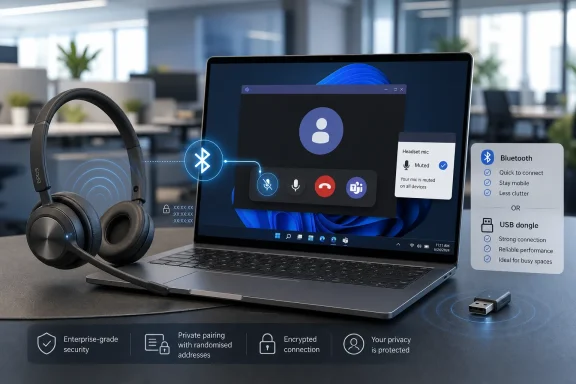 Native Bluetooth changes the connection, not the headset’s basic role
The firmware update lets compatible IMPACT 500 and IMPACT 1000 headsets connect directly to a computer through Bluetooth rather than relying on the EPOS USB receiver. The key distinction is that this is not merely ordinary Bluetooth audio. Microsoft’s native-Bluetooth certification is intended to preserve Teams-specific functions such as answering and ending calls from the headset, synchronized mute state, and use of the Teams button in the desktop application.
That makes this more consequential than a port-saving convenience. Conventional Bluetooth headsets can already handle call audio, but their buttons and mute indicators have not always behaved consistently with Teams. Microsoft created the native-Bluetooth program to move some of the integration previously associated with USB receivers into the operating system, host Bluetooth stack, and Teams desktop client.
EPOS says the change supports triple connectivity, allowing the headset to remain paired with up to three devices. That is useful for a worker moving between a Windows laptop, a phone, and another Bluetooth device without carrying a receiver or occupying a scarce USB-C port. The company has also framed the update as an asset-management benefit: one fewer detachable part to inventory, replace, and lose.
There is a less glamorous corollary for IT teams. Removing the dongle also removes the one component EPOS fully controls in the PC connection. Audio behavior now depends more heavily on the laptop’s Bluetooth chipset, driver package, wireless environment, and Windows configuration.
Windows 11 is the line between certified Teams integration and ordinary Bluetooth audio
Microsoft’s current requirements are more restrictive than the broad phrase “connect directly to computers and laptops” suggests. Native Bluetooth for Teams is supported on Windows 11, not Windows 10, and Microsoft says macOS is not supported yet. The program also applies to the Teams desktop client rather than every Teams endpoint or browser-based workflow.
For Windows hardware, Microsoft recommends Windows 11-compatible AMD systems, Intel Core processors from the 12th generation onward, and Qualcomm Snapdragon X platforms. On Intel systems, Microsoft specifies minimum versions for Intel Smart Sound Technology, Bluetooth, and Wi-Fi drivers. It does not recommend aftermarket USB Bluetooth adapters, and it says USB Bluetooth audio dongles that identify themselves as standard USB audio devices cannot provide the native Teams Bluetooth experience.
The most important operational point is that a headset can still play call audio on an unsupported PC, but that does not mean it has the certified Teams feature set. EPOS’s IMPACT 1000 documentation explicitly says that, on a device outside the supported configuration, the headset will work as a standard Bluetooth audio device while Teams functions such as mute, answer/end controls, and optimized unified-communications audio may be reduced or unavailable.
That distinction is where support tickets will land. A user who pairs an updated headset to an older Windows 11 laptop, a Windows 10 desktop, or a machine using a cheap USB Bluetooth adapter may hear audio perfectly well and still report that the Teams button or mute synchronization “doesn’t work.” In that situation, the firmware is unlikely to be the only variable.
Microsoft also identifies current native-Bluetooth limitations that matter in managed deployments. The Teams button may not work reliably when more than one Bluetooth peripheral is connected directly to the laptop, when the Teams client has more than one tenant signed in, or briefly after the Teams desktop client restarts. Those are platform limitations, not conditions EPOS can solve by updating the headset alone.
EPOS’s own documentation says the dongle remains the higher-reliability choice
EPOS has not positioned native Bluetooth as a universal instruction to retire every BTD 900c receiver. Its IMPACT 1000 FAQ identifies several features that remain dongle-dependent, including Dictation Mode, Auto Pause, and Usage Mode. It also says the dedicated receiver offers a more stable connection, lower latency, better audio-video synchronization, greater range, and super-wideband call audio.
That is unusually candid product guidance, and it aligns with Microsoft’s own advice. Microsoft says a portion of users will need to keep using a USB dongle in high-density wireless environments, on heavily loaded Bluetooth radios, or with older PCs whose Bluetooth hardware is no longer receiving manufacturer support.
For a hot-desk worker with a recent Windows 11 laptop, the firmware update can remove a recurring annoyance: finding the receiver, plugging it in, and recovering after it is lost. For contact-center-adjacent staff, executives running continuous video calls, or workers in dense offices, the receiver is still likely to be the correct standard configuration. Dongle-free is a deployment option, not a replacement for radio planning.
This also means organizations should avoid a blanket policy that tells all IMPACT 500 and IMPACT 1000 owners to discard their receivers. The better approach is to treat the update as a user-selectable connection method, with native Bluetooth favored on validated Windows 11 laptops and the dongle retained where call quality, range, or specialized EPOS features take priority.
The RPA claim is primarily about Bluetooth privacy, not endpoint management
CommsBusiness reports that EPOS has added Resolvable Private Addresses, or RPA, for Bluetooth connections. That is a recognized Bluetooth privacy mechanism: rather than continually exposing a stable device address that nearby observers can use to recognize and track a headset, a device can rotate its address. Previously bonded devices with the necessary identity information can still resolve the changing address and reconnect.
It is a sensible enhancement for equipment carried through offices, airports, and shared workspaces. A static Bluetooth identifier can become a small but persistent location signal; RPA reduces that exposure to nearby parties that do not possess the paired-device keys.
However, calling RPA an enterprise security solution would go too far. It does not by itself establish who is permitted to use a headset, enforce conditional-access rules, control Teams sign-in, protect endpoint data, or provide administrators with an inventory and compliance system. Those functions remain with Windows, Microsoft 365, identity controls, endpoint management, and the organization’s Bluetooth policy.
There is also a technical nuance in EPOS’s security framing. Microsoft says Teams native-Bluetooth certification currently applies to Classic Bluetooth devices and has not yet begun certifying Bluetooth LE Audio headsets. RPA is a Bluetooth Low Energy privacy feature. That does not mean the EPOS implementation is incompatible with Teams; modern headsets commonly use more than one Bluetooth mode or transport for different functions. It does mean the RPA feature should be understood as a separate privacy layer around the headset’s wireless behavior, not proof that Teams audio has moved to certified LE Audio.
What IT teams should validate before changing the default connection method
The firmware is delivered through EPOS Connect, but EPOS has not publicly specified a firmware version number, an enterprise deployment mechanism, or whether administrators can centrally enforce native Bluetooth versus dongle use. Those omissions matter more than the marketing claim of reduced clutter, especially for organizations that do not permit end users to install desktop utilities or pair personal peripherals freely.
A sensible rollout should begin with a small Windows 11 pilot across the actual laptop models in service. Validate headset controls, Teams mute-state synchronization, call answering, client restart behavior, roaming range, and performance in the busiest office locations. IT should also confirm that current Teams desktop builds meet Microsoft’s minimum version requirement and that Intel driver packages meet Microsoft’s specified baselines where applicable.
- Native Bluetooth should be tested on the organization’s managed Windows 11 image rather than assumed to work identically across all Bluetooth-capable PCs.
- The EPOS USB dongle should remain available for users in radio-dense offices, users who need the BTD 900c-only features, and systems that fail the native-Bluetooth validation.
- Help-desk documentation should distinguish “Bluetooth audio works” from “Teams-certified controls work,” because those are different support outcomes.
- Bluetooth privacy improvements should be welcomed, but they should not be substituted for device-management, identity, or endpoint-security controls.
EPOS has delivered a useful firmware upgrade to hardware that was designed around this capability, rather than forcing customers to buy a replacement headset. For Windows 11 organizations with modern laptops, the result can genuinely simplify Teams deployments. The receiver has not disappeared from the engineering equation, though: on the machines and offices where call reliability is the priority, it remains the more controlled connection.