
Neowin first collected the month’s Excel announcements, describing four Copilot-focused additions across Microsoft’s spreadsheet clients. Microsoft’s own support documentation confirms much of the underlying functionality, but it also clarifies limits that matter more to organizations than the feature list itself: Copilot’s workbook-history summaries are constrained by Excel’s existing change log, previous chats are still rolling out only to commercial Microsoft 365 Copilot subscribers, and restoring a workbook remains a Version History task rather than a magical AI rollback.
For IT teams, August is less about a new Excel calculation engine than about giving Copilot more authority to interpret, format, and alter documents that may be shared across a company. That makes review controls, licensing assignments, and user expectations more important than the novelty of another prompt shortcut.
 Copilot can summarize workbook history, but it cannot see everything
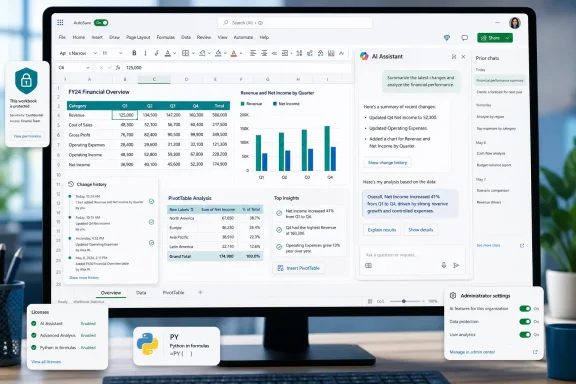
The most useful August addition is the change history capability. Users can ask Copilot to summarize how a shared workbook has changed, narrow the request to a worksheet, range, cell, person, or time period, and identify who changed a particular value. Microsoft explicitly says the feature can also describe changes made by Copilot itself, which gives teams a potentially valuable audit aid when AI-assisted edits have become hard to distinguish from conventional coauthoring.
This is a genuine improvement for a workbook that has passed through several hands. Excel’s built-in Show Changes view can be laborious in a busy file; asking for “summarize changes to the Forecast sheet over the last seven days” is a faster way to orient a reviewer before they begin checking individual cells.
But the feature is only as complete as Excel’s underlying history. Microsoft says Copilot reports changes available in the workbook’s change history, which tracks supported edits for up to 365 days. Edits made through unsupported Excel versions or untracked features may not be present. In other words, a Copilot summary is a guided view of the log Excel already has; it is not an independent forensic record of every alteration ever made to a spreadsheet.
Neowin says the new skill enables users to undo specific edits or return to a previous state. Microsoft’s documentation draws a more precise line. Users can inspect granular changes through Review > Show Changes, but recovery of multiple edits or restoration of an older workbook is handled through Version History. That distinction matters for finance, operations, and compliance teams: Copilot can help identify what deserves reversal, but staff should still use Excel’s established version controls to perform a reliable restoration.
The feature also should not be treated as proof that an AI-generated summary is exhaustive or correctly prioritized. For sensitive workbooks, the safe procedure remains simple: use Copilot to locate suspicious or relevant changes, then verify the underlying cells and version record before restoring anything.
Previous Copilot chats are rolling out, not universally available
The second Feedback In Action item is an easier way to revisit earlier Copilot conversations from the Excel pane. According to Microsoft’s support guidance, the menu in the pane’s upper-left corner opens prior conversations sorted by recency, with the newest at the top.
That sounds small, but it addresses a real workflow problem. Users frequently ask Copilot to create a chart, explain a formula, identify outliers, or modify a table, then lose the exact wording and context of the request after closing the pane. Restoring the conversation makes multi-step editing less disposable and gives a user a way to retrace why they asked Copilot to make a particular change.
The rollout language is important: Microsoft says access to Excel conversation history is currently rolling out for commercial Microsoft 365 Copilot subscriptions. The company does not describe it as an across-the-board feature for consumer Microsoft 365 plans, nor does it publish a completion date in the support article. Organizations should therefore avoid updating internal training material to imply that every licensed Excel user will see the option immediately.
Chat history also adds a governance consideration. A prior prompt can reveal a user’s intent, assumptions, and the data analysis they requested, even when the visible workbook does not preserve that reasoning. Admins should understand how their organization’s Microsoft 365 Copilot data, retention, and compliance policies apply before encouraging staff to use chat history as an informal work log.
Chart design is a skill, and it is disabled by default
Microsoft has also documented the @chart-design skill, which creates or revises charts from workbook data. It can recommend a chart type and modify existing charts with titles, axis labels, legends, data labels, and other presentation elements.
The key operational detail absent from a simple features roundup is that chart-design is disabled by default. Microsoft places it in the Visualization folder of Copilot in Excel’s Manage skills dialog. A user who hears that the feature has arrived but cannot invoke it may not be waiting for a broken rollout; the skill may simply need to be turned on.
That design is sensible. Chart generation can make a spreadsheet look more polished while still producing a misleading visual, particularly when a model chooses unsuitable axes, aggregation, labels, or chart types. The skill can accelerate the presentation layer, but it cannot decide whether a chart answers the business question honestly.
Excel already offers Recommended Charts and conventional chart formatting across its clients. The new value here is intent-driven automation: a user can tell Copilot what the visual needs to communicate rather than manually moving through chart settings. For routine status reports and internal dashboards, that could save time. For executive reporting, regulated financial material, or operational decisions, the output should still be checked for source range, aggregation logic, axis scale, omitted categories, and labeling.
Neowin also reports an @chart-design and PivotTable skill pairing. Microsoft’s public support pages clearly document @chart-design, while its broader Excel guidance confirms that Copilot can create PivotTables when requested. Microsoft’s currently available skills documentation, however, does not establish a separate public @PivotTable command with the same level of detail. Until Microsoft publishes that command and its availability requirements, administrators should not build documentation or automation around a specific PivotTable mention syntax.
Python in Excel gains a Copilot entry point, with familiar dependencies
The final reported addition is a @python-in-excel skill for Excel Insiders, intended to create editable and refreshable Python formulas from natural-language analysis requests. This is an extension of Python in Excel rather than a replacement for it.
Microsoft’s Python in Excel documentation is clear about the underlying architecture. Python code runs in Microsoft’s cloud, with results returned to the workbook; it is not a local Python installation running directly on an employee’s PC. The service uses Python libraries supplied through Anaconda, and users need an internet connection. That architecture reduces the deployment burden of installing Python runtimes and packages on every Windows machine, but it means availability and performance depend on Microsoft 365 connectivity and subscription entitlements.
Python in Excel itself is available in Excel for Windows, Mac, and the web, although it is unavailable on iPhone, iPad, and Android. Workbooks containing Python can be viewed on unsupported clients, but Python cells show errors when recalculated there. Microsoft also sells a Python in Excel add-on for premium compute and additional calculation options.
The August Copilot skill therefore should be read as a productivity layer on top of an existing, cloud-backed Excel feature. Insiders may be able to ask Copilot to compose Python formulas and then edit or refresh them, but organizations still need to decide who is allowed to use Python in Excel, whether they have the necessary subscription, and how cloud calculation fits their data-handling rules.
It also does not remove the need for review. A refreshable Python formula can be more transparent than an opaque one-off AI answer because its code remains in the workbook, but reproducibility still depends on the formula, source data, libraries, calculation mode, and permissions being stable.
August makes Copilot more persistent inside Excel
Microsoft’s changes point in one direction: Copilot is being made less like a disposable chat sidebar and more like an enduring layer over workbook history, previous interactions, chart construction, and advanced analysis. The change-history and chat-history features preserve context; chart and Python skills turn prompts into visible workbook artifacts.
For Excel administrators, the immediate work is not to promise a universal rollout. Check which employees hold commercial Microsoft 365 Copilot licenses, confirm whether the conversation-history control has appeared, decide who may enable @chart-design, and establish a review process for Copilot-generated charts, formulas, and Python output. Users who do not have Copilot licenses—or who prefer normal formulas, PivotTables, and chart tools—receive no material new Excel capability from this month’s announced set.
The most consequential feature is probably the change-history summary, provided users recognize its boundary: it can speed up investigation of a shared workbook, but Version History and direct cell-level verification remain the controls that determine whether a reversal is safe.
