
Neowin first reported that Microsoft is planning to retire Excel’s existing Exchange connector and have workbook authors move manually to replacement connectors. The practical warning is sound even before the replacement details are fully public: Microsoft’s own Exchange Online retirement guidance explicitly lists Power Query for Excel among the first-party applications that can still require EWS, while its security documentation says the Exchange connector does not work in Excel when EWS is disabled.
The important correction to the “a lot of workbooks will break” framing is scope. This does not affect ordinary .xlsx files, formulas, PivotTables, Power Pivot models, CSV imports, SharePoint lists, SQL Server queries, or Outlook exports saved as static worksheets. It affects a narrower but consequential category: Excel files with a Power Query connection that reads a mailbox, mail folder, calendar, contacts, or other Exchange-backed data through the Microsoft Exchange connector.
For teams that built recurring reporting around shared mailboxes or calendars, that distinction offers little comfort. A query feeding a help-desk dashboard from a support mailbox, a staffing sheet from a shared calendar, or a compliance report from email metadata may look like an ordinary workbook to its owner. Its dependency is stored in the query connection, and it often becomes visible only when a scheduled refresh or a user’s manual Refresh All starts returning errors.
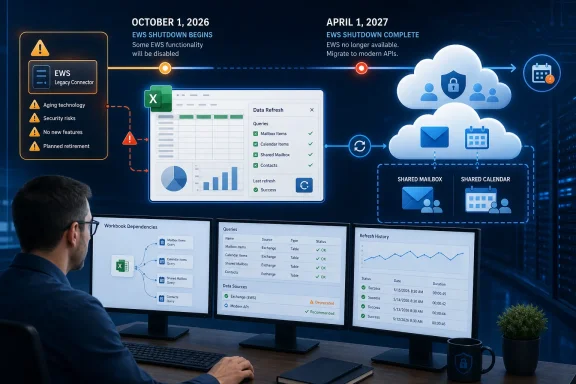 The deadline belongs to EWS, not to Excel alone
The immediate driver is Exchange Online’s retirement of EWS, an API Microsoft has been trying to phase out since 2018. Microsoft says the final enforcement process begins October 1, 2026, when EWS will be progressively disabled for Exchange Online organizations. On April 1, 2027, it will be fully disabled, with no exceptions or re-enablement path.
That retirement applies to Exchange Online and Microsoft 365, not to Exchange Server running on-premises. In hybrid deployments, the difference is especially important: a workbook reading an on-premises mailbox can have a different outcome from one reading a cloud mailbox, even if both users think they are using “Exchange.” Microsoft’s guidance says cloud mailboxes must move away from EWS, while EWS remains available for Exchange Server.
Excel’s existing Power Query connector is one of the dependencies caught in that transition. Microsoft’s connector documentation continues to describe the Microsoft Exchange connector as a generally available Power Query source in Excel, using the Exchange.Contents function. Yet Microsoft’s baseline-security documentation says that enabling the settings which block EWS leaves the connector unavailable in Excel for Windows and Excel for the web, alongside Power BI, Fabric, Power Platform dataflows, and Dynamics 365 Customer Insights.
That is the operational point: the connector may remain visible in Excel’s Get Data menu while its underlying service path no longer functions. Treating a visible connector as a working connector after April 2027 would be a mistake.
Microsoft’s public documentation still leaves gaps
Neowin reports that validation of replacement connectors begins in August 2026 and that the old Excel connector is expected to retire in April 2027. Microsoft has publicly confirmed the EWS dates, the impact on Power Query for Excel, and the need to migrate EWS-dependent workflows. But its currently published Power Query connector documentation still presents the Microsoft Exchange connector as generally available and does not, in the public material reviewed for this report, name the replacement Excel connectors, list their supported builds, or publish a workbook conversion procedure.
That missing detail matters. “Move to Microsoft Graph” is clear advice for developers writing an application against Exchange Online. It is not, by itself, a migration recipe for an Excel author with a Power Query M script and a workbook that must continue to refresh from a user’s desktop.
Microsoft Graph exposes mail and calendar data through a modern API, but a workbook-based migration will depend on what Microsoft ships in Excel, which data entities it supports, how it handles authentication and consent, and whether its returned schema matches the existing Exchange.Contents output. A query built around mailbox folder names, message metadata, calendar recurrence fields, or a set of expanded nested columns can require real rewrites even if a new connector covers the same broad data category.
Workbook authors should also be cautious about assuming a one-click upgrade. Neowin says current workbooks will not automatically transition to the new connector. Microsoft’s broader EWS guidance reinforces the underlying reason: EWS applications and integrations need to be discovered and migrated individually. The data source is part of the query definition, and Excel cannot safely swap it behind the scenes without risking changed tables, privacy settings, authentication prompts, permissions, and column structures.
October is an administrative control point, not the final outage date
Organizations have a window before the permanent April 2027 shutdown, but the October 1, 2026 phase is not something to ignore. Microsoft has introduced an EWS application allow list, called EWSAllowedAppIDs, for tenants that need temporary control over which applications can keep using EWS during the staged disablement.
Microsoft’s Exchange team specifically tells administrators to include first-party clients such as Office and Power Query for Excel on that allow list if they still need EWS access. That means Excel is not merely an obscure downstream casualty of the EWS change; it is a dependency Microsoft expects tenant administrators to encounter in their usage reporting.
The allow list is a temporary continuity control, not a migration solution. It can help an organization avoid an abrupt October interruption while it inventories and replaces remaining dependencies. It cannot preserve EWS after April 1, 2027.
There is also a configuration trap. Microsoft’s documentation describes different behavior depending on the existing EWSEnabled state and the presence of an allow list. Admins should not assume that simply setting EWS to “enabled” protects every legacy application. An allow list that is incomplete can block an Excel or Office dependency that had previously worked, and changes can take time to propagate.
Find the workbooks before their owners do
The right first step is not opening every Excel file on a file share. Start with the Exchange Online side. Microsoft recommends reviewing EWS usage reports in the Microsoft 365 admin center and the related reporting tools and scripts. Those records can reveal application IDs that are using EWS in a tenant, including Microsoft first-party applications.
Then move to the workbook inventory. Search managed file locations, SharePoint libraries, Teams-connected document libraries, OneDrive areas used for shared reporting, and automation accounts for files that refresh from Exchange. Query names and connection strings may reveal terms such as Exchange.Contents, “Microsoft Exchange,” mailbox addresses, shared-mailbox addresses, or calendar-table logic.
For each discovered workbook, document:
- The Exchange mailbox, folder, calendar, or other data it reads and whether that mailbox is in Exchange Online or Exchange Server.
- The person or business process that depends on refreshes, including refresh frequency and the consequences of stale data.
- The account used for authentication, the permissions it holds, and whether those permissions can be recreated through the eventual replacement method.
- The query’s output schema and downstream dependencies, especially PivotTables, formulas, macros, Power BI models, and exports that expect exact column names.
Testing must go beyond “the query connects.” Refresh the migrated workbook using the same user identity, device policy, tenant controls, and shared-mailbox access that production users rely on. Compare row counts, date handling, recurrence data, read-status fields, sender and recipient values, and nested properties before replacing the old process.
Perpetual Office is a separate support problem
Neowin also argues that organizations using Office 2021 or older perpetual versions may have to buy Office 2024 or subscribe to Microsoft 365 to use Microsoft’s replacement. That conclusion is plausible if Microsoft limits the new connectors to Microsoft 365 Apps and Office 2024, as Neowin reports, but Microsoft has not yet published the connector-specific support matrix needed to treat it as settled.
What is already established is that Office LTSC 2021 reaches end of support on October 13, 2026, less than two weeks after the first EWS disablement phase begins. Excel 2024, meanwhile, remains under Microsoft’s Modern Lifecycle through October 10, 2029. Organizations still standardizing on Office 2021 therefore face two overlapping decisions: whether their Exchange-fed workbooks can survive the EWS transition, and whether it makes sense to keep deploying a version about to leave support.
The more immediate issue is inventory. By October, an undocumented Excel query can become a service desk incident. By April 1, 2027, it becomes a broken integration unless its owner has moved the data flow away from EWS.