
The significant change is not a universal “unsend” button for external mail. A company receiving mail holds the control: it decides whether to accept recall requests at all and which partner, subsidiary, or affiliated tenants may issue them. Microsoft’s Exchange Team describes the feature as disabled by default, meaning organizations that do nothing retain the prior behavior.
For Exchange administrators, this turns Message Recall from an internal convenience feature into a cross-organization data-handling decision. It can help when staff send a confidential file, pricing sheet, or customer data to the wrong contact at a trusted partner. It cannot retrieve mail sent to ordinary internet destinations, including consumer mail providers or external organizations that have not entered into this specific Microsoft 365 tenant-to-tenant trust arrangement.
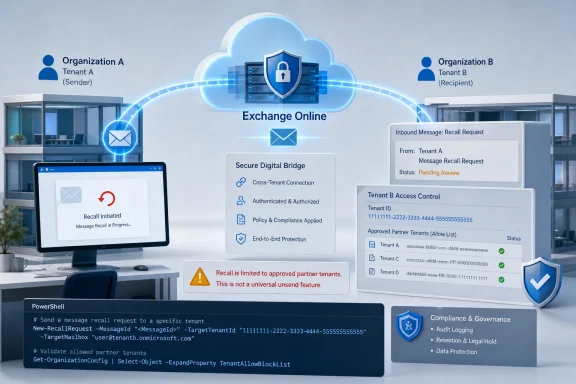 The receiving tenant decides who may recall mail
Microsoft’s model is intentionally one-way. If Contoso adds Fabrikam’s Microsoft Entra tenant ID to Contoso’s cross-tenant recall allow list, a Fabrikam sender can attempt to recall messages delivered to Contoso mailboxes. Fabrikam’s own configuration does not grant Contoso the same privilege in reverse.
That distinction is easy to miss in a rollout notice, but it is the feature’s central safeguard. A bilateral relationship requires two separate administrative decisions: Contoso must allow Fabrikam to recall inbound messages, and Fabrikam must separately allow Contoso to do the same. Neither decision is inherited from existing B2B collaboration, cross-tenant access settings, Teams federation, mail contacts, or a commercial partnership.
Microsoft says a recall from a non-allow-listed tenant will fail and the sender will see that result in the recall status report. In practical terms, organizations should treat the allow list as a narrowly scoped exception list, not as a directory of every outside tenant with which employees communicate.
The Exchange Team’s published configuration uses the new Exchange Online PowerShell cmdlet:
Set-CrossTenantRecallConfiguration -CrossTenantRecallEnabled $true
Administrators then add the tenant IDs permitted to recall messages into their organization:
Set-CrossTenantRecallConfiguration -AllowedSenderTenantIds @{Add="<tenantId1>","<tenantId2>"}
Microsoft’s design means an enabled feature with an empty list still permits no external tenant to recall mail. That is a useful safety property: enabling the setting does not silently extend recall authority to every Microsoft 365 customer.
This is a mailbox deletion workflow, not a security control
The new feature relies on the same cloud-based recall mechanism that Exchange Online introduced for internal messages in 2023. As Microsoft documents for that service, a recall request is intercepted in Exchange Online and the service attempts to hard-delete the original message from recipient mailboxes. The sender receives a recall report, normally populated within minutes, while the service can continue trying for up to 24 hours.
This is a genuine operational improvement over the old Outlook recall experience, which was historically unreliable and often depended on the recipient not having read the message. Microsoft’s cloud model can be configured to recall read messages as well. But “read” is not the same as “unseen,” and deletion from the destination mailbox does not erase what a recipient may already have copied, forwarded manually, downloaded, photographed, or acted upon.
It also does not travel beyond the protected Exchange Online boundary. Microsoft’s existing Message Recall documentation says manually forwarded messages are not recalled, messages forwarded by Inbox rules are not recalled, and automatic forwarding outside the organization cannot be recalled. The cross-tenant announcement expands the boundary to approved Microsoft 365 tenants; it does not change recall into a remedy for internet email.
That limitation is especially important for incident-response playbooks. A mistaken external send should still trigger the normal process: assess the data involved, contact the recipient where needed, revoke access to shared links, rotate exposed credentials, preserve evidence, and involve legal or privacy teams when policy requires it. Message Recall can reduce exposure in an approved partner tenant, but it is not proof that a disclosure never happened.
Existing compliance behavior deserves a closer look
Microsoft says a successful cross-tenant recall is processed like a standard intra-tenant recall, and that recipient notifications apply if the receiving organization has enabled them. That brings an overlooked consequence: users may see an externally initiated deletion event in their mailbox experience, even though their own organization authorized it at the tenant level.
The more consequential issue is records management. Microsoft’s existing Exchange Online documentation says a recalled message remains discoverable for mailboxes under Litigation Hold or In-Place Hold. It also says recall activity does not currently appear in mailbox audit logs. Microsoft has not yet published separate cross-tenant documentation spelling out whether every one of those reporting and compliance behaviors is unchanged for the new scenario, but its statement that cross-tenant recall follows the standard process makes that the reasonable operating assumption until documentation says otherwise.
Administrators in regulated environments should not enable the feature solely because a business partner asks for it. Legal, records-management, security, and messaging teams should decide whether an external sender should be able to trigger deletion attempts against already delivered content, even if retained copies remain discoverable.
There is another documentation wrinkle. Microsoft Learn’s existing cloud-based Message Recall article, last updated on November 25, 2025, still says recall works only within one organization and cannot cross organizations. That was accurate before this release. The newer Exchange Team announcement supersedes that limitation for approved cross-tenant Exchange Online relationships, but the older page remains useful for the underlying mechanics, reports, message tracing, retention behavior, and client limitations.
Outlook availability does not mean every client path is equal
The Microsoft 365 roadmap lists Android, desktop, iOS, Mac, and web platforms for RM561330. That reflects where users can initiate the familiar recall action, not a requirement to deploy a new client application before the feature can operate. The recall is enforced by Exchange Online after the sender starts the request.
Still, local client configuration can affect whether a user can begin the process. Microsoft’s current Message Recall documentation lists Classic Outlook, new Outlook, Outlook for Mac, Outlook on the web, and Outlook for Android and iOS as supported initiation paths. It also lists two Outlook for Windows restrictions: recall does not work when Outlook is in Online mode, or when multiple Exchange accounts are configured in the same Outlook profile.
Those details matter for support desks. A tenant can be correctly configured for inbound cross-tenant recall while an employee still cannot initiate a recall from a particular Windows Outlook profile. Administrators should test the intended sender client combinations before promising the capability to business teams.
Microsoft’s documentation also warns that recall-report messages come from [email protected] and may be blocked or quarantined by mail controls. That is not merely a notification nuisance: if the sender never receives the report, the organization may mistakenly assume a recall succeeded or failed without checking message trace data.
A controlled option for partners, subsidiaries, and divestitures
The strongest use cases are organizations split across multiple Microsoft 365 tenants: subsidiaries, recently acquired companies, joint ventures, managed service provider arrangements, and long-standing partners that exchange sensitive operational material. In these situations, the feature can remove a gap between the way employees assume email works and the old intra-tenant-only boundary.
Independent coverage from Neowin and Office 365 IT Pros also emphasizes the same practical limit: the recipient side controls the trust list, and external addresses outside supported Microsoft 365 tenant relationships remain beyond recall. That leaves Gmail, personal Outlook.com addresses, non-Microsoft mail platforms, and unapproved customer tenants in the same position as before.
Before enabling the feature, Exchange teams should establish an owner for each allow-listed tenant, document the business justification, verify the partner’s tenant ID through a trusted administrative channel, and set a review date. A partner tenant can change hands, be reorganized, or become inappropriate for this kind of access without any technical signal reaching the Exchange administrator who created the entry.
Microsoft’s rollout covers worldwide multi-tenant Microsoft 365, GCC, GCC High, and DoD environments in the roadmap listing. The Exchange Team’s rollout announcement additionally names Microsoft 365 operated by 21Vianet, a scope detail not shown in the submitted roadmap metadata. Because deployment is phased through mid-September, admins should verify that the configuration cmdlet and tenant setting are available in their own service environment before changing policy.
For most organizations, leaving cross-tenant recall disabled remains the correct default. For those that enable it, the feature’s value comes from a short, reviewed list of trusted tenant IDs—and from treating a successful recall as exposure reduction, not evidence that an email incident has disappeared.