
The significance is larger than one repairable laptop. Windows notebook vendors routinely put considerable effort into first-run utilities, branded support hubs, promotion-heavy dashboards, and pre-installed services. Yet the basic recovery path—what happens after a storage replacement, a clean Windows 11 install, or a user-built configuration—often remains fragmented. Framework’s approach demonstrates that an OEM can provide a cleaner, more deliberate answer: deliver the correct set of drivers in a coherent package, make it easy to identify, and keep the operating system’s own update mechanism in its proper role.
That is the lesson other notebook manufacturers should take seriously. The best Windows 11 experience is not just the one that works when it leaves the factory. It is the one that remains understandable and supportable after the owner changes the SSD, rebuilds the machine, repairs it, or simply wants a fresh start.
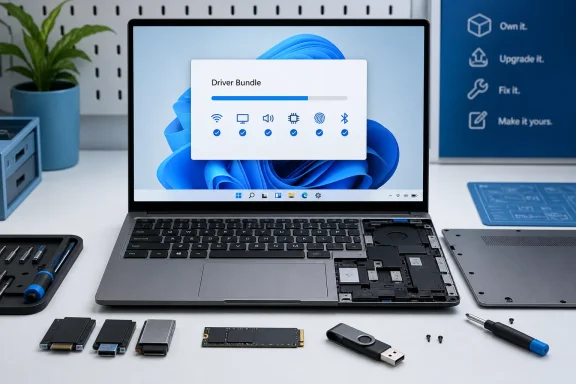 The Windows 11 Driver Installation Problem Is Real
A driver is not optional polish. It is the software layer that allows Windows to communicate with physical hardware, from graphics and network adapters to storage controllers and fingerprint readers. Microsoft describes drivers as the software enabling Windows devices and connected hardware to work properly, and notes that updated drivers can arrive through Windows Update. Microsoft’s driver guidance is clear on that foundational role.
On a typical prebuilt laptop, much of the complexity stays invisible. The manufacturer has already installed Windows, loaded the vendor’s preferred driver set, tested a particular software image, and often added its own management software. For many buyers, that is sufficient—until it is not.
The friction becomes apparent in several common situations:
- Replacing a failed or undersized SSD.
- Installing a larger drive after purchase.
- Rebuilding Windows 11 to remove unwanted preinstalled software.
- Recovering from an operating-system problem.
- Deploying multiple laptops in a small business, lab, school, or household.
- Building a DIY Edition laptop from parts rather than starting from a factory image.
At that point, consumers are often sent to a support page containing a maze of downloads. There may be separate packages for the chipset, Wi-Fi, Bluetooth, Ethernet, audio, camera, touchpad, card reader, graphics, fingerprint reader, hotkeys, BIOS tools, and OEM control application. Some installers unpack first; others launch immediately. Some require administrative approval; some request a reboot. Some are dependent on a prior chipset or management-engine package already being present.
None of this is impossible for a technically comfortable Windows enthusiast. But it remains a poor experience. It turns what should be a straightforward Windows 11 installation into a checklist exercise where the owner must determine whether a driver is applicable, current, duplicated, superseded, or intended for a nearby—but not identical—model.
Framework’s Driver Bundle reduces that decision burden. Its own setup guide states that a fresh install may lack the drivers required for complete hardware support because the Laptop 13 Pro uses new hardware, and it directs owners to download the bundle after Windows installation. Framework’s official guide even accounts for the practical catch-22 of an unconnected system: if networking is unavailable, the package can be downloaded on another machine and transferred over by USB.
That last detail matters. A driver installation process is only truly robust when it works before the machine has Wi-Fi or Ethernet access.
What Framework Has Actually Improved
The headline claim is not that Framework invented driver packages. Enterprise IT teams have used deployment packages and curated driver repositories for years, while many PC makers have offered some form of automated update utility. The meaningful difference is where Framework applies the idea and how directly it presents it to an individual DIY buyer.
For the Laptop 13 Pro, Framework’s published instructions reduce the post-install sequence to a simple flow:
- Install Windows 11.
- Obtain the model-appropriate Framework Driver Bundle.
- Run the executable with administrative permission.
- Allow the bundle to install the relevant drivers.
- Reboot once at the end.
- Connect to the internet and run Windows Update for security updates and future driver or firmware releases.
That is an appropriately simple process for a modular laptop. Framework’s installation instructions say the bundle installs all required Laptop 13 Pro drivers automatically, takes several minutes, and ends by prompting the user to reboot. The guide also specifies that the exact driver set varies according to the installed mainboard.
One bundle is not the same as zero reboots
There is an important distinction worth making because it improves the accuracy of the story. A single-executable driver workflow does not mean that Windows never needs to restart. Framework’s own documentation calls for a reboot after the bundled installation finishes. The official setup guide says the user should press a key to reboot once the installation is complete.
That is still a substantial usability improvement over a scattered sequence of standalone installer packages, each of which may prompt separately or leave the user wondering whether another restart is necessary before proceeding. The achievement is consolidation: one supported package, one coherent installation phase, and one final reboot.
This may appear mundane, but mundane reliability is exactly what Windows laptop setup needs. A user should not have to be a driver-release historian just to restore Wi-Fi, brightness controls, a fingerprint sensor, or a properly tuned touchpad after reinstalling the operating system.
The package is device-specific rather than generic
A bundled installer has real value only if it maps correctly to the machine in front of the user. Framework’s instructions emphasize that driver contents differ by mainboard, which is particularly relevant in a product family where upgradeability is part of the value proposition. Framework’s Laptop 13 Pro guide directly notes that installed drivers can vary with the mainboard configuration.
That is an advantage over an improvised “download everything that looks close” recovery method. A customer who upgrades a board years later should not have to reconstruct the support matrix manually or hunt for an obscure component ID in Device Manager.
Framework also publishes component-level information for some of its driver bundles, including versions for Intel chipset software, Management Engine components, graphics, Wi-Fi, Bluetooth, fingerprint support, Ethernet, and card-reader packages. A May 2026 stable release listing for the older 12th- and 13th-generation Intel Framework Laptop 13 family, for example, identifies individual components and provides a SHA-256 checksum for the executable. Framework’s driver-bundle release post shows the kind of transparency that should accompany all-in-one OEM installers.
That combination—automation plus component visibility—is much healthier than a black-box “update everything” button.
Why Windows Update Is Helpful but Not a Complete Setup Strategy
It is tempting to argue that this problem no longer matters because Windows 11 can install drivers automatically. Microsoft itself says Windows Update installs recommended drivers automatically. Microsoft’s support documentation confirms that behavior.
For routine maintenance, that is largely true. Windows Update is an essential part of a healthy Windows 11 PC. It can deliver broadly compatible drivers, resolve known issues, and reduce the number of manual updates that ordinary users need to think about.
But it is not identical to an OEM’s curated hardware enablement package.
Optional drivers are not automatically installed
Microsoft’s own documentation makes a key limitation explicit: optional drivers are not installed automatically. Users must navigate through Settings > Windows Update > Advanced options > Optional updates and choose available driver updates themselves. Microsoft’s Windows Update instructions describe that manual process.
That design makes sense from a risk-management perspective. Microsoft cannot assume that every optional driver is appropriate for every deployment scenario. However, it also means a clean-install user cannot necessarily treat Windows Update as a complete replacement for a manufacturer’s initial driver package.
The situation becomes especially awkward when the device lacks network connectivity immediately after setup. If Windows does not have the correct Wi-Fi or Ethernet driver, it cannot fetch the driver that would enable it to download the rest. Framework acknowledges precisely this scenario and recommends copying the Driver Bundle via USB from another system when necessary. Framework’s official Windows 11 installation guide lays out that offline fallback.
The OEM knows the configuration Windows cannot infer perfectly
Windows Update deals with an enormous range of systems, component revisions, corporate policies, and compatibility constraints. It is optimized for broad distribution, not necessarily for providing the complete vendor-certified baseline on the first boot of every newly rebuilt notebook.
The original manufacturer, by contrast, knows the precise platform design. It knows which wireless module, audio codec, controller firmware, display subsystem, biometric hardware, and power-management components shipped with a given configuration. That knowledge should be translated into a dependable first-install package.
Framework’s Driver Bundle is a practical expression of that responsibility. It does not replace Windows Update. It provides the initial known-good foundation, after which Windows Update can handle ongoing security and compatibility maintenance. Framework itself instructs owners to run Windows Update after networking is available, and says future driver and firmware updates can be delivered through Windows Update. Framework’s setup guide positions the two systems as complementary rather than competing.
That is the right division of labor.
Why This Matters More for Repairable and Upgradeable PCs
Framework’s Laptop 13 Pro is positioned as a system with repairability, upgradeability, customization, and Linux support at the center of its identity. The company describes the machine as featuring Intel Core Ultra Series 3 processors, LPCAMM2 memory, a haptic touchpad, and a CNC aluminum chassis while maintaining its repairable and upgradeable design. Framework’s Laptop 13 Pro product page makes those claims plainly.
That hardware philosophy creates a software obligation.
If a laptop owner can replace storage, change modules, repair a component, or upgrade a board, then a clean operating-system installation is not an exceptional support event. It is a foreseeable part of ownership. Treating driver setup as an afterthought would undermine the entire argument for a machine designed to remain in service longer.
Modularity should reduce friction, not relocate it
There is a risk with any repairable product: the vendor can make physical work easier but quietly transfer complexity into software. An SSD swap may take minutes, only for the owner to spend an hour finding drivers and testing functions afterward.
Framework’s bundled installer helps avoid that trap. It makes the system’s physical accessibility and its software recovery path feel like parts of the same experience. The laptop can be opened, changed, rebuilt, and brought back to full functionality without requiring the buyer to manually assemble a driver library.
This is also where larger manufacturers should pay attention. They may not sell laptops that are as modular as Framework’s, but their customers still reinstall Windows after failures, upgrades, migrations, and cleanup projects. A more serviceable driver-recovery process would benefit every owner, not merely enthusiasts.
A proper recovery path is part of product quality
Notebook reviews often dwell on benchmark results, battery life, display brightness, chassis rigidity, keyboard feel, webcams, port selection, and price. All of those factors matter. Yet they describe the machine mostly at its best: new, configured, and running the vendor’s factory image.
The recovery experience is a more revealing quality test. It shows whether a manufacturer expects the user to retain control of the device.
A well-designed Windows 11 recovery path should offer:
- A single model-specific driver package for clean installations.
- A downloadable offline copy suitable for USB transfer.
- Clear version numbers and release notes.
- A visible integrity hash for security-conscious users and IT teams.
- A transparent list of package contents.
- Minimal dependence on an all-encompassing vendor dashboard.
- A straightforward route to firmware and BIOS updates.
- A clear handoff to Windows Update once the baseline is installed.
Framework is not alone in offering pieces of this formula, but it illustrates how coherent the experience can be when those pieces are treated as first-class product features.
The Case Against the Traditional OEM Utility Stack
Many Windows laptops arrive with a vendor control center that handles power modes, charging thresholds, display profiles, audio tuning, firmware checks, warranty access, or driver updates. In principle, such tools can be useful. A notebook has platform-specific features that Windows itself cannot always expose fully.
In practice, the problem is that the support utility often becomes the center of the ownership experience. Users are asked to create accounts, accept telemetry preferences, acknowledge promotional content, endure update notifications, and trust a persistent background service simply to manage functions that should remain straightforward.
Framework’s bundle-first model is refreshing because it separates initial enablement from ongoing utility software. A clean Windows 11 installation does not need to begin with a heavyweight branded application. It needs the correct drivers.
Driver delivery should not be an excuse for bloatware
The industry has blurred several distinct jobs:
- Installing essential drivers.
- Delivering firmware updates.
- Configuring hardware features.
- Providing customer support links.
- Advertising accessories, subscriptions, warranties, and cloud services.
Those functions do not all need to sit inside one frequently updated, always-present application. In fact, combining them can create unnecessary complexity and widen the scope of failure. A malfunctioning OEM utility should not become the reason a system misses critical driver updates or cannot expose basic settings.
Framework’s approach is not an argument against every vendor tool. It is an argument for restraint. A small, device-specific installer can solve the core driver problem without turning post-install setup into a branded software ecosystem.
This is particularly relevant for users who deliberately reinstall Windows 11 to remove preloaded software. They should not have to reinstall a large vendor platform merely to recover a Wi-Fi driver or make a fingerprint reader functional.
Security and Reliability Still Require Discipline
A one-click driver bundle is only beneficial when it is built, signed, maintained, and distributed responsibly. Convenience must not mean abandoning the safeguards that are especially important for low-level Windows software.
Microsoft’s Windows Driver Policy is designed to restrict which kernel-mode drivers may load. Microsoft says that properly certified drivers, or those explicitly allowed by the policy, are accepted; unsupported drivers can be blocked to reduce malware, instability, and security risks associated with unvetted driver publishers. Microsoft’s Windows Driver Policy documentation explains the security rationale.
That context raises the standard for vendors that offer all-in-one packages. They should not merely package installers together. They must ensure the contents remain current, properly signed, compatible with the relevant Windows versions, and documented.
Bundles can be excellent—or opaque
A bundled installer has obvious strengths:
- It reduces user error.
- It establishes a curated baseline.
- It saves time after a clean install.
- It helps ensure related components are installed in the intended order.
- It makes offline recovery possible.
- It can reduce support burden for both customers and the vendor.
But it also carries risks if poorly implemented:
- An outdated bundle may install superseded components.
- A generic package may include software irrelevant to the configuration.
- A black-box installer may obscure exactly what changes it is making.
- A failure in the middle of the process may be harder to troubleshoot than a single manual driver.
- An unsigned or compromised bundle would pose a much broader threat than an isolated download.
Framework’s existing release practice offers a useful model for the rest of the industry. Its community release listing for a stable Windows driver bundle identifies a versioned executable, supports specific Windows 11 releases, lists component versions, and provides a SHA-256 hash. The Framework community release post demonstrates that automation need not come at the cost of auditability.
Users should still favor official sources
The safest way to obtain platform drivers remains the manufacturer’s official support site or the Windows Update channel. Microsoft specifically advises users encountering driver-policy issues to check Windows Update and then obtain the latest compatible driver from the hardware vendor’s official website. Microsoft’s support guidance is unequivocal on this point.
That is especially important because driver downloads are a common target for misleading search results, unofficial repackaging sites, and outdated archives. A bundled executable makes life easier only if it comes from a trusted, verifiable publisher.
The appropriate response is not to reject automated driver packages. It is to demand that OEMs distribute them transparently and maintain them consistently.
A Better Standard for Windows 11 Laptop Makers
Framework has shown that a polished clean-install process need not be expensive, complicated, or tied to a bloated preinstalled application. The Laptop 13 Pro’s workflow is sensible precisely because it is modest: the owner gets a supported bundle, runs it, reboots once, and then moves on to Windows Update.
Other notebook makers should adopt that baseline and improve on it.
What the ideal OEM driver experience should look like
A genuinely customer-friendly Windows 11 driver strategy would include the following:
- A single downloadable driver bundle for every distinct model and platform revision.
The filename should state the model, operating system, version, and release date clearly. - Offline accessibility.
The package should be easy to save to a USB drive before replacing storage or reinstalling Windows. - Component-level transparency.
Users should be able to see exactly which drivers are included, their versions, and whether they are new, retained, or removed. - Cryptographic verification.
Every download page should publish a SHA-256 hash and code-signing information. - Clean separation of drivers from promotional software.
The driver baseline should not require an account, marketing consent, storefront integration, or intrusive background service. - A predictable Windows Update handoff.
After the baseline install, Windows Update should manage the widest possible range of ongoing driver and firmware updates. - Long-term retention.
Driver bundles should remain available long after the laptop leaves retail shelves. Repairability without long-lived software support is only partial repairability. - Documentation written for normal people.
A user should not need to decode cryptic package names or understand the relationship between chipset drivers, serial I/O, and platform-management subsystems.
Framework’s approach satisfies several of these requirements already. Its Laptop 13 Pro download-and-guides page centralizes driver and firmware update resources, provides separate paths for prebuilt and DIY owners, and directs users to operating-system installation guidance. Framework’s product support page shows how the hardware, setup, updates, and repair documentation can live in one navigable support structure.
The Broader Lesson: Ownership Is a Software Experience Too
The broader takeaway is not merely that Framework has made Windows 11 driver installation less annoying. It is that the company has recognized a truth many PC manufacturers overlook: ownership starts after purchase, not at first boot.
A laptop can have excellent hardware engineering and still frustrate its owner when recovery becomes necessary. Conversely, a well-designed driver bundle cannot rescue weak hardware, but it can make a capable system feel more durable, more approachable, and more honest about who ultimately controls it.
For Framework Laptop 13 Pro DIY buyers, the single Driver Bundle executable turns an intimidating post-install chore into a manageable final step. The company’s instructions acknowledge that fresh Windows installations may not immediately support every piece of modern hardware, provide an offline workaround, automate the driver baseline, and direct users back to Windows Update for continuing maintenance. Framework’s official installation guide is therefore more than a setup document; it is part of the product’s repairability story.
Other Windows laptop manufacturers should take note. The industry does not need more sprawling support apps to solve the clean-install problem. It needs more vendors willing to ship a trustworthy, model-aware, transparent driver bundle—and to treat that unglamorous piece of the Windows 11 experience as seriously as the laptop’s chassis, display, or benchmark score.
