

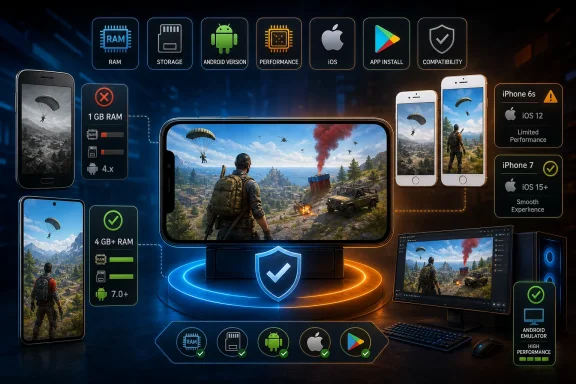
The most important correction is on iPhone: Garena’s Latin American support documentation, updated March 6, 2025, lists iPhone 6s running iOS 11 as the minimum for standard Free Fire. It recommends an iPhone 7 or newer. Apple’s current App Store listing for Free Fire in the region checked requires iOS 12 or later, which makes the storefront requirement more restrictive than Garena’s support article.
That immediately rules out the iPhone 5 named in Vandal’s “compatible iOS devices” list. The guide also cites iOS 9 as the minimum, a requirement found in Garena’s older English-language support material, but it does not match the newer regional support page or the current App Store listing. An iPhone 5 is therefore not a sensible compatibility recommendation for a player installing the current game build.
On Android, the picture is less clean because Garena’s official materials retain very low baseline requirements, while actual availability can vary by country, device certification, installed Android build, free storage, and whether the player is installing Free Fire or the heavier Free Fire MAX client. The practical conclusion is simple: minimum specifications mean the app may launch; they do not mean the phone will provide a playable competitive experience.
Garena’s current baseline is lower than Vandal’s Android list suggests
Vandal says Android players need a quad-core MediaTek MT6737M, Mali-400 graphics, 1 GB of RAM, 8 GB of storage, and “Android Nougat or later (version 4.1 and above).” That last line contains a clear contradiction. Android Nougat is Android 7.0, while Android 4.1 is Jelly Bean, released years earlier. They cannot both describe the same operating-system floor.
Garena’s own support page is clearer, though it is still written as a broad minimum rather than a guarantee for every phone. For standard Free Fire, Garena specifies Android 4.4, a dual-core 1.2 GHz processor, 1 GB of RAM, and at least 1.5 GB of storage. Its recommended specification is Android 7, a dual-core 2.0 GHz CPU, 3 GB of RAM, and 3 GB of storage.
Those figures explain the source of the confusion. Android 7 is Garena’s recommended OS level, not the official minimum listed in its current support documentation. Vandal has effectively combined elements of a recommended target with a much older hardware profile, then attached an incorrect Android version number.
The game’s Google Play listing confirms that Free Fire is still distributed as an Android app by Garena International, but Google Play’s compatibility decision is device-specific. A handset can meet a published RAM or CPU threshold and still be blocked because of its Android version, ABI support, certification state, regional app availability, or vendor software configuration. Conversely, a device that appears “old” on a generic phone list may be allowed to install if its particular software build meets the Play Store’s requirements.
For users with an older Android phone, the useful test is not whether the model appears in an article. Open the official Play Store while signed into the phone that will run the game. If the Install button is available, the device has cleared the store’s current compatibility filter for that account and region. Then check that there is substantially more free space than the download size alone requires, because maps, events, voice assets, updates, cached files, and the operating system all compete for internal storage.
Free Fire and Free Fire MAX should not be treated as the same install
Garena separately documents Free Fire MAX, and its requirements are materially higher. The minimum Android specification for Free Fire MAX is 2 GB of RAM and 2.5 GB of storage; Garena recommends an octa-core 2.0 GHz CPU, Android 7 or later, 4 GB of RAM, and 4 GB of storage. On iPhone, Garena names the iPhone 7 as the Free Fire MAX minimum and the iPhone 8 Plus as its recommended target.
That distinction matters for buyers of budget devices. A phone with 1 GB of RAM may technically satisfy Garena’s floor for the original Free Fire client, but it is below the stated minimum for MAX. It should not be sold or described as a reliable Free Fire MAX device merely because it appears on a generic Free Fire compatibility list.
The same distinction applies to storage. Vandal’s blanket “8 GB” requirement is not Garena’s stated application-storage threshold for standard Free Fire or MAX. But its instinct that tiny storage capacities are a problem is directionally correct. An 8 GB phone may have only a fraction of that capacity free after Android, carrier software, security updates, photos, messaging apps, and cached data are accounted for. On a device with 8 GB total storage, the issue is often not whether Free Fire’s initial package can download, but whether subsequent game updates can unpack without the phone running out of space.
Garena itself warns that minimum-spec devices may run the game without running it smoothly. That caveat is more meaningful in 2026 than it was when the game’s original low-end targets were common. Battle royale play creates the heaviest conditions precisely when smooth performance matters most: a crowded landing, multiple players deploying abilities, vehicle movement, close-range combat, and late-circle fights. A launch screen and training match are not useful proof that a phone will sustain stable frames in ranked play.
The published phone list is not a certification roster
The Android models collected by Vandal range from old entry-level hardware such as the Samsung Galaxy J1 mini to substantially newer midrange and flagship-class devices such as the Realme X2 Pro. That breadth is a warning sign: it is a list inferred from broad specifications, not an official compatibility roster maintained by Garena.
The Galaxy J1 mini illustrates the problem. Common versions of that phone shipped with 768 MB of RAM, below Garena’s 1 GB minimum for standard Free Fire. Some regional variants have different configurations, but that is precisely why model-name lists are unreliable. “Galaxy J1 mini” is not a single universal hardware specification, and it should not be presented without the memory configuration, Android build, and regional variant.
The iOS list has the opposite problem: Apple hardware is easier to identify, but the listed products are too old or too imprecisely described. “iPhone 6s/5” combines two devices that sit on different sides of Garena’s current documented minimum. “iPhones running iOS 8.0 or later” is also incompatible with both Garena’s iOS 11 support guidance and the iOS 12 requirement shown by the App Store listing checked for Free Fire.
The iPad situation deserves similar care. Apple’s listing says the current Free Fire build supports iPad hardware running iPadOS 12 or later, but Garena’s own minimum-device table is written around iPhone models. An iPad Mini 3 or iPad Mini 4 may be able to meet the OS requirement in some regions, yet that is not the same as Garena naming either device as a performance target. Installability, official minimum hardware, and smooth gameplay are three separate questions.
Windows PC play depends on the emulator, not a Free Fire PC specification
Vandal also presents a set of “minimum requirements on PC,” including Windows XP, Windows Vista, 2 GB of RAM, a Core i3 processor, and Intel HD Graphics 4000. Those should not be read as official Free Fire PC requirements, because Free Fire is a mobile-only game in Garena’s own FAQ and Garena does not publish a native Windows client requirement sheet.
PC play means running the Android version through an emulator. Garena has acknowledged emulator matchmaking in its support material, including separate emulator matchmaking pools for ranked Battle Royale and Clash Squad modes in at least one regional announcement. That establishes that emulator play is recognized in the game’s matchmaking design. It does not turn the game into a native Windows application or make decade-old Windows configurations a dependable target.
The actual requirement is the one imposed by the emulator selected, its Android image, graphics-rendering mode, virtualization support, current Windows version, driver stack, and the particular Free Fire package available through Google Play. A Windows PC that would satisfy a generic “2 GB RAM” list may struggle before the game even starts, because modern Android emulators consume memory and rely heavily on CPU virtualization and updated graphics drivers.
For Windows users, the sensible order is to choose a maintained emulator that supports the current Windows release, enable hardware virtualization in UEFI where required, install the game through the official Google Play channel inside that emulator, and expect a separate matchmaking environment when using mouse and keyboard. Do not plan a build around Windows XP, Vista, or an old Intel integrated GPU because a third-party requirement list says Free Fire can run there.
Garena’s own figures still make standard Free Fire accessible on modest Android hardware, but the safe purchasing floor is its recommended 3 GB RAM target for the original client and 4 GB for Free Fire MAX—not the lowest number that may permit an installation. For iPhone buyers, the current practical floor is an iPhone 6s capable of running iOS 12, while an iPhone 7 or later better aligns with Garena’s performance recommendation.