
At $799 in the U.S. configuration reviewed by PCWorld and Tom’s Hardware, the IT13 Max pairs Intel’s 16-core, 22-thread Core Ultra 9 185H with 24GB of memory and a 500GB Kingston NVMe SSD. Intel introduced that Meteor Lake processor in late 2023, so this is not a current-generation CPU launch. But Geekom’s decision to put it in a roughly one-liter chassis with two USB4 ports, dual 2.5GbE and a 65W-rated cooling design gives it a practical role as a small workstation, lab box, or heavily connected desk PC.
The independent testing agrees on the central point: this is a fast mini PC for office work, development, moderate content creation, and multi-display setups. It is less persuasive as a long-term machine for users who expect to expand memory for virtual machines, local AI workloads, or larger creative projects.
 PCWorld’s performance result is real, but it has a ceiling
PCWorld recorded 7,117 points in PCMark 10, including 9,164 in Productivity and 10,488 in Digital Content Creation. Those numbers put the IT13 Max above several midrange mini PCs based on older Ryzen 7 and Core Ultra 7 chips, while leaving it behind newer high-end systems based on the Core Ultra 9 285H and Ryzen AI 9 HX 470.
The gap is significant enough to frame the purchase properly. PCWorld found the newer Geekom IT15 with Intel’s Core Ultra 9 285H about 15 percent ahead in PCMark 10, while the company’s Ryzen AI 9 HX 470-based A9 Max was roughly 20 percent ahead. The IT13 Max is therefore buying down from the performance frontier, not redefining it.
That does not make the 185H inadequate. Its six Performance cores, eight Efficiency cores, and two low-power Efficiency cores give Windows a lot of scheduling headroom for compiling code, managing a busy browser session, running Microsoft 365 applications, handling image edits, or driving several displays. PCWorld also found no major performance collapse during its CPU testing, despite temperatures briefly approaching 90 degrees Celsius.
Its Intel Arc integrated graphics are better than the Iris Xe graphics attached to earlier Intel mobile chips, and PCWorld’s 3DMark Time Spy result of 3,880 underscores that improvement. Still, this is integrated GPU performance drawing from system memory. PCWorld cautioned that current AAA titles will require reduced details and that dedicated graphics remain the right answer for demanding gaming. A pair of USB4 ports provides a path to external high-speed storage and displays, but Geekom has not built this machine around OCuLink or an explicit external-GPU-first design.
The local AI pitch needs the same restraint. Intel rates the Core Ultra 9 185H’s NPU at 11 TOPS, and the platform can reach a higher total figure when CPU and GPU resources are counted together. That is useful for supported lightweight acceleration tasks, but it does not turn a 24GB mini PC into a substitute for a system with a discrete GPU and abundant, upgradeable memory.
The port selection is the IT13 Max’s clearest advantage
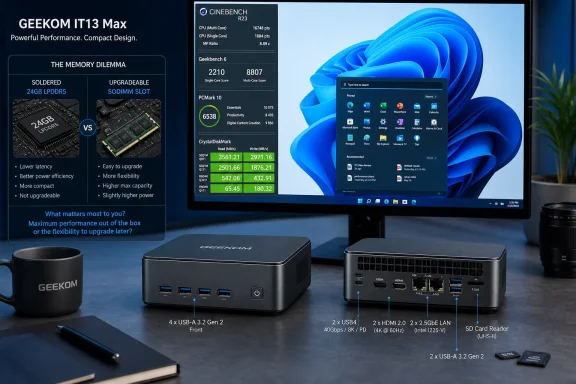
The IT13 Max is unusually well equipped for a Windows mini PC. PCWorld counted four 10Gbps USB-A ports on the front, a headphone jack, two 40Gbps USB4 Type-C ports on the rear, two HDMI 2.0 outputs, two 2.5GbE Ethernet ports, an SD card reader, and two additional rear USB-A ports. One of those rear USB-A ports is USB 2.0, a limitation worth remembering for external SSDs.
For a desk workstation, the arrangement reduces the need for a dock. The two USB4 ports can carry displays and high-speed storage; the HDMI connectors can handle additional screens; and Geekom specifies support for up to four displays. CNX Software independently tested the Windows 11 Pro configuration and reported that its two HDMI and two USB4 outputs, 2.5GbE, and wireless networking all functioned as expected.
Dual 2.5GbE is particularly practical for small-office and home-lab use. One port can connect the machine to the primary network while the other serves a direct NAS connection, a separate management network, a router appliance, or a high-speed point-to-point transfer link. TechRadar made the same observation in its review, noting that two 2.5GbE connections can be useful for direct NAS access, although it also pointed out that professionals working with high-bitrate network media will still prefer 5GbE or 10GbE.
The port story has one conspicuous miss: there is no front USB-C port. Both PCWorld and Tom’s Hardware flagged that omission. Four front USB-A ports will suit keyboards, mice, dongles, card readers, and older peripherals, but a modern compact workstation should make it easier to connect a USB-C SSD, phone, camera, or charging cable without reaching behind the chassis.
Cooling keeps performance up, not noise down
Geekom calls its cooling setup IceBlast 3.0 and says it is designed for up to 65W of CPU power. The company’s claim is supported in the narrower sense that reviewers have found the mini PC able to sustain demanding work without obvious benchmark throttling. It should not be read as a promise of silent high-load operation.
PCWorld describes the IT13 Max as nearly silent in ordinary Windows and office use, but clearly audible during prolonged CPU or graphics workloads. Tom’s Hardware measured approximately 29.8 dB at idle and 52.3 dB under sustained load. TechRadar’s review also heard a pronounced fan ramp during heavier work, with the reviewer especially noticing it in Premiere Pro and gaming.
The numerical readings cannot be compared directly because room noise, meter placement, workload, and power settings differ. The common finding is more useful: the IT13 Max is quiet at light load and conspicuously audible when its 45W-class processor is doing the work that justifies buying it.
That trade-off is normal for a sub-liter PC using an H-series laptop processor. The practical consequence is that this makes more sense beside a monitor in a general office, lab, or shared workspace than in a silent recording environment. It also means that buyers should not base a purchase on Geekom’s cooling label alone; a 65W cooling target says little about fan acoustics or total system draw.
The memory configuration is the buying trap
The most important finding outside PCWorld’s benchmark results is the difference between the available IT13 Max variants. PCWorld’s review unit has 24GB of soldered LPDDR5 memory and a 500GB SSD. Tom’s Hardware independently tested the same 24GB/500GB direction and says Geekom sells that configuration as the current IT13 Max 2026 model.
Tom’s Hardware also reports that Geekom continues to sell an older Core Ultra 9 185H IT13 Max with two SODIMM slots, a 1TB SSD, and a single 16GB DDR5 module. That version can be expanded to 96GB of DDR5-5600 memory. At the time of Tom’s Hardware’s review, the two versions were being offered at the same $799 price.
That is not a minor configuration distinction. The soldered 24GB model likely offers a more balanced memory setup for its integrated Arc graphics than a machine sold with one 16GB SODIMM. But 24GB is a hard capacity limit for the life of the system. A Windows developer running several containers, a Hyper-V or VMware workstation user, a homelab operator running VMs, or an editor who expects projects to grow may find that constraint sooner than expected.
The upgradeable 16GB/1TB version starts with less memory and may require an immediate RAM purchase to achieve its potential. Yet it has a much longer runway. Buyers should confirm all three items before ordering:
- The listing should explicitly state whether its RAM is 24GB soldered LPDDR5 or socketed DDR5 SODIMM.
- The listing should state the installed SSD capacity, because the competing configurations use 500GB and 1TB drives.
- The listing should show the exact chassis revision and expansion slots rather than relying on “IT13 Max” alone.
A capable Windows mini PC, provided the workload fits the fixed RAM
PCWorld is right that the Geekom IT13 Max has surprising power for a mini PC, especially when judged by CPU throughput, integrated graphics, connectivity, and physical build quality. The metal-reinforced chassis, broad ventilation, dual USB4, and dual 2.5GbE make it a more substantial machine than the many low-cost mini PCs built around U-series processors and minimal I/O.
But the stronger conclusion from the combined testing is more specific: the 24GB IT13 Max is a good fit for a connected Windows workstation whose memory needs are already known. It is a less flexible choice for anyone buying a small PC as an expandable platform.
For $799, buyers are not paying for Intel’s newest mobile architecture. They are paying for a mature Core Ultra 9 185H implementation with unusually rich I/O and cooling sufficient to let that processor work. Confirming which IT13 Max motherboard and memory layout is in the cart will matter more than the “Ultra 9” badge on the front of the listing.