
 Overview: Gemini Daily Brief Is Moving Beyond Generic Summaries
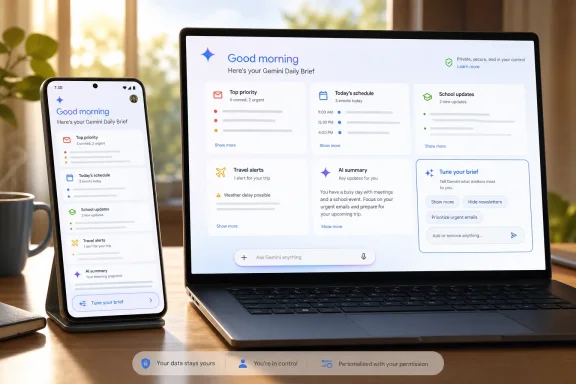
Google introduced Daily Brief at I/O 2026 as a personalized, agent-style morning overview in the Gemini app. The service is intended to assess relevant information from connected Google services, organize it around a user’s priorities, and surface useful next steps instead of merely condensing messages into a static summary. Google describes Daily Brief as an opt-in agent that works across connected apps to identify urgent Gmail updates, upcoming Calendar events, and related follow-up details.
That positioning is important. A traditional email digest asks, “What arrived?” Daily Brief is designed to ask a more difficult question: “What should receive attention today?” Google says the feature organizes and prioritizes information based on a person’s goals, rather than simply presenting a chronological feed. Its current Daily Brief product page also frames the experience as a way to scan an inbox, calendar, and active tasks, then identify the items that need attention.
The problem is that prioritization is deeply personal. A school newsletter might be background reading for one parent but essential for another. A manager may want every email from a direct report included in the morning brief, while a different user wants only messages requiring an answer before noon. A single universal relevance model will always make wrong assumptions.
The leaked Tune your brief control appears intended to address that exact limitation. Rather than forcing people to wait for the AI to infer their preferences from thumbs-up and thumbs-down reactions, Google may allow them to tell Gemini plainly: show more of this, show less of that, keep these senders visible, and stop treating those updates as important.
That is a small interface change with potentially large consequences for how useful — and how intrusive — proactive AI assistants feel in everyday life.
What the Leaked “Tune Your Brief” Feature Appears to Do
According to the APK teardown, the latest Google app build contains a dedicated text box on the Daily Brief page. Selecting it opens a bottom sheet with suggested instructions that users can apply to adjust future digests. The reported suggestions include seeing email newsletters, more Calendar events, updates from school, and even using more concise language in the briefing. Android Authority reports that users can also enter their own instructions or use voice input.
In practical terms, this would make Daily Brief a more configurable AI daily planner. Instead of hoping Gemini notices a pattern after several days of feedback, a user might write instructions such as:
- “Always include messages from my child’s school.”
- “Do not show promotional newsletters.”
- “Prioritize emails from my manager and project team.”
- “Include any flight, hotel, or travel itinerary changes.”
- “Only show events that require preparation.”
- “Keep the summary under five items.”
- “Call out invoices, payment failures, and account-security notices.”
- “Do not mention recurring meetings unless they have changed.”
The important distinction is that these are not requests for a one-off answer in a chat window. They are standing preferences intended to influence a recurring, automated briefing. That makes the feature closer to a personal operating policy than a standard Gemini prompt.
The teardown further indicates that tapping a suggested preference sends it to Gemini so that the next Daily Brief is adjusted accordingly. Android Authority’s screenshots and description suggest that the feature is technically functional in testing, rather than merely a stray string of unfinished interface text. Still, it remains hidden code, not a released Google feature.
That caveat matters. APK teardowns can reveal work in progress, but a feature discovered in an app build may change substantially, be delayed, launch only in limited markets, or never ship publicly. The same report explicitly notes that unreleased code should not be treated as a rollout guarantee. Android Authority’s teardown disclaimer is especially relevant here because preference controls touch privacy, safety, and product-design questions that Google may still be resolving.
Why Direct Tuning Is Better Than Thumbs-Up and Thumbs-Down
Daily Brief already includes a feedback loop. Google says users can steer the experience by responding positively or negatively to items over time, and its public feature page says feedback should influence the following brief. Google’s Daily Brief overview describes that adaptation model as a core part of the service.
But binary feedback is a weak language for a nuanced task. A thumbs-down on an item could mean several different things:
- The topic was irrelevant.
- The item came from the wrong sender.
- The information was useful but arrived too late.
- The summary was too vague.
- The detail was correct but not important enough for a morning digest.
- The user wants fewer items of that type, not none at all.
An explicit tuning field removes much of that ambiguity. A user can specify that school messages should appear only when they contain deadlines, for example, or that a particular newsletter belongs in the brief only on Fridays. The AI still has to interpret the instruction correctly, but the objective becomes clearer.
This is where the proposed feature could deliver a genuine improvement over the familiar “rate this response” pattern used across generative AI products. A proactive assistant becomes valuable when it respects a person’s attention budget. The goal is not simply to summarize more data; it is to reduce the number of decisions required before the workday begins.
A direct tuning system could also make Daily Brief more resilient to changes in a user’s life. A person planning a move, supporting an aging relative, starting a new job, or managing a school term may have a temporary need for different categories of information. Waiting for an algorithm to recognize those changes is inefficient. A short instruction is faster, more transparent, and easier to reverse.
Background: Google’s Push Toward Proactive AI Agents
Daily Brief is part of Google’s broader attempt to make Gemini less dependent on the traditional chatbot model. At I/O 2026, Google positioned Gemini as a platform for agentic experiences — systems that can work across connected services, maintain context, and assist with multi-step tasks under user direction. Google’s I/O 2026 announcement roundup lists Daily Brief alongside Gemini Spark as major efforts to turn Gemini into a more proactive assistant.
The difference between an AI assistant and an AI agent is not merely marketing language. A conventional assistant waits for a prompt: summarize this email, draft that reply, create a calendar event. An agent is designed to act more continuously, monitoring defined sources and preparing information or completing work when conditions are met.
Daily Brief is the relatively restrained version of that idea. Google says it operates overnight to gather information for the day ahead, analyze an inbox, calendar, and tasks, identify priorities, and suggest next steps. Google’s I/O recap says the service is meant to learn over time from preferences, dates, and times.
Gemini Spark takes the concept further. Google characterizes Spark as a 24/7 personal AI agent that can work in the background and connect with Workspace tools such as Gmail, Docs, and Slides. Google’s Gemini app announcement says Spark is designed to take action under the user’s direction, including recurring tasks such as reviewing statements or consolidating school-related deadlines.
Daily Brief therefore functions as a proving ground for a key agentic-AI challenge: can software look across a person’s digital life and surface what matters without becoming a source of noise, mistakes, or surveillance anxiety? The reported tuning tools are a direct response to that challenge.
The Similarity to Windows Productivity Workflows
For Windows users, the concept will sound familiar even if the implementation differs. Modern productivity tools already attempt to identify priority messages, upcoming meetings, unfinished documents, task lists, and notifications that require attention. The difference with Gemini Daily Brief is that Google is trying to create a single, conversational control layer across connected personal data rather than leaving prioritization inside individual apps.
That approach has clear appeal for users who live in Gmail and Google Calendar while working on a Windows PC. A morning briefing that directs someone to an urgent email, provides context from a previous Gemini conversation, highlights a calendar conflict, and suggests a reply could reduce app-switching. Google says Daily Brief can support actions including opening emails, drafting replies, setting reminders, and scheduling events from within the briefing. Google’s Daily Brief feature page presents those shortcuts as part of the product’s intended workflow.
Yet the benefit depends on accuracy. In an enterprise environment, the difference between a useful summary and a distracting one is often whether the system understands business context: which client is strategic, which deadline is hard, which thread is merely informational, and which calendar event can safely be ignored.
That is why direct customization is not a cosmetic addition. It is a potential mechanism for giving people control over the relevance model.
The Most Promising Use Cases
A well-designed tuning system could make Gemini Daily Brief considerably more practical for several types of users.
Knowledge Workers With Overloaded Inboxes
The obvious audience is the worker who begins every day with dozens or hundreds of unread messages. Many inboxes contain an unhelpful mixture of customer requests, internal threads, automated alerts, receipts, newsletters, calendar updates, and notifications from services that are not urgent.
A tuned Gemini Daily Brief could establish a hierarchy:
- Immediate action items from specific people or domains.
- Schedule changes that affect the day.
- Deadlines hidden in long message threads.
- Reference material that can wait.
- Noise that should stay out of the digest entirely.
This does not eliminate the need to review email. It could, however, make the first ten minutes of the workday more purposeful.
Parents and Caregivers
The leaked suggested prompts reportedly include updates from a child’s school, an example that illustrates why context matters more than generic inbox sorting. Android Authority’s report indicates that school updates are among the proposed tuning categories.
School emails vary wildly in urgency. Some are routine newsletters, while others contain schedule changes, permission slips, closures, transportation issues, health notices, or deadlines. A user may reasonably want Gemini to highlight the latter, suppress the former, and always include messages from a teacher or administrator.
For a caregiver, a daily briefing that reliably separates “read later” from “act today” could be valuable. But it is also a high-stakes use case, because overlooking a message about a child’s safety, medical needs, or schedule would be far more serious than missing a promotional email.
Frequent Travelers
Travel is another case where relevance changes rapidly. In the weeks before a trip, a person may want Daily Brief to surface airline emails, hotel confirmations, itinerary updates, weather-related changes, passport reminders, and event reservations. Once the trip ends, those same categories become irrelevant.
Natural-language tuning could make that temporary shift straightforward. Users could instruct Gemini to prioritize all messages containing reservation numbers or travel changes, then later remove that rule. This is a strong example of why a personal AI assistant should support editable preferences rather than rely exclusively on behavioral inference.
Users Seeking a Less Noisy AI Experience
There is also a simpler use case: people who want a morning overview but do not want their AI assistant to become a second inbox. The ability to say “make this more concise” or “only show items that require action” could be as important as adding more data sources.
The leaked interface reportedly includes an option to request more concise language. Android Authority’s teardown suggests Google understands that personalization is not only about what information appears, but also how it is presented.
That is a welcome design direction. AI products often assume that more generated text equals more help. In a daily briefing, the opposite is frequently true.
Privacy and Control: The Non-Negotiable Side of Personalization
The same data access that makes Daily Brief potentially useful also makes it sensitive. An assistant that examines Gmail, Calendar, tasks, and chat context can identify patterns about work, family, travel, finances, health-related appointments, and personal relationships.
Google states that Daily Brief requires users to enable Personal Intelligence for Workspace and Memory, and says people can disable connected sources at any time. Google’s Daily Brief FAQ identifies Gmail, Google Calendar, and Gemini chats as the sources used for the feature. That is meaningful control, but it also means users must make deliberate choices before turning the feature on.
Google’s separate Personal Intelligence page says the experience is optional, that users choose which Google apps to connect, and that personalization settings can be managed at any time. Google’s Personal Intelligence documentation also says Gemini will attempt to reference or explain information used from connected sources so users can verify it.
Those safeguards are necessary, but personalization itself creates an additional privacy dimension. A tuning instruction such as “always show emails from my therapist,” “include school messages about my child,” or “prioritize mortgage communications” can become sensitive preference data in its own right. The product’s value proposition depends on remembering those instructions, yet users need a clear way to inspect, edit, and delete them.
What Google Needs to Get Right
For Daily Brief tuning to earn trust, Google should make several controls obvious rather than burying them in settings:
- A visible preference history showing every active tuning instruction.
- Per-source controls for Gmail, Calendar, Gemini chats, and any future connected services.
- Temporary instructions with an expiration date for travel, projects, or seasonal events.
- A “why am I seeing this?” explanation for each item in the briefing.
- Fast exclusion tools for senders, labels, calendar types, and recurring categories.
- A reset option that clears learned preferences without forcing users to disconnect everything.
- Clear separation between summarization and action, especially when a briefing offers to draft replies or schedule events.
Google already notes that users can view item-specific sources through a “More” option in Daily Brief. Its product documentation says this lets people identify the origin of information surfaced in a digest. Extending that transparency to tuning decisions would make the feature materially stronger.
The Accuracy Problem: A Daily Brief Must Be Dependable, Not Just Impressive
The central risk is not that Gemini will fail to generate elegant prose. It is that it may misjudge importance.
An AI system can make at least four kinds of errors in a morning briefing:
- False positives: It highlights something unimportant.
- False negatives: It fails to surface something urgent.
- Context errors: It summarizes an item accurately but misunderstands why it matters.
- Action errors: It proposes a reply, reminder, or calendar change that is inappropriate.
False positives are annoying. False negatives can be damaging. If Daily Brief misses a meeting cancellation, payment problem, school closure, security notification, or deadline because a tuning rule was interpreted too aggressively, the “less noise” benefit disappears quickly.
This is why the product should be treated as a prioritization assistant, not an authoritative inbox replacement. Google itself advises users to check responses, and the public Daily Brief page emphasizes that compatibility and availability can vary. Google’s Daily Brief documentation also makes clear that the feature is opt-in and dependent on connected services.
The most effective tuning design would allow users to establish non-negotiable categories. For example, a person should be able to say that security alerts, travel itinerary changes, messages from specified people, and calendar changes must always appear, regardless of Gemini’s confidence score. Conversely, low-value categories should be demoted without being silently hidden forever.
A trustworthy briefing needs an escape hatch from algorithmic judgment. The user must remain able to review the raw source material quickly and understand why Gemini reached its conclusion.
Availability and What to Expect Next
Daily Brief began rolling out in the United States to eligible Google AI subscribers aged 18 and older, with access tied to supported subscription plans and required Personal Intelligence settings. Google’s current Daily Brief page lists Google AI Ultra, Pro, and Plus users in the U.S. as the audience for the rollout, while noting that feature availability varies.
The reported tuning feature has no official launch date. It was activated by researchers in Google app version 17.43.11, according to the APK teardown, but it is not enabled for ordinary users at publication time. Android Authority’s report says the interface appears to work in testing, while also warning that Google’s final release plans remain unknown.
That uncertainty should not overshadow the larger trend. Google has already publicly committed to Daily Brief as a personalized agent that learns preferences and suggests next actions. Google’s I/O 2026 announcement frames the product as an overnight organizer for the next day. A prominent tuning field is a logical extension of that strategy, even if the final wording, design, and availability change before release.
Conclusion: Customization May Be the Difference Between Helpful and Overbearing
The leaked Tune your brief function is promising because it addresses the core weakness of proactive AI: an assistant that acts without enough user control can quickly become another source of digital friction. Gemini Daily Brief already has the difficult assignment of interpreting emails, calendars, task-like signals, and personal context. Giving users plain-language control over its priorities is the most practical way to make that interpretation more useful.
For Google, the opportunity is substantial. A Daily Brief that consistently identifies meaningful updates, respects personal boundaries, explains its reasoning, and stays concise could become a genuinely valuable part of the morning workflow across Android, the web, and Windows PCs. A Daily Brief that overreaches, forgets preferences, or buries a critical item among generic summaries will reinforce skepticism around proactive AI.
The next stage of Gemini should not be about making the assistant more autonomous for its own sake. It should be about making it more governable. If this tuning feature reaches users with transparent controls, reliable source links, and strong privacy management, Google may have found the missing layer between a clever AI summary and a personal assistant people can actually trust.
