

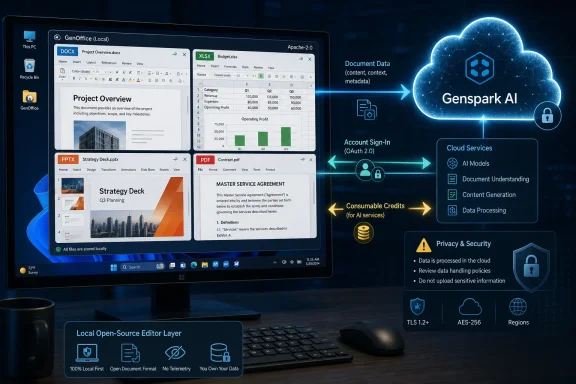
.docx, .xlsx, .pptx, PDF, and Markdown files, but its headline AI capability still depends on a Genspark account, Genspark’s cloud proxy, and a consumable-credit system. That is the material distinction missing from the “free, open-source AI Office” pitch: the editors are Apache-2.0 software; the intelligence that makes GenOffice unusual is a hosted Genspark service.Microwire’s report accurately identifies the broad release: Genspark has published GenOffice’s source code and installers, and the project does aim to work directly on document and workbook structures rather than make users shuttle text through a separate chat panel. The project’s own GitHub repository goes further than the article in one important respect, however. As of August 10, GenOffice is no longer limited to macOS and Windows: version 0.6.13 adds signed Windows x64 and Apple Silicon macOS installers alongside Debian/Ubuntu and AppImage packages for x64 Linux.
The project is moving quickly, but it is still an alpha-grade office suite that has gone from version 0.4.110 on August 2 to version 0.6.13 on August 9. For Windows enthusiasts, that makes it an interesting test platform and a potentially useful secondary editor—not a sensible replacement for Microsoft 365 or LibreOffice on production documents yet.
The open-source editor and the paid AI service are separate things
GenOffice is genuinely open source under the permissive Apache-2.0 license. The public repository includes the Electron applications, shared TypeScript engine packages, installer build scripts, test fixtures, and a Rust-based spreadsheet sidecar. The license permits reuse and modification, including commercial redistribution under its terms, and identifies Mainfunc, Inc. as the copyright holder.
But the default AI implementation is not a local model runner. Genspark’s own architecture notes say the applications use a device-code sign-in flow, send model requests through Genspark’s proxy, and do not ask the user to enter a model-provider API key. The service routes work among Claude, GPT, and Gemini model families, and makes Genspark-operated tools available for web and image search, image generation, media analysis, and transcription.
That design brings a practical consequence for Windows deployments: opening, editing, and saving a document can be local, but invoking the agent is a cloud workflow. Any document text, spreadsheet data, slide content, or PDF material that an AI prompt needs to process must be treated as potentially leaving the endpoint and entering Genspark’s service path. Genspark’s public project material describes how requests are routed, but it does not publish an enterprise data-flow diagram for GenOffice, retention terms specific to the desktop app, geographic processing guarantees, or administrative controls for regulated tenants.
The cost claim also needs more careful wording than “free AI office.” Genspark says the local editing software is free and ad-free. Its Help Center says AI features consume credits based on task complexity, uploaded content, conversation depth, generated media, and model selection. Free accounts receive a daily credit allocation, while higher allocations are tied to Genspark’s paid Plus and Pro plans. In other words, GenOffice removes the software license charge for basic editing; it does not remove the operating cost of cloud AI.
This is not a hidden fee. The project’s launch post says GenOffice uses Genspark credits. But it changes the buying decision for SMBs: the suite can reduce the cost of a conventional Office license, while frequent AI generation may still turn into a subscription budget and a vendor-account dependency.
GenOffice’s technical bet is narrow document editing
The project’s strongest technical idea is its approach to Microsoft Office round-tripping. GenOffice Docs is built around an Office Open XML block tree that preserves original XML slices and regenerates only the edited document blocks. Its stated goal is to let an untouched portion of a Word document remain byte-for-byte intact while changing the paragraph, table, or other structure that the user—or the AI—actually modified.
If the implementation lives up to that claim, it addresses a real weakness in many alternative editors. A document can look fine inside a replacement word processor yet shift page breaks, text metrics, shapes, headers, or complex formatting when reopened in Word. GenOffice says it uses paragraph-level patching, tracks “dirty” blocks, and retains untouched archive entries when saving. It also claims Word-faithful pagination, tracked changes, comments, styles, math equations, and ink.
That is a more conservative strategy than wholesale conversion to an internal document model. It does not mean full Microsoft Word compatibility has been independently established. Compatibility is not a binary feature, particularly for files carrying macros, embedded controls, custom XML, complex review history, enterprise templates, SharePoint metadata, or third-party add-in content. Genspark has published no formal interoperability test matrix, no corpus results, and no statement of supported VBA or ActiveX behavior.
The same caution applies to Sheets and Slides. GenOffice says Sheets combines the Apache-2.0 Univer core with its own Rust .xlsx import/export layer using Calamine and IronCalc, plus in-house charting, pivot-table, slicer, conditional-formatting, and formula-tracing work. GenOffice Slides uses an in-house .pptx parser, renderer, and editor with support claimed for masters, layouts, charts, cropping, ink, and text shaping.
Those are ambitious components to ship in a one-week-origin project. The repository’s open issues already show ordinary early-product gaps: a multi-cell deletion bug in Sheets, requests for table-formatting tools, right-to-left support, legacy .doc import, Intel Mac support, and user-owned AI configuration. The issue tracker also shows that users cannot create new issues directly at present, so GitHub’s visible list should not be read as a complete fault record.
The AI is document-aware, but it is currently Genspark-controlled
GenOffice’s AI is more deeply connected to content than the usual “draft in chat, paste into Office” workflow. In Docs, the agent can propose block-level changes with snapshots and diffs. In Sheets, Slides, and PDF, the agent is given tools that operate over workbook, presentation, and document state. Slides also has a constrained interpreter for AI-generated layout scripts rather than executing model output through eval or a normal JavaScript runtime.
Genspark has documented several sensible protections around that architecture. Its security policy says Electron renderers run with context isolation, no Node integration, and sandboxing enabled; renderer-to-main-process calls use validated IPC; and outbound links are filtered through an allowlist. For the Slides layout interpreter, the project says scripts only get a bounded collection of data and edit primitives, not ambient access to the DOM, network, filesystem, process, or IPC bridge.
Those are worthwhile design choices, but they should be judged as source-level assurances rather than a completed security audit. The repository presently shows no published third-party assessment, no software bill of materials attached to the release, and no published hash set stronger than MD5 checksums for the downloadable installers. The Windows installer is described as signed, which improves the normal Windows trust chain, but IT teams should still verify the signer in Windows before deployment and test the package under their own application-control policy.
The larger deployment limitation is control. GenOffice’s project documentation says no model API key is entered or stored by the user in its standard flow. Yet requests for bring-your-own-key capability, custom model endpoints, local models, proxy control, and alternative AI integrations remain open enhancement requests. That leaves organizations with limited options if they need Azure OpenAI, an internal inference gateway, a self-hosted model, a fixed model vendor, or a DLP-approved route for confidential material.
GenOffice is open source, but its default AI trust boundary is Genspark. Those are compatible facts; they are not the same promise.
Why Microsoft Office and LibreOffice users should not rush a migration
The submitted report frames GenOffice as a direct bridge between Microsoft 365 and LibreOffice. It is better understood as an early attempt to build a modern, local-first editing shell around proprietary cloud AI. Microsoft 365 remains the practical choice where organizations depend on coauthoring, Microsoft identity, Teams, OneDrive, SharePoint, Purview, Outlook integration, Intune management, and vendor-backed support. LibreOffice remains the more mature offline open-source alternative for users who want to avoid a hosted AI account altogether.
GenOffice has a potentially attractive niche between them. A Windows 10 or Windows 11 user with ordinary Word, Excel, PowerPoint, and PDF files can try a signed desktop app without buying an office-suite license. The reported minimum for Windows is Windows 10 x64, and the current project release adds Linux support even though its initial public messaging centered on Apple Silicon Macs and Windows PCs.
The first safe use cases are disposable or low-risk work: creating a draft from scratch, reshaping a copied report, cleaning a simple spreadsheet, producing a non-confidential slide outline, or testing how a representative .docx survives a save-and-reopen cycle in Microsoft Word. The first unsafe use cases are the documents companies normally cannot afford to lose fidelity on: contract templates, board decks, financial models, macro-enabled workbooks, compliance material, branded presentations, and client files containing confidential data.
Users should also distinguish what GenOffice promises from what has been demonstrated outside the project. The repository contains detailed engineering claims, but there is little independent reporting or large-scale compatibility testing available in the first week after launch. Microwire’s coverage is one of the few contemporaneous write-ups, while Genspark’s Reddit announcement remains the primary public launch statement.
Genspark has delivered a real open-source codebase and signed desktop builds faster than most AI-office announcements ever reach a public repository. The concrete question now is whether the team can turn its byte-preserving Office-file strategy into repeatable interoperability results—and whether it will give Windows administrators a way to run the AI layer without routing sensitive work through Genspark credits and Genspark’s cloud.