
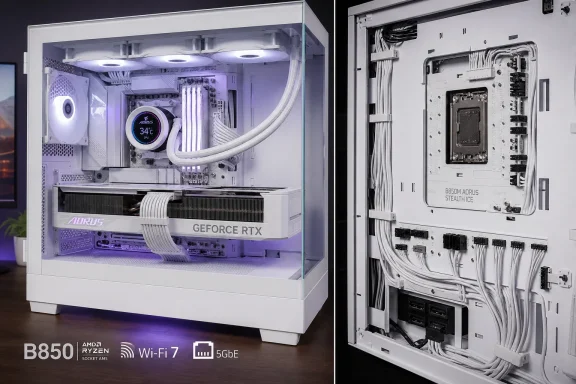
That distinction gets lost in the usual “cableless” marketing. The B850M AORUS Stealth ICE does not eliminate cables; it moves nearly all of them behind the motherboard tray. The GPU’s own power lead remains visible in most conventional configurations, and the reverse side of the board becomes far more crowded than a normal build. Still, moving the 24-pin ATX connector, 8-pin CPU connector, fan headers, RGB headers, front I/O and SATA connections off the presentation side is a substantial improvement for glass-panel systems.
Wccftech’s results show why this board should be judged as more than a cosmetic experiment. In its Ryzen 7 9800X3D test suite, the B850M AORUS Stealth ICE produced 1,339 points in Cinebench 2024 multi-core, 22,503 in Cinebench R23 multi-core, 8,822 in CPU-Z multi-thread, and 18,922 in Geekbench 6 multi-core. Those are effectively level with competing B850 boards tested on the same CPU, memory, graphics card and Windows 11 installation. There is no hidden performance tax for putting the headers on the back.
The thermal figures are also reassuring for a compact board with an 8+2+2-phase power design. Wccftech measured its VRM at 55°C at stock and 65°C during a Cinebench stress run with Precision Boost Overdrive and Curve Optimizer settings, placing it alongside considerably more conventional B850 designs. A separate hands-on review from GLITCHED likewise reported stable VRM temperatures under a Ryzen 9 9900X3D stress workload. This is a board capable of running AMD’s current high-end AM5 gaming chips; it is not an aesthetics-first product that forces the user to compromise on basic power delivery.
 The compact Stealth board has real platform limits
Gigabyte’s official specification confirms a reasonably balanced Micro-ATX feature set: four DDR5 slots supporting up to 256GB, one CPU-attached PCIe 5.0 x16 graphics slot with Ryzen 7000 and 9000 processors, a second physical x16 slot electrically limited to PCIe 4.0 x4, and three M.2 sockets. Only the top M.2 slot supports PCIe 5.0 x4 on Ryzen 7000 and 9000 CPUs; the remaining two are PCIe 4.0.
That is plenty for the mainstream gaming PC Wccftech used in testing, including its GeForce RTX 4090 and Crucial T700 Gen5 SSD. But it also defines the board’s boundary. A builder planning multiple high-bandwidth add-in cards, more than three NVMe drives, or a substantial SATA array should not mistake the board’s dense surface design for workstation-class expansion. There are only two SATA ports, and the lower full-length expansion slot is appropriate for many capture cards, networking adapters or storage controllers, but not a second GPU expected to run at full x16 bandwidth.
The USB configuration demands the same kind of careful reading. Gigabyte provides ten rear USB ports: four USB 2.0 ports, four USB 3.2 Gen 1 ports at 5Gbps, one 10Gbps Type-A port, and one 10Gbps Type-C port. An internal 10Gbps Type-C header supports a compatible case’s front port. The total count is strong for Micro-ATX, but there is no USB4 and no 20Gbps USB connection. Geeknetic separately reached the same conclusion in its June review, calling out the lack of higher-speed Type-C as a meaningful omission at its quoted €309 price.
This is where the approximate $250 figure needs care. Wccftech lists that as its estimated price, while Gigabyte’s product page does not publish a U.S. MSRP, and ComputerBase reported in July that it could not find retailer listings at that point. Regional retail pricing is therefore still more useful than an assumed universal launch price. At around $250, the clean layout, 5GbE and Wi-Fi 7 make a persuasive package for a showcase-focused AM5 build. At a substantially higher premium, the missing USB4, two-port SATA limit and reduced expansion relative to ATX alternatives become harder to ignore.
Rear-facing connectors are only as good as the case behind them
Gigabyte’s Stealth approach relies on a motherboard tray that exposes the connector locations. The company says it has worked with case vendors on reverse-connector support, and the format has broadened from its early proprietary roots. But “Stealth-compatible” is not an abstract box to tick: builders need to verify that their specific chassis revision supports Gigabyte’s connector pattern in the Micro-ATX position, not merely a competing reverse-connector standard or a full-ATX board.
That pre-purchase check is the practical consequence of this review. The B850M AORUS Stealth ICE is 24.4 cm by 24.4 cm, so a case must support both Micro-ATX and the necessary rear-tray openings. Space behind the tray also matters. Thick or rigid 24-pin, front USB 3.x and Type-C cables need room to bend without pressing hard into the side panel.
GLITCHED’s independent build experience puts some weight behind that concern. Its reviewer installed the board in a Cooler Master Mesh 400, but found that the case’s USB-C and USB 3.2 front-panel leads projected too far from the rear-facing headers for the side panel to close. The reviewer said Gigabyte supplied no angled adapters, leaving some front I/O unusable without separately sourced 90-degree connectors. That is one outlet’s report, not a confirmed universal fault, but it highlights a gap in Gigabyte’s current bundle: a specialized connector layout needs specialized cable-clearance planning.
The board therefore rewards builders who choose the chassis first and the motherboard second. A conventional case can turn the Stealth advantage into an installation problem; a genuinely compatible chassis turns ordinary chores—routing fan leads, powering RGB hubs, connecting front USB and managing the 24-pin cable—into a much cleaner job.
Windows 11 is the intended operating system
Gigabyte officially lists Windows 11 64-bit support, and its specification includes a limitation that deserves more attention than it gets: the onboard Realtek RTL8922AE Wi-Fi 7 module has no Windows 10 driver support. Gigabyte says Wi-Fi 7 functionality requires Windows 11 “SV3,” while 6GHz availability also depends on local regulations and compatible access-point hardware.
For Windows enthusiasts and administrators, the immediate takeaway is simple: do not plan a Windows 10 installation around the integrated Wi-Fi adapter. Wired connectivity is more accommodating thanks to the Realtek 5GbE controller, but a Windows 10 build that depends on Wi-Fi will require another adapter or a different installation plan. The board’s 512Mbit BIOS also ships with preloaded networking drivers, according to Wccftech, which can ease first-boot Windows 11 setup when an Ethernet drop is not available.
The firmware toolset is more practical than flashy. Q-Flash Plus allows BIOS updating without a CPU or memory installed, while physical Clear CMOS, power and reset buttons are unusually useful on a board aimed at builders who may be experimenting with memory profiles, Ryzen tuning or an early AM5 CPU install. Gigabyte also includes X3D Turbo Mode, though Wccftech’s reference to gains of up to 20 percent is drawn from prior AORUS testing rather than a claim that every game or 9800X3D configuration will see that increase here. Treat it as a BIOS profile to test against stock settings, not as performance that arrives automatically with the motherboard.
A premium for presentation, with enough substance underneath
The B850M AORUS Stealth ICE’s test results establish the central point: it performs like its conventional B850 peers, and its VRM temperatures leave room for a Ryzen 7 9800X3D or Ryzen 9 9900X3D-class build. The reverse-connector implementation adds a visible payoff without degrading CPU performance, storage capability or networking to achieve it.
Its constraints are equally clear. There is no debug display, no USB4, no 20Gbps USB, only two SATA ports and no included right-angle adapters to solve the very cable-clearance issue the design creates. The more accurate buying advice is therefore to treat the board as a targeted option for a clean white Micro-ATX AM5 system with a compatible chassis—not as the automatic value choice for every B850 build.
For the builder who has already selected a reverse-connector-ready case, Gigabyte’s compact Stealth board looks like one of the more complete executions of the format so far. For everyone else, the price of entry is not just the motherboard: it is the chassis fit, the rear-cable space, and potentially the adapters needed to make every front-panel port usable.
