
The correction matters for Windows developers and IT teams evaluating Copilot workflows: Canvases are not a replacement for GitHub Copilot Chat, GitHub Actions, or pull-request controls. They are a local, interactive work surface inside the Copilot desktop app—a way to make an agent’s working state visible and editable while the underlying session continues to do the actual work.
GitHub calls the approach a bidirectional surface. The agent can update a plan, checklist, dashboard, browser view, or other artifact; a developer can then alter, reorder, approve, or redirect that state in the same interface. In practical terms, the feature is aimed at the awkward middle of agentic development, where a task is too involved to manage through an ever-growing chat transcript but still requires human review before code is committed, a deployment is prepared, or a modernization step proceeds.
 The August reports describe examples, not a new rollout
TechGig and Analytics Insight frame Canvases as GitHub Copilot’s answer to context loss in long-running agent sessions. That characterization is consistent with GitHub’s June announcement: the company said chat remains the place to set intent and work through ambiguity, while a canvas gives that conversation a place to “land” as visible work.
But GitHub’s primary record puts the announcement on June 2, not August 17. At that time, the Copilot app technical preview expanded to existing Copilot Pro, Pro+, Business, and Enterprise customers on Windows, macOS, and Linux, and Canvases were positioned as the headline feature. GitHub subsequently published a July 21 guide explaining how to create interactive canvas experiences, followed by a July 22 product post that described Canvases as part of the broader Copilot app experience.
That timeline changes the story from “GitHub has launched a new agent-workflow feature” to “GitHub’s earlier canvas capability is beginning to acquire reusable examples and documentation.” The latter is more useful, because it tells administrators and developers that the technology is past its announcement phase but still early enough that the available patterns are actively taking shape.
The submitted reports also cite Ayan Gupta’s Site Studio and Java Modernization Studio work. Both projects exist in GitHub’s Awesome Copilot collection, where they are offered as installable plugins or extensions. Those examples provide the concrete demonstrations missing from the broad product description, but they are not evidence that every Copilot workflow automatically receives structured approval gates or a polished dashboard.
What a Canvas actually is in the Copilot app
A Canvas is an extension that opens in the Copilot app’s right-side panel. It can represent a work artifact—a release checklist, Kanban board, browser session, spreadsheet, deployment view, incident dashboard, plan, or workflow state—and it holds shared state that both a person and an agent can use.
GitHub’s documentation says a new canvas is scaffolded from an agent session using the /create-canvas skill. The developer describes the work surface and the capabilities it needs. For example, a team could request a board that creates, assigns, and moves work items, or a Markdown view that combines meetings, issues, pull requests, and active agent sessions.
The resulting implementation is more substantial than a saved prompt. A canvas extension commonly includes a package.json metadata file, an entry file such as extension.mjs, and optional JSON artifacts for persistent state. The extension can be stored in .github/extensions for a repository-shared workflow or in ~/.copilot/extensions for one person’s local use.
That split deserves attention from engineering leaders. A canvas held under .github/extensions becomes source-controlled workflow code: it can be reviewed, versioned, and distributed with a repository. A personal extension in ~/.copilot/extensions may be ideal for an individual’s planning board or local triage tool, but it is not automatically a standardized team process.
The important operational boundary is that a Canvas renders and coordinates work; it does not independently guarantee that a workflow is safe or approved. It can show an approval button, a validation status, or a remediation step, but the permissions and enforcement behind an action still come from the Copilot app, repository configuration, connected tools, and GitHub’s normal controls.
Java Modernization Studio illustrates the useful pattern
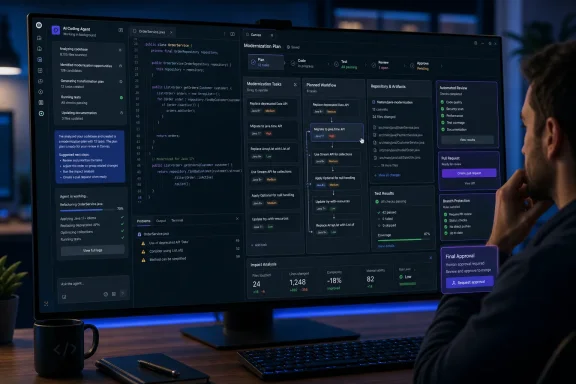
Java Modernization Studio is the stronger of the two examples cited in the submitted reports because it attaches a Canvas to a workflow where losing track of state is genuinely costly. The project layers an interactive dashboard over GitHub Copilot App Modernization for Java tooling, which can assess a legacy Java repository, assemble a prioritized remediation plan, run validation gates, and dispatch predefined modernization tasks.
Its dashboard is designed to display environment readiness, assessment findings, planning progress, validation results, and a final summary. It can identify missing prerequisites such as a suitable JDK, Maven or a Maven wrapper, Git, Docker, and—where relevant—Azure CLI. It also reads artifacts produced in the repository, including assessment data and plan or progress files, rather than simply displaying an agent-written narration of what may have happened.
That is the key design decision. The project documentation says its controls dispatch grounded prompts to the Copilot agent, while the Canvas reflects results found in the repository. A button does not silently execute transformation logic in the Canvas itself. For a modernization project that may involve dependency upgrades, vulnerability checks, test generation, container work, and Azure migration preparation, separating the visible control surface from the execution engine makes the state easier to inspect.
It does not, however, turn the Canvas into a compliance control. GitHub made the same point in a separate July release for agent automations in GitHub Issues: an approval mechanism is a workflow convenience, not a security boundary. An agent with permission to apply a change can be instructed to apply it directly rather than offer it as a suggestion. Teams should carry that warning into Canvas design.
For a Windows-based enterprise development team, the appropriate use is clear: make the Canvas a place to expose evidence before moving to the next step. A modernization workflow should surface the planned target framework, changed dependencies, test outcomes, CVE findings, and proposed pull request before a human approves the next stage. It should not pretend that a green card in a side panel replaces branch protection, required reviewers, CI checks, least-privilege tokens, or deployment approvals.
Site Studio proves the feature is broader than code generation
Gupta’s Site Studio is less consequential but arguably easier to understand. It organizes the creation of a personal website section by section, letting a user and agent plan content, draft sections, track progress, and review changes in one shared Canvas. The project is available in Awesome Copilot as site-studio, with an install command for the Copilot app.
The use case shows why GitHub is emphasizing interaction rather than merely persistent memory. A website author may need to change a design preference, correct a single section, inspect the rendered result, or decide that a draft should not progress. A chat thread can record those decisions, but it is poor at presenting the current state of each page, asset, task, and review point.
For developers, the more relevant analogy is a feature implementation that spans code, tests, visual verification, a release checklist, and a pull request. A Canvas can give that bundle a shared representation rather than forcing the developer to reconstruct it from tool windows and chat history. GitHub’s own examples include browser canvases, active worktree views, and prompt-coaching tools, reinforcing that the mechanism is intended to be adaptable rather than limited to a fixed workflow template.
The tradeoff is that customization is work. The submitted reports repeat figures of roughly 3,000 AI credits for the Java modernization Canvas and 2,000 for Site Studio, attributed to Gupta. GitHub’s documentation does not set a standard credit cost for creating a Canvas, and those figures should be treated as anecdotal build experiences, not as pricing guidance or expected consumption for an organization.
What teams should do before standardizing on Canvases
Teams already using the GitHub Copilot app can try Canvases without waiting for another rollout. GitHub’s current documentation says the Copilot app is available for all Copilot plans, though enterprise policy can still govern which actions users may take, which plugins they can install, and whether permissive “YOLO-style” commands are allowed.
A sensible first project is a repetitive, review-heavy workflow with a narrow boundary: issue triage, release-readiness tracking, test-failure investigation, dependency remediation, or a small modernization assessment. Build the Canvas around observable artifacts—the issue list, test results, a checked-in plan, a pull request, or a machine-readable assessment file—not around the agent’s claims about what it has completed.
Keep the controls deliberately modest at first:
- Use the Canvas to surface state and propose next actions before allowing it to initiate consequential work.
- Store team workflows in
.github/extensionsso the implementation can be code-reviewed and updated through normal repository governance. - Treat Canvas approvals as a human-interface feature and retain existing GitHub branch protections, required checks, environment protections, and least-privilege access.
- Measure whether the shared surface reduces repeated prompting and review time before treating its AI-credit cost as a worthwhile trade.
GitHub Copilot Canvases are a meaningful addition to the Copilot app because agent work needs an inspectable state, not another longer transcript. But the practical story on August 18 is not a just-announced feature. It is a June capability now gaining reusable examples—and the teams that benefit most will be those that use it to expose real repository evidence before an agent’s work crosses a review or deployment boundary.
