

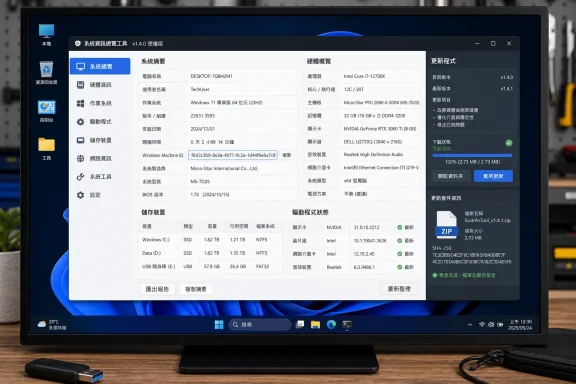
Neowin’s August 9 software listing surfaced the release, while Glow maintainer Eray Türkay’s GitHub release record shows version 26.12 was published on August 7 and supplies a SHA-256 checksum for the ZIP archive. That primary record matters here: the update is real, but it is a focused maintenance release rather than a new diagnostic capability on the scale of Glow 26.11’s Hardware Security Audit tool.
Glow remains a free, MIT-licensed C# and .NET Framework application that inventories Windows hardware, drivers, services, storage, networks, batteries and installed applications. It also packs repair and diagnostic shortcuts around DISM, SFC, cache cleanup, benchmarks and security checks. The attraction is familiar to admins and enthusiasts: collect a system snapshot quickly without deploying an agent or installing a large management suite.
The updater fix is more consequential than the redesign
The headline visual changes in Glow 26.12 are a redesigned light and dark palette, support for hexadecimal color values in its theme engine, and larger, better-fitted table text. Those are welcome quality-of-life changes for a program that presents dense machine data, particularly on high-resolution displays where small property-grid text becomes tiresome. They do not change the data Glow collects or its suitability for inventory work.
The important operational repair is under TS Updater. Türkaysoft says downloads used by the updater could time out after seven seconds; the component now handles downloads through a separate connection, removing that stated time limit. The changelog also says concurrent operations could create access conflicts, with the updater architecture revised to make simultaneous work more reliable.
For a portable app, updater reliability has an outsized effect. Portable tools are often kept in technician kits, network shares, USB recovery media, or a downloads folder precisely because they do not need a formal deployment process. If the internal updater fails, users may continue running an older binary longer than they realize, especially when the program itself is used only during troubleshooting.
Glow’s release does not state which connection type was changed, whether download integrity is checked before replacement, or whether a failed update can roll back cleanly. The GitHub release does publish the ZIP’s SHA-256 hash, which gives careful users a way to validate a manually downloaded archive. It does not describe code-signing status, update-channel controls, proxy behavior, or enterprise management options.
That makes the repair useful for personal and break/fix use, but it does not turn Glow into a centrally managed inventory agent. Organizations with change-control requirements should still obtain the archive through a controlled process, validate its published hash, test it on representative hardware, and distribute it through their usual software-management method rather than treat the internal updater as a fleet tool.
“Windows Machine ID” needs a definition before it becomes inventory data
Glow 26.12 adds a Windows Machine ID entry to its Operating System section. The release notes do not say what Windows value is being shown, how Glow derives it, whether it is a registry identifier, a Microsoft account or enrollment-related value, a hardware-derived identifier, or something generated by Glow itself.
That omission is important because Windows has several identifiers commonly described as a machine ID, device ID, hardware ID, or GUID, and they serve different purposes. Some can persist across hardware changes; others can change after a reinstall, reset, Sysprep operation, or a cloned image. A value that looks stable on one workstation may be duplicated across improperly prepared deployments or may change when an endpoint is rebuilt.
Glow already includes a separate System ID Analysis tool, and its repository describes a unique-device-ID feature for hardware verification. The new field appears to be additional information, not a replacement for that existing function. Türkaysoft has not documented the relationship between the two identifiers, so administrators should not assume Glow’s newly displayed Windows Machine ID is safe to use as a unique primary key in an asset database.
The sensible immediate use is diagnostic correlation. If a support technician is comparing two reports from the same known PC, the field could help establish whether the reports were taken from the same installation. It should not be used alone to identify a physical device across reimages, motherboard replacements, virtual-machine templates, or endpoint-management migrations until its source and lifecycle are documented.
There is also a reporting concern. Glow can export machine information to text, HTML and Markdown documents. The release notes do not specify whether the new Machine ID is included in every export, excluded by default, or protected by the product’s hiding or stealth features. Since a machine-specific identifier can make a troubleshooting report more linkable to one Windows installation, support teams should inspect a generated report before attaching it to a public forum post, ticket visible to third parties, or vendor case.
Taiwan localization also fixes a real language-selection flaw
The Traditional Chinese addition is credited in the official release notes to contributor danfong and tracked as project issue 95. On its own, a language addition sounds modest. Paired with the accompanying repair, it exposes a problem that could affect more than the new locale: Glow could select the wrong language when multiple language variants were used within the same country.
Türkaysoft says it updated the Language Management Engine to identify and process variants of the same language correctly. That should matter to users whose Windows regional configuration, display language and preferred app language do not map neatly to a single country-language pairing. Chinese is the visible example in 26.12, but the underlying defect was in locale handling rather than a missing translation string.
The release notes do not name all affected language combinations or state whether users must change their current selection manually after upgrading. If Glow has previously launched in an unexpected language, the practical check is straightforward: update, restart the application, confirm its selected language in settings, and verify that an exported report uses the expected locale and character encoding.
This is also a reminder that system-information utilities sit unusually close to the quirks of Windows configuration. They parse WMI results, registry values, driver metadata, language and regional settings, display scaling, and sometimes low-level security state. A polish release can fix a visible cursor problem or table sizing issue, yet the language repair may be the part that prevents incorrect behavior in the field.
The published requirements are narrower than the download listing suggests
Neowin describes Glow as compatible with 64-bit Windows 10 and Windows 11. Glow’s own GitHub documentation is more specific: it lists Windows 10 version 22H2 as the minimum supported OS, recommends Windows 11 25H2, requires .NET Framework 4.8.1, and provides separate executables for x64 Intel/AMD systems and ARM64 devices such as Surface hardware.
That is a material distinction for anyone maintaining older Windows 10 estates. A generic “Windows 10 64-bit” label implies support for releases well before 22H2, while the project’s current technical requirements do not. Glow 26.11 raised the minimum supported operating system to Windows 10 22H2, and version 26.12 does not announce a reversal.
The GitHub documentation also says every file in the downloaded ZIP must be extracted before launch. Both Neowin and Türkaysoft repeat that warning because running the executable directly from the compressed archive can produce errors. That is not an installer requirement; it is a portable-app packaging requirement. Extracting the full folder preserves the supporting files Glow expects alongside the executable.
A small release, with one clear admin rule
Glow 26.12 is worth installing for users already relying on it, especially if the updater has failed, interface tables are difficult to read, or a mismatched language has appeared on multilingual Windows systems. The official archive is only about 1.8 MB, the code is publicly available, and the maintainer has published a checksum for the release.
The Machine ID addition deserves more restraint than the release notes give it. Treat it as a new diagnostic data point, not a trustworthy asset-management identifier, until Türkaysoft documents exactly what it represents, when it changes, and how it is handled in exported reports.