

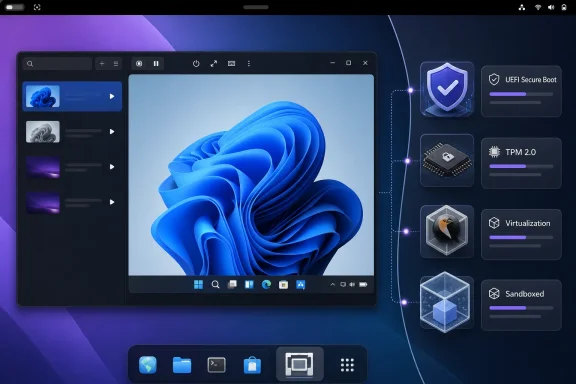
org.gnome.Boxes.Devel, after two years rebuilding the application around GTK4, Libadwaita, and the new Libmks display stack.The visible redesign is substantial, as It’s FOSS reported, but the consequential change is underneath it: Boxes will ship its own virtualization stack rather than adapt itself to whichever versions of libvirt, QEMU, firmware, and related components a distribution happens to provide. For casual users, that should mean more consistent VM creation. For Windows users in particular, it means a Windows 11 guest can receive the virtual TPM and Secure Boot configuration automatically rather than failing an installer hardware check.
Microsoft’s current Windows 11 documentation still calls for UEFI firmware capable of Secure Boot and TPM 2.0, including for supported virtual-machine configurations. That makes the new automatic setup a practical compatibility fix, not merely a convenience toggle.
But the beta is also a change in what GNOME Boxes is: a simple desktop VM frontend is becoming a self-contained Flatpak appliance with its own libvirt environment. That will make support easier for a lone upstream maintainer. It will also make Boxes less interchangeable with a host’s existing virtualization administration tools.
Windows 11 support arrives without the ritual
Borges says the rewrite configures UEFI, Secure Boot, and a virtual TPM device during Windows 11 setup. In the test described by It’s FOSS, Boxes selected RAM and storage values automatically and preferred UEFI boot without user intervention; the Windows 11 installer itself completed normally.
That closes an awkward gap in the old experience. Microsoft does not require every Windows 11 VM host to expose a physical TPM directly to the guest—virtual TPM 2.0 is the standard answer—but the virtualization frontend must actually create the device and the correct firmware configuration. Missing either one has commonly led users toward unsupported installer bypasses or XML edits.
The distinction is especially useful for people who keep a Windows VM around for one Windows-only line-of-business application, testing an installer, checking a browser regression, or accessing a peripheral utility. Those users generally do not want to learn the difference between an OVMF firmware image, a swtpm backend, and a libvirt domain definition merely to get through the first installation screen.
There is a limit to the claim, however. Successful installation is not the same thing as a validated Windows workstation deployment. Neither Borges’ announcement nor the It’s FOSS hands-on report establishes Windows guest performance, graphics acceleration, clipboard behavior, device redirection, Windows activation, BitLocker behavior, or reliability through Windows cumulative updates. The report also stopped at the Microsoft-account prompt during out-of-box setup, before reaching a usable desktop.
For home testing, that is still a material improvement. For IT staff who need repeatable Windows VM templates, snapshots, virtual networking, removable-media workflows, or guest-device pass-through, this beta remains a preview rather than a replacement for a managed Hyper-V, VMware, Proxmox, or libvirt/virt-manager workflow.
Flatpak-only makes the runtime predictable—and separate
The Flatpak-only decision is the engineering center of this rewrite. Boxes is not a standalone GUI that can casually consume any host package version; it sits atop QEMU, libvirt, firmware components, display plumbing, networking, storage, and guest integration. Borges has argued for years that distro-specific builds create a combinatorial support problem when the application depends on such a deep stack.
GNOME’s own Flatpak documentation describes the core trade-off: applications gain a stable, controlled runtime that runs across distributions, while components can be bundled when a runtime does not provide them. For an application that launches operating systems, that control has unusual value. An Ubuntu, Fedora, Arch, Debian, or immutable-desktop user can in principle be running the same Boxes release and the same virtualization components rather than debugging a downstream backport or a mismatched firmware package.
This is not an entirely new direction. Borges wrote in 2018 that the Flatpak build already ran its own libvirtd inside the sandbox rather than using the system service. The new beta takes that model from an available packaging option to the app’s declared foundation.
The cost is that Boxes’ virtual machines are not automatically part of the libvirt estate an administrator sees with host-native tools. In an earlier GNOME Discourse explanation, Borges said the Flatpak version bundles the virtualization stack within its container; a user can work inside that container, but cannot directly access its libvirt socket from outside it. That is acceptable for the project’s intended “virtualization made simple” audience. It is a serious boundary for anyone accustomed to managing guests centrally with virsh, virt-manager, Ansible, host-level storage pools, or custom networks.
The new Properties dialog exposes raw libvirt domain XML and execution logs, which is welcome. It gives advanced users a way to inspect the commands Boxes is issuing and alter a guest definition. But XML access does not erase the architectural boundary: the VM is still operated by the Flatpak-contained libvirt stack, not necessarily by the system libvirt installation an administrator already maintains.
This is the point the announcement does not resolve for existing users. Borges has not published a stable-release date, a migration plan for current Boxes installations, or a clear compatibility statement for VMs created by the distribution package versus the new development Flatpak. GNOME’s current Boxes documentation does describe backing up or moving VMs through exported configuration, but testing a migration on copies—not a production VM disk—should be the baseline assumption until upstream documents the transition.
Libmks is more than a fresh coat of paint
The rewritten application replaces the old GTK3-era SPICE widget with Libmks, short for “Mouse, Keyboard, and Screen to QEMU.” GNOME’s Libmks documentation labels the library version 1.0.alpha, and its API includes display, keyboard, mouse, clipboard, microphone, speaker, and session components. That indicates the new display layer is meant to own more of the guest interaction than simply rendering a remote framebuffer.
For Boxes, that unlocks a UI that fits current GNOME applications while moving away from a legacy display component that constrained the app’s design. The new window and sidebar-driven Properties dialog separate general configuration, resources, network, devices, snapshots, logs, and raw configuration. The existing stable documentation describes a much denser three-tab Preferences window covering Resources, Devices & Shares, and Snapshots.
The difference is useful beyond aesthetics. Logs and raw configuration become first-class destinations rather than advanced functions tucked into the old properties flow. The new Network page also begins to expose host-to-guest port forwarding through SSH and HTTP switches. That should help developers who need to reach a test web service or shell inside a guest without discovering its NAT address or changing firewall rules manually.
Still, the words early support matter. Port forwarding for SSH and HTTP is a narrow starting point, not a general virtual networking solution. It does not amount to bridged networking, arbitrary port maps, VLANs, multiple NICs, host-only lab networks, or the multi-VM topology an administrator might build for a domain-controller lab or clustered application test.
The beta introduces a VSOCK device for another reason: Flatpak sandboxing restricts the ordinary host-to-guest integration paths. Borges’ approach uses VSOCK, which is a host/guest socket transport, together with modern systemd support to allow SSH access into a guest running systemd version 256 or later. A July post by GNOME contributor Maximiliano Sandoval detailed the same underlying route: QEMU VSOCK and systemd-delivered SSH credentials can provide direct SSH access to a sandboxed Boxes guest.
That is clever and valuable for GNOME OS and modern Linux guest testing. It is not a feature Windows 11 guests will benefit from in the same way, because the announced requirement is systemd 256 or newer. Windows users should treat the Windows 11 setup improvement and the Linux SSH integration as separate capabilities.
Test it as a new VM platform, not an app update
The development build is available through GNOME Nightly under the separate application ID org.gnome.Boxes.Devel. The separate ID is important: it permits side-by-side testing rather than overwriting a stable Boxes installation, but it also signals that this is not a routine update channel.
It’s FOSS encountered two failures worth treating as beta evidence rather than isolated curiosities. Its Windows 11 guest crashed shortly after a snapshot was created, with ISO ejection identified as a possible contributing action. It also reported repeated “unsupported configuration” errors while attempting an EndeavourOS installation, regardless of selecting generic Linux or Arch Linux and switching between UEFI and legacy BIOS.
Those reports do not prove a general snapshot or Arch-family compatibility defect. They do establish that the beta has not reached the level where a user should point it at the only copy of an important VM and assume the glossy new interface reflects mature behavior. The project’s own earlier Flatpak work also documented feature gaps around bridged networking, physical-media installation, shared folders, and USB redirection; the current announcement does not say which of those boundaries are fully closed.
For Windows enthusiasts, the sensible first test is a disposable Windows 11 VM: verify that the installer recognizes its virtual TPM and Secure Boot setup, confirm that guest display and input work acceptably, and test a shutdown, restart, snapshot, and restore before importing personal data. For Linux developers, test VSOCK-backed SSH and the restricted port-forwarding implementation with a current systemd guest.
GNOME Boxes is finally addressing the installation barrier that made Windows 11 a poor fit for its otherwise approachable VM workflow. The larger migration—turning the app into a consistently shipped, Flatpak-contained virtualization product—will be judged by whether snapshots, networking, guest integration, and existing VM migration become as reliable as the new first-run experience.