
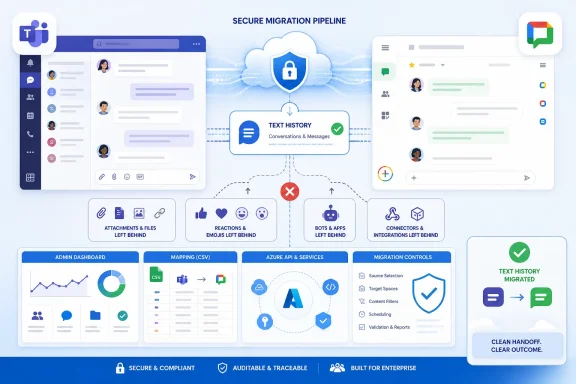
The important qualification is that this is a chat-history migration tool, not a complete Microsoft Teams preservation system. Google’s own documentation describes substantial feature gaps, including file attachments, code snippets, tables, bot messages, emoji reactions, Loop components, pasted images, stickers, and messages involving external users or former employees. For IT departments, the release is useful precisely because it makes a staged Teams-to-Google-Chat move easier—but it should not be treated as a turnkey records migration.
Google says the tool is available now to Business, Enterprise, Education, Frontline, Essentials, and Nonprofit Workspace editions. The company calls it available at “zero tool cost,” meaning no separate Google migration license or migration server is required. That does not make a Microsoft 365 exit cost-free: the destination Workspace users must be licensed, the tenant needs administrator preparation, and organizations still need to decide what happens to the Teams files and compliance records the tool does not bring across.
 What Google has actually made generally available
Google’s August announcement expands its enterprise Data import platform to Microsoft Teams chat data. A Workspace super administrator can run the transfer from the Google Admin console, selecting Teams and users through CSV files, mapping identities where the source and destination email addresses differ, then monitoring the job with status reports for discovered, skipped, failed, and successfully imported items.
The general-availability release is broader than Google’s earlier Teams migration work. In December 2024, Google opened a beta aimed at moving Microsoft Teams channel conversations into Google Chat spaces. The current offering explicitly includes channel messages, group chats, and direct conversations, while Google says its migration-planning utility can estimate migration timelines and organize users into batches intended to improve throughput.
Google offers two routes:
- The default import method uses Google’s shared API quota and supports up to 1,000 Teams in a single import.
- The advanced import method uses an organization’s own Microsoft API quota, requires an Azure application, supports up to 1,000 Teams per batch, and allows up to 10 batches to run at once.
The distinction is more than an implementation detail. An organization testing a limited move can use the default path with fewer moving parts. A large tenant seeking more control over concurrent imports and source-side API capacity will likely use advanced mode, which requires creating an Azure application and supplying its client ID, client secret, and tenant ID to Google.
In both cases, Google is copying—not moving or deleting—the source data. Teams remains intact during the process, which gives administrators a rollback option at the service-transition level even though Google Chat will not mirror every Teams object or behavior.
“High fidelity” has clear limits in Google Chat
Chrome Unboxed characterized the release as a high-fidelity way to move a company’s full communication history. Google’s documentation paints a narrower and more useful picture: it preserves a meaningful share of the text conversation, but it translates Teams content into Google Chat’s different data model and leaves important classes of collaboration content behind.
A Teams channel becomes a Google Chat space. The resulting space name combines the Teams channel name and team name. If a Team had multiple owners or channel managers, only one becomes the Google Chat space manager; the others become regular members. All imported channel types arrive as restricted spaces, even if their original Teams configuration differed, and an administrator must revisit access settings after the import.
Private conversations also do not retain their original Chat presentation. One-to-one, group, and meeting chats are imported as group chats shared among participants. Google’s own advanced-import documentation says that one-to-one conversations do not land in a user’s ordinary direct-message history. Instead, they appear as group-space-style records, identified with names such as “Direct Chat” followed by the participants.
That will matter to users who expect familiar Teams-style chat navigation on their first day in Google Chat. The conversation text can be available, but the workflow and visual organization change. Administrators should set that expectation before rollout rather than presenting the import as an invisible back-end transfer.
Basic message content fares reasonably well: plain text, bold, italics, strikethrough, quoted text, paragraph spacing, hyperlinks, standard emoji, and SharePoint links are supported. GIFs are preserved only as links to their source. Mentions become plain text, and ordered lists become unordered lists.
The exclusions are where a Teams deployment can lose much of its working context. Google does not import:
- File attachments from OneDrive, SharePoint, or user devices.
- Tables, which appear as
Missing_Table, and code snippets, which appear asMissing_Code_Snippet. - Bot messages, cards, approvals, Streams, Praise, custom emoji, emoji reactions, Loop components, and pasted images or stickers.
- Chats involving users outside the organization or former employees.
- Replies beyond the first 500 messages in an individual thread.
For many Windows-centric businesses, the attachment limitation is the operational issue. Teams discussions frequently serve as the index to SharePoint documents, Excel workbooks, PowerPoint decks, logs, installers, and support bundles. A migrated Chat space may preserve a SharePoint link’s text, but it does not carry the attachment itself into Google Drive. The Teams chat import should therefore be planned alongside Google’s separate OneDrive and SharePoint migration work, or a deliberate retention plan for Microsoft 365 content.
The migration sequence creates a real cutover point
Google’s service includes delta imports, allowing administrators to copy newly added or updated Teams content after an initial migration. That is the feature that makes a phased cutover possible: import historical data, continue operating in Teams during a transition window, run a delta import, then expose the imported spaces to Workspace users.
But the order is strict. Once an administrator selects Roll out spaces, users can access the imported content in Google Chat, and Google will no longer allow another delta import for that data set. Admins should not roll out spaces until they have completed their final synchronization and reviewed import reports.
Google warns that imports can also create duplicate spaces when the same source data is processed through separate imports after an earlier rollout. It advises against starting a new import for the same data set, and its documentation directs administrators to keep the original batch active if they need delta synchronization. This is the sort of detail that a migration tool’s “available now” announcement does not convey, but it can determine whether users find a coherent chat archive or multiple near-identical spaces.
There is also a 90-day clock. After an import starts, administrators must complete the process and roll out the imported spaces within 90 days or Google deletes the imported spaces. That makes it unsuitable for a casual, open-ended archival project. It is designed for a managed transition with a planned discovery phase, defined batch schedule, validation period, and cutover date.
Compliance teams should keep Teams as the record until retention is settled
Google explicitly says Data import is a productivity feature and is not designed for legal compliance. Its guidance tells customers that they are responsible for assessing their own compliance requirements and suggests backing up Teams files and folders before importing when legal preservation is required.
That warning deserves to be read broadly. The limitation is not confined to files. A collaboration record may include deleted material, eDiscovery holds, retention policies, external participants, application-generated messages, and files whose business meaning depends on the surrounding Teams conversation. Google Chat’s imported spaces are useful working references, but Google is not presenting them as a legally equivalent reconstruction of the Microsoft 365 tenant.
Microsoft administrators should consequently preserve Microsoft Purview retention, eDiscovery, and backup arrangements until counsel and records-management owners approve a replacement strategy. Migrating a conversation into Google Chat does not establish that the migrated copy has the same evidentiary completeness, governance configuration, or retention behavior as its Teams source.
The necessary administrative checklist is straightforward, even if the change-management work is not:
- Inventory Teams channels, private chats, external collaboration, apps, bots, files, and long-running threads before choosing an import scope.
- Decide whether the default shared-quota route is sufficient or whether advanced mode and its Azure application are required.
- Test identity mapping, data fidelity, permissions, naming, and imported-space access with a pilot batch.
- Run a final delta import before rolling out Google Chat spaces to users.
- Retain the Teams tenant and its compliance controls until attachments, files, and legal-record obligations have been independently addressed.
Google has made the conversation portion of a Teams migration materially less difficult and less expensive. It has not eliminated the hard parts of leaving Microsoft 365: moving files, replacing Teams-integrated applications, retraining users, validating permissions, and preserving records remain separate projects.