
Google’s July 2026 Google System Updates are not a single Android firmware release, but they may still affect the day-to-day experience on phones, tablets, Wear OS watches, Google TV devices, Android Auto systems, and Chrome OS hardware. The month’s changes range from more practical Pixel Watch express-pay setup and lock-screen IMEI access to deeper platform work around passkeys, WebView caching, AI-image labeling, Play Store discovery, and developer-facing APIs. The important caveat is familiar: a feature listed in Google’s release notes can begin reaching devices now yet take weeks or even months to become visible to every eligible user. Google’s July 2026 release notes confirm that this month’s rollout spans Google Play services, the Play Store, Android WebView, Android AICore, Android System Intelligence, and Private Compute Services.
For Android users—especially those who also use Windows PCs—the bigger story is Google’s continued effort to make its services feel less tied to the annual Android version upgrade. Passwords, payment tools, app discovery, web content, account recovery, and device administration are increasingly handled through separately updated Google components. That modular approach can deliver useful improvements faster, but it also makes the Android update picture more fragmented and sometimes more difficult to audit.
The term Google System Updates covers more than the monthly Google Play system update package that appears in Android settings. Google groups together updates to key Android operating-system components, Google Play services, and the Google Play Store, with coverage extending across certified Android phones, tablets, Wear OS, Android TV and Google TV, Android Auto, and Chrome OS devices. Google’s support documentation describes these updates as a way to deliver security, reliability, and feature improvements outside the conventional device-maker firmware schedule.
That distinction matters. A Samsung Galaxy, Motorola phone, or Pixel may be on different Android firmware builds and receive security patches on different dates, while still obtaining certain system-level capabilities through the same Play services or Play Store release. It is one reason a new Android feature can arrive without an Android 17—or later—OS upgrade.
July’s release notes identify several versioned components:
The change is nevertheless meaningful. Payments from a watch are most useful when the watch can operate as a self-contained device rather than a remote screen for a paired phone. Requiring users to go back to the phone during setup adds friction at exactly the point where a wearable should demonstrate its independence.
For Windows users who rely on a phone-and-PC workflow, this is another small step toward the broader “device continuity” model already familiar from Microsoft Wallet-era payment ambitions, Windows Hello, and passkey synchronization. The watch itself is becoming a more capable endpoint for identity and payment functions, rather than merely an accessory.
That is the kind of regional change that can look insignificant from the United States while being highly relevant in markets where Pix is a routine part of person-to-person and merchant payments. It also demonstrates how Google Play services can tailor wallet and payment behaviors by region without waiting for a broader operating-system update.
The potential downside is that menu terminology changes can make support instructions, screenshots, and enterprise documentation temporarily harder to follow. Google frequently adjusts labels in account and privacy settings, and a more stable information architecture would reduce that support burden.
Credential Manager is Google’s recommended Android framework for modern sign-in, bringing together passwords, passkeys, federated sign-in methods such as Sign in with Google, and some digital credential workflows. Android’s Credential Manager documentation explains that the framework is intended to replace several legacy Android authentication APIs and local FIDO2 credential approaches.
Using a nearby phone for passkey authentication is a more natural solution. It lets the phone provide the biometric or PIN-based verification while the television remains the destination device. Google’s own passkey documentation says passkeys use public-key cryptography and are designed to resist phishing, while enabling sign-in with a device’s local unlock method rather than a typed password. Android Developers also notes that passkeys are compatible across operating systems including Android, Microsoft Windows, macOS, and iOS.
That cross-platform compatibility is a particularly important point for WindowsForum readers. A user’s passkey strategy should not be limited to a single phone platform. Google’s move toward Credential Manager on more Android form factors reinforces a direction already visible across Windows, browsers, and mobile devices: authentication increasingly depends on securely synchronized credentials and local device verification rather than passwords stored in a spreadsheet, browser vault, or memory.
Google’s developer guidance also makes clear that seamless cross-device credential use relies on correct app-and-website associations, including Digital Asset Links for passkeys. Android Developers In practice, consumers may see uneven support for some time: an app might recognize a saved password but not a passkey, or support phone-assisted authentication only in selected builds.
Still, the TV support is a significant quality-of-life development. It reduces one of the worst password-entry scenarios while giving developers a standard path rather than a collection of service-specific QR code or device-code workarounds.
Google says WebView v151 includes the HTTP Cache Quota API, a migration of visited-link infrastructure to a partitioned-aware system with no intended behavior change, security and privacy improvements, bug fixes, and new developer features. Google’s release notes
For users, that may translate into more predictable performance in apps that make extensive use of embedded web content—think sign-in flows, store pages, account portals, support pages, and hybrid applications. For developers, it creates an opportunity to tune disk use and offline responsiveness.
But there is a legitimate trade-off. Google warns that reducing a cache quota can trigger background eviction work, which can affect performance, and that developers should only configure profiles they own. Android Developers Poorly chosen cache policies could make embedded pages slower or increase unnecessary network traffic. The API is a useful control, not an automatic guarantee of better battery life or speed.
Web privacy has repeatedly shown that small pieces of stored browser state can become tracking signals when they are exposed or shared too broadly. Google does not provide implementation detail in this release-note entry, so it would be premature to assign a specific privacy gain to this one migration. What can be said is that moving toward partition-aware infrastructure fits the wider industry direction of limiting unnecessary cross-context data exposure.
For Windows users, the lesson is familiar from modern browser privacy work in Microsoft Edge, Chrome, and Firefox: web content embedded in applications deserves the same security and privacy attention as web content opened in a full browser.
Natural-language queries could make Play Store search easier for people who do not know the name of the exact app they need. Searching for “a scanner that saves PDFs to OneDrive,” for example, should be more approachable than trying to guess an app category or publisher.
The concern is predictability. Traditional app-store search already struggles with advertising, keyword stuffing, and algorithmic ranking. A more conversational interface can be useful, but Google will need to ensure that it does not become another opaque layer separating users from a clear understanding of why an app was recommended.
The widget-install option is more straightforward. Users who install an app specifically for a glanceable home-screen tool—weather, calendar, notes, battery status, or smart-home controls—can skip an extra setup step. The feature should be especially welcome on large phones and foldables, where home-screen layouts often support more persistent information.
The Windows parallel is obvious. Microsoft has spent years adjusting app layouts for touchscreens, tablets, desktop windows, ultrawide monitors, and two-in-one hardware. Android’s large-screen ecosystem faces a similar challenge. The operating system can support tablets and foldables, but the experience lives or dies by whether major first-party surfaces use the available space effectively.
Google’s Play Store is among the most visible places to demonstrate that commitment. Higher density can improve browsing speed, though it must be balanced against readability, touch-target sizing, and accessibility.
That caveat is essential. An AI label is helpful only if users understand what it signifies and what it does not signify. The presence of a label can improve disclosure, but the absence of one should not be treated as proof that an image is authentic, manually created, or unaltered.
This is one of the risks of provenance signals across any platform, including Windows applications and web services: a label can encourage better transparency, but incomplete coverage may create a false binary between “identified AI” and “definitely real.” Google’s wording appropriately recognizes the technical and historical limitations.
The travel-resumption capability has the strongest practical case. Returning to an interrupted hotel, flight, or itinerary search can save time, particularly when a user moves between apps or devices.
However, the broader trend is clear: Google Play is becoming more like a personalized content hub. That can be convenient, but it also means an app marketplace is gathering more contextual signals around interests, entertainment, and intent. Users should retain clear controls over recommendations and linked-app relationships, especially as the renamed Linked apps menu becomes the central place for managing cross-service connections.
The practical benefit is obvious. A user who cannot unlock a phone because it is damaged, reset, or locked out may still need the IMEI to report the handset stolen or work with a carrier. Making the number more accessible can shorten that process.
Yet the decision deserves scrutiny. Device identifiers are sensitive data. Although an IMEI alone is not a magic key that unlocks a phone, exposing a stable identifier on the lock screen can create privacy and social-engineering concerns. Google’s release notes do not state whether the display is enabled by default, limited to certain devices, or configurable by the owner. Users should check their own lock-screen settings after the feature arrives and decide whether the recovery convenience outweighs the disclosure risk.
This is not a consumer feature announcement in the conventional sense, but it is relevant to how AI behaves on-device. Streaming-output safety filters matter because they attempt to address problems as model-generated content is delivered incrementally rather than as a single completed response. Model-management improvements can also influence download reliability, storage behavior, and the ability to update local AI components.
The problem is transparency. “Safety filtering” and “additional diagnostics” are broad labels. They do not tell users which experiences change, what data is collected for diagnostics, or how much AI processing occurs locally versus through a remote service. The presence of Private Compute Services indicates Google is continuing to maintain privacy-oriented infrastructure, but a maintenance note alone is not enough for a full audit of data practices.
For a platform increasingly built around AI features, Google should offer more readable technical summaries when a component affects model behavior, telemetry, safety classification, or device storage. The current notes are useful as a signal that something changed; they are not sufficient as a detailed accountability record.
Google says it has added an API to improve work-profile setup reliability, and users can now transfer a work-profile account to their watch. Google’s release notes This could reduce friction for employees who need work notifications, authentication, or enterprise services available on Wear OS.
At the same time, support for audio permission in WebViews arrives in Play services v26.28. Google’s release notes This may help web-based experiences embedded within Android apps, including communication or media workflows, behave more consistently. But permissions embedded in WebView flows deserve careful design: users should be able to tell whether they are granting microphone access to the host app, a website, or a combination of both.
Google also notes new support for device manufacturers to launch storage-management and subscription flows. Google’s release notes That could produce a smoother experience when a device is low on storage or a user needs to manage a service plan, but it is also fertile ground for dark patterns if manufacturers use system surfaces primarily to upsell cloud storage or subscriptions.
The best implementation will be one that prioritizes transparent storage breakdowns, clear cancellation routes, and no misleading pressure to buy a subscription when local cleanup is sufficient.
Users should also distinguish between three separate update channels:
The more cautious reading concerns transparency and control. AI safety and diagnostics changes are lightly documented; lock-screen IMEI visibility requires thoughtful privacy settings; and the Play Store’s increasingly personalized content model makes linked-app permissions and recommendation controls more important. Google’s modular update system remains a major advantage for getting features and fixes onto certified Android devices faster, but its complexity also demands clearer explanations about what has changed, who receives it, and what data or settings may be affected.
July’s release is therefore not a headline-grabbing Android overhaul. It is something more characteristic of modern mobile platforms: a steady layer of changes that quietly shapes how Android devices authenticate, pay, browse, discover content, and connect to the wider ecosystem.
For Android users—especially those who also use Windows PCs—the bigger story is Google’s continued effort to make its services feel less tied to the annual Android version upgrade. Passwords, payment tools, app discovery, web content, account recovery, and device administration are increasingly handled through separately updated Google components. That modular approach can deliver useful improvements faster, but it also makes the Android update picture more fragmented and sometimes more difficult to audit.
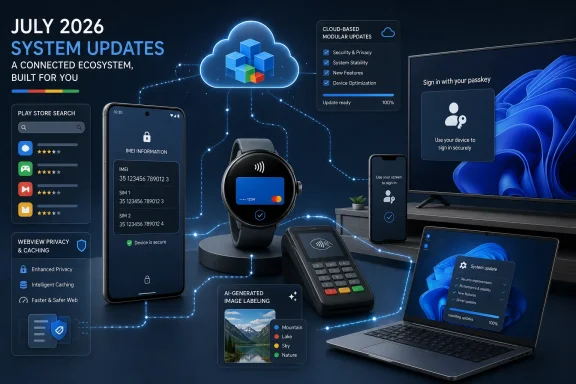 Overview: What Google System Updates Actually Change
The term Google System Updates covers more than the monthly Google Play system update package that appears in Android settings. Google groups together updates to key Android operating-system components, Google Play services, and the Google Play Store, with coverage extending across certified Android phones, tablets, Wear OS, Android TV and Google TV, Android Auto, and Chrome OS devices. Google’s support documentation describes these updates as a way to deliver security, reliability, and feature improvements outside the conventional device-maker firmware schedule.That distinction matters. A Samsung Galaxy, Motorola phone, or Pixel may be on different Android firmware builds and receive security patches on different dates, while still obtaining certain system-level capabilities through the same Play services or Play Store release. It is one reason a new Android feature can arrive without an Android 17—or later—OS upgrade.
July’s release notes identify several versioned components:
- Google Play services v26.26, released July 6
- Google Play Store v52.3, released July 13
- Android WebView v151, released July 15
- Google Play services v26.28 and Play Store v52.4, released July 20
- Google Play services v26.29 and Play Store v52.5, released July 27
- Android System Intelligence v76
- Private Compute Services B.27 / C.5
- Updates to Android AICore for phone and PC-class device categories Google’s July 2026 release notes
Wallet, Payments, and the Pixel Watch Get the Most Visible Changes
Express pay setup moves onto Pixel Watch
The clearest consumer-facing Wear OS feature in the July 27 Google Play services v26.29 update is the ability for Pixel Watch owners to set up express pay directly on the watch. Google also says onboarding should be smoother for new watch users. Google’s release notes do not specify regional availability, compatible issuers, or precisely which cards and transit systems qualify, so those limitations will still depend on the market and participating payment provider.The change is nevertheless meaningful. Payments from a watch are most useful when the watch can operate as a self-contained device rather than a remote screen for a paired phone. Requiring users to go back to the phone during setup adds friction at exactly the point where a wearable should demonstrate its independence.
For Windows users who rely on a phone-and-PC workflow, this is another small step toward the broader “device continuity” model already familiar from Microsoft Wallet-era payment ambitions, Windows Hello, and passkey synchronization. The watch itself is becoming a more capable endpoint for identity and payment functions, rather than merely an accessory.
Pix and Gboard integration
Google’s July 27 notes also say that Pix users can use Gboard within communication applications. Google’s release notes The wording is narrow and does not spell out the app list, country constraints, or exact interaction model, but the feature appears to connect Brazil’s instant-payment system more closely with messaging workflows.That is the kind of regional change that can look insignificant from the United States while being highly relevant in markets where Pix is a routine part of person-to-person and merchant payments. It also demonstrates how Google Play services can tailor wallet and payment behaviors by region without waiting for a broader operating-system update.
“Connected apps” becomes “Linked apps”
Across Auto, PC, phone, TV, and Wear categories, Google is renaming the “Connected apps” menu item to “Linked apps.” Google’s release notes This is a minor interface change, but it is directionally useful: “linked” better conveys an account relationship, while “connected” could imply active device connectivity.The potential downside is that menu terminology changes can make support instructions, screenshots, and enterprise documentation temporarily harder to follow. Google frequently adjusts labels in account and privacy settings, and a more stable information architecture would reduce that support burden.
Passkeys Reach Another Screen: Android TV Credential Manager Support
One of July’s most strategically important changes is not aimed at phone users at all. Google Play services v26.28 adds Android TV support for Credential Manager, including saved passwords and passkeys, with an option to use a phone for passkey authentication. Google’s release notesCredential Manager is Google’s recommended Android framework for modern sign-in, bringing together passwords, passkeys, federated sign-in methods such as Sign in with Google, and some digital credential workflows. Android’s Credential Manager documentation explains that the framework is intended to replace several legacy Android authentication APIs and local FIDO2 credential approaches.
Why TV passkeys matter
Typing a password using a TV remote has always been among the least pleasant computing experiences. A password manager can improve the situation, but it still leaves a larger issue: TVs are shared, living-room devices that rarely lend themselves to conventional username-and-password entry.Using a nearby phone for passkey authentication is a more natural solution. It lets the phone provide the biometric or PIN-based verification while the television remains the destination device. Google’s own passkey documentation says passkeys use public-key cryptography and are designed to resist phishing, while enabling sign-in with a device’s local unlock method rather than a typed password. Android Developers also notes that passkeys are compatible across operating systems including Android, Microsoft Windows, macOS, and iOS.
That cross-platform compatibility is a particularly important point for WindowsForum readers. A user’s passkey strategy should not be limited to a single phone platform. Google’s move toward Credential Manager on more Android form factors reinforces a direction already visible across Windows, browsers, and mobile devices: authentication increasingly depends on securely synchronized credentials and local device verification rather than passwords stored in a spreadsheet, browser vault, or memory.
The implementation risk remains
The rollout does not automatically mean every streaming service or TV app will support passkeys tomorrow. Developers must integrate Credential Manager properly, and services need an account system that supports passkey registration and sign-in. The underlying release is a platform enabler, not a universal app switch.Google’s developer guidance also makes clear that seamless cross-device credential use relies on correct app-and-website associations, including Digital Asset Links for passkeys. Android Developers In practice, consumers may see uneven support for some time: an app might recognize a saved password but not a passkey, or support phone-assisted authentication only in selected builds.
Still, the TV support is a significant quality-of-life development. It reduces one of the worst password-entry scenarios while giving developers a standard path rather than a collection of service-specific QR code or device-code workarounds.
Android WebView v151: Cache Controls and Privacy Plumbing
Android WebView v151, released July 15, is one of the technically denser July updates. WebView is the component that lets Android apps display web content inside an app, rather than forcing every link or embedded sign-in page to open in a separate browser.Google says WebView v151 includes the HTTP Cache Quota API, a migration of visited-link infrastructure to a partitioned-aware system with no intended behavior change, security and privacy improvements, bug fixes, and new developer features. Google’s release notes
More control over embedded web cache storage
The new HTTP Cache API gives developers more deliberate control over the cache space used by a WebView profile. The official API reference shows that an app can inspect the active cache quota, use WebView’s automatic quota setting, or specify a cache quota in bytes. Android DevelopersFor users, that may translate into more predictable performance in apps that make extensive use of embedded web content—think sign-in flows, store pages, account portals, support pages, and hybrid applications. For developers, it creates an opportunity to tune disk use and offline responsiveness.
But there is a legitimate trade-off. Google warns that reducing a cache quota can trigger background eviction work, which can affect performance, and that developers should only configure profiles they own. Android Developers Poorly chosen cache policies could make embedded pages slower or increase unnecessary network traffic. The API is a useful control, not an automatic guarantee of better battery life or speed.
Partitioned-aware visited links are a quiet privacy improvement
The visited-link infrastructure migration is described as having “no behavioral change,” which suggests that ordinary users should not see a visible difference. But privacy-oriented partitioning work matters precisely because it can alter how information is isolated behind the scenes.Web privacy has repeatedly shown that small pieces of stored browser state can become tracking signals when they are exposed or shared too broadly. Google does not provide implementation detail in this release-note entry, so it would be premature to assign a specific privacy gain to this one migration. What can be said is that moving toward partition-aware infrastructure fits the wider industry direction of limiting unnecessary cross-context data exposure.
For Windows users, the lesson is familiar from modern browser privacy work in Microsoft Edge, Chrome, and Firefox: web content embedded in applications deserves the same security and privacy attention as web content opened in a full browser.
Play Store Changes: Search, Widgets, Comics, and Larger Screens
Google delivered three separate Play Store releases during July, and the changes are a mixture of genuine usability improvements and a continued push to make the store a content-discovery surface rather than only an app catalogue.Search grows more conversational
The July 20 Google Play Store v52.4 update adds support for natural-language queries, expands search suggestions and the input field to two lines, and adds the option to place an app’s widget on the home screen during installation. Google’s release notesNatural-language queries could make Play Store search easier for people who do not know the name of the exact app they need. Searching for “a scanner that saves PDFs to OneDrive,” for example, should be more approachable than trying to guess an app category or publisher.
The concern is predictability. Traditional app-store search already struggles with advertising, keyword stuffing, and algorithmic ranking. A more conversational interface can be useful, but Google will need to ensure that it does not become another opaque layer separating users from a clear understanding of why an app was recommended.
The widget-install option is more straightforward. Users who install an app specifically for a glanceable home-screen tool—weather, calendar, notes, battery status, or smart-home controls—can skip an extra setup step. The feature should be especially welcome on large phones and foldables, where home-screen layouts often support more persistent information.
Better layout density on large screens
With Play Store v52.3, Google says it has improved the content layout and increased content density on large screens. Google’s release notes This is a sensible response to an old Android tablet problem: an interface designed around phone dimensions can feel comically sparse on a larger display.The Windows parallel is obvious. Microsoft has spent years adjusting app layouts for touchscreens, tablets, desktop windows, ultrawide monitors, and two-in-one hardware. Android’s large-screen ecosystem faces a similar challenge. The operating system can support tablets and foldables, but the experience lives or dies by whether major first-party surfaces use the available space effectively.
Google’s Play Store is among the most visible places to demonstrate that commitment. Higher density can improve browsing speed, though it must be balanced against readability, touch-target sizing, and accessibility.
AI-generated image labels in the European Union
The same Play Store version adds an AI label for AI-generated images in the EU, though Google cautions that certain formats and older images may not support the tag. Google’s release notesThat caveat is essential. An AI label is helpful only if users understand what it signifies and what it does not signify. The presence of a label can improve disclosure, but the absence of one should not be treated as proof that an image is authentic, manually created, or unaltered.
This is one of the risks of provenance signals across any platform, including Windows applications and web services: a label can encourage better transparency, but incomplete coverage may create a false binary between “identified AI” and “definitely real.” Google’s wording appropriately recognizes the technical and historical limitations.
Comics, Play Shorts, and resumed travel searches
The July 27 Play Store v52.5 update introduces popular comic-book previews in the Play Shorts feed and allows users to resume travel searches from integrated third-party travel apps through updates to Engage SDK content clusters. It also promises improved stability and experience for the Play Games Sidekick Dashboard. Google’s release notesThe travel-resumption capability has the strongest practical case. Returning to an interrupted hotel, flight, or itinerary search can save time, particularly when a user moves between apps or devices.
However, the broader trend is clear: Google Play is becoming more like a personalized content hub. That can be convenient, but it also means an app marketplace is gathering more contextual signals around interests, entertainment, and intent. Users should retain clear controls over recommendations and linked-app relationships, especially as the renamed Linked apps menu becomes the central place for managing cross-service connections.
IMEI on the Lock Screen: Useful in Emergencies, Sensitive by Nature
Google Play services v26.28 adds the ability to find a device’s IMEI on the lock screen. Google’s release notes The IMEI is a unique mobile-equipment identifier commonly used by carriers and support teams when diagnosing, blocking, or tracking a device after loss or theft.The practical benefit is obvious. A user who cannot unlock a phone because it is damaged, reset, or locked out may still need the IMEI to report the handset stolen or work with a carrier. Making the number more accessible can shorten that process.
Yet the decision deserves scrutiny. Device identifiers are sensitive data. Although an IMEI alone is not a magic key that unlocks a phone, exposing a stable identifier on the lock screen can create privacy and social-engineering concerns. Google’s release notes do not state whether the display is enabled by default, limited to certain devices, or configurable by the owner. Users should check their own lock-screen settings after the feature arrives and decide whether the recovery convenience outweighs the disclosure risk.
AICore, System Intelligence, and the Less Visible AI Layer
July’s Android AICore update includes changes to safety filtering for streaming-output features, improvements to model download and management, and new diagnostics for multimodal inference and API latency. Google’s release notes Meanwhile, Android System Intelligence v76 receives bug fixes and maintenance changes, and Private Compute Services B.27 / C.5 receives maintenance updates. Google’s release notesThis is not a consumer feature announcement in the conventional sense, but it is relevant to how AI behaves on-device. Streaming-output safety filters matter because they attempt to address problems as model-generated content is delivered incrementally rather than as a single completed response. Model-management improvements can also influence download reliability, storage behavior, and the ability to update local AI components.
The problem is transparency. “Safety filtering” and “additional diagnostics” are broad labels. They do not tell users which experiences change, what data is collected for diagnostics, or how much AI processing occurs locally versus through a remote service. The presence of Private Compute Services indicates Google is continuing to maintain privacy-oriented infrastructure, but a maintenance note alone is not enough for a full audit of data practices.
For a platform increasingly built around AI features, Google should offer more readable technical summaries when a component affects model behavior, telemetry, safety classification, or device storage. The current notes are useful as a signal that something changed; they are not sufficient as a detailed accountability record.
Work Profiles, WebView Permissions, and Device Administration
The July 6 and July 20 Play services updates include several enterprise-adjacent and developer-facing changes that will matter to managed-device users.Google says it has added an API to improve work-profile setup reliability, and users can now transfer a work-profile account to their watch. Google’s release notes This could reduce friction for employees who need work notifications, authentication, or enterprise services available on Wear OS.
At the same time, support for audio permission in WebViews arrives in Play services v26.28. Google’s release notes This may help web-based experiences embedded within Android apps, including communication or media workflows, behave more consistently. But permissions embedded in WebView flows deserve careful design: users should be able to tell whether they are granting microphone access to the host app, a website, or a combination of both.
Google also notes new support for device manufacturers to launch storage-management and subscription flows. Google’s release notes That could produce a smoother experience when a device is low on storage or a user needs to manage a service plan, but it is also fertile ground for dark patterns if manufacturers use system surfaces primarily to upsell cloud storage or subscriptions.
The best implementation will be one that prioritizes transparent storage breakdowns, clear cancellation routes, and no misleading pressure to buy a subscription when local cleanup is sufficient.
How to Check for July’s Google System Updates
Google says Google system services update automatically by default, but users can manually check for available updates. On current Android builds, the general route is:- Open Settings.
- Tap the profile image or account area.
- Select All services.
- Open Privacy & security.
- Choose System services.
- Review items under Available updates and tap Update where offered. Google’s Android Help instructions
Users should also distinguish between three separate update channels:
- Google Play services updates, which quietly refresh core service components.
- Google Play Store updates, which alter the store and related discovery or installation features.
- Android system and security updates, which are delivered through the phone maker and carrier support model.
The Bottom Line
Android’s July 2026 Google System Updates are strongest where they reduce routine friction: setting up payment features on a Pixel Watch, offering passkey support on Android TV, making widgets easier to add at install time, improving large-screen Play Store layouts, and making a lost phone’s IMEI easier to retrieve. The expansion of Credential Manager to TV screens is particularly promising because it addresses a stubborn usability problem while moving Android further toward phishing-resistant authentication that can coexist with Windows and other platforms.The more cautious reading concerns transparency and control. AI safety and diagnostics changes are lightly documented; lock-screen IMEI visibility requires thoughtful privacy settings; and the Play Store’s increasingly personalized content model makes linked-app permissions and recommendation controls more important. Google’s modular update system remains a major advantage for getting features and fixes onto certified Android devices faster, but its complexity also demands clearer explanations about what has changed, who receives it, and what data or settings may be affected.
July’s release is therefore not a headline-grabbing Android overhaul. It is something more characteristic of modern mobile platforms: a steady layer of changes that quietly shapes how Android devices authenticate, pay, browse, discover content, and connect to the wider ecosystem.
References
- Primary source: 9to5Google
Published: 2026-07-27T22:20:00+00:00
What’s new in Android's July 2026 Google System Updates [U]
The monthly “Google System Release Notes” primarily detail what’s new in Play services, Play Store, and Play system update across...9to5google.com - Related coverage: support.google.com