

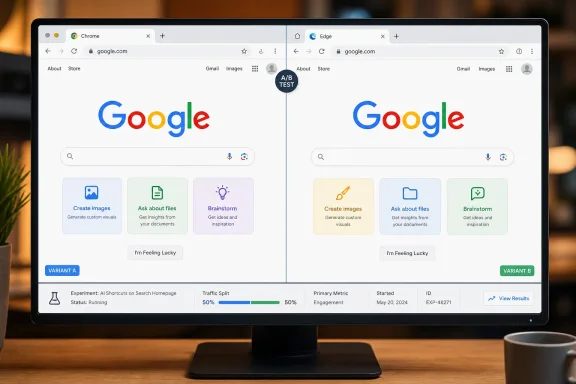
Search Engine Watch first documented the change on August 10 after seeing it in stable Chrome without a Google account, then reproducing it in Microsoft Edge and Perplexity’s Comet browser. Android Authority independently confirmed that the test is real enough to be visible in screenshots and reporting, but could not trigger it after trying multiple browsers, account states, and VPN locations. That split is the most important fact: this is a server-side experiment with an unknown audience, not a Chrome update, Edge change, or a new setting that Windows users can enable.
Google has not announced the homepage test, its geographic scope, its eligibility rules, or whether it will ship more broadly. The company’s silence leaves a large distinction that coverage of the missing button can blur: Google is not removing the ability to perform ordinary searches. It is changing the visual invitation on the one page where a user decides what Google is for before they type anything.
The Search button is gone, but the search box still submits queries
The tested page still accepts a normal query in the search field. Pressing Enter or Return should continue to submit it in the ordinary way, as Android Authority noted after examining the redesign. “I’m Feeling Lucky” also survives beside the new AI shortcuts, which means the test removes only one of the two legacy buttons beneath the field.
That may sound cosmetic, but it is a consequential piece of interface design. A button labeled “Google Search” states the product’s primary purpose in plain language. Three buttons labeled Create images, Ask about files, and Brainstorm say something else: this is a place to generate, analyze, and converse.
For users arriving at Google through a browser’s address bar, that distinction will often pass unnoticed. Edge, Chrome, Firefox, and most other browsers already send a typed query directly to a results page; many people rarely visit Google’s stripped-down homepage at all. But the homepage still matters for people who explicitly open google.com, for enterprise kiosks and shared PCs, and for anyone deciding whether to start with a keyword search or an AI task.
The test also carries a small practical implication for old habits and lightweight automation. Keyboard submission remains the durable way to run a web search. Scripts, accessibility tools, browser add-ons, or documentation that expects to click a visible “Google Search” button should not assume that control will remain present if Google expands the experiment. There is no evidence that the search endpoint or search behavior has changed; the visible control is the part under test.
Three AI shortcuts turn the homepage into a task launcher
Search Engine Watch reports that the three replacement buttons do not all behave alike. Ask about files opens an upload path inside the search experience, allowing the visitor to attach a file and ask questions about it. Brainstorm starts a Gemini-powered conversational prompt. Both reportedly work without signing into a Google account, as does the AI Mode entry point inside the search box.
Create images is the exception. In the observed test, selecting it sends the user to a Google sign-in requirement. Search Engine Watch saw that difference directly, and The Next Web separately reported the same behavior. Google has not explained why image creation is account-gated while file questions and brainstorming can be used in a signed-out session.
It would be easy to conclude that image generation is being restricted because it is more expensive, but the available reporting does not establish that. There are other plausible explanations: age controls, abuse prevention, rate limits, provenance requirements, regional availability, or a desire to connect generated media to an account history. Google’s own help documentation says AI Mode image creation has country, language, and age availability limits, which makes an account requirement more than a simple cost question.
What is clear is the product strategy behind the placement. Google announced in May that its “intelligent” Search box would accept text, images, files, video, and Chrome tabs, and said it would still return conventional Search results. The signed-out homepage test puts three concrete examples of those non-keyword actions directly below the box. It is an onboarding layer for capabilities Google has already been rolling out, rather than evidence of a new underlying search engine.
Google has also been steadily putting image generation closer to Search. In July, it said that Nano Banana-powered image creation would come to AI Overviews in supported regions. The Create images button seen in this test therefore fits an existing direction of travel, even if its unsigned-user placement has not been officially acknowledged.
The signed-out-only behavior is the real anomaly
The test’s most revealing detail is not that Google removed a button. It is that the AI shortcut row reportedly disappears when the same visitor signs in, then comes back after signing out.
Search Engine Watch observed precisely that behavior. Android Authority could not reproduce the new screen at all, including when changing browsers, VPN country, and sign-in state. Together, those reports support the narrower conclusion: Google is varying the page at the server level, and account state is at least one eligibility signal. They do not establish how many users are included, which countries are involved, or whether a person’s browser profile, cookies, language, IP address, prior use of AI Mode, or experiment assignment controls the outcome.
That targeting makes the test more interesting than a general visual refresh. Signed-out visitors are the audience Google knows least about and the audience most likely to treat its homepage as a blank starting point. A prompt to “Search” requires no explanation. A row offering help with a file, an image, or a brainstorming session demonstrates a different model of use before someone has committed to a query.
Yet Google is withholding that presentation from people who are signed in, at least in the version Search Engine Watch saw. That suggests the company may be measuring whether an AI-first set of calls to action changes initial behavior among visitors without established Search histories, rather than trying to retrain every existing Google user at once.
It also punctures one broad claim circulating around the test: that Google has made its homepage AI-first for everyone. It has not. The reported layout is selective, transient, and unannounced. Google’s May rollout of the intelligent Search box is a separate, publicly described product change; this August homepage treatment appears to be an additional experiment layered on top.
Google is testing the wording of Search, not abandoning web results
Google’s official position since its May 2026 Search announcements has been that people will continue to receive a range of conventional Search results. The company described the new intelligent Search box as an expansion of inputs and assistance, not a replacement for web retrieval. The homepage test does not contradict that claim mechanically: type a query, press Enter, and Google still searches.
But it changes the hierarchy of the page. The standard search action becomes implicit, while AI tasks become named, clickable, and visually dominant. That is a meaningful shift even if the results page remains full of links.
For Microsoft Edge users, there is another practical lesson: seeing this layout in Edge does not mean Microsoft has integrated Google’s AI features into the browser. Search Engine Watch observed it in Edge because the page is served by Google, not because the browser provided a new capability. The same report saw it in Chrome and Comet. Administrators should treat it as a Google web-service experiment that can appear across browsers, not as a browser-version deployment to track through Windows servicing or enterprise update rings.
The test also should not be confused with AI Mode itself. AI Mode is Google’s conversational search experience, already available in supported markets and tied to Google’s broader Gemini rollout. The homepage’s AI Mode control remains inside the search box in the reported experiment. The new row adds shortcuts around it, aimed at steering a visitor toward a particular kind of prompt before they type.
For organizations that use Google Search as a simple public-facing utility, nothing requires immediate action. There is no announced policy change, no enterprise control associated with this homepage variant, and no documented way to opt into or out of it. The sensible response is to avoid changing browser policies around a layout that may never leave testing.
Google has made one thing unmistakable, though: it no longer sees the empty search field as sufficient product instruction. If this experiment expands, the Google homepage will increasingly tell users to upload, generate, and converse first — while ordinary web search remains available in the background, one Enter key away.