
For Windows users, this is not merely an Apple ecosystem curiosity. Granola has offered a Windows app since June 2025, and its Apple Watch expansion points to a broader strategy: capture a conversation on whichever device is least intrusive, then turn it into structured notes, summaries, decisions, and follow-up actions on the computer where the real work is completed. Granola’s product-update history confirms that the company’s platform has moved from desktop meeting notes to Windows, iOS, team collaboration, search, and AI-powered cross-meeting analysis.
The result is a noteworthy new category of cross-device AI meeting assistant. The Apple Watch is not replacing a Windows workstation or a laptop; it is becoming the front door to a meeting record that can later be searched, edited, shared, and acted upon from a larger screen.
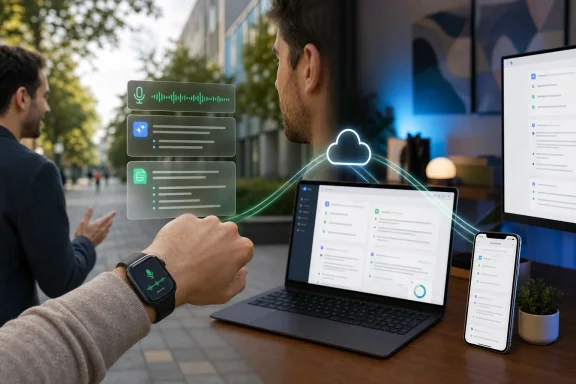 Overview: From Desktop Transcription to Wrist-Based Capture
Granola built its reputation as an AI notepad designed to avoid one of the more awkward aspects of modern virtual meetings: the visible recording bot. On desktop, the company says its software can capture microphone and system audio from meeting services such as Zoom, Google Meet, and Microsoft Teams without joining the call as a separate participant. It then transcribes the meeting and combines that transcript with the user’s typed notes to generate structured outputs. Granola’s security documentation describes the desktop product as working across meeting platforms and emphasizes that it must be manually started rather than automatically joining or recording sessions.
That positioning matters. Many teams have grown accustomed to AI assistants appearing in meeting participant lists, sometimes creating an immediate concern about surveillance, approval, or who owns the output. Granola’s model is different: it presents itself as an individual’s notepad rather than an autonomous attendee.
The Apple Watch app carries that model into physical conversations. TechCrunch reports that the app is designed to let a person capture in-person meetings without retrieving a smartphone, with Granola co-founder Chris Pedregal specifically pointing to walking one-on-ones as a use case. The premise is simple: a smartwatch is already on the user’s body, its microphone is immediately available, and a quick tap can feel less socially intrusive than placing a phone on a table.
The workflow is intentionally divided across devices
Granola’s device strategy is increasingly clear:
- Windows and Mac are the main environments for online meetings, detailed editing, searching, and follow-up work.
- iPhone is the mobile companion for in-person conversations and outbound phone calls.
- Apple Watch is the fastest and most discreet activation point for in-person capture.
- Cloud-synced notes are the connective layer, enabling an encounter captured on one device to become actionable on another.
The company’s App Store listing says Granola can create summaries with highlights, decisions, and action items, support note search and AI chat, sync with Google Calendar, and allow users to manage notes across iPhone and Mac. The listing also confirms Apple Watch support and lists watchOS 11.0 or later as the compatibility requirement.
For a Windows-centric workflow, the critical implication is that the Apple Watch app should be understood as a capture extension, not as the primary workspace. A user may begin recording on the wrist during a client walk-through, then review the transcript and turn the generated action list into email, Teams, Word, Notion, CRM, or project-management work later from Windows.
Why Apple Watch Is a Sensible AI Meeting Notes Device
The phrase “AI device” is often overused, especially when it is applied to hardware that is essentially acting as a microphone and interface for cloud services. Still, the Apple Watch form factor solves a real product-design problem: friction.
A meeting-notes system only captures useful information when people remember to start it. That is where many otherwise capable transcription tools fail. The user has to open a laptop, unlock a phone, find the app, decide whether recording is appropriate, and then activate it. By the time those steps are complete, the most useful early context may already be lost.
Granola’s watchOS implementation reduces that sequence to a few interactions. 9to5Mac reports that the app can present reminders for scheduled meetings and can be reached through a watch face complication. That combination makes the software more proactive without making it fully automatic.
The best use cases are not formal boardroom calls
The Apple Watch version appears particularly well suited to conversations that are both important and poorly documented:
- Walking one-on-ones between managers and employees.
- Hallway follow-ups after a scheduled meeting.
- Coffee meetings with customers, partners, or candidates.
- Whiteboard discussions where the conversation moves faster than typing.
- On-site visits in retail, construction, manufacturing, healthcare administration, or facilities management.
- Conference conversations where a laptop would be awkward and a phone may remain in a pocket.
- Personal voice memos that need to become organized thoughts rather than disposable recordings.
These scenarios are valuable precisely because they are often informal. Formal meetings usually have agendas, invitations, calendars, and shared screens. A quick conversation while walking from one building to another may produce a decision, a deadline, or a customer commitment that never enters the official record.
That is where AI meeting notes on Apple Watch can be more meaningful than another watch-based notification app. The promise is not that the watch can perform deep analysis on its tiny display. The promise is that it can preserve context at the moment context is created.
A watch is less conspicuous—but that is both benefit and risk
There is a social advantage in using a wearable. Starting a recording from a watch is potentially less disruptive than setting a phone face-up on a table. It may help meetings feel more natural, because participants are not prompted to stare at a glowing rectangle positioned between them.
However, discretion should not be confused with invisibility. A less conspicuous recorder can create a greater obligation to be transparent. Granola says the watch app shows a green screen and plays an audio confirmation when note-taking begins, according to 9to5Mac’s coverage. Those signals are useful, but they do not eliminate the need for the person initiating transcription to speak up.
What Granola Adds to the Windows Workflow
The most important question for WindowsForum readers is not whether the Apple Watch app is clever. It is whether it improves a Windows productivity setup rather than creating another isolated data silo.
On that front, Granola’s trajectory is encouraging. The company publicly announced Windows availability in June 2025, and its update history positions the platform as more than a basic recorder. Granola has added file uploads, multilingual support, team-oriented folders, note sharing, editable AI-generated meeting notes, Slack sharing, Notion support, CRM-related integrations, and Zapier connectivity. Its official updates page says users can ask questions across weeks or months of conversation history and can connect notes to more than 8,000 apps through Zapier.
Capture on watch, process on Windows
For a Windows user with an Apple Watch, the practical sequence could look like this:
- Receive a meeting reminder from Granola on the watch.
- Start transcription with a tap before an in-person discussion begins.
- Keep the phone in a pocket and avoid taking out a laptop during the conversation.
- Allow the system to generate a transcript and structured summary after the discussion.
- Open Granola on Windows to review the transcript, correct errors, add context, and identify decisions.
- Turn outputs into work by copying or sharing notes to Teams, Outlook, Slack, Notion, a CRM, or a project-management system.
- Use cross-meeting search and chat to connect the new discussion to earlier conversations with the same person, client, or project.
The value is especially apparent for hybrid workers. Employees may spend part of a day on Teams calls from a Windows PC, then leave the desk for a customer walkthrough or manager check-in. Traditional meeting transcription products frequently force an artificial choice between “documented digital meeting” and “undocumented real-world conversation.” Granola is trying to close that gap.
The watch app makes the desktop product more useful
It is tempting to frame the Apple Watch app as a companion feature, but the more accurate interpretation is that it expands the addressable data set for the desktop application. A notes system becomes more useful when it contains not only scheduled video calls but also the small, decision-rich conversations surrounding them.
That means the Apple Watch may strengthen Granola’s Windows proposition even though the wearable itself is limited to Apple hardware. The watch captures. Windows organizes, reviews, searches, and distributes.
This is also a notable contrast with standalone AI recording gadgets. TechCrunch notes that Granola considered building for Apple Watch easier than integrating with a separate recording device, while other companies have introduced auxiliary hardware for recording and transcribing meetings. That reporting highlights a strategic advantage: a user who already owns an Apple Watch does not need to buy, charge, carry, or explain an additional gadget.
The Strengths: Fast Activation, Familiar Hardware, and Better Continuity
Granola’s Apple Watch launch has several strengths that extend beyond the novelty of putting AI on a wrist.
One-tap access is a genuine usability improvement
The best productivity tools reduce the number of decisions required before useful work begins. A watch complication, calendar reminder, and one-tap start mechanism create a short path from “this conversation might matter” to “this conversation is being documented.”
That is a strong design choice because it leaves the final decision with the user. Granola’s security materials say its software must be manually started and does not auto-join or auto-record meetings. The company’s documentation frames that as a privacy and control feature, and it is also sensible product design.
It avoids another dedicated gadget
A smartwatch does not solve every recording problem, but it is already accepted workplace hardware for many people. No one needs to ask why someone is wearing it. That reduces the practical barrier that has limited adoption of wearable AI recorders.
The watch is also connected to a broader Apple device ecosystem, while Granola’s Windows desktop app extends the workflow beyond Apple-only computing. The combination is unusual but useful: Apple Watch for frictionless capture, Windows for sustained knowledge work.
The platform is evolving beyond transcription
A raw transcript is rarely the final deliverable. Most workers need:
- A concise meeting summary.
- A list of decisions.
- Assigned action items.
- A record of who said what.
- Searchable historical context.
- A follow-up message or task list.
Granola’s App Store description says the service can produce shareable summaries, surface action items, support note-related questions through chat, and enable note management across devices. The App Store listing presents this as an end-to-end note workflow rather than a standalone transcription engine.
That distinction matters. AI transcription is quickly becoming a commodity. The competitive value lies in what happens after the audio becomes text: editing, search, sharing, contextual recall, and integration into a team’s existing systems.
It may reduce meeting fatigue
The traditional advice to “take better notes” often imposes a cognitive tax on the person trying to participate. The individual either types continuously and risks disengaging from the room, or remains fully present and accepts imperfect recall later.
An AI note-taking workflow can reduce that tradeoff. The potential benefit is not only a more complete record but a more engaged participant. This is especially relevant in one-on-ones, interviews, feedback sessions, and customer conversations where attentive listening is central to the outcome.
The Risks: Consent, Accuracy, and Sensitive Data
The usefulness of AI meeting notes does not remove their risks. In fact, a wrist-based implementation amplifies some of them because the device is easy to activate and easy for others to overlook.
Consent cannot be an afterthought
Granola explicitly recommends obtaining consent before transcribing others. Its guidance says legal consent requirements can vary based on participant location and that the user remains responsible for securing any consent required by law. Granola’s consent documentation also strongly recommends asking for consent even where a user may not be legally obliged to do so.
For organizations, the best policy is simple and direct:
“I’m using an AI note-taking app on my watch so I can capture action items accurately. Is everyone comfortable with that?”
That statement is not merely legal hygiene. It protects trust. In a sensitive performance conversation, customer negotiation, interview, healthcare-related discussion, or confidential strategy session, participants deserve to know whether their words are being transcribed and processed by AI systems.
A transcript is not a verbatim truth machine
AI transcription and summarization systems can mishear names, technical terminology, product identifiers, numerical commitments, accents, overlapping speech, or context-dependent remarks. The risk becomes more significant when an automatically generated summary assigns an action item or converts a tentative thought into an apparent decision.
Users should treat Granola’s summaries as draft records, not final legal or operational documentation. A responsible Windows workflow includes a quick post-meeting review before sharing notes broadly, creating formal tasks, sending customer follow-ups, or entering commitments into a CRM.
The smaller interface of the Apple Watch reinforces this point. The watch is optimized for starting capture, not for detailed verification. Quality control belongs on the Windows desktop, where the user can review the transcript in context.
“No stored recording” does not mean “no sensitive data”
Granola says it does not store meeting audio; instead, it stores transcripts and user-provided notes. The company explains that desktop transcription happens in real time, while mobile workflows use temporarily cached audio that is deleted after transcription is completed. Granola’s security page and its consent FAQ make that distinction clear.
That may reduce the long-term exposure associated with retaining raw audio, but the transcript itself can still be highly sensitive. Text may contain customer information, personnel discussions, product roadmaps, commercial terms, internal disputes, security details, or personal data.
Granola says notes are private by default, encrypted in transit and at rest, stored in a US-hosted AWS Virtual Private Cloud, and deletable by the user. It also says third-party AI providers are not permitted to use customer data to train their models, although Granola may train on anonymized data unless users opt out; enterprise users have model training disabled by default. Those policies are outlined in the company’s security documentation.
Those are meaningful controls, but they do not remove the need for organizational review. IT and security teams should evaluate:
- Whether Granola is approved for company conversations.
- Whether transcription is permitted for customer calls and internal HR discussions.
- Whether administrators can enforce single sign-on, retention, and data-sharing policies.
- Which users can create share links or export notes.
- Whether data residency and contractual requirements are satisfied.
- How meeting transcripts should be classified, stored, and deleted.
Apple Watch does not make the workflow platform-neutral
The Apple Watch component is naturally limited to users in Apple’s wearable ecosystem. Granola’s desktop Windows availability softens that limitation, but the hands-free capture experience described at launch is not a universal mobile feature for every employee.
That creates a potential unevenness inside mixed-device organizations. One employee may start a meeting note from a wrist complication, while another must reach for a phone or laptop. Companies that standardize on Android devices or do not permit wearables should view the launch as an additional capture option, not as a general replacement for existing meeting-note procedures.
Practical Guidance for Windows Users and IT Teams
The best way to deploy a tool like Granola is to set expectations before usage becomes habitual. Convenience features can spread faster than a formal governance process, particularly when they are free to install and easy to start.
A sensible individual workflow
For individual users, the following approach strikes a reasonable balance:
- Use the Apple Watch app for conversations that genuinely need a record, not every casual interaction.
- State clearly that transcription is beginning and obtain agreement from participants.
- Review generated notes on Windows as soon as practical, while memory of the meeting remains fresh.
- Correct names, dates, figures, and commitments before sending summaries or assigning tasks.
- Keep sensitive notes private by default and share only with participants who need access.
- Delete accidental, incomplete, or inappropriate captures rather than allowing them to become an unreviewed archive.
- Avoid using AI-generated summaries as the sole source of truth for compliance, contractual, disciplinary, or legal matters.
What IT administrators should ask
For IT departments, this launch is another reminder that shadow AI can begin with a watch tap rather than a desktop software deployment. Employees can experiment with tools long before an organization has evaluated them.
A productive governance discussion should cover:
- Approved meeting types and prohibited meeting types.
- Consent language for internal and external conversations.
- Identity management and enterprise account requirements.
- Data retention, deletion, and offboarding processes.
- Sharing controls for transcripts and summaries.
- Integration permissions for Zapier, Slack, CRM platforms, and knowledge bases.
- Incident-response procedures if a sensitive conversation is accidentally transcribed.
- Training on AI hallucinations, transcription errors, and summary review.
Granola’s own materials say its app can work with Google Workspace or Microsoft login and calendar integration, making it relevant to Microsoft 365-heavy organizations even though the new wearable client is Apple Watch-only. The company’s security overview also says the desktop product supports meeting services including Teams, an important detail for businesses that operate primarily on Windows and Microsoft collaboration tools.
The Bigger Significance of Granola’s Apple Watch Launch
Granola’s move to watchOS is significant not because the Apple Watch suddenly becomes a full computer for AI work. It is significant because it redefines the role of the smartwatch in a productivity stack.
For years, smartwatch productivity has often meant notifications, reminders, timers, quick replies, and fitness data. These functions are useful but peripheral. AI meeting notes introduce a more consequential role: the watch becomes a context capture device for work conversations that would otherwise vanish into memory.
The success of that idea will depend on execution. Battery life, microphone quality, transcription accuracy in noisy settings, clear consent indicators, reliable synchronization, and useful Windows-side editing will matter far more than the novelty of having an AI app on a watch face.
Still, the product logic is strong. The most valuable business information is not always created inside a scheduled Teams meeting. It often emerges while walking to another room, meeting a customer at a conference, reviewing an issue on site, or having an unscripted conversation after the “official” meeting has ended.
Granola’s Apple Watch app gives those moments a path into the same searchable AI notes workflow that users can access from Windows. If the company can preserve transparency, give users control over sensitive data, and maintain accurate transcripts, the watch may become less of a notification screen and more of a practical extension of the modern workplace notepad.
