
The activity is detailed in the U.S. and South Korean government advisory on Gunra, also known in some reporting as Golden Community, and was independently reported this week by IT Pro. The group’s playbook combines data theft, identity compromise, backup destruction, and encryption, turning what might have been a recoverable Windows outage into a broader business-continuity and data-breach incident.
Gunra is not presenting a new encryption trick so much as demonstrating a failure mode that many organizations still leave open: treating geographically separate backup infrastructure as if it were administratively separate. It is not.
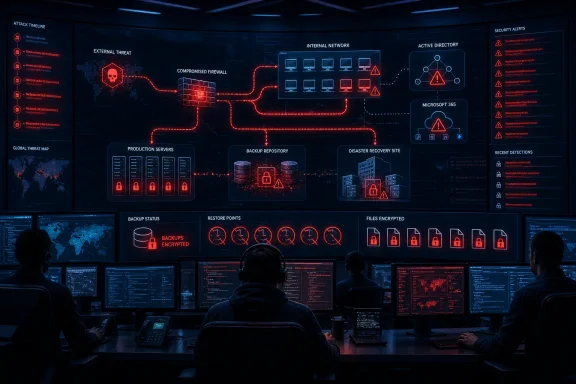 The disaster-recovery copy was inside the attack boundary
The notable detail in the documented Gunra incident is not merely that attackers deleted Windows Volume Shadow Copies. That is familiar ransomware behavior, and security researchers including AhnLab have previously documented Gunra’s Windows encryptor using WMI to enumerate and delete local shadow copies.
The more consequential action happened higher up the stack. Gunra operators reportedly deleted data held in both the primary and disaster-recovery backup environments, before and after the ransomware phase. That sequence suggests the attackers had time and privileges to identify recovery systems, remove restore points or archives, and return to destroy anything created or replicated during the intrusion.
A DR site protects against a failed storage array, fire, flood, or regional outage. It does not automatically protect against a compromised Windows domain administrator account, a backup administrator account, a shared virtualization console, or a backup platform whose repository is reachable over the same network. If production and DR environments accept the same privileged credentials, the second location may only provide a second target.
This is the part that deserves attention from infrastructure teams. Backup availability, backup integrity, and backup administrative isolation are separate controls. A successful nightly job proves only that data was copied; it does not establish that the copy can survive a hostile administrator session.
Gunra’s entry points start with exposed edge devices
The government advisory identifies exploitation of Fortinet vulnerabilities CVE-2024-55591 and CVE-2025-24472 as observed initial-access paths. Fortinet’s own security advisory classifies the flaws as critical, known-exploited issues affecting FortiOS and FortiProxy configurations, and documents the risk of unauthorized command execution through the vulnerable components.
Attackers exploiting this Fortinet chain have been associated with the creation of unauthorized super-admin accounts, including an account named forticloud-sync. The presence of that name should not be treated as a harmless service-account oddity. It is a high-priority compromise indicator requiring a full review of FortiGate or FortiProxy configuration, administrator accounts, automation stitches, API access, trusted hosts, firmware level, and recent logins.
The supplied reporting describes Gunra affiliates using the access to move laterally with Impacket tools such as psexec.py, smbclient.py, and secretsdump.py. Those utilities are frequently used in Windows environments because they work with common enterprise protocols and Active Directory credential material rather than requiring exotic malware on every endpoint. A stolen NTDS database or privileged hash can turn a firewall compromise into a domain-wide recovery problem.
For defenders, the chain matters more than any individual indicator:
- An internet-facing appliance is compromised and used to establish durable privileged access.
- The intruder captures credentials and reaches Windows servers, domain controllers, VDI infrastructure, file servers, and backup administration systems.
- Sensitive data is staged and removed before encryption, creating extortion exposure even if systems are rebuilt.
- Recovery tooling and backup copies are deleted or sabotaged, reducing the victim’s options before the file locker runs.
This is why a clean endpoint rebuild is insufficient after a ransomware deployment. If the identity tier, network appliance configuration, backup console, or remote-access path remains compromised, restoration can return the attacker to the environment along with the data.
Windows recovery controls need to survive privileged compromise
Gunra’s use of WMI to remove Volume Shadow Copies is a Windows-specific warning, but organizations should avoid overvaluing shadow copies as their primary recovery mechanism. Volume Shadow Copy Service is useful for operational recovery and previous-version restoration, yet it normally lives within the same Windows estate the attacker is trying to control. An actor with local administrative privileges can often delete it.
Windows teams should instead distinguish between three recovery layers:
- Local snapshots and shadow copies can speed up recovery from accidental deletion or limited incidents, but they should be assumed disposable during a full ransomware intrusion.
- Online backup repositories are useful for routine restores, but they require strict privilege separation, restricted network exposure, and monitoring because attackers actively seek their consoles and storage credentials.
- An immutable or offline recovery copy provides the strongest protection against deletion, provided that its retention configuration, credentials, and storage controls cannot be altered from the compromised production identity plane.
CISA’s ransomware guidance has long recommended offline, encrypted backups and regular restoration testing. Gunra’s reported activity reinforces why the testing requirement cannot be a paper exercise. A backup is only usable if the organization can identify a clean recovery point, obtain it without relying on compromised systems, restore it into a controlled environment, and validate that it does not reintroduce attacker persistence.
For Microsoft-heavy environments, that means testing more than file recovery. A meaningful recovery exercise should include Active Directory, DNS, certificate services where used, virtualization management, line-of-business databases, file shares, endpoint-management infrastructure, and the backup platform itself. Restoring user data without restoring trusted identity and core services may leave the organization unable to resume operations safely.
OneDrive and SharePoint do not remove the extortion risk
The Gunra reporting also describes theft of data from Microsoft OneDrive and SharePoint using a malicious executable identified as main.exe. The group has reportedly used tools including 7-Zip, Rclone, FileZilla, and Mega for collection, compression, and exfiltration.
This creates a separate problem from encrypted Windows servers. Microsoft 365 data may have version history, recycle-bin retention, and restore capabilities that help address destructive changes, but they do not erase the consequences of data that was already copied out of the tenant. A successful restore can return documents to users while the organization still faces notification, contractual, regulatory, and reputational exposure from stolen personal information, internal communications, databases, or system documentation.
Administrators should therefore review audit coverage and retention around bulk downloads, app registrations, privileged consent, Exchange and SharePoint administrative changes, anomalous OneDrive access, and large outbound transfers. The operational question is no longer only, “Can we restore?” It is also, “What did the intruder read and export before we noticed?”
Gunra’s reported alteration of a VDI portal to allow a selected one-time password to bypass MFA is especially important in this context. Multi-factor authentication is effective only when the systems enforcing it, the identities behind it, and the applications that consume its result remain trustworthy. A modified authentication workflow can make otherwise sound MFA deployment look successful while quietly granting an attacker persistent entry.
Immediate checks for Fortinet and backup administrators
The most urgent work is to look for evidence that the attacker is already present, especially where vulnerable Fortinet devices have been exposed to the internet. Patching is necessary, but it does not remove a backdoor account or malicious configuration left behind before the upgrade.
Security and infrastructure teams should immediately:
- Verify FortiOS and FortiProxy versions against Fortinet’s remediation guidance for CVE-2024-55591 and CVE-2025-24472, and investigate rather than merely patch any device that was exposed while vulnerable.
- Hunt for unauthorized administrator accounts, particularly
forticloud-sync, unknown automation configuration, unexpected API tokens, new VPN users, abnormal administrator logins, and suspicious JavaScript-console activity. - Rotate credentials used by firewall administrators, backup platforms, virtualization systems, Active Directory privileged groups, service accounts, and remote-management tooling where compromise is suspected.
- Confirm that production administrators cannot delete retention-locked recovery points or alter backup immutability settings through ordinary domain or backup-console credentials.
- Isolate backup management networks from routine workstation and server administration, and restrict the systems allowed to reach repositories, storage controllers, and DR orchestration tools.
- Perform a controlled restoration from a known recovery point into an isolated network, including validation of identity services and a scan for persistence before reconnecting restored systems.
The last item is where many plans break. A recovery test that restores a few files to an existing workstation does not prove that the organization can rebuild after simultaneous loss of production servers, backup infrastructure, and DR replicas.
Gunra’s backup destruction does not mean disaster recovery is futile. It means DR designs must assume that an adversary may have privileged access long before encryption begins. The organizations best positioned to withstand that scenario will be the ones whose final clean restore point cannot be deleted, altered, or accessed through the same compromised Windows and network identities that run production.