
The mistake is consequential for anyone who follows the article to create a server for friends running the current game. Hostinger’s command downloads the official 1.21.1 server JAR, identified by the hash
59353fb40c36d304f2035d51e7d6e6baa98dc05c; the Minecraft Wiki’s release record ties that exact file to version 1.21.1. Mojang released 1.21.1 on August 8, 2024 as a security hotfix. It is not the current release track.
Mojang’s own server-download page continues to advise administrators to use the server JAR matching the desired version, and its support documentation says clients need to connect using the correct server configuration. Minecraft Java Edition 26.2, released on June 16, 2026, is part of the current calendar-versioned series and requires Java 25. Hostinger’s guide tells readers, twice, that Java 21 is the requirement and gives them a 1.21.1 binary. Those two instructions fit one another, but they do not fit a current server.
The result is a tutorial that looks current because it is dated August 7, 2026, while its critical technical examples are rooted in an older Minecraft release. A substantially matching Hostinger regional edition was indexed in May 2026 with the same 1.21 “Tricky Trials” Game Panel claim, the same JAR hash, and the same broken Linux package commands. This appears to be a refreshed regional presentation, not a freshly tested 2026 setup guide.
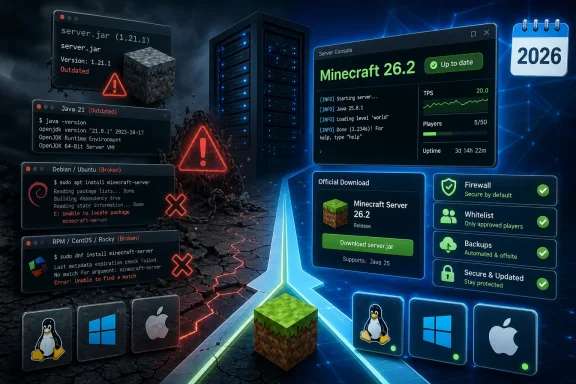 The Java 21 advice is now a startup failure
For a modern Java Edition server, Java 21 is no longer a safe blanket recommendation. Minecraft 1.20.5 through the 1.21 generation moved servers to Java 21, which explains where Hostinger’s instruction came from. But Minecraft 26.1 and newer require Java 25 or later. A server operator who installs Java 21 exactly as the article specifies and then downloads a current 26.x server JAR should expect an
UnsupportedClassVersionErroror equivalent startup failure.
This is the detail that changes the practical advice for Windows administrators. The Minecraft Launcher can manage its own runtime for the client, but a standalone dedicated server launched from
cmd.exe, PowerShell, a
.batfile, Task Scheduler, or a service wrapper uses whichever Java runtime resolves first on the machine’s PATH. Checking
java -versionin the same shell that will start the server is therefore mandatory, not a formality.
On macOS and Linux, the same principle applies. A system can have several Java versions installed, and
javamay still point to an older default even after Java 25 has been added. Server operators should use the Java executable they have actually verified, or explicitly set the path in their startup script. Updating only the game launcher does nothing for a separately hosted
server.jar.
Hostinger also calls its Linux runtime choice “OpenJDK,” then directs readers to download Oracle JDK packages. Either distribution can run an unmodified Minecraft server if it meets the game’s version requirement, but they are not interchangeable labels. Administrators following vendor documentation need to know whether they are using a distribution-provided OpenJDK package, Eclipse Temurin, Microsoft Build of OpenJDK, or Oracle JDK—especially when automated updates and PATH selection are involved.
Two Linux installation commands are simply wrong
The guide’s Debian and RHEL examples contain package-manager errors that are not matters of preference.
For Debian, Ubuntu, and related distributions, the article downloads an Oracle
.debpackage and follows it with:
deb -i install jdk-21_linux-x64_bin.debThere is no standard
debcommand that installs a Debian package this way. Oracle’s installation documentation specifies
dpkg -ifor a downloaded
.deb, normally with elevated privileges. A Debian-family administrator could instead install a supported Java 25 runtime from the distribution’s own repositories, which generally gives the system package manager responsibility for updates.
The Red Hat-family instructions are worse. They download an
.rpmpackage for RHEL, CentOS, or AlmaLinux, then try to install it with
dpkg:
dpkg -i --nosignature jdk-21_linux-x64_bin.rpm
dpkgis Debian’s package tool and does not install RPMs. Oracle’s documentation calls for
rpm -ivhor
rpm -Uvhon RPM-based systems. The
--nosignatureswitch is also an alarming suggestion in a beginner guide because it bypasses a package-signature check rather than solving the underlying trust or key-import issue. Oracle documents how to import the relevant signing key if an RPM-based installation needs it.
The reliable path is less glamorous than copying a five-command block: install Java 25 from a maintained repository or a trusted vendor package, run
java -version, and only then start the server. A new administrator should not disable signature verification just to get past an installation warning.
The fixed JAR URL creates an invisible version lock
A direct JAR URL is convenient for a reproducible deployment only when the guide clearly says it intentionally pins a specific version. Hostinger does not make that distinction. Its instructions describe the download as the “Minecraft server setup file,” but the supplied URL resolves specifically to the 1.21.1 server—not “latest,” not 1.21 generally, and certainly not a 2026 build.
This matters beyond the version mismatch players will see in the multiplayer screen. Pinning an old binary means the server will not receive later gameplay fixes, security fixes, protocol changes, or compatibility improvements simply because the administrator reruns the tutorial. Mojang’s 1.21.1 release notes themselves framed that 2024 update as a response to critical server-crash exploits, a reminder that server upgrades are not cosmetic maintenance.
A workable current setup should begin at Minecraft’s official Java server-download page each time the operator deliberately upgrades. Download the server JAR for the exact version the group intends to use, keep its filename stable if startup scripts refer to
server.jar, and record the version in the server directory. Before replacing an existing JAR, stop the server cleanly and back up the world, configuration files, whitelist, operator list, and any mod or plugin data.
The guide does correctly describe the first-run EULA flow: launch the JAR once, change
eula=falseto
eula=true, then launch it again. Mojang’s support documentation confirms that this initial failed start is expected because it creates the EULA and properties files. What the guide omits is that a version upgrade may also change world data and server settings, so a server directory is not a disposable download folder once players have begun using it.
A VPS and a home server have different network risks
Hostinger presents VPS hosting as the simplest route, and its Game Panel documentation supports the basic claim that a user can create a Java Edition instance and connect through the endpoint it exposes. For a small group that wants an always-on server without leaving a personal PC running, that is a reasonable trade-off: the public IP, host firewall, operating system maintenance, backups, and hardware uptime are separated from the player’s home network.
But the guide blurs VPS networking with local hosting when it tells readers to “enable port forwarding” for outside users. A VPS usually has a public address already; the task is normally to ensure the provider’s network rules and the VPS firewall allow the Minecraft port. Port forwarding is primarily the home-router task required when a server sits behind NAT on a residential network.
Mojang’s own support article sets the default Java server port at 25565 and explicitly warns owners not to advertise their home public IP publicly. For a local Windows, macOS, or Linux host, opening that port on the router makes the service reachable from the internet. Disabling port forwarding, as Hostinger suggests for local-only play, also means friends outside the home network cannot join. It is not an optional security hardening step if remote play remains the objective; it is a choice between LAN-only access and a public-facing service.
A better baseline for a private server is to use the whitelist, retain
online-mode=true, allow only the required inbound port, avoid giving operator privileges casually, and keep the server JAR and Java runtime updated. The whitelist is useful access control; it is not a replacement for authentication or firewall rules. Opening a server to the internet also means its availability and software maintenance are now the operator’s responsibility.
Hostinger’s Game Panel version claim needs verification before deployment
The guide says Hostinger Game Panel will create “Minecraft Java Edition” version 1.21 Tricky Trials. That wording is outdated in August 2026. Minecraft changed its release numbering in 2026, and a panel that actually provisions 1.21 would create an older server even if the surrounding account dashboard is current.
Hostinger’s support pages show that the Game Panel can create Java Edition instances, assign RAM, update a Minecraft server, and change its Java version. Those capabilities are useful, but they do not establish what version the panel deploys by default today. The vendor has not stated in the guide whether existing instances are upgraded automatically, whether the default image changed, how world migration is handled, or which Java runtime its current templates use.
That omission puts the burden on the customer to inspect the running instance rather than trust the tutorial’s label. Before inviting players, administrators should check the server console’s reported Minecraft version, verify the Java runtime version, and confirm that clients can connect with the intended release. If the panel is still building 1.21, a current 26.2 client will not join without deliberately selecting the corresponding older client version.
The immediate takeaway is straightforward: do not use Hostinger’s pasted Linux commands or JAR hash as a current Minecraft server recipe. Use the official Minecraft download for the version you mean to host, run it with Java 25 for the 2026 release line, and treat a first successful launch as the beginning of administration—not proof that the server is current or safely exposed.
References
- Primary source: Hostinger
Published: August 7, 2026 at 12:40 PM UTC
- Related coverage: minecraft.net
Minecraft Server Download | Minecraft
Gain access to amazing Minecraft servers using the Minecraft Server Download. Set up multi-player servers today by following the detailed instructions provided.www.minecraft.net - Related coverage: help.minecraft.net
en-us
help.minecraft.net
- Related coverage: minecraft.net
Minecraft Java Edition System Requirements | Minecraft
Minecraft: Java Edition is over 17 years old now, and it’s grown a lot over the years! Worlds are bigger and the game has continued to evolve with new features, technical improvements, and more. But like a teenager outgrowing their shoes – Java Edition needs room to keep growing, too. That’s why...www.minecraft.net - Related coverage: docs.oracle.com
Installation of the JDK on Linux Platforms
This topic describes the installation procedures of the JDK on the Linux platform, along with the system requirements.docs.oracle.com
- Related coverage: docs.oracle.com
- Related coverage: help.minecraft.net
en-us
- Related coverage: hostinger.com
How to Make a Minecraft Server in 2026
Learn how to make a Minecraft server: 1. Choose a Minecraft hosting plan 2. Setup the Minecraft hosting 3. Configure the Game Panel + more.www.hostinger.com - Related coverage: oracle.com
Java Downloads | Oracle
Download the Java including the latest version 17 LTS on the Java SE Platform. These downloads can be used for any purpose, at no cost, under the Java SE binary code license.www.oracle.com - Related coverage: assets.hostinger.com
- Related coverage: tomshardware.com
Minecraft system requirements raised for the first time in 17 years — Microsoft now recommends 16GB of RAM and a 2020s or newer CPU to run the Java Edition | Tom's Hardware
The game is about to hit legal age, so it needs big-boy PC specs, too.www.tomshardware.com - Related coverage: windowscentral.com
Minecraft: Java Edition just got two massive multiplayer features we've all wanted for years — it's finally on par with Bedrock's options, and could even work with mods | Windows Central
At long last, Minecraft Java is getting a Friends List and peer-to-peer multiplayer.www.windowscentral.com - Related coverage: windowscentral.com
Minecraft update version numbers are changing | Windows Central
Starting next year, Minecraft is changing how it numbers updates, but it won't affect much for most people.www.windowscentral.com - Related coverage: techradar.com
How to set up a Minecraft server in 2025 | TechRadar
Want to know how to set up a Minecraft server with your friends? Here's all you need to know with step-by-step instructions.www.techradar.com - Related coverage: tomshardware.com
After 17 years, Minecraft Java Edition starts replacing OpenGL with a Vulkan multi-threaded renderer — update will prove a boon for performance and modding | Tom's Hardware
Vibrant Visuals update will bring Java Edition to the current age.www.tomshardware.com - Related coverage: gamesradar.com
Mojang is finally revealing all of Minecraft: Java Edition's code after 16 years to "make it quicker and easier for modders to create and improve mods" | GamesRadar+
Modding is at the heart of Java Editionwww.gamesradar.com - Related coverage: feedback.minecraft.net
Minecraft Java Edition - 26.2 Pre-release 4 – Minecraft Feedback
Today we are releasing 26.2 Pre-Release 4, with a couple of fixes and tweaks to the Chaos Cubed drop. As announced at Minecraft Live, the...feedback.minecraft.net - Related coverage: feedback.minecraft.net
Minecraft Java Edition - 26.2 Pre-Release 5 – Minecraft Feedback
Today it is time for 26.2 Pre-Release 5, with a change to Hardcore mode settings along with other fixes! As announced at Minecraft Live,...feedback.minecraft.net - Related coverage: minecraft.fandom.com
Java Edition 26.1 – Minecraft Wiki
Java Edition 26.1, named Tiny Takeover, is a game drop for Java Edition, released on March 24, 2026. It is the first version to use the new YY.D.H version format and the first to require Java 25. Golden Dandelion A new decoration block which can be planted on flower pots like other flowers do...minecraft.fandom.com
- Related coverage: modready.gg
What Java Version for Minecraft 26.1? Java 25 (2026 Guide) | ModReady.gg
Short answer: Minecraft 26.1 needs Java 25 (OpenJDK 25). Full server setup guide, why version numbers changed in 2026, and which mod loaders are compatible. modready.gg
- Related coverage: curseforge.com
BlockFrame DLSS - Minecraft Mods - CurseForge
Experimental NVIDIA DLSS and DLAA integration for Minecraft 26.2’s native Vulkan renderer. Download BlockFrame DLSS by oliverwalter on CurseForgewww.curseforge.com - Related coverage: supercraft.host
Minecraft Chaos Cubed Drop (June 16, 2026): Server Update Guide
Minecraft's Chaos Cubed drop lands June 16, 2026 (Java 26.2 / Bedrock 26.30) with the Sulfur Spring biome, Sulfur Caves, sulfur and cinnabar blocks, and the Sulfur Cube mob. The server admin checklist: backups, plugin compatibility, why new biomes need new chunks, and when to update. supercraft.host
- Related coverage: discourse.cubecoders.com
Startup Issue with Minecraft - Minecraft 26.1 and newer requires Java 25 - Technical Support - CubeCoders Support
System Information Field Value Operating System Linux - Debian GNU/Linux 13 on x86_64 Product AMP ‘Deimos’ v2.7.2.2 (Mainline) Virtualization Docker Application Minecraft Module MinecraftModule Running … discourse.cubecoders.com
- Related coverage: owasp.org
2025 11 19 From Protocol to Practice Secure and Responsible MCP Server Operations
PDF documentowasp.org
- Related coverage: learn.microsoft.com
Pack Manifest Documentation - minecraft:header | Microsoft Learn
Describes the minecraft:header pack manifestlearn.microsoft.com - Related coverage: learn.microsoft.com
Latest Platform Version Guidance | Microsoft Learn
A guide to using the latest platform version in your contentlearn.microsoft.com - Related coverage: minecraft.wiki
- Related coverage: minecraft.wiki
Java Edition 1.21.1 – Minecraft Wiki
1.21.1 is a minor hotfix update to Java Edition released on August 8, 2024,[1] which fixes critical exploits including block entity swap, and adds two new languages. Servers running this version are compatible with 1.21 clients.minecraft.wiki - Related coverage: filehippo.com
- Related coverage: hub.docker.com
- Related coverage: docdroid.net
Inside A Minecraft Launchercgkrw.pdf.pdf
Inside A Minecraft Launcher Recently, I’ve been playing around with writing a Minecraft launcher from scratch, and also contributing to PolyMC and ManyMC. Through these harrowing interesting experiences, I have gathered a lot of knowledge about how Minecraft launchers actually work from the... www.docdroid.net
