
HP’s own U.S. catalog lists the EliteBook X Flip G2i with processors ranging from the eight-core Core Ultra 5 325 through Core Ultra 7 356H and 366H models, topping out at the 16-core Core Ultra X7 358H. Only the X7 configuration is paired with Intel Arc B390 graphics and the 3K touch panel in the current lineup. That means buyers seeking the graphics uplift highlighted by Notebookcheck need to select a specific premium SKU rather than assume every X Flip G2i carries the same graphics capability.
For Windows professionals who use a convertible as a primary machine—annotating documents, presenting in tent mode, working with pen input, or carrying a managed PC between offices—the EliteBook looks like HP’s most complete current business 2-in-1. But the review’s heat and screen-quality cautions are material, while the price leaves little room for a “buy the top model by default” recommendation.
 The Core Ultra X7 system is the one to evaluate
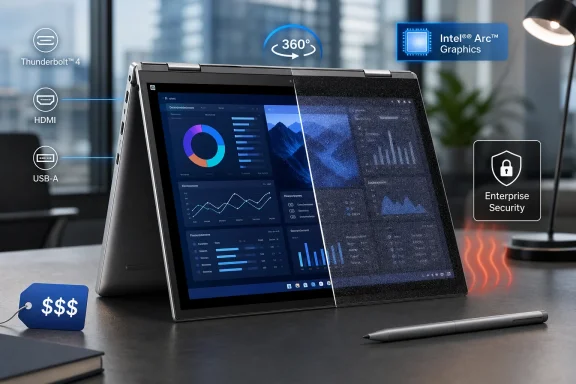
Notebookcheck’s conclusion that the EliteBook X Flip G2i is HP’s strongest convertible to date is principally about the high-specification machine. The reviewed model uses the Core Ultra X7 platform, and the publication says its graphics performance is substantially ahead of the previous-generation model. HP’s product listings explain why: its Core Ultra X7 358H configuration includes Intel Arc B390 graphics, while the Core Ultra 5 325, Core Ultra 7 356H and Core Ultra 7 366H systems are listed with plain integrated Intel Graphics.
That distinction has practical consequences beyond gaming. Arc B390 graphics can be useful for GPU-accelerated photo processing, light video production, some engineering visualization workloads, and local AI tools that can use Intel’s graphics stack. It also gives the machine more headroom with multiple high-resolution external displays and graphics-heavy Windows applications. The lower-tier systems remain reasonable for Office, browsers, collaboration software, Power BI dashboards and general enterprise work, but they are different performance classes.
HP’s published configuration options also make the X7 model the display-tier choice. The current U.S. listing pairs a 32GB-memory, 1TB-SSD X7 358H system with a 14-inch 3K touch screen; other listed configurations use 1920-by-1200 WUXGA touch displays. The choice is therefore bundled: higher graphics performance, more memory, larger storage and a sharper display push the buyer toward the expensive end of the range.
That package is powerful for a machine that still folds into a tablet, but it weakens the argument for calling the EliteBook a universal fleet standard. IT departments should define whether the requirement is convertibility or high integrated-graphics performance. If most users need only a pen-enabled Windows device for meetings and document workflows, an X7 Arc B390 configuration may be costly capacity that goes unused.
The matte-panel warning is more serious on a premium machine
Notebookcheck says customers prioritizing the sharpest image should consider BrightView configurations rather than the grainier matte alternatives. This is not a cosmetic complaint. At this pricing level, a screen is the part of the PC an employee experiences all day, and an anti-glare coating or integrated privacy technology can materially change text clarity, perceived contrast and white-background quality.
Independent testing by the Japanese outlet The Hikaku reaches a compatible conclusion for its WUXGA non-glare test unit with HP Sure View privacy functionality. It found that the privacy layer reduced reflections but introduced a noticeable sparkle effect and could make the edges of the panel appear somewhat darker even when viewed head-on. Its reviewer characterized that as a trade-off for the privacy function rather than a defect, but it reinforces the need to choose the display based on work environment.
HP markets the EliteBook X Flip G2i as a mobile executive device, and that is the scenario in which a privacy screen has a legitimate purpose. A consultant working on a train, a finance employee reviewing sensitive figures at an airport, or a healthcare manager carrying protected information can benefit from reducing side-angle visibility. Yet a developer, writer, analyst or designer working primarily at a desk may prefer the clearer-looking display and accept the use of a physical privacy filter when traveling.
The deeper issue is that display configuration and performance configuration are entangled. Buyers should not treat “matte” versus “BrightView” as a minor checkout option. They should request the exact panel specification, brightness, resolution, color coverage, privacy-screen behavior and CPU/GPU pairing for the SKU their procurement team intends to order. HP’s current catalog demonstrates that these are not interchangeable variations of one standardized laptop.
Heat limits the sustained-performance story
Notebookcheck also found that core temperatures become quite warm under demanding workloads. That is a predictable engineering compromise in a thin convertible, but it matters more here because HP is positioning the high-end X7 model for work that can actually sustain load: compilation, code analysis, local AI inference, video rendering and heavier graphics processing.
A short benchmark or a quick export is not the difficult case. The relevant question is whether the machine maintains performance during a lengthy build, a multi-hour Teams day while docked, or a sustained compute workload while charging. Warm processor temperatures do not automatically mean unsafe operation or poor reliability—modern Intel mobile processors are designed to manage temperature through boost behavior and throttling—but they do mean the system is operating close enough to its thermal envelope that chassis temperature, fan behavior and sustained clock speeds deserve scrutiny before a bulk order.
The Hikaku also tested the X7 358H version and found high overall performance, but its battery test result—eight hours and four minutes in its stated test—was not exceptional beside several lighter, lower-power laptops in its comparison group. Its review additionally lists the convertible at roughly 1.457kg, or 3.21 pounds, in that configuration. HP’s U.S. specifications list a lower starting weight of 2.86 pounds, underscoring another procurement rule: do not compare a base weight with a fully configured, high-resolution, high-performance model as though they were the same product.
For road warriors, the EliteBook therefore occupies an awkward but understandable position. It is portable enough to travel with, yet the high-performance configuration is neither the lightest 14-inch business machine nor likely the coolest under sustained work. Buyers who primarily want a light Windows companion should compare HP’s non-convertible EliteBook X G2i as well as the Flip; the hinge, touch stack and pen support impose real weight and thermal costs.
The ports and business features justify part of the premium
There is more to the EliteBook X Flip G2i than silicon and a folding hinge. HP lists two Thunderbolt 4 ports with 40Gbps signaling, a 10Gbps USB-C port, a powered USB-A port, HDMI 2.1, a 5MP IR camera and quad Poly Studio speakers. For a business convertible, that is a strong practical port selection: users can retain USB-A accessories, connect directly to a conference-room display, and use Thunderbolt docks without living through a dongle-heavy workflow.
HP also includes Windows 11 Pro and sells the system with a three-year limited warranty in current U.S. configurations. Features such as HP Wolf Security, an IR camera for Windows Hello, TPM hardware, HP Sure Platform and optional cellular connectivity speak to the buyer that has to manage and secure endpoints rather than merely choose a personal laptop.
Those features can justify a premium when the machine replaces several compromises: a tablet for note-taking, a conventional notebook for work, a docking-compatible desk system and an enterprise-managed remote device. They do not automatically justify it for users who will spend nearly all of their time in clamshell mode connected to a dock and external monitors. In that use case, the 360-degree hinge, pen support and touch display are expensive hardware that may not add measurable business value.
HP’s price creates a configuration problem
Notebookcheck places the EliteBook X Flip G2i’s entry point at $2,200 and its reviewed configuration above $3,500. HP’s current product page confirms there is a broad hardware spread from Core Ultra 5 systems with 24GB of onboard memory and a 512GB SSD through 64GB Core Ultra 7 variants, with the X7/Arc B390 model occupying the performance tier.
The important figure is not simply the starting price; it is the cost of reaching the configuration that earned the flattering performance conclusion. Once an organization specifies the X7 processor, 32GB or 64GB of non-upgradeable memory, 1TB storage, the 3K display and any cellular option, the laptop has entered a market where premium ThinkPads, Dell Pro models and high-end mobile workstations compete for the same budget.
Notebookcheck points to Dell’s Pro 14 Plus 2-in-1 as a less expensive alternative, though it notes that Dell’s option is thicker and uses slower Lunar Lake processors. That is a legitimate trade-off, but pricing comparisons need matching requirements. A thicker device with a lower-cost processor may be the better corporate purchase if the organization values serviceability, standardization and office productivity over graphics performance. Conversely, an employee who needs pen input, strong integrated graphics and a travel-ready Windows workstation may find that the HP’s concentrated feature set avoids a second device.
The EliteBook X Flip G2i’s strongest case is therefore selective deployment: executives handling sensitive material, technical managers who travel, field specialists marking up plans, and developers or analysts who genuinely need the X7’s graphics tier in a convertible form. Its weakest case is a blanket refresh for ordinary knowledge workers.
HP has produced a high-specification convertible whose best configuration can credibly serve as a primary Windows workstation. The decision point is simple: buy the exact X7 and display SKU only when its specialized hardware will be used, because the lower-priced versions do not replicate the benchmarked model’s graphics package, and the premium configuration’s heat, screen trade-offs and price make it a poor fit for default fleet deployment.