
The review unit tested by Can Buy or Not pairs an Intel Core Ultra 9 386H with 32GB of memory and a 1TB SSD, in a 1.28kg aluminum 14-inch design. Its strong first impression was physical: a rigid chassis with little perceptible lid or base flex, a 3K 120Hz OLED touch display, and a haptic touchpad that behaves like a conventional mechanical pad rather than a shallow vibration gimmick. The reviewer’s criticism is equally relevant: sharp thin edges, noticeable keyboard-deck flex, and a port selection that assumes the buyer already owns a USB-C hub.
Those tradeoffs are credible, but the price needs more scrutiny than a local launch comparison alone provides. HP’s current U.S. configurator lists an OmniBook Ultra 14 starting at $1,199.99 after a stated discount, with a Core Ultra 7 356H, 16GB of onboard memory, and a 512GB PCIe Gen5 SSD. Moving to the Core Ultra 9 386H with 32GB raises the configuration price by $670 before other options. The S$3,399 Singapore starting price cited by Can Buy or Not therefore should not be read as a universal verdict on the product’s value; HP’s regional configurations, promotions, taxes, and supplied specifications differ substantially.
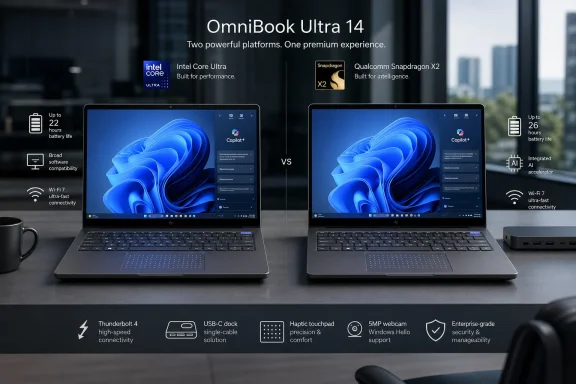 The same OmniBook Ultra name now covers different Windows platforms
HP’s Intel OmniBook Ultra 14-kd0000 series was released in February 2026, according to HP’s own specifications. It is available with the Core Ultra 7 356H, Core Ultra 9 386H, or Core Ultra X9 388H, all of which include Intel AI Boost rated at 50 NPU TOPS. The reviewed Core Ultra 9 model is therefore a legitimate Copilot+ PC-class configuration, rather than an older “AI PC” relabeled for the current Windows feature set.
HP also sells a Snapdragon X2 version under the same OmniBook Ultra 14 banner in some markets. That machine has a similar chassis and can share the 3K OLED and haptic-pad options, yet it is a Windows on Arm PC rather than an x86 Windows PC. It carries different wireless hardware and, depending on the processor, different NPU capability. Buyers who search only for “HP OmniBook Ultra 14” can easily land on reviews of a machine that looks almost identical but runs a fundamentally different platform.
That distinction matters most for people with specialized Windows software, legacy peripherals, endpoint security agents, kernel-level utilities, custom VPN clients, or developer tools. The Intel model avoids the translation layer required by Windows on Arm for traditional x86 and x64 applications. The Snapdragon model can be an excellent battery-life machine, but Tom’s Guide reported that Microsoft Prism emulation does not eliminate every application-compatibility problem, particularly in fleet deployments and niche software environments.
For a single home user, that risk may be manageable. For an administrator purchasing dozens of devices, it is a deployment blocker until the organization has verified its required apps, drivers, management agents, and peripherals on the exact processor architecture being ordered. HP’s naming does not do enough to make that distinction obvious.
The review’s strongest finding is the hardware fit and finish
The reviewed Intel configuration uses a 14-inch, 2,880-by-1,800 OLED touchscreen with a maximum 120Hz refresh rate, 500-nit SDR brightness, and a claimed 1,100-nit HDR peak. HP lists 100% DCI-P3 coverage and Gorilla Glass 3 protection for the panel. Those are premium specifications for a compact Windows notebook, and they matter beyond streaming video: text rendering, scrolling, photo review, presentation work, and Windows touch interaction all benefit from the high-resolution, high-refresh display.
The 5MP IR camera is another genuinely useful inclusion. It supports Windows Hello facial sign-in, and Can Buy or Not found the image quality crisp enough for normal video calls. The physical privacy shutter is a welcome practical control, particularly on a system intended for mobile work. Windows Studio Effects can provide framing and background effects, but Microsoft notes that those effects depend on both compatible NPU hardware and a manufacturer-provided driver; Copilot+ branding alone should not be treated as a guarantee that every AI-enhanced camera feature will behave identically across models.
HP’s haptic touchpad also deserves attention. The feature is increasingly common in high-end laptops, but implementation varies sharply. Can Buy or Not found this one large, natural to click, and usable across its surface, with a physical-feeling response rather than the mushy or overly shallow sensation found on some ultrathin systems. That is the sort of detail a specification sheet cannot communicate and is a meaningful advantage for users who spend long days in Windows productivity apps.
The weak point is the keyboard. A rigid chassis does not automatically produce a firm typing deck. The reviewer noticed flex even under light input, an odd mismatch on a laptop promoted through its premium build. Keyboard preference is personal, but deck movement is not merely aesthetic: it affects perceived quality and can become tiring or distracting during sustained writing and spreadsheet work.
Three Thunderbolt 4 ports are capable, but they are still only three ports
The Intel OmniBook Ultra’s physical I/O is limited to three Thunderbolt 4 ports and a 3.5mm headset jack. It has no built-in USB-A port, HDMI output, Ethernet port, or SD/microSD reader. Thunderbolt 4 gives those USB-C ports considerable flexibility for displays, storage, docks, and charging, but a capable connector is not the same as an adequate number of connectors.
For a desk-based setup, a single Thunderbolt dock can solve most of the problem. For a mobile user who regularly connects a USB-A security key, wired mouse, flash drive, external SSD, card reader, projector, or conference-room display, it means carrying adapters. The omission becomes harder to excuse at the upper end of the range, where HP’s upgrades can push the price well beyond the entry configuration.
This is not a complaint that the machine lacks obsolete ports. USB-A remains common across enterprise accessories, service tools, boot media, and wired input devices; SD readers remain useful for photography and field work. The OmniBook Ultra’s portability is real, but the practical cost of that 7.3mm-to-10.7mm thin profile is accessory dependence.
Copilot+ features require configuration and policy, not faith in the label
HP markets the OmniBook Ultra as a Copilot+ PC, and the Intel model’s 50-TOPS NPU clears the hardware bar for Microsoft’s current on-device AI features. That provides access to capabilities such as Windows Studio Effects, enhanced image features, and Recall on supported Windows 11 builds.
Recall remains the feature administrators should examine rather than casually enable. Microsoft says Recall snapshots and their associated data are stored locally and are not shared with Microsoft or third parties, but the feature still creates a searchable record of work performed on the PC. Organizations need to decide whether that record suits their data-handling rules, shared-device use, administrative-access model, and incident-response process before rolling it out. The presence of a secure biometric camera is helpful, but it does not replace a policy decision.
The better reading of the OmniBook Ultra’s AI pitch is narrower: its hardware should provide a longer support runway for Microsoft’s local AI features than a conventional Windows 11 laptop without a capable NPU. That is useful. It is not, by itself, a reason to accept a weaker keyboard, limited ports, or an unfavorable price.
Battery results are promising, but test methods prevent a simple winner
Can Buy or Not measured 16 hours and 41 minutes in a maximum-brightness video-loop test on the Intel Core Ultra 9 unit with a 70Wh battery. That is an excellent result, especially considering the 3K OLED touch screen and 120Hz capability. It also slightly exceeded the Lenovo Yoga Slim 7i Ultra Aura Edition result cited by the publication under its own testing conditions.
Still, video-loop endurance is not a substitute for a normal workday benchmark. Battery life varies widely with HDR mode, brightness, refresh rate, browser workload, video conferencing, external display use, and whether Windows is syncing cloud files or compiling code. The Intel review unit’s result should be treated as evidence that HP’s power management is competitive, not as a universal promise of 16-plus hours.
HP’s U.S. product page confirms the 70Wh battery and Wi-Fi 7 on the Intel configuration. It also confirms that the base model starts with 16GB of onboard memory. Anyone expecting to buy a cheaper configuration and upgrade memory later should verify the service documentation before ordering; the reviewed 32GB model is the safer choice for virtual machines, heavy browser use, developer workloads, local AI experimentation, and a longer Windows 11 service life.
The HP OmniBook Ultra 14 is a polished premium Windows laptop with a standout display, unusually convincing haptic touchpad, and battery performance that should satisfy most mobile workers. But buyers should order by full model number and processor, budget for a dock if they depend on legacy or removable-media ports, and test corporate software before treating the Snapdragon and Intel versions as interchangeable.
