
The review unit used Intel’s Core Ultra X9 processor with 32GB of integrated memory, Intel Arc B390 graphics, a 2TB SSD, and HP’s 3K OLED touch panel. Engadget found it handled heavy browser multitasking, large photo jobs, and 4K video editing without slowdowns, posting the best PCMark 10 result it had recorded among PCs tested this year. In games, it reported 81 frames per second in Cyberpunk 2077 at 1080p High with Intel XeSS frame generation enabled, while the low ray-tracing preset averaged 45 fps.
That is encouraging news for Windows users who want a thin laptop that can handle creative work without stepping up to a discrete GPU. But the more useful conclusion is narrower: HP’s top-spec OmniBook X is a powerful ultraportable because it is configured like one, and the family name conceals how far the lower-tier models can diverge.
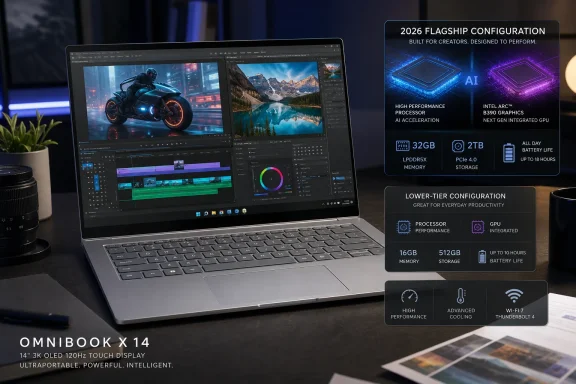 The review unit is HP’s flagship SKU, not a baseline OmniBook X
HP’s own US store identifies the high-end 14-inch model as D9KT9UA#ABA. It pairs a Core Ultra X9 chip with 32GB of memory, a 2TB SSD, Arc B390 integrated graphics, and the 14-inch 3K OLED panel. HP’s support documentation lists the Core Ultra X9 388H as a 16-core part with a 50-TOPS Intel AI Boost NPU; this is not a routine Core Ultra 7 configuration with a better display bolted on.
HP also makes the differences easy to miss. The same OmniBook X 14 series can be configured with Core Ultra 5, Ultra 7, Ultra 9, and Ultra X9 processors, with 16GB, 24GB, or 32GB of LPDDR5x memory depending on the CPU. Graphics are similarly processor-dependent: HP’s top US retail listing explicitly names Arc B390, while lower models can be listed simply as “Intel Graphics.”
That makes the broad takeaway from Engadget’s test—fast performance, credible 1080p gaming, and strong media-work headroom—valid for the X9/B390 class of OmniBook X, but unsafe to apply to every 14-inch model.
Gadgets 360’s separate review makes the split concrete. Its OmniBook X 14 used a Core Ultra 7 356H, 16GB of RAM, and unspecified Intel integrated graphics rather than Arc B390. It recorded a respectable PCMark 10 score of 7,628 and praised the machine’s everyday responsiveness, but it did not present it as a light gaming or 4K-editing powerhouse. The two reviews are not in conflict; they tested materially different hardware sold under the same product name.
For buyers, the processor line in the product configurator is therefore more important than the OmniBook X logo on the lid.
Intel Arc B390 is the reason gaming results look different
The most consequential piece of the Engadget configuration is Intel Arc B390. It is an integrated GPU, meaning it shares the laptop’s system memory rather than using a dedicated pool of GDDR memory as an NVIDIA GeForce RTX or AMD Radeon discrete GPU would. Yet Engadget’s results suggest that Intel’s current high-end integrated graphics can deliver usable 1080p play in appropriately tuned games.
The important qualifier is Intel XeSS frame generation. Frame generation creates interpolated frames to make motion appear smoother and raise the reported frame rate. It can be useful, especially in single-player games, but it is not equivalent to rendering every frame natively. It can increase latency and image artifacts, so it is less compelling in competitive shooters than in slower-paced games.
Engadget’s 81-fps Cyberpunk 2077 result uses precisely that assistance: 1080p, High settings, and XeSS frame generation. Its 45-fps ray-tracing figure is impressive for integrated graphics, but it is also a reminder that ray tracing remains a compromise on this class of hardware. The Arc B390 can make a premium productivity notebook more flexible; it does not turn the OmniBook X into a substitute for a gaming notebook with a GeForce RTX 5060-class GPU or higher.
Still, the shift has practical value beyond games. The same GPU headroom can help with GPU-accelerated video exports, effects previews, image processing, and local AI tasks that can use Intel’s graphics stack. For a Windows user who edits photographs, occasionally cuts 4K footage, and plays Overwatch 2 or Arc Raiders after work, this is a more meaningful hardware balance than the old ultrabook formula of strong CPU cores paired with graphics suitable only for desktop compositing.
The 3K OLED is a productivity upgrade with a battery cost
Engadget singled out HP’s 2,880-by-1,800 OLED touch display as worth paying extra for, citing sharpness, accurate color, strong contrast, and high HDR highlights. HP rates that panel for up to a 120Hz variable refresh rate, 500 nits in SDR mode, 1,100 nits in HDR, and 100 percent DCI-P3 coverage. Those are specifications that matter for photographers, video editors, and anyone spending long days reading text or reviewing visual work.
The display upgrade is not merely cosmetic. A 14-inch 3K panel gives Windows substantially more room for high-DPI work than a 1,920-by-1,200 screen, particularly when scaling is set sensibly. Side-by-side documents, a timeline and preview monitor, or a browser plus communication app all benefit from the extra pixels. OLED’s per-pixel lighting also makes dark interfaces look properly dark, which is welcome in Adobe applications, Resolve, and late-night productivity work.
But a 3K OLED panel consumes more power than a lower-resolution LCD in comparable use, and high refresh rates can add further draw. HP’s headline claim of up to 29 hours is therefore not a useful expectation for the fully configured OLED model used in the review. Engadget measured 18 hours and 25 minutes in PCMark 10’s Modern Office battery test—more than an hour behind the OmniBook Ultra with the same Intel chip, but still an excellent figure for a high-resolution OLED Windows laptop.
The distinction between a vendor’s maximum-life claim and a standardized productivity benchmark matters. HP’s figure likely represents a more favorable configuration and workload. Engadget’s result is the better planning number for office work, though real battery life will fall with HDR video, gaming, 3K native-resolution creative workloads, high brightness, and sustained GPU use.
HP’s pricing makes configuration discipline essential
Engadget reports that moving to the Core Ultra X9 and 32GB configuration adds $1,030 to the OmniBook X, and that HP requires a further $90 screen upgrade for the 3K OLED panel. Those figures make the review configuration hard to treat as an obvious value recommendation, even if its performance is excellent.
The issue is compounded by the memory design. HP lists LPDDR5x memory as onboard across the relevant OmniBook X 14 configurations. In plain terms, the RAM is soldered and cannot be upgraded later. Anyone buying a lower-memory model in the hope of adding capacity after a year or two will not have that option.
That does not automatically mean every buyer needs 32GB. A 16GB model remains suitable for browser-heavy office work, remote administration, Microsoft 365, light development, and ordinary photo editing. But 16GB becomes restrictive more quickly when the machine is expected to run large Lightroom catalogs, local virtual machines, Docker containers, a video editor, or AI tools alongside dozens of browser tabs. The 24GB and 32GB options may have a longer useful life, but HP’s high premium for the X9 platform raises a separate question: whether buyers would get better value from a less glamorous configuration with more storage, a discrete GPU, or a higher-grade business laptop.
HP’s current US retail listing at least confirms that the tested combination is a retail configuration rather than a one-off review build. It also bundles a two-year Care Pack with the top 14-inch X9 model. What HP’s store page does not make clear enough is how much the experience changes between the basic Intel-graphics machines and the B390-equipped flagship.
The basics HP got right are the parts users touch every day
Performance alone does not explain why Engadget’s review is positive. The more durable praise is for the input hardware: a traditional keyboard with useful travel and a haptic touchpad that can register clicks across its surface without a mechanical click mechanism. Gadgets 360 independently praised the keyboard and trackpad on its lower-spec OmniBook X 14, suggesting that those qualities belong to the chassis design rather than only to the X9 edition.
The 5-megapixel webcam also stands out in a Windows laptop category that has too often treated video calls as an afterthought. Engadget found it sharp and colorful in Zoom, while HP specifies an IR camera with HDR switching and temporal noise reduction. Gadgets 360 reported that Windows Hello facial recognition was inconsistent on its review unit, so prospective buyers should regard the webcam quality and the biometric sign-in experience as separate issues.
Audio is the conspicuous weak point. Both Engadget and Gadgets 360 describe the dual downward-firing speakers as adequate rather than premium, with limited depth and bass. That is a manageable flaw for users who live in headsets or dock the laptop at a desk, but it is out of step with the price implied by the X9 and OLED upgrades.
The HP OmniBook X 14 is a strong Windows laptop when purchased in the configuration Engadget tested: Core Ultra X9, 32GB of fixed memory, Arc B390, and the 3K OLED display. The evidence does not support treating it as one uniform product line. Buyers should verify the exact processor, graphics designation, memory capacity, screen, storage, charger, and warranty attached to the SKU in front of them—because the difference between an ordinary premium ultraportable and one of 2026’s most capable integrated-graphics machines is hidden in that configuration line.
