
The operational change is significant, but narrow: Emergency Mode does not repair Windows, decrypt files, restore data, or turn an ordinary Windows PC into a recovery device after an incident begins. It automates the switchover for endpoints that had IGEL OS installed alongside Windows, enrolled in management, licensed, and tested beforehand.
That distinction separates a useful endpoint-continuity control from the broader recovery claims often attached to ransomware products. IGEL’s own documentation describes the product as a way to regain a managed workspace on the same hardware while Windows is unavailable; the company expressly says its BC&DR offering does not recover or fix the Windows environment. The Windows partition is retained, which can preserve evidence, but it also means the organization still owns the hard work of investigation, eradication, rebuilding, and deciding when that Windows install is safe to use again.
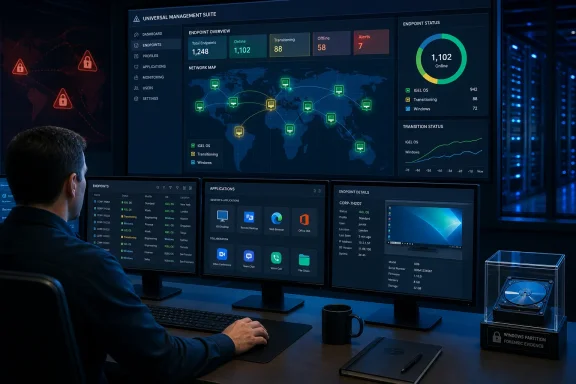 Emergency Mode turns a local boot option into an incident command
IGEL introduced Dual Boot in 2025 as a way to place IGEL OS beside Windows on an endpoint. Before Emergency Mode, a user or technician could select the alternate operating system through the boot menu, a tray application, or a boot-time hotkey. That was useful for individual recovery, but it depended on people making the right choice at a moment when the organization may be responding to a fast-moving incident.
Emergency Mode puts the decision in IGEL Universal Management Suite, or UMS. According to IGEL’s April product blog, administrators can activate recovery across all BC&DR-enabled devices, a selected group, or an individual endpoint. The command tells Windows devices to reboot into IGEL OS, where they remain under the alternate environment rather than returning to Windows on the next restart.
IGEL’s current Dual Boot deployment guide confirms that the Windows installer includes an install service specifically used to switch into and out of Emergency Mode, alongside management-agent services that communicate with UMS. The same guide now includes a Recovery Mode section describing the UMS command, a countdown on the device, and the subsequent boot into IGEL OS. That is stronger evidence of a shipped feature than a marketing announcement alone.
For an incident commander, the practical benefit is centralized endpoint isolation without waiting for a reimage. A hospital can move a ward’s prepared workstations away from Windows; a retailer can target a regional store group; a financial-services team can remove an affected business unit from its normal desktop environment while retaining access to virtual desktops, web applications, communications tools, or other preapproved services.
It also changes the risk profile of the action. Rebooting a broad fleet is disruptive even when it is the right response. Organizations need an approval path, a defined scope, and an understanding of which services users can actually reach from IGEL OS before anyone treats the control as a one-click ransomware response.
The Windows partition is preserved, not made safe
IGEL and Techzine describe Emergency Mode as keeping the Windows partition intact and isolated for forensic and compliance purposes. IGEL’s earlier BC&DR release material similarly said the compromised Windows partition remains untouched, positioning it as evidence for investigation and insurance claims.
That preservation matters. Reimaging a laptop immediately can destroy volatile clues about initial access, persistence, user activity, malware execution, and the scope of an intrusion. Keeping the partition in place can allow an incident-response team to acquire it under controlled conditions rather than forcing a rushed choice between restoring user productivity and keeping evidence.
But isolation is not remediation. A preserved Windows partition may contain ransomware tooling, stolen credentials, persistence mechanisms, or a compromised management agent. It should be handled under the organization’s existing forensic and containment procedures—not casually booted because the user needs a local file or an application that was never made available in the IGEL environment.
The limitation is especially relevant to Windows-heavy organizations with local dependencies. If employees depend on locally installed line-of-business software, locally stored files, hardware drivers, or peripherals that have not been validated under IGEL OS and a remote application platform, Emergency Mode can restore some access while leaving critical work unavailable. The recovery path is most credible where core applications are already reachable through VDI, DaaS, secure browser access, or other centrally delivered services.
IGEL’s wording around exit from the mode also deserves precision. Techzine says endpoints remain in IGEL OS until an administrator manually restores them to Windows. IGEL’s April post says the secure state persists until it is unlocked through UMS, and describes centrally disabling the mode to return devices to standard operation without manual intervention at every endpoint. Those statements are compatible if “manually” means an administrator must make a deliberate release decision—not that staff must physically touch each PC. The vendor’s own documentation supports the latter interpretation: this is intended to be a centrally controlled lock and release process.
The real prerequisite is deployment discipline before an outage
Emergency Mode works only on devices with IGEL OS Dual Boot already installed and licensed. That is not a footnote; it is the central purchasing and architecture constraint.
IGEL’s current documentation lists Windows 11 with EFI boot as a prerequisite for the present Dual Boot installation path. It also requires local administrator rights and at least 36 GB of free space on the Windows system partition: 20 GB reserved for Windows and at least 16 GB for IGEL OS. The installer modifies partitioning, installs an IGEL bootloader, and adds Windows-side services. IGEL strongly recommends backing up the device before installation because those are consequential changes to a production endpoint.
The current guide identifies IGEL OS Dual Boot 2.0.1 or later, the Dual Boot edition of IGEL OS 12.10.0 or later, and UMS 12.13.100 or later as the documented baseline. IT teams should treat those numbers as a deployment checklist, not assume that any older IGEL installation will receive Emergency Mode merely because it can boot IGEL OS manually.
Mass deployment is possible through Microsoft Intune or Configuration Manager using the MSI or executable installer, according to IGEL’s deployment instructions. But deployment is not the same as readiness. The vendor recommends booting, updating, and periodically testing IGEL OS as part of the BC&DR plan. That advice is sound: the time to discover that Wi-Fi profiles, certificates, VPN access, MFA flows, virtual-desktop clients, smart-card middleware, printers, scanners, or USB redirection do not work is not during a ransomware response.
There is another architecture point that deserves attention. UMS is the command plane for Emergency Mode, and the endpoint’s management components are designed to maintain or re-establish their connection to it. An endpoint that is powered off, disconnected from the network, unable to resolve or reach UMS, or never registered cannot receive a central reboot command at that moment. A recovery design therefore needs a reachable, protected management plane—including its DNS, identity, certificates, network paths, and administrative access—rather than treating UMS as infrastructure that can be rebuilt later.
IGEL’s guide says a dedicated BC&DR UMS is the typical and recommended deployment, instead of the regular production UMS. That is a notable design signal. If the production endpoint-management environment is part of the same outage or identity compromise, a separate recovery control plane can be more valuable than another service inside the affected administrative domain.
Licensing sets a hard boundary on extended disruption
IGEL’s BC&DR edition supports both Dual Boot and USB Boot. The USB route, based on the company’s UD Pocket subscription, can be useful for machines that were not partitioned in advance, although it brings an obvious logistics problem: the recovery media must be distributed, secured, compatible with the hardware, and available where employees are working.
For Dual Boot customers, IGEL lists two BC&DR license types. The 45 Day Emergency License permits up to 45 days of use in a calendar year, while the Unlimited License removes that annual-use ceiling. That is a material condition absent from the basic “reboot, reconnect, resume” framing.
A 45-day allocation may be appropriate for a short crisis, tabletop exercises, or a controlled recovery period. It is less reassuring for organizations that expect a prolonged Windows rebuild, repeated outages, or several regional incidents in the same year. Procurement and resilience teams should determine which license they own, how IGEL measures use during recovery, and whether test exercises consume the same allocation before approving Emergency Mode as a core continuity measure.
IGEL has not published pricing for Emergency Mode or the BC&DR licensing options in the materials reviewed, so prospective customers cannot yet assess the per-device cost against alternatives such as spare endpoint pools, managed VDI capacity, bootable recovery media, or a broader migration to cloud PCs.
What administrators should validate now
Emergency Mode gives incident-response teams a genuine new control: the ability to force a prepared Windows estate into a known alternate endpoint OS from a central console. For organizations with a remote-workspace model and disciplined endpoint preparation, that can reduce the time between deciding to isolate Windows and giving users a usable route back to critical systems.
Before adding it to a ransomware playbook, administrators should verify four things:
- The targeted Windows 11 devices meet the EFI, free-space, Dual Boot, IGEL OS, UMS, and licensing requirements documented by IGEL.
- The alternate IGEL OS workspace has been tested with the organization’s authentication, network, VDI or DaaS, browser, collaboration, peripheral, and accessibility requirements.
- The BC&DR UMS environment remains reachable and administratively secure during the kinds of incidents that would take Windows endpoints offline.
- The incident plan defines who can trigger fleet-wide recovery, how groups are selected, how Windows evidence is acquired, and who authorizes the centralized release back to Windows.
Emergency Mode is most valuable before a disaster because its essential work happens before the emergency command is ever sent. Organizations that have already made endpoint continuity part of their architecture gain a faster switch; organizations that have not will still be building the recovery path while their users wait.
