

The timing also deserves a correction. Inavate’s August 11 report describes the iSwitch 402UC-L as a new launch, but Infobit’s own product downloads are dated July 6, 2026, and AVClub reported the model on July 8. The evidence supports treating the August coverage as a wider-market announcement or renewed promotion, rather than the product’s first public appearance.
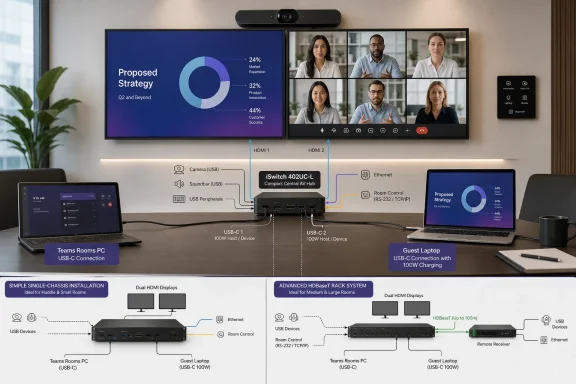
For IT and AV teams, the practical question is straightforward: can a room PC remain the normal Teams Rooms host while a visitor takes over the display and room USB devices for a BYOD or BYOM session? The 402UC-L is designed to do precisely that, with two HDMI inputs and two full-function USB-C inputs feeding two HDMI outputs and four shared USB 3.2 device ports.
A local-room design, with no HDBaseT receiver requirement
The “L” in iSwitch 402UC-L stands for local. AVClub’s July report identifies the hardware as a one-box architecture: sources, displays, room peripherals, and control connections attach directly to the switcher rather than relying on a transmitter-and-receiver pair linked over category cable.
That differentiates it sharply from Infobit’s older iSwitch 402UC. The earlier model is a 4K60 unit built around an HDBaseT 3.0 transmission design, with a separate receiver available for extending video, USB, audio, and control signals to a remote endpoint. Its documentation also specifies Dante audio networking. The 402UC-L product specifications instead describe local HDMI outputs, local USB device connections, balanced analog audio output, and no Dante or HDBaseT interface.
That is a meaningful trade-off rather than a missing bullet point. The older 402UC can suit larger rooms where the display wall or conferencing devices sit tens of meters from the equipment rack. The 402UC-L is for rooms where the rack, displays, and table-box connections are close enough to cable directly. Eliminating the receiver and HDBaseT leg can simplify deployment, reduce commissioning work, and remove a potential troubleshooting point — but it also means the new model should not be assumed to replace an existing long-distance 402UC installation one-for-one.
Infobit has not published a list price or regional availability details for the 402UC-L. Buyers will need to obtain those from distributors, and they should confirm cable-length requirements before treating the local model as an upgrade path from an HDBaseT-based room.
The useful feature is USB switching, not merely video switching
Many HDMI switchers can put a guest laptop on a display. That alone does not create a workable hybrid meeting room. The recurring failure point is the room’s USB hardware: the camera, speakerphone, audio bar, touch controller-adjacent peripherals, or capture devices remain attached to the installed Teams Rooms PC while the guest laptop owns the screen.
The iSwitch 402UC-L addresses that problem with four USB 3.2 device ports that can be assigned to whichever connected host is active. In a typical deployment, one host is the permanently installed Windows room PC and the other is a visiting Windows or macOS laptop. The switcher can move the room camera and audio hardware between them, allowing the guest to run a meeting from their own collaboration client while using the room’s installed AV equipment.
Infobit says video and USB routing can be controlled independently. That deserves attention during system design because it makes a few room behaviors possible that are often awkward with simpler switchers. A room can keep the installed PC’s USB connection to the camera and speakerphone while showing a guest HDMI source on a display, for example. Conversely, a support or presentation workflow can direct peripherals to a selected laptop without necessarily changing the displayed source.
The flexibility is real, but it raises an operational requirement: AV integrators need to define the expected routing states and make the control interface understandable. Independent USB and video switching is powerful when exposed through a properly labeled touch panel or automation sequence. It can become a help-desk problem if a user sees their laptop on the room display but cannot tell why Teams, Zoom, or Webex has not discovered the camera.
The device supports automatic switching and source-priority rules in addition to manual operation. Automatic switching is convenient for small rooms, but priority behavior should be configured deliberately. In a room with a fixed Teams Rooms PC, an incoming guest USB-C connection could otherwise take control at a moment when the installed system is expected to remain active.
“4K60” is accurate, but the 5K headline has limits
Infobit markets the unit as a “4K60” switcher with support for wider resolutions up to 5120×2160 at 30 Hz and 5120×1440 at 60 Hz. Those figures are useful for modern 21:9 and 32:9 displays, particularly in executive rooms and spaces using ultrawide panels for side-by-side presentation and participant layouts.
But the product name should not be read as a blanket promise of 5K at 60 Hz. The published ceiling is 5120×2160 at 30 Hz, while 60 Hz is available at the shorter 5120×1440 ultrawide format. This makes the 402UC-L a better fit for 5K-class ultrawide collaboration displays than for high-refresh 5K desktop-style panels.
That distinction matters for Windows users bringing premium laptops into a room. A laptop may be able to drive an external ultrawide monitor directly, yet still negotiate a different result through the switcher depending on its USB-C DisplayPort Alternate Mode capabilities, graphics driver, USB-C cable, display EDID, and enabled display topology. The switcher’s stated maximum should be treated as the room infrastructure limit, not as a guarantee that every laptop will deliver that mode.
Infobit’s most interesting video feature is Multi-Stream Transport, or MST, on one of the two USB-C inputs. A compatible laptop can send two independent display streams over one USB-C cable, supporting a dual-screen room layout where the presentation occupies one screen and remote participants occupy the other.
For Windows deployments, that can reduce table clutter substantially: one USB-C cable can provide display output, USB peripheral access, Ethernet bridging, and charging. However, the MST capability is limited to one USB-C input, so installations need to label the correct connection clearly. A guest who plugs into the other USB-C input should not expect the same dual-display behavior.
MST also depends on the source device. Windows laptops with appropriate USB-C or Thunderbolt implementations are the natural target, but organizations should test their standard laptop models rather than assume every USB-C port supports the required DisplayPort capabilities. USB-C remains a connector shape, not a complete feature guarantee.
Power, Ethernet, and room control make it an infrastructure device
Both USB-C inputs carry video and USB data, provide USB-to-Ethernet bridging, and support power delivery. Infobit rates the charging capability at up to 100 W, an increase over the 60 W rating on the older iSwitch 402UC. That gives the 402UC-L a better chance of keeping performance-oriented Windows laptops charged during a meeting, although a 100 W ceiling will still be below the full adapter rating for some mobile workstations and gaming-class systems.
The published specifications also show a dedicated USB charging port at the conference-table interface. It is a small feature, but it separates phone or accessory charging from the ports needed for meeting participation and may prevent users from treating a critical USB-C presentation connection as a general-purpose power outlet.
On the network side, Infobit lists two independent RJ-45 connections and support for HTTP/HTTPS management plus 802.1X authentication. AVClub describes the pair as a way to separate corporate and visitor networks physically. The hardware can support a sensible room-networking model, but it does not eliminate the need for policy work: USB Ethernet bridging places a guest endpoint onto whatever network is presented at that port, and switch configuration, network access control, and VLAN design still determine what that guest can reach.
The control connections are equally significant for installed rooms. RS-232, GPIO, relay, and occupancy-sensor interfaces let the 402UC-L participate in a larger control system that can wake displays, select sources, trigger room states, or react to occupancy. Those interfaces put the device beyond the category of a desktop HDMI switch. It is intended to sit in a managed meeting-room design with a control processor or automation logic.
The right target is a nearby dual-display BYOM room
The iSwitch 402UC-L looks most compelling in a small or medium dual-display room that already has a Windows-based Teams Rooms host but needs reliable guest-laptop access to the installed camera and audio system. Its one-cable USB-C proposition can provide power, display connectivity, network access, and shared USB peripherals while preserving a dedicated room PC as the default host.
It is less compelling where displays and peripherals require HDBaseT-distance extension, where Dante audio is a requirement, or where an organization needs a published certification statement rather than vendor-stated compatibility with Teams Rooms, Zoom, and Webex. Infobit has positioned the device for those platforms, but its published material does not establish that the switcher itself is a Microsoft Teams Rooms-certified accessory.
The concrete deployment consequence is clear: the 402UC-L can remove the physical cable-swapping ritual from a hybrid room, but it must be specified as a local AV hub and tested as part of the organization’s actual Windows laptop, room-PC, USB peripheral, and network-access stack.