
How-To Geek’s ranking of computing’s five worst CPUs puts Intel’s 13th- and 14th-generation Core i9 instability crisis beside older architectural blunders such as Itanium, Prescott, the Pentium FDIV bug, and AMD’s FX-8150. For Windows desktop owners, one entry is not history: Intel still advises affected systems to install a current motherboard BIOS with Microcode 0x12F or later and use Intel Default Settings.
The list, published July 28 by How-To Geek, is necessarily subjective, but its selection of the Core i9-13900K and Core i9-14900K identifies a failure with consequences beyond poor benchmark results. Intel’s Vmin Shift issue could manifest as game crashes, application failures, and system instability; in some cases, the degradation was permanent rather than a fault Windows could repair with an update.
Intel’s support guidance, reviewed July 21, 2026, says eligible affected processors receive two additional years of warranty coverage, for up to five years from the original purchase date. That is an important distinction for anyone still operating an LGA1700 desktop: a BIOS update is preventative, not a restoration tool for a processor already damaged by instability.
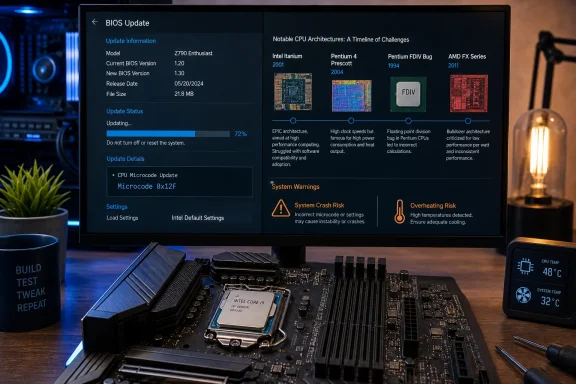
The practical response is to identify the exact CPU and motherboard model, then download the newest BIOS directly from the PC or motherboard manufacturer. Intel specifically calls for its default power settings and a BIOS carrying Microcode 0x12F or newer.
Intel’s earlier technical explanation traced the problem to several contributing operating scenarios, including motherboard power configurations outside Intel guidance and microcode behavior that could request excessive voltage. The company issued successive mitigations—0x125 in June 2024, 0x129 in August 2024, and 0x12B later that year—before 0x12F became the current requirement.
Users with a Core i9-13900K, Core i9-14900K, or another eligible 13th- or 14th-generation desktop model should not assume a stable PC is already protected. Check the motherboard vendor’s BIOS release notes for the installed microcode revision, and pursue warranty service if crashes persist at stock settings after updating.
Intel Itanium was technically ambitious but commercially undermined by its break with the established x86 software ecosystem. AMD’s 2003 AMD64 approach extended x86 while preserving compatibility, and it ultimately became the foundation of the 64-bit Windows PC platform.
Pentium 4 Prescott illustrates the limits of chasing frequency. Intel’s NetBurst design ran into power and thermal constraints, and the company cancelled the planned Tejas follow-up in May 2004 as it moved toward dual-core designs. The shift eventually helped clear the path to the far more efficient Core architecture.
The 1994 Pentium FDIV bug remains the classic trust failure: incorrect floating-point division results led Intel to implement a broad replacement program that cost roughly $475 million. Unlike the modern Core instability problem, it was a correctness flaw in a processor that was otherwise competitive.
AMD’s FX-8150, meanwhile, was hurt by Bulldozer’s module design. It exposed eight integer cores but shared key resources within pairs, including front-end and floating-point hardware, leaving it weak in many everyday and gaming workloads against cheaper contemporary Intel chips and, in some cases, AMD’s older Phenom II processors.
The Core i9 episode belongs on any list of notorious CPUs because it combined performance-class pricing with a reliability remediation that reached into firmware, motherboard policy, and warranty administration. For affected Windows PCs still in service, the historical debate can wait: verify the BIOS and microcode now.
The list, published July 28 by How-To Geek, is necessarily subjective, but its selection of the Core i9-13900K and Core i9-14900K identifies a failure with consequences beyond poor benchmark results. Intel’s Vmin Shift issue could manifest as game crashes, application failures, and system instability; in some cases, the degradation was permanent rather than a fault Windows could repair with an update.
Intel’s support guidance, reviewed July 21, 2026, says eligible affected processors receive two additional years of warranty coverage, for up to five years from the original purchase date. That is an important distinction for anyone still operating an LGA1700 desktop: a BIOS update is preventative, not a restoration tool for a processor already damaged by instability.
The current action is BIOS, not Windows Update
The practical response is to identify the exact CPU and motherboard model, then download the newest BIOS directly from the PC or motherboard manufacturer. Intel specifically calls for its default power settings and a BIOS carrying Microcode 0x12F or newer.Intel’s earlier technical explanation traced the problem to several contributing operating scenarios, including motherboard power configurations outside Intel guidance and microcode behavior that could request excessive voltage. The company issued successive mitigations—0x125 in June 2024, 0x129 in August 2024, and 0x12B later that year—before 0x12F became the current requirement.
Users with a Core i9-13900K, Core i9-14900K, or another eligible 13th- or 14th-generation desktop model should not assume a stable PC is already protected. Check the motherboard vendor’s BIOS release notes for the installed microcode revision, and pursue warranty service if crashes persist at stock settings after updating.
The older picks show different ways a CPU can fail
The other four entries make the list less about a single vendor and more about recurring processor-industry mistakes.Intel Itanium was technically ambitious but commercially undermined by its break with the established x86 software ecosystem. AMD’s 2003 AMD64 approach extended x86 while preserving compatibility, and it ultimately became the foundation of the 64-bit Windows PC platform.
Pentium 4 Prescott illustrates the limits of chasing frequency. Intel’s NetBurst design ran into power and thermal constraints, and the company cancelled the planned Tejas follow-up in May 2004 as it moved toward dual-core designs. The shift eventually helped clear the path to the far more efficient Core architecture.
The 1994 Pentium FDIV bug remains the classic trust failure: incorrect floating-point division results led Intel to implement a broad replacement program that cost roughly $475 million. Unlike the modern Core instability problem, it was a correctness flaw in a processor that was otherwise competitive.
AMD’s FX-8150, meanwhile, was hurt by Bulldozer’s module design. It exposed eight integer cores but shared key resources within pairs, including front-end and floating-point hardware, leaving it weak in many everyday and gaming workloads against cheaper contemporary Intel chips and, in some cases, AMD’s older Phenom II processors.
The Core i9 episode belongs on any list of notorious CPUs because it combined performance-class pricing with a reliability remediation that reached into firmware, motherboard policy, and warranty administration. For affected Windows PCs still in service, the historical debate can wait: verify the BIOS and microcode now.
References
- Primary source: How-To Geek
Published: 2026-07-28T12:30:13+00:00
These are the 5 worst CPUs of all time, ranked
5 times Intel and AMD completely failed us
www.howtogeek.com