
For help desks, that makes Remote Help viable for a narrower but important set of machines: kiosk systems, digital signage, shared workstations, lab devices, front-desk terminals, and PCs that need repair outside working hours. It does not turn Remote Help into a general-purpose tool for silently taking over an employee’s active desktop session. Microsoft’s documentation frames it as remote sign-in to a targeted corporate device, with its own deployment path, permissions, infrastructure dependencies, and hardware restrictions.
The practical result is useful, but organizations should treat this as a new privileged-access service rather than simply enabling another checkbox in their existing Help Desk Operator role.
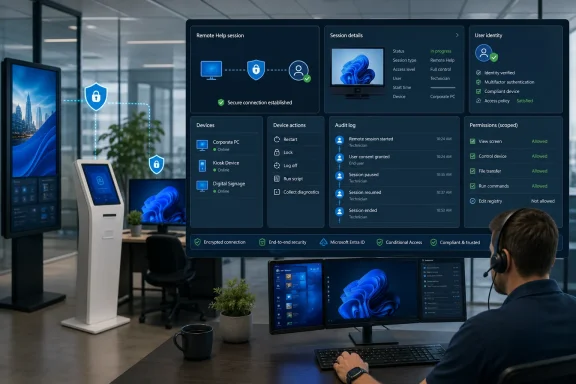 Windows unattended control is separate from ordinary Remote Help
The critical change is that Remote Help now supports an unattended session on a physical Windows device without requiring a “sharer” — Microsoft’s term for the person receiving assistance — to sign in and grant access. Microsoft says the helper remotely signs in with credentials to which they have access.
That differs sharply from the normal Windows Remote Help flow. In attended support, an employee receives a request, accepts the connection, and can grant view-only access, full control, or allow the technician to interact with User Account Control elevation prompts. Those consent-based sessions remain the appropriate method for troubleshooting a user’s live Windows session.
The new remote sign-in workflow has a deliberate operational consequence: it is designed for a device that has no active user needing support. MSEndpointMgr, which examined the feature before its release, reported that a helper does not inherit or shadow the logged-in user’s session. Instead, a helper signs in separately and the existing user is signed out. That makes the feature poorly suited to discreet troubleshooting while an employee is working, but highly suited to machines intended to be idle, shared, or userless.
Microsoft’s own support matrix reinforces that boundary. Unattended support is limited to physical, corporate-owned, Intune-managed Windows PCs running x64 Windows. The devices must be Microsoft Entra joined or hybrid joined. Windows 365 Cloud PCs, Azure Virtual Desktop sessions, other virtual machines, personally owned PCs, unenrolled devices, and ARM64 Windows hardware are excluded from unattended support even where some can still use attended Remote Help.
That scope is much narrower than a headline about “unattended Windows devices” suggests. Before investing time in a pilot, administrators should inventory their targets by ownership, Entra join state, processor architecture, and whether the device is actually a physical endpoint.
A custom Intune role is mandatory by design
Microsoft did not add the new capability to the built-in Help Desk Operator role. Instead, it introduced a dedicated permission named Remote Help app – Windows unattended control remote sign-in, which administrators must explicitly add to a custom Intune role and scope to a specific device group.
This is more than a cosmetic RBAC change. The existing Help Desk Operator role already includes permissions for normal Remote Help tasks, including viewing a screen, taking full control, handling elevation, and Android unattended control. It does not include Windows unattended remote sign-in. Microsoft’s planning documentation says a helper also needs the Remote Tasks – Offer remote assistance permission and Remote Assistance Connector – Read, plus at least one applicable Remote Help permission.
That separation provides a useful guardrail: an organization can retain ordinary remote-assistance privileges for first-line support while limiting unattended sign-in to a small group of senior desktop engineers, field-service staff, or a tightly managed after-hours operations team. It also prevents a broad role assignment from accidentally granting staff the ability to initiate a Windows logon session on unattended endpoints.
The feature’s security model depends heavily on scope groups. A technician’s role assignment must cover the device they are trying to reach; Microsoft’s documentation is explicit that a helper cannot provide assistance outside their assigned scope. The right operational model is therefore not “give the help desk unattended access,” but “grant a specific support group access to a defined fleet of eligible devices.”
For a kiosk estate, that might mean one role for retail-floor systems and another for warehouse displays. For a school district, it could mean separate assignments for testing labs and classroom presentation machines. Scoping by function and location is more defensible than handing a single central IT group access to every device in Intune.
The hidden dependency is Azure Virtual Desktop software
The most consequential implementation detail is not in the Remote Help client itself. Microsoft requires two Azure Virtual Desktop components on every Windows endpoint intended for unattended support: the Azure Virtual Desktop Agent and the Azure Virtual Desktop Agent Bootloader.
The requirement is unusual because the target device is not necessarily an Azure Virtual Desktop session host. Microsoft is reusing the Azure Virtual Desktop agent stack as the plumbing for Remote Help’s Windows remote-sign-in flow. IT-Connect independently highlighted that dependency in its review of the release, describing it as Microsoft using Azure Virtual Desktop components to establish the remote session.
Deployment order matters. The Azure Virtual Desktop Agent must be installed first, followed by the Bootloader, because the latter depends on the former. Microsoft recommends packaging each as a separate Win32 app in Intune and configuring the Bootloader app with a dependency on the Agent. Installing them manually may be acceptable for a lab, but it is not a credible production deployment method for hundreds or thousands of endpoints.
There is another management consequence: Microsoft says the Azure Virtual Desktop Agent self-updates when a newer version is available, and administrators cannot manage or control that update process. That introduces a separate change channel into devices that may otherwise be governed by carefully staged Windows and app-update rings.
Organizations with strict change-control procedures should account for that before enabling the feature on operational technology-adjacent PCs, clinical kiosks, retail terminals, or other systems where an unexpected agent update can become an incident. The agent’s automatic update behavior does not make the feature unsafe, but it means the Remote Help rollout belongs in the same review conversation as endpoint-management exceptions and third-party remote-access tooling.
Network, device and tenant boundaries will decide whether it works
Unattended Remote Help needs more than an installed client and a role assignment. The target must be powered on, online, and running the Intune Management Extension so it can receive Remote Help notifications and requests. Microsoft recommends keeping both Windows and the Intune Management Extension current for reliability.
Network teams also need to pay attention. Standard Remote Help traffic uses outbound TCP 443 and Microsoft’s Remote Assistance infrastructure, but Windows remote sign-in adds Azure Virtual Desktop session-host endpoint dependencies. A firewall or proxy configuration that supported attended Remote Help may therefore still prevent unattended sessions from connecting.
Microsoft specifically warns that SSL inspection can interfere with Remote Help, and its endpoint guidance lists a distinct set of Azure Virtual Desktop dependencies for Windows unattended access. This should be tested from the actual network segments where unattended devices reside — not merely from an administrator’s corporate laptop. Retail, manufacturing, branch-office, guest, and segmented operational networks often have different proxy rules and egress controls.
Tenant boundaries matter too. Remote Help requires the helper, device, and organization identity context to be in the same Microsoft Entra tenant. That limitation can complicate outsourced desktop support, managed service providers, and organizations operating through multiple tenants after acquisitions. Microsoft suggests that organizations needing cross-organization support may have to issue help-desk staff accounts or devices in the customer tenant rather than assume a technician’s home-tenant identity will work.
Government environments have an additional concern. Microsoft says Remote Help is unavailable in GCC High and Department of Defense tenants, while GCC support has reduced Azure Virtual Desktop availability. Since the Windows unattended workflow relies on Azure Virtual Desktop agents and endpoints, government customers should validate the exact service combination with Microsoft before treating this announcement as an available option.
Auditability exists, but the access model still needs governance
Microsoft presents the feature as having session isolation, user awareness, and session records. IT-Connect reports that Intune records active Remote Help sessions and session history, including whether a session was attended or unattended, and that unattended sessions end automatically after 12 hours.
Those controls are valuable, but they are not a substitute for administrative process. A Remote Help record can establish that a technician connected; it does not by itself answer whether the connection was authorized, why it was needed, what account was used to sign in, or whether the target device contained sensitive data.
A sensible rollout should include:
- Limit the custom Windows unattended remote-sign-in permission to a small, named support group and narrowly scoped device groups.
- Require strong authentication and compliant administrator devices through Microsoft Entra Conditional Access, which Microsoft supports for Remote Help on Windows and macOS.
- Use just-in-time group membership or a controlled approval process for after-hours support instead of permanent access where the workflow allows it.
- Review Remote Help session history alongside ticket records, privileged-account logs, and device-management audit events.
- Document that unattended remote sign-in is for userless or idle devices, not for taking over an employee’s active session.
Licensing should also be checked before deployment. Microsoft’s current Remote Help planning guidance says a Remote Help license is required for everyone targeted to use the service, including both helpers and sharers. In an unattended scenario there may be no human sharer at the time of connection, but organizations should not assume that removes the need to license the managed targets covered by the service.
Microsoft has finally filled a meaningful gap for organizations that wanted Intune-native remote assistance for unattended Windows hardware. But the implementation makes clear where the product is headed: this is controlled, auditable remote sign-in for a curated fleet of corporate endpoints, not unrestricted remote-control software for every Windows PC in the tenant.