
 Overview: A Refinement Release for Apple’s Most Consequential AI Bet
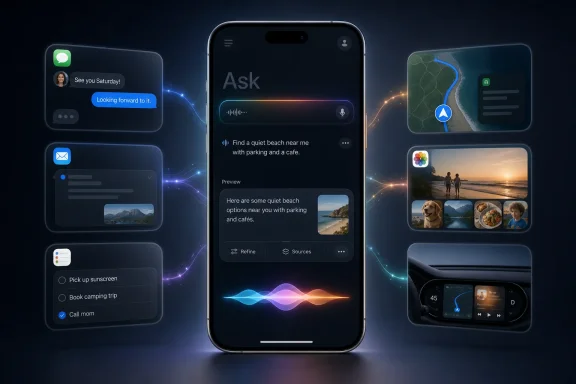
iOS 27 is Apple’s long-awaited attempt to transform Siri from a mostly command-oriented voice assistant into a context-aware, conversational AI layer. Siri AI is built to understand follow-up requests, use information contained in apps such as Mail, Messages, Photos, Notes, and Calendar, recognize what is currently on screen, and take actions across apps. Apple’s announced Siri AI capabilities describe a system positioned as a foundational change rather than an incremental upgrade.
That ambition makes the smaller adjustments in Developer Beta 4 more meaningful than they might appear in a typical mid-summer beta. Siri’s usefulness will not be measured solely by whether it can generate a clever answer. It will be measured by whether people can discover its features, understand what it heard, control its tone, trust it with personal context, and recover gracefully when it does not understand a request.
Beta 4 concentrates on those fundamentals. Its most visible additions are:
- A new introductory or “splash” screen for the Siri Search or Ask interface.
- More flexible controls over the amount of content shown in Siri app previews.
- An accessibility option to keep Siri request transcriptions visible.
- Updated voice-selection UI and an expanded path toward voice customization.
- Fixes for a long list of Siri bugs involving contacts, reminders, messages, Maps, CarPlay, email, search, and app intents.
- Continued work on the Siri app, Dynamic Island integration, Visual Intelligence, and Apple Intelligence features that surround the assistant. 9to5Mac’s iOS 27 Beta 4 coverage and Apple’s iOS 27 release notes outline the broader direction.
For Windows users watching the AI assistant race, the story is particularly instructive. Microsoft has spent years integrating Copilot across Windows, Edge, Microsoft 365, and enterprise services. Apple is pursuing a different but overlapping route: make the assistant a personal operating-system interface that can locate a reservation in an email, identify a detail in a message thread, understand an image on screen, and carry context between devices.
The technology is not new in concept. The difference is Apple’s intention to make it feel native, private, and ordinary enough that people will use it every day.
Siri AI Is Becoming a Product, Not Just a Feature
For years, Siri was something users summoned to set a timer, send a text, call a contact, or ask a quick question. That model still matters, but iOS 27 reframes the assistant as a destination in its own right.
Apple has added a dedicated Siri app intended to keep conversations available across devices, rather than treating each spoken request as a disposable interaction. Siri responses can also surface through the Dynamic Island on iPhone, allowing a brief answer to remain lightweight while still offering an expandable conversation view. 9to5Mac’s feature rundown describes how the Dynamic Island and standalone app are meant to work together.
That productization matters because it addresses one of the biggest weaknesses of traditional voice assistants: poor conversational continuity. A user might ask a smart speaker a question, receive a short response, and then have to restate the entire topic to ask a follow-up. Apple’s new design aims to make the thread visible and persistent.
Preview-length controls make conversation history more manageable
Developer Beta 4 adds a setting for controlling the amount of text shown in Siri app previews. Users can choose no preview text or increase the display to as many as five lines. MacRumors reports that the option appears in the Siri settings section.
This sounds minor, but it is a smart acknowledgement that AI assistants increasingly create a record of interaction. A Siri request can now be more than “set an alarm for 7 a.m.” It might include travel details, a summary request, a work reminder, or a question whose answer exposes sensitive personal context.
The ability to reduce or eliminate preview text is therefore more than cosmetic. It offers a modest privacy safeguard on a phone screen that might be visible to colleagues, family members, or anyone glancing over a shoulder.
Apple should take the idea further before the public release. The most useful extension would be per-conversation privacy settings: an easy way to hide a single sensitive chat, expire a thread automatically, or prevent certain categories of requests from appearing in history at all.
Always Show Request is an accessibility feature—and a trust feature
Beta 4 also introduces an “Always Show Request” toggle under Accessibility. When enabled, it displays a transcription of what a user said to Siri. MacRumors’ Beta 4 report identifies the setting as one of the release’s Siri-focused interface changes.
The immediate value is accessibility. People who are deaf, hard of hearing, have speech differences, or simply want a visible confirmation can see precisely how the assistant parsed a spoken request.
But the broader value is trust. Voice assistants fail in frustrating ways when they misunderstand a name, a date, a location, or an instruction—and then act on that misunderstanding. Showing the transcription turns an opaque speech-recognition process into a visible, correctable one.
That is a principle Microsoft and other AI platform vendors should take seriously. As AI systems move from answering questions to performing tasks, the UI must show users what the machine thinks they asked for before an irreversible action occurs.
A Better On-Ramp for Siri Search or Ask
Apple is also adding a new explainer screen when users pull down into the Siri Search or Ask interface. MacRumors reports that the new screen is designed to introduce the feature rather than leave users to discover it unaided.
This addresses a common problem in operating-system AI: hidden power. The best contextual assistant features can go unused if people do not know they exist or do not understand how to phrase a request.
A user may know Siri can set a timer. They may not realize it can potentially answer questions such as:
- “What was the confirmation number for my flight?”
- “What restaurant did my friend recommend last week?”
- “Show me the photos from that concert.”
- “What do I need to do tomorrow?”
- “Find the address I was sent for tonight’s meeting.”
Those examples reflect the personal-context understanding Apple has described for Siri AI, where an Apple Intelligence semantic index can search across emails, messages, files, photos, notes, and other on-device information. MacRumors’ Siri AI guide details the kinds of contextual requests Apple is targeting.
The new onboarding screen is not merely a tutorial. It is a recognition that generative AI requires a different mental model from conventional mobile UI. Users need to understand that the search box is not just another keyword field; it is a conversational interface capable of interpreting intent.
The design challenge: powerful without being intimidating
Apple’s greatest UX challenge is to avoid turning Siri into a feature that feels either mysterious or overwhelming. Too much prompting can make the interface look like a chatbot product demo. Too little guidance means users fall back on old habits and never test the new system.
Beta 4’s approach appears restrained. A short explanation at the point of use is preferable to an intrusive setup wizard or a screen full of sample prompts.
Still, Apple has an opportunity to make these prompts context-sensitive. If a user opens Mail, Siri could suggest safe, practical tasks such as finding a tracking number or locating an appointment. In Photos, it could highlight natural-language image search. In Maps, it could surface trip-planning queries. The key is to demonstrate utility without pressuring users to surrender more data or use AI for its own sake.
Siri’s Voice Is Finally Being Treated as a Real Interface Decision
The Siri experience is defined not only by what the assistant knows, but also by how it responds. Apple has adjusted the Siri Voice selection interface in Beta 4, showing a more modern voice-and-accent presentation even on devices that cannot yet use fully customizable voices. MacRumors’ hands-on coverage notes that Apple is signaling additional voice options are coming.
The customizable Siri voice option is currently limited to the iPhone 17 Pro, iPhone 17 Pro Max, and iPhone Air, according to that report. That limitation makes clear that, like many Apple Intelligence experiences, the highest-end personalization features have hardware prerequisites.
Apple has also added controls for pace and expressivity in Siri’s voice settings. Those controls affect spoken output in Maps and Safari as well as Siri itself. 9to5Mac reports that the adjustments are available under Settings > Siri > Voice.
This is more consequential than it sounds. A voice assistant with a fixed cadence can quickly become tiring, especially during navigation, long responses, or accessibility use. Faster delivery can be efficient for an experienced user; slower, more expressive delivery can make information easier to process.
Personalization must not become fragmentation
There is a risk, however, in splitting basic voice customization into device tiers. An assistant’s voice is not simply a flashy AI effect. It is an accessibility and usability preference.
Apple can reasonably reserve advanced generative voice models for newer hardware. But essential controls—speed, clarity, language, voice selection, and the ability to reduce overly expressive delivery—should remain broadly available. The release notes already acknowledge a Beta 4 issue where the new American English Siri voices 6 and 7 can revert to legacy U.S. voices under low-power or high-temperature conditions. Apple’s iOS 27 release notes list that limitation and suggest disabling Low Power Mode or allowing the device to cool.
That caveat highlights an important reality: AI features remain dependent on hardware conditions. Users will not distinguish between a model limitation, a thermal safeguard, or a voice-selection bug. They will simply experience Siri as inconsistent.
The Most Important Beta 4 Changes May Be the Bugs Apple Fixed
The public-facing UI changes are welcome, but the most reassuring part of iOS 27 Developer Beta 4 is Apple’s extensive list of resolved Siri issues. The fixes show both the complexity of Siri AI and the breadth of situations in which an error can have real consequences.
Apple says Beta 4 addresses problems including:
- Siri drafting a message to an unrelated contact when the requested contact did not exist.
- Failures or ambiguity when placing calls, sending messages, or emailing people with similar names.
- Siri failing to create recurring reminders or update existing reminders to repeat.
- Search results from third-party apps that could not be tapped.
- A message confirmation flow where tapping Send could fail to deliver the message.
- Maps and CarPlay navigation failures.
- Siri errors when composing an email if Mail was not already open in the background.
- Siri conversations disappearing minutes after streaming responses arrived.
- Several failures related to app intents, app-specific contacts, phone numbers, URL opening, and reminder lists. Apple’s official release notes provide the detailed list.
Some of these are ordinary beta defects. Others expose the high stakes of granting a conversational system deep access to personal data and app actions.
Contact resolution is not a trivial edge case
The issue where Siri could choose the wrong contact is especially important. Apple’s notes say the assistant could struggle where multiple contacts shared a name, group names contained emoji or special characters, or relationship labels such as “my brother” were ambiguous. In some cases, Siri might pick the wrong person, fail to show a disambiguation prompt, or freeze. Apple’s release notes
That is exactly the kind of error that damages user confidence. Sending the wrong message is not merely a failed automation. It can reveal private information, create embarrassment, or cause financial and professional harm.
Apple’s best response is not just better recognition. It is better confirmation design. When an assistant has any meaningful uncertainty, it should show the destination clearly—name, photo, phone number or email address—before executing the action. The more personal and consequential the task, the lower the acceptable confidence threshold should be.
CarPlay remains a demanding environment
Beta 4’s notes also record a fix for a CarPlay situation where asking ChatGPT a question through Siri might fail to produce a spoken response, leaving the Siri orb visible and the microphone reopened. Apple also lists a known issue in which Siri can respond more slowly than expected in CarPlay under higher temperatures or poor network conditions. Apple’s release notes
This is where the difference between a chatbot and an assistant becomes clearest. In a car, there is no tolerance for lengthy typing, confusing UI, or a response that silently fails. Siri needs to be short, clear, resilient, and appropriately conservative.
Apple should consider a driving-specific response profile for Siri AI: concise answers by default, reduced multi-step dialogue, explicit confirmation for actions, and graceful fallback to standard voice commands when advanced AI services cannot respond quickly enough.
What Still Needs Work Before the Fall Release
iOS 27 Developer Beta 4 strengthens the case that Siri AI is progressing. It does not establish that the assistant is ready for universal daily use.
Apple continues to list known issues with photo selection, Maps result formatting, photo-album actions, notification readouts, voice behavior, and message retrieval. One particularly revealing issue is that Siri might read an unread message from an unknown sender—such as spam—instead of the latest message from a known contact when asked to read the last message. Apple’s workaround is to name the sender directly. Apple’s release notes
That is a useful workaround, but it points to the same core concern: context-aware AI has to be reliably context-aware. An assistant that has access to more data but cannot consistently identify the right data can feel less trustworthy than an older, narrower system.
Hardware eligibility will shape the real rollout
Not every iPhone that can run iOS 27 can run Siri AI. iOS 27 itself supports the iPhone 11 family and newer models, along with the second-generation iPhone SE and later, but Siri AI requires Apple Intelligence-compatible hardware. 9to5Mac’s compatibility overview says some of Apple’s most demanding on-device AI capabilities have stricter requirements still.
That division is understandable from a performance perspective. On-device models require memory bandwidth, neural processing capability, battery headroom, and thermal capacity that older devices may not provide.
But it creates a confusing consumer reality. Two iPhones may both receive “iOS 27,” yet their headline experience can be radically different. Apple needs to be unusually clear in Settings, marketing, and support materials about which Siri capabilities are available on each device—and whether a request is being handled on-device, through Private Cloud Compute, or through a third-party model integration.
Privacy explanations must match the assistant’s reach
Siri AI’s competitive advantage is also its privacy challenge. Apple is asking users to permit the assistant to understand information from messages, emails, photos, files, and other highly personal sources. That can be genuinely useful, but the value depends on confidence that the boundaries are understandable.
Apple has said that some iOS 27 intelligence features run locally while others can use Private Cloud Compute. 9to5Mac’s report notes that split. For users, though, “some capabilities run on-device” is not enough of an explanation.
The system should make it obvious:
- What information Siri can access for a given request.
- Whether that information is processed locally or sent to Apple’s cloud infrastructure.
- Whether a third-party service is involved.
- How to revoke permissions or erase relevant history.
- What happens when Siri cannot determine the answer with confidence.
That degree of transparency would not make Siri AI less magical. It would make the product safer to rely on.
Why Beta 4 Is a Positive Sign
The strongest signal from iOS 27 Developer Beta 4 is that Apple is working on the unglamorous details that determine whether a major AI platform survives contact with everyday use.
A new splash screen does not sell phones by itself. A visible request transcript does not generate keynote applause. A fix for a recurring reminder bug is hardly cinematic. Yet these are the changes that convert an ambitious assistant into an understandable one.
Siri AI’s promise is substantial: an assistant that can retain conversational context, locate information across a user’s apps, understand what is on screen, work across Apple devices, and take meaningful actions. Apple’s own framing emphasizes personal context, broad knowledge, and deeper app integration, while the platform’s expanded availability spans iOS, iPadOS, macOS, visionOS, and watchOS. Apple’s Siri AI announcement and cross-platform Siri AI coverage show the scale of that plan.
The danger is equally clear. The more deeply an assistant can search and act, the less forgiving users will be when it identifies the wrong person, exposes the wrong message, loses a conversation, or fails while they are driving.
Developer Beta 4 does not eliminate those risks. It does, however, show Apple concentrating on the right areas: discoverability, accessibility, response presentation, voice control, reliability, and error correction. If the company continues that work through the remaining beta cycle, Siri AI may finally become what Siri has long promised to be—not just a voice command layer, but a capable and appropriately cautious personal assistant built into the operating system.
