
System.IO.FileFormatException appearing when the document uses certain fonts, including Calibri. The immediate concern is not a broken Windows print spooler or a faulty printer driver: it is a regression in the WPF document-generation path used by line-of-business desktop software.Microsoft has documented the issue in the support entry for KB5120708, the .NET Framework 3.5 and 4.8.1 update for Windows 11 version 25H2 and the matching Microsoft server operating system 24H2 release. BleepingComputer separately reported that Microsoft’s release-health information describes the problem as affecting WPF applications across supported Windows client and server releases. The result can be abrupt: an application may look and work normally until a user prints a report, exports an invoice, or generates a PDF, then fail before producing a document.
The update is a security release, which makes the available workaround unusually uncomfortable. Microsoft’s prescribed switch restores the affected code path by disabling a protection added in August—meaning organizations must choose between a narrow application-level loss of protection and an operational failure in a business application.
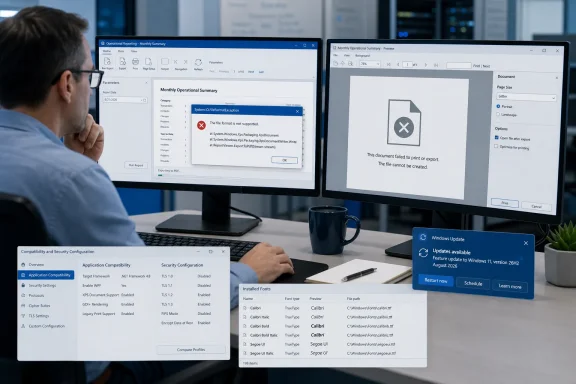 This is a WPF font-subsetting failure, not a universal printing outage
WPF is the Windows desktop UI framework used by many established internal applications, commercial reporting tools, document-management clients, and custom .NET desktop software. It can send documents through Windows’ XPS-based printing and serialization pipeline, which also underpins certain PDF-export implementations.
Microsoft’s wording limits the known issue to WPF applications printing or generating PDF/XPS content with particular fonts. That qualification is important. Microsoft Word, a browser print dialog, a conventional Win32 application, and software using another PDF engine are not automatically in scope merely because they run on a PC that installed the August updates.
A report filed in the public dotnet/wpf issue tracker provides a plausible technical explanation for the observed failure. The reporter says WPF’s font-subsetting code now rejects several stock Windows fonts during XPS serialization, including Calibri, Cambria, Constantia, and Corbel variants. In that report, the fonts render on screen without trouble; the exception occurs only when WPF tries to subset and embed glyphs for printing or document export.
That difference explains why help desks may initially receive vague reports such as “PDF printing stopped” while users can still view the same document normally. Screen rendering and the export/print path do not exercise the same code. It also means the exception’s reference to a font file should not prompt administrators to delete, replace, or “repair” fonts in C:\Windows\Fonts as a first response.
The documented workaround changes application configuration
Microsoft’s official mitigation is an AppContext switch named Switch.MS.Internal.TtfDelta.DisableCmapAndSbitOverflowProtection. In a traditional .NET Framework application, the setting belongs in the application configuration file, generally alongside the executable as ApplicationName.exe.config:
<configuration>
  <runtime>
    <AppContextSwitchOverrides
      value="Switch.MS.Internal.TtfDelta.DisableCmapAndSbitOverflowProtection=true"/>
  </runtime>
</configuration>
The placement is operationally significant. This is not a Windows-wide registry repair that a desktop administrator can apply once to fix every affected program. Each affected application must load the setting itself, and a packaged or vendor-owned application may not expose a supportable way for customers to alter its configuration.
For in-house WPF software, developers should add the switch only after reproducing the failure with the application’s real document templates and fonts. The test must cover more than a simple one-page print: PDF export, XPS export if applicable, physical printing, virtual printers, service accounts, and any automated report-generation jobs should each be tested. A workaround that succeeds in an interactive desktop session may still fail in a scheduled process using a separate deployment folder or account.
For third-party products, the more defensible path is to open a vendor support case with the full exception, the installed August .NET Framework KB, Windows version, and a minimal document that triggers the failure. Customers can ask the vendor whether it supports the Microsoft switch, but they should not silently modify deployed application files if doing so violates the product’s servicing model or may be overwritten on the next repair, upgrade, or endpoint-management deployment.
The security tradeoff is concrete
Microsoft states directly that the switch disables protections introduced in the August 2026 update and may increase exposure to vulnerabilities that update addresses. KB5120708 lists six .NET Framework security fixes: CVE-2026-65810 and CVE-2026-62872 for elevation of privilege; CVE-2026-62886, CVE-2026-62897, and CVE-2026-70354 for remote code execution; and CVE-2026-62902 for information disclosure.
That is why rolling back the .NET update should not be treated as a routine printing fix. It removes a broader set of security corrections, whereas the documented AppContext setting scopes the compatibility concession to an individual application. Neither choice is ideal, but the latter gives administrators a way to preserve security coverage for unaffected programs and devices.
The practical decision should be based on the application’s exposure. A WPF application used to produce internal reports from trusted data on a segmented workstation presents a different risk profile from an application that processes documents, templates, fonts, or other content received from outside the organization. Microsoft has not published a threat model explaining precisely which input conditions make the disabled protection exploitable, so administrators should avoid treating the switch as harmless just because it resolves a printing failure.
A sensible temporary containment plan is to identify the business-critical WPF applications that cannot print or export, use the switch only for those programs, record where it was deployed, and schedule its removal as soon as Microsoft publishes a corrected update. Endpoint teams should also prevent configuration management from copying the setting indiscriminately across every .NET application.
Microsoft’s update documentation is not yet consistent
The most troubling detail is a documentation mismatch in Microsoft’s own update record. KB5120708 clearly lists the WPF printing/PDF problem as a known issue and says Microsoft is investigating. The August 2026 .NET Framework cumulative-update overview, however, still says the release contains no known issues.
Windows 10 documentation is also out of step with the broader affected-platform description reported by BleepingComputer. Microsoft’s pages for KB5120701 and KB5120709—the August .NET Framework updates for Windows 10 versions 21H2 and 22H2—state that Microsoft is “not currently aware of any issues” in those updates. Yet those Windows 10 packages contain the same August security CVEs and are part of the update family described in the reporting.
That does not prove Windows 10 is immune. It does mean administrators should distinguish between the broader scope described in BleepingComputer’s reporting and the specific SKU documentation Microsoft has updated publicly. As of August 24, Microsoft has explicitly documented the problem for Windows 11 version 25H2/server 24H2 and Windows Server 2022. Its public Windows 10 KB entries have not caught up, if the issue applies there as reported.
This is more than paperwork. Organizations that use automated patch dashboards, knowledge-base scraping, or update notes to decide whether to test and mitigate regressions may miss the issue if they consult only the generic .NET release page or the relevant Windows 10 KB article.
What IT teams should do now
The first task is to identify whether the failing program is actually a WPF application and whether its print or export workflow passes through XPS serialization. The System.IO.FileFormatException, the document font family, and the application’s .config file are more useful starting points than reinstalling printer drivers.
Administrators should then inventory the August .NET Framework update applicable to each affected device. KB5120708 is associated with Windows 11 version 25H2 and server operating system 24H2; KB5120705 covers Windows Server 2022; Windows 10 has separate .NET Framework packages, including KB5120701 for .NET Framework 3.5 and 4.8 and KB5120709 for 3.5 and 4.8.1. The installed-update view may not always show the operating-system offering KB from Microsoft’s summary table, because Microsoft says the actual installed entry depends on the .NET Framework version present on the device.
For applications where changing the configuration file is not feasible, a temporary document-level alternative may be possible: use a font that does not trigger the failure, or generate PDFs through a non-WPF path if the product supports one. Those are application-specific workarounds, not vendor-approved universal fixes, and they can alter document layout, branding, accessibility, or archival behavior. They deserve the same regression testing as the AppContext switch.
Microsoft has not announced a corrected build or a target date for a permanent fix. Until it does, the safest operational posture is to treat this as a targeted WPF compatibility regression, preserve the August security update, and limit the protection-disabling switch to confirmed business-critical failures rather than deploying it across the estate.