
Microsoft’s own KB5120998 release notes confirm the builds, the KB number, the supported Windows versions, and the staged rollout model. They do not mention Print Management anywhere in the published change log. That omission is the central fact here: the new console may indeed be in the build, as Windows Latest reports from hands-on testing, but Microsoft has not publicly committed to shipping it broadly, replacing the existing MMC snap-in, or supporting a particular deployment path for it.
For IT staff, that means this is worth watching and testing in Release Preview—but not worth basing a printer-management migration plan on yet.
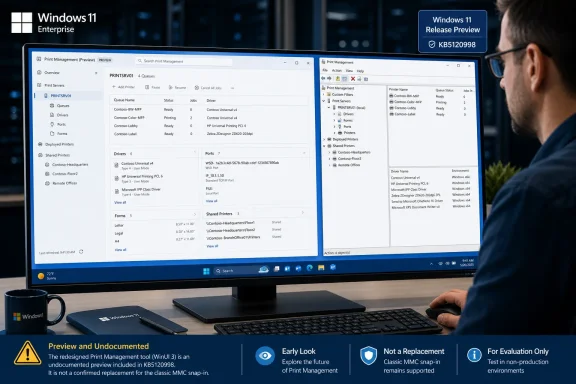 KB5120998 confirms the build, not the Print Management rollout
Microsoft Learn identifies KB5120998 as a Release Preview update for Windows 11 version 24H2, build 26100.9267, and version 25H2, build 26200.9267. The update includes a mixture of gradual-rollout features and normal quality improvements, and Microsoft explicitly warns that availability can vary by device and market.
The official notes list taskbar placement and sizing changes, Start menu adjustments, Windows Search changes, updated progress indicators, networking fixes, and the removal of the WMIC command-line utility from Windows 11 24H2 and 25H2. Print Management is absent from both the feature list and the quality-improvement section.
That does not prove the interface is missing. Windows features frequently exist in builds before Microsoft decides to document, enable, or broadly deploy them. It does mean that a Release Preview appearance is weaker evidence than the original report suggests when it is framed as a rollout date.
Windows Latest’s report is useful because it identifies a concrete executable experience that it says is present on a test PC running the new Release Preview build. But no other outlet has independently reported the tool’s appearance in KB5120998, and Microsoft has not confirmed that this particular version of Print Management will be enabled for every eligible machine—or at all—when the update reaches production.
The practical distinction matters. Release Preview is close to general availability, but it is still a validation channel. Windows admins have seen features arrive in that channel, remain controlled by staged rollout, or disappear from a release before the corresponding monthly update reaches managed fleets.
The redesign does not change Windows printing’s underlying support model
According to Windows Latest’s hands-on account, the new Print Management preserves the administrative areas that made the old console valuable: printer queues, drivers, ports, forms, print servers, shared printers, and related configuration. The report describes a modern navigation layout for views such as All Printers, All Drivers, Printers Not Ready, and Printers with Jobs, plus server-level sections for Drivers, Forms, Ports, and Printers.
If that account holds through a broader release, the change is primarily an interface rebuild rather than a new printing platform. It will not make a problematic printer suddenly work, eliminate a vendor’s driver dependency, cure spooler failures, or add device-specific finishing options that the existing driver stack cannot expose.
This is important because Microsoft is pursuing a separate, more consequential change in the Windows print stack. Its published driver-servicing plan says that, beginning July 1, 2026, Windows changes printer-driver ranking to prefer the inbox Windows IPP class driver. Microsoft’s longer transition away from legacy third-party v3 and v4 printer drivers affects Windows 11 and Windows Server 2025 and later, while the company says existing drivers can still be installed and vendor-supplied installation packages remain permitted.
A redesigned Print Management console sits alongside that transition; it does not replace it. Shops using conventional queues, print servers, Type 3 drivers, vendor deployment packages, or specialized multifunction devices should not interpret a fresh UI as a declaration that those workloads have moved to Windows Ready Print or the Microsoft IPP Class Driver.
Microsoft has also said there are no plans to disable existing features specifically because they depend on the legacy printer-driver platform. That is a useful reassurance, but it is different from a promise that all old management workflows will be equally polished in a future WinUI application.
The real test is whether the new tool retains administrator efficiency
The classic Print Management snap-in is old, but it is not merely a relic. It exposes a dense administrative view of printer infrastructure that remains useful on workstation and server-adjacent management systems. Modernizing it is a good outcome only if Microsoft preserves that density, keyboard behavior, elevation flow, and access to the same underlying controls.
Windows Latest says its earlier testing found that users needed to manually choose Run as administrator, and that some dialogs still opened in legacy-looking windows. Those details should be expected in an unfinished transition: rebuilding a host window in WinUI 3 does not automatically rebuild every inherited property sheet, driver UI, migration wizard, or shell extension behind it.
They also point to the risks. Print administration is not an area where larger margins, a hamburger menu, or visual consistency alone equal an improvement. A tool used to inspect queues, purge jobs, compare driver versions, manage ports, export queues, and diagnose remote print servers needs fast access to information and predictable elevation. A cleaner surface that adds clicks or hides frequently used controls would be a regression for the people who actually use it.
Windows Latest reports that the new interface includes an Add/Remove Columns panel instead of the classic contextual column selector. That may be easier to discover for occasional users, but it needs accessibility and keyboard testing before it can be called an upgrade for administrators. Community discussion of the earlier preview has already raised concerns about lower information density and more cumbersome selection behavior, though those observations are anecdotal rather than formal testing.
This is where Release Preview users can provide the evidence Microsoft has not supplied. The right test is not whether the window looks native to Windows 11. It is whether an admin can perform the same printer, queue, driver, port, and migration tasks at the same speed, with the same privileges and without unexpected fallbacks to the old console.
What administrators should do before the August and September servicing cycle
The date being discussed needs some precision. KB5120998 entered Release Preview on August 14, 2026. Windows Latest expects it to become an optional non-security update later in August and then feed into the regular cumulative update on September 8, 2026, the second Tuesday of the month. Microsoft has not announced either of those outcomes for Print Management specifically.
Organizations that use Windows Update for Business, Intune, WSUS, or Configuration Manager should therefore avoid communicating a Print Management replacement to help desks or print administrators. The documented update may be approved and deployed under normal servicing policy, while the undocumented UI remains absent, disabled, or changed by the time it reaches a broader audience.
Release Preview testers should instead verify a limited set of operational questions:
- Confirm whether the new console appears on both Windows 11 24H2 and 25H2 after KB5120998, rather than assuming identical build numbers produce identical feature activation.
- Test local and remote printer administration, queue management, driver properties, port configuration, forms, exports, and printer migrations using the organization’s real drivers and print servers.
- Record whether standard users receive appropriate elevation prompts and whether launching the console elevated is still required before routine administrative controls work.
- Keep the classic MMC-based Print Management workflow documented and available until Microsoft explicitly states whether it is being retired or retained alongside the new application.
Microsoft’s Release Preview notes make clear that feature delivery in this update is gradual. That alone makes the “rollout starts in the next few days” framing too definite. The most supportable conclusion is narrower: a WinUI 3 version of Print Management is reportedly present in a near-production Windows 11 build, while the vendor has yet to document its availability, support status, or replacement plan.
For now, the old console remains the known quantity. The new one becomes operationally significant only when Microsoft names it in release documentation—and when it proves it can manage a production print environment without taking away the controls that made the MMC version endure.
