
Microsoft Support published the update on August 27, 2026, but its notice gives administrators very little to assess: it says only that KB5123778 contains “improvements” to the Qualcomm QNN Execution Provider AI component. There are no listed bug fixes, performance figures, known issues, security CVEs, changed model support, or component package details beyond the KB title. No independent outlet had reported additional technical detail at publication.
The immediate operational takeaway is straightforward: install the latest Windows 11 26H1 cumulative update first, then confirm that Windows ML Runtime Qualcomm QNN Execution Provider Update (KB5123778) appears in Windows Update history. Treat the release as a platform-runtime refresh, not as evidence that every Snapdragon PC or every Windows AI feature has received a visible upgrade.
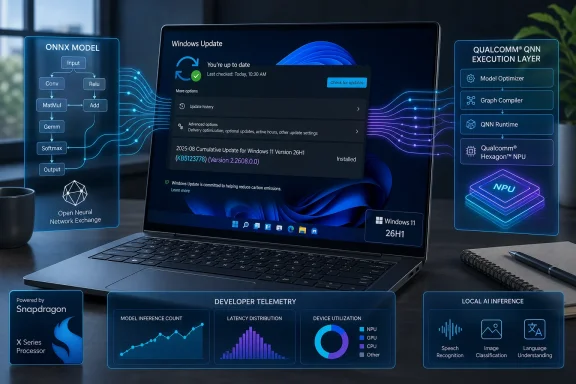 QNN is the layer between an ONNX model and Qualcomm hardware
The Qualcomm QNN Execution Provider is part of the machinery Windows uses to run certain AI inference tasks locally. In ONNX Runtime terminology, an execution provider takes supported operations from an ONNX model and routes them to a hardware-specific backend rather than leaving all work to the CPU.
Microsoft describes QNN as using Qualcomm’s AI Engine Direct SDK to convert an ONNX model into a QNN graph and execute that graph through a supported accelerator backend. In practical terms, an app built against Windows ML can use QNN to target Qualcomm acceleration without bundling its own separate Qualcomm inference stack for each installation.
That makes this a different kind of update from a feature update, cumulative update, or a Qualcomm device driver. It does not itself add a new Copilot+ experience, change the Windows shell, or promise faster AI performance across ordinary applications. Its scope is the shared Windows ML component that compatible software can request and register with ONNX Runtime.
Microsoft’s broader documentation says execution providers are dynamically acquired components rather than in-box parts of the base ONNX Runtime. Windows ML can determine which provider is compatible with a device, obtain it, and make it available system-wide. Applications must still use Windows ML and the appropriate provider-registration path before the QNN backend becomes relevant to their inference sessions.
For an end user whose apps do not invoke Windows ML or ONNX Runtime through this provider, KB5123778 may install without producing any observable change. For a developer shipping local AI models, the update can matter even when the app binary has not changed, because the hardware-specific implementation beneath the app can change through Windows Update.
“All editions” does not mean all Windows 11 26H1 hardware
KB5123778 applies to “Windows 11, version 26H1, all editions,” but that language describes the Windows servicing target, not universal hardware applicability. Microsoft’s Windows ML documentation lists Qualcomm QNN support around Snapdragon X Elite and Snapdragon X Plus systems, with a Qualcomm Hexagon NPU driver requirement of version 30.0.140.0 or newer.
That leaves three practical gates before a machine can benefit from this component:
- The PC must be on Windows 11 version 26H1 and current on its cumulative updates.
- The hardware and Qualcomm NPU driver must meet Windows ML’s QNN compatibility requirements.
- An installed application must actually select, download, and register the QNN Execution Provider for an applicable ONNX Runtime workload.
The first condition is explicit in KB5123778. The second and third come from Microsoft’s Windows ML technical documentation. Together, they show why this is best understood as an update for a narrow class of AI-capable Snapdragon Windows devices and software—not a general-purpose patch for every 26H1 PC.
This also means IT teams should resist treating the appearance of the KB in update history as a health check for local AI applications. Windows Update can confirm delivery of the component, but it cannot prove that a particular ONNX model is supported by QNN, that every operator is offloaded to the NPU, or that an application has registered the provider correctly. Unsupported portions of a model can use another compatible compute path instead.
Microsoft’s own version records do not line up cleanly
KB5123778’s title says “2.2608.0.0,” and its replacement target, KB5121776, was titled “2.2607.0.0.” That sequence implies a monthly servicing cadence for the Windows 11 26H1 QNN component.
However, Microsoft’s public WindowsML execution-provider release ledger, edited on August 26, lists a different QNN package version for the August general-availability window: MSIX 2.2480.49.0, paired with Qualcomm AI Runtime 2.48.40. The same ledger describes its QNN release date as the August “D week,” which is Microsoft’s term for the fourth-week optional non-security release window.
The records could refer to different package identities or different versioning layers: the KB’s Windows ML Runtime component version on one hand, and the distributable QNN MSIX/QAIRT package version on the other. But Microsoft does not explain the relationship between 2.2608.0.0 and 2.2480.49.0 in either record. Administrators and developers should not assume that the numbers are interchangeable.
That documentation gap has a real support consequence. If an app vendor asks for the “QNN version,” the answer could vary depending on whether the team is reading Windows Update history, inspecting an installed MSIX package, or referring to Qualcomm’s QAIRT SDK version. Microsoft has given each of those layers a separate identifier but has not provided a cross-reference for this release.
For deployment records, preserve all three labels where available: KB5123778, the Windows Update history entry, and the QNN package or QAIRT version reported by the application’s own diagnostics. That is more useful than recording only “QNN updated.”
What administrators and developers should do now
For managed Windows 11 26H1 fleets that include Snapdragon X hardware, first ensure the latest cumulative update is installed; KB5123778 will not meet its stated prerequisite otherwise. Then verify the component in Settings > Windows Update > Update history after normal Windows Update servicing has run.
Developers with ONNX Runtime-based applications should perform a focused regression pass rather than a broad Windows acceptance test. Validate model initialization, provider discovery, provider registration, first-run download behavior if the execution provider was not already present, and fallback behavior when the QNN path cannot accept part of a model.
The most useful telemetry is at the provider level: record whether QNNExecutionProvider is present, whether it is ready for the app’s runtime dependency graph, and whether the model session was actually created with QNN. A successful Windows Update installation by itself does not establish any of those facts.
Microsoft’s support note does not identify a security fix, a restart requirement, a manual-download package, or a workaround for failures. It also does not say whether existing applications will see a performance change, altered operator coverage, or compatibility differences. Until Microsoft or Qualcomm publishes release notes that tie KB5123778 to a QAIRT revision and a concrete change list, the responsible reading is limited: this is an automatically delivered Windows ML runtime maintenance update for supported Qualcomm AI workloads on Windows 11 26H1.