
The important practical point is that this is not an Intel graphics-driver update, a Windows feature update, or an application update for Photos. It is a separately serviced Windows AI component: a set of local models and supporting runtime software used for image understanding tasks on qualifying hardware. Microsoft’s Support bulletin says the component covers image scaling, segmentation, foreground and background extraction, and visual analysis, with work intended to run on the PC’s dedicated neural processing unit.
Microsoft’s AI component release history confirms that KB5124877 was published on August 27, 2026, alongside equivalent Image Processing packages for AMD and Qualcomm Copilot+ systems. That separate packaging is significant. Windows is distributing the same component generation across hardware families, but each platform receives its own package because the models and runtimes must work with a different NPU software path.
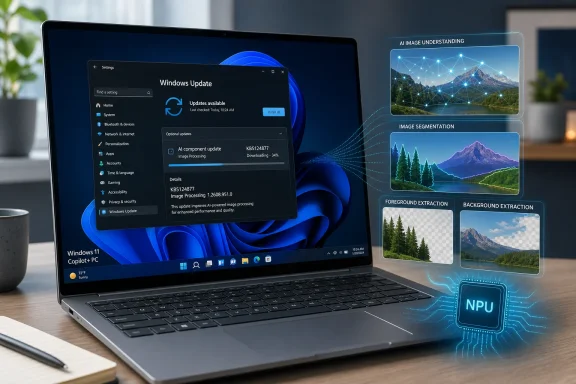 KB5124877 replaces July’s Intel Image Processing package
KB5124877 supersedes KB5121641, the Intel Image Processing component update released on July 28, 2026. The outgoing package was version 1.2607.840.0; the new package advances Intel devices to 1.2608.951.0.
Microsoft has not published a feature-by-feature changelog, benchmark, model revision note, or list of bug fixes for the new version. The word “improvements” in the KB is the entirety of the release description. That means administrators and users should avoid reading the version jump as proof of a new user-facing Copilot+ feature, better image quality in a particular app, or a fix for a particular failure. None of those claims is documented.
What is documented is the servicing mechanism: this component can change independently of the major Windows 11 cumulative update that enables its delivery. In other words, a PC may already be on Windows 11 24H2 or 25H2 and still receive a newer local AI model or runtime package later through Windows Update.
That arrangement is increasingly central to how Microsoft maintains Copilot+ capabilities. Microsoft Learn describes Windows AI components as the local software used by Copilot+ PCs to run AI models on-device. The company’s developer documentation also identifies Intel Core Ultra 200V systems as part of the Intel Copilot+ PC hardware family, with the NPU handling suitable AI workloads rather than pushing all such work to the CPU or cloud.
The update is for Copilot+ PCs, not every Intel Windows 11 PC
The “Intel-powered systems” wording in the package title has a limit that is easy to miss: KB5124877 applies only to Intel-based Copilot+ PCs. A conventional Intel laptop or desktop running Windows 11 24H2 or 25H2 is not automatically eligible simply because it has an Intel processor.
Microsoft’s published guidance defines Copilot+ PCs around a qualifying NPU, rather than CPU branding alone. The company says many Windows AI features require an NPU capable of more than 40 trillion operations per second. For Intel hardware, that generally points to the Copilot+ generation of Core Ultra systems, rather than every PC with a Core Ultra badge or an Intel GPU.
The component is also narrower than the broad “AI in Windows” label suggests. Microsoft’s Windows AI Imaging documentation ties local imaging capabilities to specific functions: Image Super Resolution, Image Description, object extraction, foreground extraction, segmentation, and Object Erase. These are platform capabilities that Windows features and third-party software can call; KB5124877 itself does not announce a new app, user interface, or API.
For users, the result may be invisible until an existing Windows feature or compatible application invokes the updated component. For developers, it is another reminder that app behavior can depend on a device-maintained model and runtime layer outside the app’s own installation package.
Automatic delivery does not remove the prerequisite
Microsoft says KB5124877 downloads and installs automatically from Windows Update. But the bulletin makes the latest cumulative update for Windows 11 24H2 or 25H2 a prerequisite. A machine held back on its monthly quality update, paused from Windows Update, or unable to finish its cumulative update should not be expected to receive this AI component normally.
That makes update verification more useful than searching installed apps or looking for a new Photos build. Microsoft directs users to Settings > Windows Update > Update history, where the successful installation should appear as:
2026-08 Image Processing version 1.2608.951.0 for Intel-powered systems (KB5124877)
Microsoft’s current Windows AI troubleshooting guidance adds a second place to investigate model availability: Settings > System > AI Components. That page is more useful when a Windows AI-dependent feature or developer test reports a missing model; Update history is the record that specifically confirms KB5124877 installed.
A sensible support sequence is therefore straightforward:
- Confirm that the device is an Intel-powered Copilot+ PC rather than merely an Intel Windows 11 computer.
- Install all pending cumulative updates for Windows 11 24H2 or 25H2, then check Windows Update again.
- Verify the KB5124877 entry in Update history after Windows Update completes.
- If a local AI imaging feature still fails, review the installed entries under Settings > System > AI Components before blaming the application itself.
The omission: Microsoft has not said what changed
There is no indication in KB5124877 that the package addresses a security vulnerability. Microsoft did not assign a CVE, publish a severity rating, describe a known issue, or specify an image-processing defect resolved by version 1.2608.951.0. It should be treated as a routine platform-maintenance update, not an emergency patch.
The absence of details also leaves IT teams without a documented way to judge impact before deployment. There is no declared package size, restart requirement, rollback procedure, enterprise deployment guidance, affected-app list, or statement explaining whether an administrator can defer this individual component while continuing normal quality updates. Microsoft’s support page promises automatic installation and names the prerequisite, but stops there.
That is manageable for most consumer Copilot+ PCs, where silent upkeep is the point. It is less satisfying in managed environments, where a change to local image-analysis behavior can matter for validation, disk planning, privacy documentation, or support baselines even if no visible Windows feature changes overnight.
For now, the concrete outcome is limited: Intel Copilot+ PCs on fully updated Windows 11 24H2 or 25H2 should move from the July Intel Image Processing component, KB5121641, to version 1.2608.951.0 through Windows Update. Microsoft has supplied the package and its target hardware, but not the release notes needed to say more about its real-world effect.
