
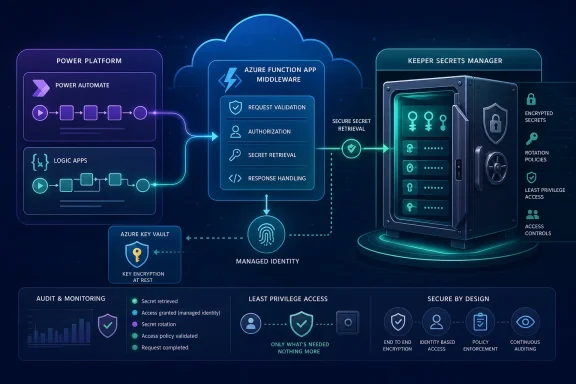
For administrators, the important detail is the architecture behind the low-code interface. This is not a direct connection from a Logic App to Keeper’s hosted service. According to IT Brief Asia, the connector calls a Python middleware service deployed as an Azure Function App in the customer’s own Azure environment, which then uses the Keeper Secrets Manager SDK to access the vault.
That approach can reduce a familiar automation risk: API keys, database passwords and service-account credentials copied into workflow JSON, scripts, variables or shared repositories. It also means the connector introduces a new privileged Azure component that needs the same design review as any other production secrets broker.
 A connector with its own runtime footprint
Keeper’s implementation reportedly provisions an Azure Function App, Azure Key Vault and Managed Identity through an Azure Resource Manager template. The company describes that as a one-click deployment, but IT teams should read “one click” as repeatable infrastructure deployment, not as an integration with no operational footprint.
The Function App becomes a security-sensitive control point. It is where the Keeper SDK runs, where workflows are translated into requests to the vault, and where plaintext secrets may be available briefly in process memory before being returned to the automation job. That does not invalidate Keeper’s design; it defines the component administrators need to protect.
Microsoft’s own Logic Apps guidance recommends managed identities for access to Microsoft Entra-protected resources because they remove the need to store credentials, access tokens or application secrets in the workflow configuration. Keeper’s stated use of Managed Identity and Key Vault therefore aligns with the normal Azure direction. But it also leaves several deployment questions that the launch announcement does not answer:
- The report does not specify whether the connector supports private endpoints, VNet integration or other controls to limit network paths between Logic Apps, the Function App and Keeper’s service.
- It does not state which Azure regions are supported, whether the deployment works in Azure Government, or whether Logic Apps Standard and Consumption have identical support.
- It does not disclose the required Keeper licensing tier, Azure consumption costs, or whether Power Automate users will need Premium licensing for every workflow that invokes the external connector.
- It does not explain how the middleware is updated, how customers are notified about breaking changes, or how long the connector’s supported versions will remain available.
Those omissions matter more than the marketing language around avoiding hardcoded credentials. Removing secrets from source code is valuable, but teams still need to decide who can invoke the Function App, who can alter its settings, who can change the Managed Identity’s role assignments, and who can edit the workflows that receive secret values.
“Certified” is meaningful, but it is not an architecture approval
The connector’s claimed Microsoft certification is a useful distinction from an organization-built custom connector. Microsoft says a connector must go through technical review before it is published broadly across Power Platform products, including Power Automate, Power Apps, Logic Apps and Copilot Studio. Certified connectors are also expected to meet Microsoft marketplace and connector requirements rather than relying solely on a customer importing a Swagger or OpenAPI definition.
That gives Keeper customers a more supportable starting point than maintaining an internal connector definition. It should also make the Keeper actions appear in the normal Logic Apps Designer experience, which is a real usability benefit for teams building workflows without writing bespoke integration code.
Certification, however, is not a declaration that a customer’s Azure deployment is secure. Microsoft’s process reviews the connector package and its behavior as a published integration. It does not replace a review of the customer-controlled Function App, Key Vault permissions, role assignments, networking, logs or downstream workflow design.
The certification label also does not turn an external SaaS connector into a feature included with every Power Automate plan. Microsoft’s connector documentation says connectors reaching external infrastructure are assigned to the Premium tier. Organizations should therefore validate licensing with Microsoft and Keeper before treating this as a no-additional-cost alternative to Azure Key Vault or a custom integration.
The write operations need stronger boundaries than retrieval
The initial operation set is small, but two actions deserve close attention: Create Secret and Update Secret. Reading a database password into a workflow is one class of privilege; allowing a workflow to replace a database password, API token or service account credential is another.
A broad automation identity with write access could let a flawed or compromised flow overwrite a production secret, disrupt dependent services or redirect an integration to an attacker-controlled value. This is particularly relevant in Power Automate environments where ownership changes, imported solutions and shared connections can make the effective authority of a flow harder to see than in conventional application code.
The safer operational model is to separate retrieval and lifecycle management:
- Production workflows that only need to consume credentials should receive access limited to the specific folders and records they require.
- Secret-creation and secret-update actions should be reserved for dedicated rotation or provisioning workflows with separate ownership, change control and alerting.
- Administrators should avoid using a single connector connection with broad vault access across unrelated flows, environments or business units.
- Vault audit events, Function App logs and Power Platform run history should be reviewed together so a secret access can be traced to the workflow and identity that requested it.
Keeper’s release material emphasizes that secrets are decrypted locally inside the customer’s Azure environment under its zero-knowledge design. Keeper’s public security documentation separately describes local encryption and decryption as central to its Secrets Manager model. That is a meaningful protection against Keeper storing or processing plaintext centrally, but it does not prevent a downstream workflow from mishandling a secret after retrieval.
If a flow writes a retrieved password into an email, Teams message, approval card, error record or unprotected run-history output, the original benefit can be lost immediately. Connector adoption should therefore include a review of action inputs and outputs, secure-input and secure-output settings where available, diagnostic log destinations and any custom exception handling.
Azure Key Vault remains the obvious comparison
For Azure-first shops, the arrival of a Keeper connector does not make Azure Key Vault obsolete. Logic Apps already supports managed-identity authentication to Azure resources, including Key Vault scenarios, and Microsoft documents the permissions required for a workflow identity to list or read secrets.
Keeper is positioning its product differently: as a centrally managed secrets platform that can cover Azure alongside other clouds, developer tooling, CI/CD systems and privileged-access workflows. That can be useful where an organization already runs Keeper Secrets Manager and wants a consistent vault, audit model and access approach across Azure, AWS, GitHub Actions, Kubernetes and on-premises systems.
But organizations using Azure Key Vault as their existing system of record should not assume the new connector is automatically the simpler route. A Keeper deployment introduces a second secrets-management plane and the Azure Function middleware described in the launch report. The operational trade-off is clear: Keeper may provide cross-platform centralization, while Azure Key Vault can avoid an additional vendor integration and runtime layer for Azure-only use cases.
The right choice depends on where the authoritative secret should live, which teams administer it, and whether the workflow needs to operate across environments that Azure Key Vault does not cover cleanly.
What to verify before moving a production flow
The practical test is not whether a designer can select a secret from a dropdown. It is whether the full chain of custody is narrower and more auditable than the hardcoded credential it replaces.
Before deploying the connector into a production Power Platform environment, administrators should confirm the exact Azure resources created by Keeper’s template; scope the Managed Identity and Keeper vault permissions to least privilege; determine whether workflow outputs can expose returned values; and establish a rollback plan for middleware or connector failures. They should also test what happens when a secret is rotated while a long-running Logic App or Power Automate flow is still in progress.
IT Brief Asia’s report provides the only detailed public account of the release at publication time; a corresponding Keeper product announcement and dedicated Microsoft connector documentation were not yet visible in public search records. Until those materials appear, customers should treat the connector as a promising integration with an unusually important implementation detail: it replaces hardcoded secrets only if the Azure Function, identity permissions and downstream flows are locked down with equal care.
