
For Windows users looking for a small, quiet machine for productivity, home-office work, media playback, light development, or a compact homelab role, the Lecoo Mini Pro deserves attention. Its appeal is not raw cutting-edge performance; the Ryzen 5 7430U is a mature Zen 3 mobile chip rather than a current-generation platform. Instead, Lenovo’s value proposition is more practical: provide enough CPU power for mainstream desktop tasks, avoid soldering down the most important upgradeable components, and fit it all into a chassis scarcely larger than an external hard drive.
That formula comes with clear trade-offs. The system uses Wi-Fi 5, not Wi-Fi 6 or Wi-Fi 7; its USB-C port is not USB4; and the Radeon integrated graphics are suitable for lighter workloads rather than modern AAA gaming or serious GPU-accelerated production work. Still, for the right Windows setup, the Lecoo Mini Pro’s compromises are coherent rather than accidental.
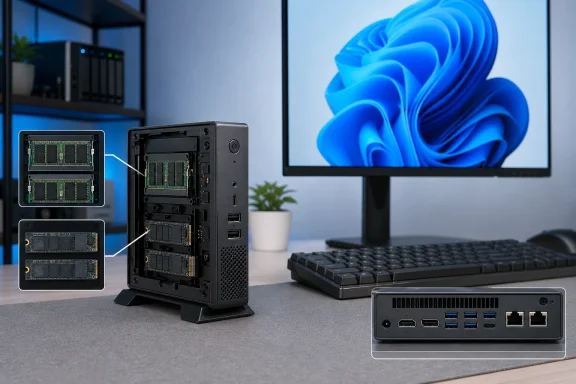 A 0.8-Liter Desktop That Prioritizes Useful Expansion
The defining number is 0.8 liters. In a market where many mini PCs look tiny beside an ATX tower but still occupy meaningful desk space, a sub-1-liter enclosure changes where a Windows desktop can live. It can sit behind a monitor, on a small reception desk, beside a television, or in a wiring cabinet where a conventional desktop would be impractical.
Compact PCs have often forced buyers into an uncomfortable choice: accept a fixed configuration, or buy a larger box. The Lecoo Mini Pro attempts to avoid that problem. Reporting on the China launch says Lenovo has included two SO-DIMM memory slots and two M.2 2280 SSD slots, allowing the machine’s RAM and storage to be replaced or expanded rather than treated as permanent factory decisions. Notebookcheck
That matters more than a specification-sheet bullet point. A preinstalled 512GB SSD is adequate for a basic Windows 11 installation and a normal office software stack, but it can become restrictive surprisingly quickly when a PC is used for:
- A local photo and video library
- OneDrive or SharePoint offline synchronization
- Virtual machines through Hyper-V, VMware Workstation, or VirtualBox
- PC game libraries
- Media-server storage and metadata
- Development tools, Docker images, and source repositories
- A growing archive of work documents
A second internal M.2 drive is far cleaner than permanently hanging USB storage from a mini PC. It also enables more flexible Windows storage strategies. Users can keep the operating system and applications on the primary SSD, then allocate a second drive for project files, game libraries, backups, or a separate Linux installation.
The presence of two memory slots is equally important. Many compact computers advertise 16GB of memory but use a single module, limiting memory bandwidth until the owner upgrades. Lenovo has not publicly detailed the exact factory module arrangement for this Ryzen 5 configuration, so buyers should verify whether the initial 16GB uses one or two SO-DIMMs before making any purchasing or upgrade assumptions. The physical availability of two slots, however, makes a move to a larger matched pair of DDR4 modules possible in a way that soldered-memory mini PCs simply do not. Notebookcheck
Processor support is not motherboard support
AMD lists the Ryzen 5 7430U with support for two memory channels and up to 64GB of DDR4 memory, but that is a processor-level capability, not a guarantee that every system using the chip supports the same ceiling. Motherboard firmware, memory validation, and Lenovo’s own product configuration determine what the Lecoo Mini Pro will actually accept. AMD
That distinction should guide upgrade planning. The sensible approach is to treat dual-slot access as a major benefit, but to consult the specific retail listing, documentation, or support materials for maximum RAM capacity, supported SSD types, and any storage-slot limitations before buying components.
Ryzen 5 7430U: Mature Zen 3 Performance in a Tiny Chassis
The Lecoo Mini Pro is powered by the AMD Ryzen 5 7430U, a six-core, 12-thread processor based on AMD’s Zen 3 architecture. AMD specifies a 2.3GHz base clock, boost speeds of up to 4.3GHz, a 15W default TDP, and a 7nm manufacturing process. The chip, codenamed Barcelo R, entered AMD’s product stack in the fourth quarter of 2023. AMD
The “Ryzen 7000” branding can be misleading to buyers who assume every processor in that family uses the same underlying technology. AMD’s mobile naming has included several architectures under the Ryzen 7000 umbrella, and the 7430U is not a Zen 4 or Zen 5 part. It is a proven Zen 3 design aimed at low-power laptops and compact systems, with performance characteristics that still make sense for everyday Windows computing but do not position it at the leading edge of mini-PC hardware. AMD
That is not automatically a flaw. A six-core Zen 3 processor remains comfortably equipped for the workloads that dominate many small-desktop deployments:
- Microsoft 365 and browser-heavy work
- Video conferencing in Teams or Zoom
- Remote Desktop and virtual desktop sessions
- Email, accounting, and line-of-business software
- Coding in Visual Studio Code or lightweight IDEs
- Multiple 1080p and 4K video streams
- Home automation dashboards and server administration
- Light image editing and document creation
The 12-thread layout helps particularly when Windows is managing several active applications at once. A machine running a video call, web browser, Outlook, Teams, File Explorer transfers, cloud synchronization, and a security scan will benefit more from the 7430U’s core count than an older dual-core or quad-core mini PC would.
The power profile suits the form factor
The processor’s 15W default TDP is central to why this design works. It is not a 45W or 65W desktop-class CPU squeezed into a small enclosure with aggressive fan behavior. AMD designed the Ryzen 5 7430U around energy efficiency, which should make it well suited to long-running office, kiosk, media, and light-server tasks where electricity use and heat are as important as peak benchmark scores. AMD
However, the TDP figure alone does not reveal sustained performance. Mini PCs can differ substantially in fan curves, cooling mass, firmware power limits, and the duration for which a processor is allowed to boost. Lenovo has not published enough detailed thermal and sustained-load information for this specific Ryzen 5 Lecoo Mini Pro to draw firm conclusions about noise or long-term performance behavior. Buyers whose workloads include prolonged rendering, large compilations, or frequent virtual-machine use should wait for independent testing rather than infer desktop-class performance from the core count alone.
Radeon Integrated Graphics Set Clear Boundaries
Graphics are handled by the Ryzen 5 7430U’s integrated AMD Radeon Graphics engine. AMD lists seven graphics cores operating at up to 1,800MHz, along with DirectX 12, OpenGL 4.6, OpenCL 2.2, and support for USB-C DisplayPort Alternate Mode at the processor level. AMD
This is capable integrated graphics, but it is not comparable to the Radeon 780M-class solutions found in more expensive Zen 4 mini PCs. The distinction is critical. The Lecoo Mini Pro can handle desktop compositing, high-resolution displays, video playback, classic and indie games, emulation with modest requirements, and older esports titles with tuned settings. It should not be bought on the expectation that it will replace a gaming desktop or a creator workstation with a dedicated graphics card.
The integrated GPU also shares system memory. That makes memory configuration unusually relevant. A dual-channel DDR4 installation can improve the performance available to the Radeon graphics core compared with a single-channel setup, because the graphics engine relies on system memory bandwidth. It is another reason to verify the out-of-box RAM arrangement and to consider a matched two-module upgrade if the system is intended for emulation, casual gaming, or graphics-sensitive display tasks.
No USB4 means no straightforward eGPU future
The most consequential limitation is the omission of USB4. Launch reporting says the Ryzen 5 Lecoo Mini Pro has a USB-C 3.2 Gen 1 port with Power Delivery and DisplayPort Alternate Mode, but not USB4. That means users should not expect the standard USB4 external-GPU enclosure path available on many newer high-performance mini PCs. Notebookcheck
This is not merely a theoretical specification difference. Lenovo’s earlier, higher-tier Lecoo Mini Pro configuration built around the Ryzen 7 8745H was reported with two USB4 ports, Radeon 780M graphics, DDR5 memory, dual PCIe 4.0 M.2 slots, Wi-Fi 6, and 2.5GbE networking. That system targeted a different buyer: someone looking for stronger integrated graphics and a route to external GPU expansion. TechRadar
The Ryzen 5 version is more constrained, but also more focused. Its upgrade story is about RAM and internal SSD capacity, not transforming it into a graphics workstation later. That is a reasonable compromise at an entry-level price, provided buyers recognize it before purchase.
Connectivity Is the Lecoo Mini Pro’s Unexpected Strength
For such a small computer, the Lecoo Mini Pro’s wired connectivity is arguably its most surprising feature. Lenovo’s reported port selection includes:
- 2 × USB-A 3.2 Gen 1
- 1 × USB-C 3.2 Gen 1
- 2 × USB-A 2.0
- 1 × 3.5mm audio jack
- 2 × Gigabit Ethernet
- 1 × HDMI 2.1
- 1 × DisplayPort 1.2
Notebookcheck
This is a practical mix, even if it is not state of the art. HDMI and DisplayPort together remove the need for a dongle in many two-monitor Windows desk setups. That is a meaningful convenience for offices still using mixed monitor generations, where one panel may accept HDMI and another DisplayPort.
The USB-A count is also welcome. Keyboard, mouse, webcam, printer, USB headset receiver, external drive, security key, and smartphone cable can rapidly exhaust the port count on ultra-small PCs. Two USB 2.0 ports may be old-fashioned, but they remain perfectly appropriate for low-bandwidth accessories such as keyboards, mice, dongles, and certain printers.
Dual Gigabit Ethernet invites more ambitious roles
The inclusion of two Gigabit Ethernet ports is particularly notable. A typical office mini PC needs one network port. Two ports open up more specialist uses, including network monitoring, router or firewall experimentation, isolated lab networks, a compact virtualization host, or a Windows PC serving as a bridge between differently segmented networks.
That does not turn the Lecoo Mini Pro into a dedicated network appliance. Its processor, cooling, operating system choice, storage configuration, and driver support still matter. But dual Ethernet creates options that most compact Windows desktops at this price and size do not provide. It is a feature that makes the machine potentially attractive to enthusiasts who want a quiet secondary device for a lab, remote-management box, or multi-network workspace.
The system’s wireless side is less impressive. Available specifications list Wi-Fi 5, while the Bluetooth version has not been clearly specified in launch reporting. Notebookcheck Wi-Fi 5 remains usable for normal browsing, conferencing, and media streaming, but it is behind the Wi-Fi 6 and Wi-Fi 6E capability common in current mini PCs. In congested apartment buildings, dense offices, or homes with newer routers, this could matter more than the wired port abundance suggests.
Price, Availability, and the China-Market Caveat
The Ryzen 5 Lecoo Mini Pro was listed in China at 2,999 yuan for the configuration with 16GB of memory and a 512GB SSD. Independent launch coverage translated that figure to roughly US$443, though currency conversion is naturally variable and should not be read as a promised U.S. retail price. Notebookcheck
More important, the price is a China-market figure. A direct currency conversion does not account for import duties, shipping, reseller margins, local sales taxes, regional power-adapter differences, Windows licensing variations, or warranty coverage. Buyers outside China should avoid assuming that 2,999 yuan becomes a simple US$443 purchase at checkout.
There is also a product-positioning wrinkle. The Lecoo brand sits within Lenovo’s wider brand ecosystem but does not have the international visibility of ThinkCentre, ThinkPad, Legion, or IdeaCentre. Coverage of the more powerful Lecoo Mini Pro configuration has described global shipping availability through a Lecoo sales page, but that does not by itself establish that this Ryzen 5 model will receive official retail distribution, local support, or the same warranty terms in every market. TechRadar
For Windows enthusiasts, imported hardware can be worthwhile, but the risk calculation is different from buying a locally supported Lenovo desktop. Firmware updates, recovery images, replacement parts, return shipping, and support response all deserve consideration—especially in a PC intended for work or always-on use.
Who Should Consider Lenovo’s Smallest Lecoo Mini Pro?
The Lecoo Mini Pro is most compelling when its limitations match the job. It is a strong conceptual fit for users who value physical footprint, upgradeable storage, and wired connectivity more than the newest architecture or fastest graphics.
It makes particular sense for:
- Home-office users who want a compact Windows 11 desktop with native support for two displays and plenty of legacy peripherals.
- Students and families seeking a small shared PC for schoolwork, web browsing, streaming, Office applications, and light creative tasks.
- Remote workers who use Remote Desktop, cloud applications, Teams, and browser-based business tools but do not need a dedicated GPU.
- Homelab enthusiasts who can make use of the dual Gigabit Ethernet ports and two internal SSD positions.
- Media and living-room PC builders who want a compact system with HDMI, DisplayPort, replaceable storage, and sufficient processing power for everyday playback.
- Organizations deploying space-constrained endpoints, provided they can confirm regional procurement, warranty, operating-system configuration, and management requirements.
It is a less suitable choice for users who need fast wireless networking, Thunderbolt or USB4 accessories, external GPU support, serious local AI acceleration, heavy 4K video production, CAD, or demanding contemporary games. Those buyers should look toward systems built around newer AMD platforms, more capable integrated graphics, USB4, or a discrete GPU.
A Sensible Mini PC, Not a Spec-Sheet Fantasy
Lenovo’s Lecoo Mini Pro does not attempt to win every mini-PC comparison. It is not the fastest model, the newest AMD platform, or the most future-proof option for graphics expansion. Its Wi-Fi 5 radio and lack of USB4 make that clear.
Yet the system’s strengths are unusually grounded. A 0.8-liter enclosure, six-core Ryzen processor, 16GB RAM, 512GB SSD, dual memory slots, two M.2 2280 bays, dual Gigabit Ethernet, HDMI, DisplayPort, and a useful spread of USB ports create a compact Windows PC that can grow in the two areas many owners actually need: memory and internal storage. Tamindir
That is the Lecoo Mini Pro’s real surprise. Its size suggests a disposable, tightly sealed appliance. Its internal layout and connectivity suggest something more flexible: a small but serviceable desktop that understands the value of upgrades. As long as buyers treat the Ryzen 5 7430U as a capable mainstream processor rather than a modern gaming engine, Lenovo’s new configuration looks like a well-judged compact PC for practical Windows workloads.
