
TechPowerUp’s review identifies the 16-inch Yoga as Lenovo’s highest-end consumer creator notebook, built around Intel’s Panther Lake-based Core Ultra 7 356H or Core Ultra 9 386H processors and GeForce RTX 5050, 5060, or 5070 Laptop GPUs. Lenovo’s own product documentation confirms the platform and its 100W GPU ceiling, while LaptopMedia’s independently tested Core Ultra 9 386H/RTX 5060 unit shows that Lenovo has prioritized sustained CPU output rather than merely short benchmark bursts.
The resulting machine is a serious Windows 11 option for photographers, video editors, developers compiling large projects, and designers who need CUDA or NVIDIA Studio acceleration without carrying a conventional gaming chassis. It is less compelling for buyers treating its component list as a promise of desktop-replacement gaming performance.
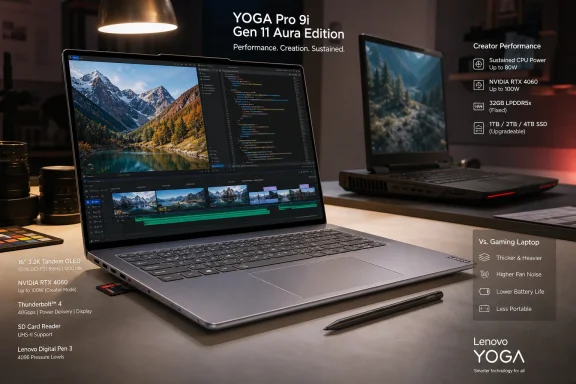 The Tandem OLED is the configuration to seek
The defining feature is Lenovo’s 16-inch, 3,200-by-2,000, 120Hz PureSight Pro Tandem OLED touchscreen. Lenovo lists 1,000 nits of typical SDR brightness and 1,600 nits peak HDR brightness, alongside 100% coverage of sRGB, DCI-P3, and Adobe RGB, factory color calibration, Pantone validation, Dolby Vision, and DisplayHDR True Black 1000 certification.
That is a markedly different proposition from the standard 2,880-by-1,800 OLED alternative. Lenovo lists the lower-resolution panel at 500 nits typical SDR brightness and 1,100 nits peak HDR brightness. Both are glossy touch panels with anti-fingerprint treatment and 120Hz refresh, but only the 3.2K option is the Tandem OLED that anchors the review’s enthusiasm.
Buyers should not mistake “OLED” in a retailer listing for confirmation of the Tandem panel. Lenovo explicitly says Tandem OLED is not fitted to every model, and the 16IPH11 family can be sold with both displays. A lower-priced configuration may retain the same chassis, processor family, RTX branding, and OLED label while giving up the substantial brightness advantage that makes the premium panel useful in bright rooms and for HDR mastering.
LaptopMedia’s measurements and assessment support Lenovo’s claims of exceptional brightness and strong factory color accuracy on its Tandem OLED review unit. The same review also records the compromise Lenovo’s marketing does not emphasize: this remains a highly reflective glossy screen, and it is not PWM-free. The outlet says the measured pulsation amplitude is limited, but users sensitive to OLED flicker should test this specific panel in person rather than assume that a low-blue-light certification settles the comfort question.
For Windows users working with color-managed apps, the display’s value is practical rather than decorative. A panel covering Adobe RGB and DCI-P3 gives photographers and video editors a wider working space than the usual sRGB laptop screen, while the 16:10 3.2K resolution gives Adobe Premiere Pro, DaVinci Resolve, Photoshop, and Visual Studio room for tools without moving to a 17- or 18-inch system. The gloss is still a poor fit for field work under uncontrolled light.
Lenovo uses Panther Lake performance aggressively
The Core Ultra 9 386H has 16 CPU cores—four performance cores, eight efficiency cores, and four low-power efficiency cores—and an NPU rated at up to 50 TOPS. Lenovo classifies the laptop as a Copilot+ PC, meaning it meets Microsoft’s local AI-hardware threshold for Windows 11’s Copilot+ features. That classification is useful for buyers who want on-device features such as enhanced Windows Studio Effects and future NPU-backed applications, but the RTX GPU will remain the more consequential accelerator for many creator workloads.
LaptopMedia’s Core Ultra 9 model averaged about 65W package power during a 30-minute full CPU load, maintaining an average 4.292GHz P-core clock. That is the evidence behind the “creator” label: extended rendering, compiling, and export work does not quickly collapse to low power after the initial boost window.
The cost is heat. LaptopMedia measured an average CPU temperature of 94 degrees Celsius during that sustained workload, following 91 degrees Celsius in its shorter test. Those temperatures are not evidence of a failure by themselves—modern mobile processors are designed to manage high thermal limits—but they establish the machine’s operating character. This is a slim 17.3mm laptop squeezing a high-end H-series processor and RTX graphics behind a six-speaker deck, not a cool-running ultraportable.
TechPowerUp’s specification listing also names RTX 5050, RTX 5060, and RTX 5070 options, with each rated up to 100W. Lenovo’s PSREF documentation corroborates the 100W power target and specifies 8GB GDDR7 on the RTX 5050 and 5060, rising to 12GB on the RTX 5070. The 5070 therefore has a more credible long-term case for GPU-heavy local AI, 3D work, and complex timelines—not merely a faster badge—because the additional VRAM can determine whether a workload fits without spilling into slower system memory.
RTX 5060 performance has a clear ceiling
The Yoga Pro 9i can game capably, but it does not erase the distinction between a creator laptop and a gaming laptop. LaptopMedia measured 113 frames per second in Counter-Strike 2 at the native 2,000-pixel vertical resolution on Very High settings, 71 fps in Shadow of the Tomb Raider at High, and 56 fps in Black Myth: Wukong at High. Those are respectable results from a 16-inch machine with a bright OLED screen, a large battery, and a restrained professional design.
The relevant comparison is with other RTX 5060 laptops. In 3DMark Time Spy Graphics, LaptopMedia recorded 11,628 points for the Yoga Pro 9i and 12,907 points for Lenovo’s thicker Legion Pro 5 Gen 10 with the same GPU class. That roughly 10% deficit is the consequence of Lenovo’s thermal and power-envelope choices, not a mystery of product naming.
For creators, that trade can make sense. Video encoding, photo processing, CAD viewport work, GPU-assisted effects, and occasional 1440p-class gaming benefit greatly from the RTX 5060 without requiring the heavier cooling hardware of a Legion. For a buyer whose priority is maximum frame rate, longer GPU boost behavior, or high-refresh competitive play, the Yoga’s 120Hz display does not overcome the performance available in gaming systems built around the same NVIDIA silicon.
The standard 100W limit also means that model-to-model comparisons need to use the full configuration number, not just “RTX 5060.” Lenovo offers the Yoga with several GPU and memory combinations, and the retail channel is already showing configurations with 32GB or 64GB memory, 1TB or 2TB storage, and different display options. A configuration’s panel and memory matter as much as its GPU name.
The Force Pad is more than an oversized touchpad
Lenovo’s most unusual hardware decision is the large, buttonless glass Force Pad. It is not simply a haptic touchpad: Lenovo says the included Yoga Pen Gen 2, using Wacom technology, can turn it into a drawing surface and automatically disable normal touchpad input while the pen is in use.
That is a better idea than it first appears on a 16-inch clamshell. Drawing directly on a traditional non-folding laptop display can be awkward because of the screen’s angle and the force applied to the lid. Putting the digitizer in the horizontal pad gives the owner a compact pen surface without requiring a separate graphics tablet. UltrabookReview, which independently tested the feature, found it functional but said the interaction model takes getting used to; drawing on the pad can be more practical, while pointing at objects on the distant display feels less natural.
Lenovo’s documentation, however, is not entirely consistent. Its product marketing prominently explains that the Force Pad doubles as a drawing pad, while the technical PSREF page describes the pad as supporting Windows Precision Touchpad functionality without mentioning pen input. In this case the company’s CES 2026 announcement, U.S. product page, LaptopMedia testing, and UltrabookReview’s hands-on report all support the pen-capable Force Pad as a real feature. Lenovo should still correct the technical reference, because that is the page IT buyers and service staff use to validate a device before deployment.
The keyboard has another documentation wrinkle. Lenovo’s PSREF page lists a numeric keypad, but LaptopMedia reports that its review unit had no NumPad and notes that Lenovo’s own product imagery shows the centered keyboard without one. The lack of a number pad appears intentional, freeing room for front-facing speakers; spreadsheet-heavy buyers should verify photos and the exact SKU instead of relying on the series-level specification table.
Upgrade storage before you buy memory
The Yoga Pro 9i is unusually balanced on serviceability for a premium thin laptop: RAM is fixed, but storage is not. Lenovo specifies 32GB or 64GB of soldered LPDDR5X-7467 memory, with no SO-DIMM slots, so the memory capacity chosen at checkout is permanent. For a machine intended to run Adobe applications, local AI tooling, virtual machines, large RAW catalogs, or long 4K timelines, 64GB is the safer purchase even if it raises the upfront price.
Storage is a different story. Lenovo’s reference documentation lists two M.2 slots: one 2242 slot and one 2280-capable slot. The company’s language is messy—the specification table describes one 2242 PCIe 4.0 slot while separately listing a 2TB 2242 PCIe 5.0 offering—but the important operational point is that the platform offers a second internal SSD position. LaptopMedia opened its test unit and found the second M.2 slot free.
That split has a useful consequence for Windows deployments and creators alike. System storage can stay on the factory drive while a second SSD holds scratch media, project files, virtual machines, or a separate test installation. It also means Lenovo’s immutable-memory decision does not completely lock the machine into its original capacity profile. Storage can grow; memory cannot.
The 92.5Wh battery, two Thunderbolt 4 ports, two 10Gbps USB-A ports, HDMI 2.1, and UHS-II SD reader round out a port selection that is unusually practical for camera and video work. LaptopMedia measured 14 hours and 25 minutes of offline video playback at 180 nits in SDR, an impressive number for a large OLED/RTX system, though it should not be read as a prediction for rendering, gaming, or AI workloads.
Lenovo announced the Yoga Pro 9i Aura Edition with U.S. pricing starting at $1,899.99, but that was a starting point rather than a price for the Core Ultra 9, RTX 5070, 64GB, 3.2K Tandem OLED configuration that best realizes the machine’s ambitions. The purchasing rule here is straightforward: verify the panel, buy enough soldered memory for the laptop’s full life, and judge the RTX option by its 100W implementation rather than by the GPU label alone.
