
Lian Li’s 8.8-inch Universal Screen can do more than show CPU and GPU temperatures: when switched into its “Secondary Screen” mode through L-Connect 3, it becomes a 1920×480, 60Hz Windows display over USB. XDA’s August 5 hands-on account describes using that narrow panel as a permanent home for media controls, Discord, and notifications—functions that normally consume space on a primary monitor or force an Alt+Tab interruption.
That behavior is real, rather than an undocumented trick. Lian Li markets the US88v1 as both a hardware-monitoring panel and a USB secondary screen, while independent testing by ALKtech and Modding.fr confirms that L-Connect 3 can place the panel into a Windows-display mode. The notable part is not that a small monitor can extend a desktop; USB monitors have existed for years. It is that Lian Li has packaged a Windows display driver, a sensor dashboard, mounting hardware, and an internal USB-header connection into a product sold primarily to the RGB-heavy PC-build market.
For enthusiasts running a single main display, especially an OLED used for both gaming and work, that changes the product from a decorative sensor panel into a specialized utility monitor. But prospective buyers should be clear-eyed about the trade: this is a very narrow, software-dependent secondary display, not a replacement for a conventional second monitor—and its USB implementation introduces support and reliability considerations that the polished product photos do not advertise.
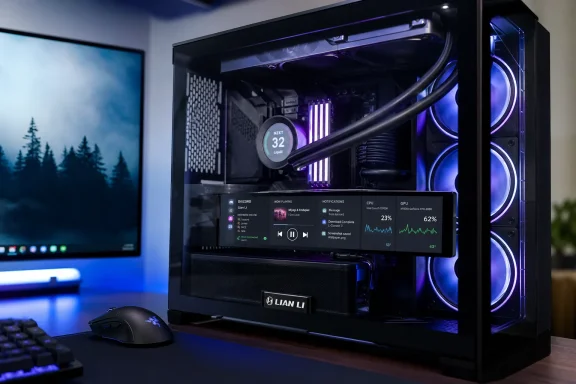
The Universal Screen’s panel measures 8.8 inches diagonally and runs at 1920×480, an unusually wide 4:1 aspect ratio. Lian Li lists it as an IPS LCD with a 60Hz refresh rate and 500-nit brightness. In normal operation, L-Connect 3 uses it for themed dashboards, component telemetry, custom images, video, and RGB-border control.
The Windows-display function is an alternate use, not simply another dashboard template. Once enabled through L-Connect 3, Windows can extend the desktop to the screen; users can move the pointer and ordinary app windows onto it. That distinction is central. Temperature widgets and animated themes live inside Lian Li’s application, while a Windows desktop extension can carry any compatible app interface: a compact music player, Discord’s channel controls, chat, system-monitoring widgets, a stream deck-style control page, or even a browser window.
XDA’s experience makes the best case for the feature. Media playback controls and voice-chat controls are exactly the kinds of interfaces that are useful at a glance but irritating to keep on a main display. A 480-pixel-high strip is poor territory for documents, timelines, spreadsheets, and most full applications. It is well suited to persistent, shallow windows that need to remain visible without competing with a game or full-screen work application.
The panel therefore addresses a specific friction point in modern single-monitor setups: many users have enough screen area for the work itself but not enough uncontested screen area for peripheral controls. Running Discord or a music player on a conventional second monitor solves that problem better, but costs far more desk space and usually requires a spare GPU output, monitor arm or stand, display cable, and power cable. The Lian Li screen makes a compact compromise available inside the PC case.
That is also why calling it “a taskbar monitor” is more revealing than calling it a temperature display. Its strongest role is not expanding usable workspace. It is relocating the desktop clutter that otherwise sits above a game, a creative application, or a browser.
For small-form-factor and micro-ATX builds, that included adapter matters more than it may appear. Internal USB 2.0 headers are a recurring bottleneck once a system has an AIO cooler, RGB/fan controller, front-panel USB hardware, and other accessories. A display that demanded another internal header would often require an internal hub or splitter; those solve the problem but add cost, cable bulk, and another potential failure point. Using a rear Type-A port is a simple escape route.
There is a less flattering implication, though. The Universal Screen is not receiving a conventional video signal from a graphics card. Lian Li’s own support material refers to the device appearing in Windows Device Manager and provides recovery steps for cases where it appears there but is not controllable through L-Connect 3. Community reports identify the display adapter as “LIANLI USB Secondary Display-60hz,” reinforcing that it relies on a software and driver stack rather than an ordinary HDMI or DisplayPort monitor path.
This makes the screen unusually dependent on L-Connect 3 and its driver continuing to work properly after Windows changes. Lian Li’s support advice for an undetected-but-listed screen begins with removing the device in Device Manager and rebooting. Its final suggested step, if the issue persists, is reinstalling Windows to restore driver and software integration. That is a dramatic troubleshooting recommendation for an $84.99 accessory, and it exposes the practical downside of the single-cable design: convenience arrives by putting video, device discovery, and customization behind vendor software.
A normal monitor can survive a vendor control app crashing because its display link is independent of that app. Here, L-Connect 3 is more than RGB software. It is part of the screen’s operating path.
The screen has enough horizontal resolution for a taskbar-like row of controls, a media player, a Discord voice channel, hardware graphs, or an always-open chat. Its 480-pixel vertical limit means many software dialogs, Settings pages, web pages, and office apps will feel cramped. The same limitation applies to gaming overlays: a voice call control strip may work well, but a large Discord window or an extended text chat will quickly become a scrolling exercise.
Independent testing by Modding.fr reached the same broader conclusion as XDA from a different direction: the screen can host Windows secondary-display workloads such as small app windows, media playback, and widgets. The key word is secondary. Buyers who want more room for email, coding, Teams, or browser research should spend the same money on the larger portable USB displays that compete with this product. Those will be less elegant inside a tempered-glass case, but materially better as monitors.
The Lian Li screen is more defensible when the case itself is part of the build’s visual design and the computer stays on the desk within viewing distance. The internal mounting position removes desk clutter and turns otherwise empty case volume into an information surface. It also creates a visibility compromise: glass reflections, viewing angle, case placement, and cable length all matter more than they would with a conventional monitor.
ALKtech specifically flagged the supplied cable length as an area where more flexibility would help, particularly in large cases. That is a detail worth considering before ordering. A full tower with a screen mounted far from its motherboard header or rear I/O area may require more cable planning than product images suggest.
One support warning is especially important for system builders: Lian Li says using the wrong mounting screws or inserting the screen connector upside down can damage the PCB. That is not a routine cosmetic-installation concern. Anyone mounting the display inside a finished case should verify the screw identifiers in the manual and avoid forcing either of the two display-side connectors.
Community reports also point to USB topology as a possible trouble spot. One owner reported persistent disconnects that stopped after bypassing a USB 9-pin extender hub; another cited an issue tied to an extender. Those are anecdotal reports, not proof that every hub is incompatible, but they align with Lian Li’s own focus on USB connections when troubleshooting. Builders should favor a direct motherboard header or a rear motherboard USB port before introducing splitters and low-cost internal hubs.
The product’s $84.99 suggested price makes those caveats harder to overlook. Cheap generic sensor panels can be less polished and may come with shakier software, yet Lian Li is charging a premium for integration and support. The company’s value proposition holds only if its bundled mounting kit, L-Connect themes, USB display mode, and warranty support save more time than a generic screen would cost in experimentation.
The missing detail in most discussions is that this utility comes with a software dependency and a very particular workflow. It is an excellent place for a persistent control strip; it is a poor place for general productivity. It frees GPU display outputs and clears desk space, but takes an internal USB header or rear USB port, requires L-Connect 3, and may demand hands-on troubleshooting if Windows or the device driver stops cooperating.
For builders who already have a Lian Li-heavy system and a glass-sided case, the screen is a credible upgrade rather than a novelty. For everyone else, the deciding question is simple: whether moving a handful of always-on controls out of the way is worth $84.99 and one USB connection. If it is, the 8.8-inch Universal Screen has a clearer purpose than its “temperature monitor” label suggests.
For enthusiasts running a single main display, especially an OLED used for both gaming and work, that changes the product from a decorative sensor panel into a specialized utility monitor. But prospective buyers should be clear-eyed about the trade: this is a very narrow, software-dependent secondary display, not a replacement for a conventional second monitor—and its USB implementation introduces support and reliability considerations that the polished product photos do not advertise.
A sensor panel that Windows treats as a display
The Universal Screen’s panel measures 8.8 inches diagonally and runs at 1920×480, an unusually wide 4:1 aspect ratio. Lian Li lists it as an IPS LCD with a 60Hz refresh rate and 500-nit brightness. In normal operation, L-Connect 3 uses it for themed dashboards, component telemetry, custom images, video, and RGB-border control.The Windows-display function is an alternate use, not simply another dashboard template. Once enabled through L-Connect 3, Windows can extend the desktop to the screen; users can move the pointer and ordinary app windows onto it. That distinction is central. Temperature widgets and animated themes live inside Lian Li’s application, while a Windows desktop extension can carry any compatible app interface: a compact music player, Discord’s channel controls, chat, system-monitoring widgets, a stream deck-style control page, or even a browser window.
XDA’s experience makes the best case for the feature. Media playback controls and voice-chat controls are exactly the kinds of interfaces that are useful at a glance but irritating to keep on a main display. A 480-pixel-high strip is poor territory for documents, timelines, spreadsheets, and most full applications. It is well suited to persistent, shallow windows that need to remain visible without competing with a game or full-screen work application.
The panel therefore addresses a specific friction point in modern single-monitor setups: many users have enough screen area for the work itself but not enough uncontested screen area for peripheral controls. Running Discord or a music player on a conventional second monitor solves that problem better, but costs far more desk space and usually requires a spare GPU output, monitor arm or stand, display cable, and power cable. The Lian Li screen makes a compact compromise available inside the PC case.
That is also why calling it “a taskbar monitor” is more revealing than calling it a temperature display. Its strongest role is not expanding usable workspace. It is relocating the desktop clutter that otherwise sits above a game, a creative application, or a browser.
USB is the convenience—and the constraint
Lian Li’s design avoids HDMI and DisplayPort entirely. The Universal Screen can connect to an internal USB 2.0 motherboard header, and the package includes an adapter arrangement that lets builders route it to a rear USB Type-A port instead. XDA used that external-port option after discovering that its available internal header was already occupied. ALKtech’s review independently confirms both connection paths and notes that the bundled cables and mounting choices are intended to accommodate internal installations.For small-form-factor and micro-ATX builds, that included adapter matters more than it may appear. Internal USB 2.0 headers are a recurring bottleneck once a system has an AIO cooler, RGB/fan controller, front-panel USB hardware, and other accessories. A display that demanded another internal header would often require an internal hub or splitter; those solve the problem but add cost, cable bulk, and another potential failure point. Using a rear Type-A port is a simple escape route.
There is a less flattering implication, though. The Universal Screen is not receiving a conventional video signal from a graphics card. Lian Li’s own support material refers to the device appearing in Windows Device Manager and provides recovery steps for cases where it appears there but is not controllable through L-Connect 3. Community reports identify the display adapter as “LIANLI USB Secondary Display-60hz,” reinforcing that it relies on a software and driver stack rather than an ordinary HDMI or DisplayPort monitor path.
This makes the screen unusually dependent on L-Connect 3 and its driver continuing to work properly after Windows changes. Lian Li’s support advice for an undetected-but-listed screen begins with removing the device in Device Manager and rebooting. Its final suggested step, if the issue persists, is reinstalling Windows to restore driver and software integration. That is a dramatic troubleshooting recommendation for an $84.99 accessory, and it exposes the practical downside of the single-cable design: convenience arrives by putting video, device discovery, and customization behind vendor software.
A normal monitor can survive a vendor control app crashing because its display link is independent of that app. Here, L-Connect 3 is more than RGB software. It is part of the screen’s operating path.
The narrow resolution defines the useful workloads
Windows will let users drag almost any window to a 1920×480 display. That does not mean every Windows interface behaves well there.The screen has enough horizontal resolution for a taskbar-like row of controls, a media player, a Discord voice channel, hardware graphs, or an always-open chat. Its 480-pixel vertical limit means many software dialogs, Settings pages, web pages, and office apps will feel cramped. The same limitation applies to gaming overlays: a voice call control strip may work well, but a large Discord window or an extended text chat will quickly become a scrolling exercise.
Independent testing by Modding.fr reached the same broader conclusion as XDA from a different direction: the screen can host Windows secondary-display workloads such as small app windows, media playback, and widgets. The key word is secondary. Buyers who want more room for email, coding, Teams, or browser research should spend the same money on the larger portable USB displays that compete with this product. Those will be less elegant inside a tempered-glass case, but materially better as monitors.
The Lian Li screen is more defensible when the case itself is part of the build’s visual design and the computer stays on the desk within viewing distance. The internal mounting position removes desk clutter and turns otherwise empty case volume into an information surface. It also creates a visibility compromise: glass reflections, viewing angle, case placement, and cable length all matter more than they would with a conventional monitor.
ALKtech specifically flagged the supplied cable length as an area where more flexibility would help, particularly in large cases. That is a detail worth considering before ordering. A full tower with a screen mounted far from its motherboard header or rear I/O area may require more cable planning than product images suggest.
Lian Li’s own support record is a warning label
The panel’s hardware concept is sound, but the available support documentation shows it has encountered a recognizable set of early-adopter problems. Lian Li’s FAQ addresses repetitive USB connect/disconnect sounds, display restarts, white lines on the panel, L-Connect detection failures, and orientation problems with the offline clock mode. The company attributes some power-cycle behavior to loose USB connections and advises a cable replacement if securing the connector does not solve it.One support warning is especially important for system builders: Lian Li says using the wrong mounting screws or inserting the screen connector upside down can damage the PCB. That is not a routine cosmetic-installation concern. Anyone mounting the display inside a finished case should verify the screw identifiers in the manual and avoid forcing either of the two display-side connectors.
Community reports also point to USB topology as a possible trouble spot. One owner reported persistent disconnects that stopped after bypassing a USB 9-pin extender hub; another cited an issue tied to an extender. Those are anecdotal reports, not proof that every hub is incompatible, but they align with Lian Li’s own focus on USB connections when troubleshooting. Builders should favor a direct motherboard header or a rear motherboard USB port before introducing splitters and low-cost internal hubs.
The product’s $84.99 suggested price makes those caveats harder to overlook. Cheap generic sensor panels can be less polished and may come with shakier software, yet Lian Li is charging a premium for integration and support. The company’s value proposition holds only if its bundled mounting kit, L-Connect themes, USB display mode, and warranty support save more time than a generic screen would cost in experimentation.
A useful accessory, provided it stays in its lane
XDA’s conclusion—that the Universal Screen became more useful after it stopped being merely a sensor display—is supported by the hardware’s actual feature set. Lian Li has built a miniature auxiliary monitor for tasks that do not deserve to monopolize a main display. For a gamer who constantly changes music, watches Discord activity, monitors recording controls, or wants temperatures visible without an overlay, its form factor can be more practical than its size suggests.The missing detail in most discussions is that this utility comes with a software dependency and a very particular workflow. It is an excellent place for a persistent control strip; it is a poor place for general productivity. It frees GPU display outputs and clears desk space, but takes an internal USB header or rear USB port, requires L-Connect 3, and may demand hands-on troubleshooting if Windows or the device driver stops cooperating.
For builders who already have a Lian Li-heavy system and a glass-sided case, the screen is a credible upgrade rather than a novelty. For everyone else, the deciding question is simple: whether moving a handful of always-on controls out of the way is worth $84.99 and one USB connection. If it is, the 8.8-inch Universal Screen has a clearer purpose than its “temperature monitor” label suggests.
References
- Primary source: XDA
Published: 2026-08-05T21:30:10+00:00
I bought a tiny USB screen to watch my PC's temperatures, but it ended up running my Windows taskbar
It looks stunning, and does more than what meets the eye
www.xda-developers.com
- Related coverage: alktech.co
Review: Lian Li 8.8" Universal Screen (US88v1) Sensor Panel
Sensor panels are all the rage these days in the DIY PC scene, and Lian Li's just joined the fray with its much-anticipated 8.8-inch Universal Screen, which features a 1920x480 IPS LCD panel with a refresh rate of 60 Hz.
www.alktech.co
- Related coverage: lian-li.com
8.8” Universal Screen - LIAN LI is a Leading Provider of PC Cases | Computer Cases
Back ● ACCESSORIES 8.8” Universal Screen ● If the 8.8” display is connected via a USB 2.0 to 9-pin header and the screen suddenly turns off/restarts, or the USB connect/disconnect sound keeps repeating ● If the 8.8” Universal Screen is detected in device manager, but not detected in L-Connect 3...lian-li.com - Related coverage: youtube.com
- Related coverage: modding.fr
[TEST] Ecran Lian Li 8.8" Universal Screen - modding.fr
www.modding.fr
- Related coverage: youtube.com
- Related coverage: techgaming.nl
Lian Li 8.8″ Universal Screen (US88v1) review - TechGaming
Een scherm die je zelf kunt inbouwen en moet werken met elke pc. Is dit de moeite waard of niet? Lees snel verder in onze review!techgaming.nl - Related coverage: desertcart.in
- Related coverage: overclockers.co.uk
Lian Li 8.8" Universal Screen – Flexibility, Style, and Function | Overclockers UK
Personalise your PC with a secondary display, using the Lian Li 8.8" Universal Screen, perfect for customising your set-up.www.overclockers.co.uk
- Related coverage: modding.fr
- Related coverage: lian-li.com
Universal Screen - LIAN LI is a Leading Provider of PC Cases | Computer Cases
The 8.8″ Universal Screen (US88v1) now supports a broader range of third-party "Template Themes" that can be imported into L-Connect 3, allowing users to personalize their setup with more vibrant visual experiences. To browse and explore the growing collection of third-party "Template Themes"...lian-li.com