
The report is based on an August 25, 2026 Link to Windows Android build examined by Windows Latest. It found unused interface text for “Restart,” “Shut down,” “Update and restart,” “Update and shut down,” and sleep, plus a RemoteControlManager component and a feature flag marked disabled. Those are credible signs of work in progress, but they are not proof of a shipping commitment. No other outlet has independently reported the newly discovered restart, shutdown, sleep, and update actions as of August 26.
Microsoft’s previous work makes the direction believable. Its Windows Insider Blog previewed a refreshed Link to Windows experience in July 2025 that explicitly included remotely locking a connected PC. That feature later appeared more broadly, although availability has varied by app build, Android hardware, region, and service-side rollout. The proposed power controls appear to be an expansion of that same Remote PC controls framework rather than a new remote-management product.
For Windows users, the practical benefit is narrow but real: a PC left running at home or at an office desk could be restarted to finish an update, powered down after a remote session, or put to sleep without returning to it. For administrators, however, it should not be mistaken for an Intune replacement or a reliable fleet-management channel.
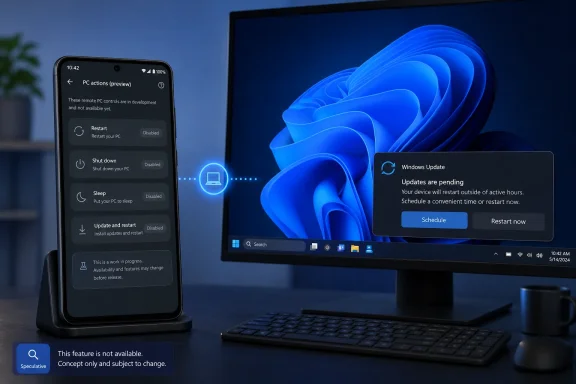 The useful command is “Update and restart”
The most consequential strings uncovered by Windows Latest are not the plain power buttons. Windows already offers several ways to shut down a machine remotely when an administrator has the necessary network access and credentials. What Link to Windows could add is a consumer-friendly path for handling the familiar “restart required” state after Windows Update.
The Android app reportedly includes separate labels and confirmation text for Update and restart and Update and shut down. The warning tells the phone owner that a restart is needed to complete an update and that unsaved work in open PC apps will be lost. That wording suggests the app is intended to call into Windows’ existing update-aware power actions, rather than simply sending a generic shutdown command.
That distinction is useful, but it also defines the risk. A phone cannot inspect documents, dismiss save prompts, resolve a BitLocker recovery screen, or tell whether a remote desktop session is still in use. Microsoft’s warning, as reported by Windows Latest, is appropriately blunt: a user away from the PC has no chance to save work before ordering a restart or shutdown.
For a personal laptop that has been idle at home, that tradeoff may be acceptable. For a shared family PC, a workstation running a long task, or any business machine with active users, it is easy to see how a convenience button becomes a source of lost work. The product design appears to recognize this with confirmation dialogs; it cannot eliminate the underlying problem.
Sleep exposes the limit of phone-based control
The reported sleep prompt contains the most revealing detail: after the PC sleeps, it disconnects from the Android device, and the user must go to the PC to wake it. In other words, Link to Windows may soon provide a remote one-way trip into sleep, not remote wake-up.
That is not a small footnote. A shutdown or sleep command is only useful remotely if the user does not subsequently need the machine. Restart normally returns the PC to an online state once Windows boots, but a sleeping PC may not be reachable through the Phone Link service afterward. Wake-on-LAN can solve that problem in some networks, and enterprise remote-management platforms can offer other options, but neither capability is established by the Link to Windows strings Windows Latest found.
The result is a sensible order of operations for anyone who eventually gets the feature: use sleep only when you are certain you will be physically present before the next session; use restart when Windows needs to complete an update and no one is working; use shutdown when the PC can remain off. The app’s own warning means Microsoft is building the constraint into the user experience rather than concealing it.
Link to Windows already has a gated remote-control path
The existing Lock PC button explains why the new controls may not appear universally even after Microsoft begins a rollout. Microsoft’s July 2025 Insider announcement required a compatible Windows Insider PC, Phone Link version 1.25062.83.0 or later, Link to Windows beta version 1.25071.155 or later, a paired Android phone, and the same Microsoft account on both ends. The feature also depended on the phone appearing under Windows Settings’ Mobile devices management.
Windows Central later reported that remote locking became available in the production-facing Link to Windows refresh, while Microsoft’s own support documentation continues to say that Phone Link features can depend on the operating system and the device model. A Microsoft moderator responding to users in January 2026 added that Remote PC controls were not present in every configuration and could be affected by Android version, device manufacturer integration, region, and service-side availability.
That history is a warning against treating the existence of strings in an APK as a release schedule. The disabled flags Windows Latest found may mean Microsoft is still testing the controls internally, may activate them for a limited cohort first, or may hold them until the PC-side Phone Link component and Windows settings are ready. A Google Play update alone may not be enough.
Pairing and connectivity remain prerequisites
Microsoft’s Phone Link setup documentation says the Android phone and Windows PC need to be paired through the same Microsoft account, with the PC running Windows 10 with the October 2022 Update or later, or Windows 11, and the phone running Android 10 or later. Microsoft recommends current Windows 11 builds for the best experience.
Its troubleshooting guidance adds a more immediate requirement: both devices need to be powered on and connected to the internet for content to remain synchronized. Microsoft also notes that battery-saving behavior on either endpoint can interfere with Link to Windows. Those conditions are routine for messages and notifications, but they become operationally important once the app can power off the device that is supposed to receive the command.
Before enabling any future remote power button, users should check the controls already available on their systems:
- Confirm that the phone is paired in Phone Link and signed in with the same Microsoft account as Windows.
- Open Settings > Bluetooth & devices > Mobile devices > Manage devices and look for the existing Remote PC controls option.
- Update both the Windows Phone Link app and the Android Link to Windows app, but do not assume an update will enable a staged feature.
- Test remote lock first, on a machine with no unsaved work, to confirm that the pairing and service connection actually work on that hardware.
A personal-device feature, not an administrative tool
Microsoft has made no announcement that these forthcoming actions will include audit logs, approval workflows, delegated access, device groups, recovery options, or any other controls expected in enterprise administration. Windows Latest’s APK findings describe actions directed at an individual paired PC, from a phone signed into the same account.
That makes the feature most appropriate for an owner managing a personal Windows laptop or desktop. It could be handy for finishing a pending update after leaving home, shutting down a desktop after noticing it was left on, or restarting a machine that is reachable but idle. It does not solve the larger IT problem of managing unattended Windows endpoints, where an administrator needs evidence of who initiated a restart, whether the action succeeded, and whether users were warned.
The near-term takeaway is therefore simple: do not go looking for restart or shutdown controls in Link to Windows yet. Windows Latest found evidence that they are being built, while Microsoft has confirmed only the older remote-lock foundation. When the controls do arrive, the decisive questions will be which Windows builds and Android devices qualify, whether Microsoft limits the rollout by region or account, and whether the PC must remain awake and online for every action.
