
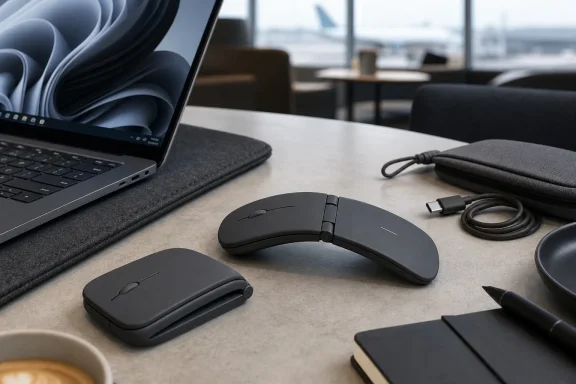
 A Different Answer to the Travel-Mouse Problem
Portable mice have traditionally been exercises in compromise. A conventional compact mouse may fit in a laptop sleeve, but it usually remains an awkward bulge among chargers, power banks, headphones, and cables. Shrinking the body further can improve packability, but the result often feels more like an emergency input device than a tool someone wants to use through several hours of work.
The Logitech Mobi Fold takes a more ambitious route. Rather than merely reducing the dimensions of an existing mouse shape, it uses a central folding mechanism to change its physical form between travel and work. Folded, it occupies a shorter footprint; unfolded, it creates the raised arch necessary for a more traditional mousing posture. The distinction sounds minor on paper, but it changes the kind of portability Logitech is pursuing.
Microsoft’s long-running Surface Arc Mouse is the most obvious comparison. Microsoft’s design flexes from an arch into a completely flat, long strip, and snapping it flat also turns it off. Microsoft’s Surface documentation still describes that design as a mouse intended to fit the hand when curved and the bag when flattened. Logitech is not copying that approach. The Mobi Fold closes across its middle, like a foldable phone, making it shorter rather than simply thinner.
That creates a legitimate split in priorities:
- A flattened mouse can be ideal for a slim folio or document case.
- A mouse with a smaller folded footprint can fit more naturally into a densely packed technology pouch or handbag.
- A conventional full-size mouse remains preferable where bag space is not meaningfully constrained.
- A foldable mouse makes most sense when the user regularly carries a laptop but does not want to dedicate much room to an accessory.
The Mobi Fold’s strongest argument is therefore not that every mouse should fold. It is that travel has its own ergonomics and spatial constraints, and the traditional desktop-mouse shape is not automatically the best answer to them.
The Fold Is the Feature, Not a Gimmick
The supplied hands-on testing makes a compelling case that Logitech’s hinge has a purpose beyond generating attention. When open, the mouse forms a stable curved shell rather than a fragile arch that feels likely to collapse under a resting hand. The hinge closes in the opposite direction from the downward pressure applied in use, which helps explain why the body can feel firm even though it transforms. The original hands-on review reports that the mechanism remained reassuringly sturdy across extended use.
That stability matters. A foldable design has to overcome a basic psychological hurdle: users must trust it before they can forget about it. If the body flexes, creaks, shifts, or threatens to close while clicking, the novelty becomes a distraction. The Mobi Fold appears to avoid that trap by turning its moving parts into a fixed, usable structure once deployed.
Logitech says the mouse has a dust-resistant silicone exterior, has undergone drop testing, and uses a hinge rated for more than 15 years of daily use. Those are manufacturer durability claims rather than independently verified lifetime results, but they show that Logitech is treating the hinge as a core component rather than a disposable novelty. The company’s product announcement also presents the folding mechanism as central to the device’s road-ready design.
There is still an ergonomic trade-off. The Mobi Fold is thin and compact enough that the hand does not sit on it as it would on a larger productivity mouse. The ring finger and little finger may naturally curl around the side rather than resting in the familiar position beside a fuller body. That can feel unusual at first, especially for users accustomed to a palm-grip mouse.
Yet this is also where the Mobi Fold is more honest than many mini mice. It does not pretend to replace a large ergonomic office mouse for eight uninterrupted hours at a desk. Instead, it targets the places where a laptop trackpad feels limiting but carrying an MX Master-class mouse feels excessive: airport lounges, hotel desks, shared workspaces, conference rooms, café tables, and temporary home-office setups.
Folding Also Replaces the Power Switch
Logitech has sensibly tied the Mobi Fold’s power behavior to its physical transformation. There is no conventional on/off slider to hunt for. Opening the mouse turns it on; closing it powers it down. Logitech lists this automatic power behavior as one of the product’s core features. Its launch materials describe the device as powering on when unfolded and off when closed.
This is a small but meaningful example of good accessory design. A portable product should reduce small points of friction, not add them. A user packing up after a meeting no longer needs to remember whether a recessed switch is off before dropping the mouse into a bag.
The result is a workflow that becomes intuitive quickly:
- Open the laptop.
- Unfold the Mobi Fold.
- Start working.
- Fold it closed when packing up.
- Trust that it is no longer wasting battery power in transit.
That sequence gives the hardware a sense of coherence. The fold changes the form, protects the mouse from accidental activation, and manages its power state in one motion.
Tracking Performance: Useful Almost Everywhere, With One Important Caveat
A travel mouse should not assume it will always have a mouse pad. That is especially true for Windows laptop users who may work from hotel furniture, conference tables, airport seating, lap desks, restaurant counters, or any flat surface available at the moment.
In the hands-on testing, the Mobi Fold tracked accurately across wood desks, standard mouse pads, larger desk mats, and even clothing. The latter is an especially revealing result: using a thigh covered by fabric as an improvised tracking surface is not an ideal setup, but it is precisely the sort of situation that exposes whether a compact mouse is actually useful away from a desk. The review’s real-world surface testing found movement consistent and usable in that scenario rather than prone to skipping and wild cursor jumps.
Logitech positions the Mobi Fold as a productivity device rather than a gaming mouse, but its optical sensor offers adjustable sensitivity from 400 to 4,000 DPI. Independent coverage identifies the sensor as a 4,000-DPI unit and notes that the mouse includes the expected USB-C charging hardware and programmable controls. PC Gamer’s review likewise characterizes the Mobi Fold as a compact travel pointer with a 4,000-DPI optical sensor.
For spreadsheets, browser work, presentations, photo selection, and ordinary Windows productivity tasks, that ceiling is more than adequate. The defining factor is not peak DPI, but whether the mouse produces predictable movement on imperfect surfaces. By that measure, the Mobi Fold appears to deliver on its central promise.
It Is Not a Glass-Tracking Mouse
The important limitation is glass. The hands-on review found that the Mobi Fold did not successfully track on the window and glass surfaces tested, even though it worked on almost everything else. That does not prove it will fail on every glass tabletop, but it is a practical warning for anyone who regularly works at glass desks or glass coffee tables. The review’s comparison testing specifically contrasts the Mobi Fold’s performance with a Logitech MX Anywhere 3S on glass.
The MX Anywhere 3S remains the stronger pick for people who need dependable glass tracking. Logitech’s business documentation for that model identifies its Darkfield sensor technology, 8,000-DPI maximum sensitivity, and MagSpeed scrolling system. Logitech’s MX Anywhere 3S datasheet makes clear that this is a more feature-rich compact productivity mouse rather than a direct substitute for the foldable Mobi Fold concept.
That does not undermine the Mobi Fold’s purpose. It simply draws a boundary around it. A sheet of paper, notebook, magazine, or laptop sleeve can become a quick tracking surface when necessary. But users who routinely work on transparent surfaces should choose based on that need, not on the appeal of the folding mechanism.
Quiet Clicks Are a Major Win for Mobile Work
Quiet switches are often advertised as a benefit, yet many silent mice make an unfortunate exchange: they reduce the sound of the click but also reduce the certainty of the click. The result can feel soft, vague, or almost rubbery.
The Mobi Fold appears to avoid that failure. The main buttons are reported to remain tactile and clearly defined beneath the finger while producing remarkably little noise. The original hands-on review found that repeated use in a quiet office did not readily register to someone seated nearby.
That is a more significant advantage than it first appears. A travel mouse spends its life in environments where mechanical clicking can become conspicuous:
- Quiet libraries
- Airport gates and airplane cabins
- Shared offices
- Hotel lobbies
- Evening work sessions at home
- Small meeting rooms
- Classrooms and lecture spaces
Logitech promotes quiet clicks as a way to make cafés and libraries more workable as temporary offices. Its product announcement emphasizes that shared-environment benefit. Crucially, the Mobi Fold’s implementation seems to preserve the physical feedback needed for accurate work.
This may be one of the product’s clearest advantages over cheap Bluetooth travel mice. It is not merely smaller; it is designed to be less socially intrusive in the places a small mouse is most likely to be used.
Adaptive Touch Scrolling Is Clever, but Not Yet Perfect
The Mobi Fold does not include a traditional scroll wheel. In its place is a touch-sensitive strip that Logitech calls Adaptive Touch Scrolling. Slow finger movement is intended to support controlled navigation, while a quicker flick introduces momentum for moving through a long page or document. Logitech’s launch information says the feature balances precision and speed according to the user’s movement.
This is an intelligent choice in a mouse designed to fold. A mechanical wheel would add height, moving parts, and a potential obstruction to the device’s low-profile silhouette. A touch surface keeps the top cleaner and allows Logitech to retain the mouse’s compact geometry.
The best part of the implementation is the momentum behavior. A quick flick can send a long webpage down the screen, and touching the strip again can stop that movement. That interaction feels more like a touchpad than a wheel, and it can be efficient once learned.
However, the touch strip is also the Mobi Fold’s most obvious first-generation compromise. The hands-on testing reported a slight stagger and a small perceptible delay between finger input and onscreen movement. The detailed review describes the system as effective but less fluid than a quality laptop trackpad and less immediate than the MX Anywhere 3S’s MagSpeed wheel.
Other reviewers have reached a similar conclusion. T3’s hands-on assessment praised the solidity of the main buttons but criticized the touch-based scrolling as stilted and insufficiently fluid. PC Gamer’s review also lists jerky scrolling among the reasons some users may prefer a conventional compact mouse.
That overlap matters because it distinguishes a personal adjustment issue from a broader design characteristic. The touch strip works; it is not simply decorative. But a physical wheel still offers an immediacy that many long-time mouse users will miss.
The Scroll-Direction Learning Curve
Touch scrolling also blurs the line between mouse behavior and trackpad behavior. Some users configure a conventional mouse wheel for traditional scrolling but set their laptop trackpad to “natural” scrolling, where content appears to move with the fingers.
The Mobi Fold’s strip can create a small mental mismatch. The user is holding a mouse, but their finger is performing a swipe gesture. The supplied review found that reversing the scroll direction in Logi Options+ immediately resolved that friction. The original test report identifies this as a short learning curve rather than a fundamental usability fault.
That configurability matters. A nonstandard control method should not force every user into Logitech’s preferred behavior. The ability to match scrolling direction to personal habit makes the Mobi Fold more adaptable for Windows users moving between a touchpad, external mouse, and tablet.
Connectivity and Windows Customization
The Mobi Fold supports pairing with as many as three devices through Bluetooth, using Logitech’s Easy-Switch system to move among them. Logitech says the product supports Windows, macOS, ChromeOS, Android, iPadOS, and Linux, though the full customization experience is centered on desktop operating systems. The company’s announcement lists that broad cross-platform support and three-device Bluetooth capability.
For Windows users, the valuable part is not just compatibility; it is the ability to configure the mouse in Logi Options+. The two buttons below the ends of the touch-scrolling surface default to browser Forward and Back commands, but they can be reassigned to actions such as taking screenshots, switching apps, or invoking other productivity shortcuts. The hands-on review confirms that the additional controls, pointer sensitivity, and scroll direction can be customized through the software.
The Easy-Switch button is located on the underside, which means changing devices requires lifting the mouse. That is slower than a top-mounted switch, but it is a defensible design decision. It keeps the clean upper surface intact and prevents accidental connection changes during ordinary use.
There is a purchase distinction worth taking seriously. The standard consumer Mobi Fold relies on Bluetooth and does not include a receiver. The Mobi Fold for Business includes a Logi Bolt USB-C receiver, Bluetooth Low Energy support, centralized management options, and a two-year limited hardware warranty. Logitech’s Mobi Fold for Business product page lists the receiver in the box and specifies Bluetooth plus Logi Bolt connectivity.
That differentiation makes sense in managed Windows deployments. Organizations may prefer a receiver for predictable setup, fleet management, or corporate wireless policies, while individual users may be perfectly content with Bluetooth.
Battery Life and Charging Suit a Modern Travel Kit
USB-C charging should be an unremarkable feature in 2026, but it still deserves recognition when a compact accessory gets it right. The Mobi Fold uses a rechargeable internal battery rather than a disposable coin-cell system, allowing it to share a cable with most modern phones, tablets, and laptops.
Logitech rates the consumer Mobi Fold for up to 30 days of use on a full charge and says a one-minute charge can provide up to 22 hours of runtime. Those are vendor estimates and will vary with usage, connection conditions, and device settings, but they are the right kind of claim for a travel product: an occasional charge rather than another item requiring daily battery management. Logitech’s launch announcement provides both battery estimates.
The business model is rated slightly differently: Logitech lists up to 32 days on Bluetooth and 33 days with the Logi Bolt receiver. Its business specification page also identifies the battery as a 100mAh rechargeable Li-Po cell. Users should not assume those figures automatically apply to the consumer edition, but the broad takeaway is unchanged: charging should be infrequent.
The fold-to-power-off behavior also improves the practical outlook. Even a strong battery is wasted if a mouse wakes up inside a bag. By tying shutdown to the closed position, Logitech removes one of the most common causes of unnecessary power drain in mobile accessories.
Is the $79.99 Price Justified?
At $79.99, the Logitech Mobi Fold is expensive relative to a generic Bluetooth travel mouse. Logitech’s own launch announcement establishes that U.S. price, placing it firmly in premium-accessory territory rather than impulse-buy territory. The company’s pricing details also list availability in Graphite, with Lilac and Off White offered in selected markets.
The price becomes easier to understand when assessed as a combination of several features rather than as a basic cursor controller:
- A mechanically distinct folding chassis
- Quiet yet tactile click switches
- USB-C charging
- Adaptive touch scrolling
- Bluetooth Easy-Switch pairing for three devices
- Customizable buttons and Windows software support
- Automatic power management
- A compact shape that has a clear travel purpose
Still, price does not erase the trade-offs. Someone who wants flawless scrolling, a larger grip, a physical wheel, or proven glass tracking can find stronger alternatives. The MX Anywhere 3S, for example, is a more capable compact mouse in several areas, especially sensor capability and scrolling hardware, though it does not solve the Mobi Fold’s packed-footprint challenge.
The key is to avoid comparing the Mobi Fold only with bargain travel mice. Its closest rivals are really a mix of compact premium mice, ultra-thin designs such as the Surface Arc Mouse, and the decision to use a laptop trackpad alone. Against that broader set, the Mobi Fold offers a distinctive and credible combination.
Final Verdict: A Thoughtful First Foldable Mouse
The Logitech Mobi Fold succeeds because its folding mechanism changes the practical experience of carrying a mouse. It does not just create an eye-catching accessory. It turns a conventional peripheral into something easier to slot into the tight, messy spaces where mobile workers keep the rest of their technology.
Its best attributes are unusually well aligned with travel: small folded footprint, quiet clicks, USB-C charging, automatic power behavior, capable multi-device Bluetooth, and reliable tracking on most non-glass surfaces. The device also appears sturdier when open than its thin, unconventional shape initially suggests.
The risks are equally clear. The Mobi Fold is not the ideal all-day desktop mouse, its touch scrolling falls short of a great trackpad or Logitech’s MagSpeed wheel, and glass tracking is not a strength. Its ergonomic shape will also demand a period of adjustment from users accustomed to fuller, more sculpted productivity mice.
But those caveats do not make the Mobi Fold a gimmick. They simply define it as a specialized tool with a specific job: making a proper mouse realistic to carry when the alternative would be leaving one behind. For Windows laptop users who frequently work in transit, share quiet spaces, and value every inch of bag capacity, Logitech’s first foldable mouse is a notably persuasive new option.
