
Security Affairs, summarizing an analysis by Ransomnews, reported that the seller — using the handle TheHatman — advertised the data as “McDonalds 1.7M+ Azure Internal Employee Dump.” The report says the sample includes employee, service, and other tenant-account records; it does not contain passwords, password hashes, or a demonstrated route back into McDonald’s environment. McDonald’s had not publicly confirmed the claim at the time of publication, and no other independently reported evidence establishes the timing or size of this alleged exposure.
For Windows and Microsoft 365 administrators, the practical concern is less an exotic Azure compromise than a familiar identity-security problem: a directory export containing names, job titles, office locations, telephone numbers, and corporate email formats can sharply improve phishing, help-desk impersonation, and business-email-compromise campaigns.
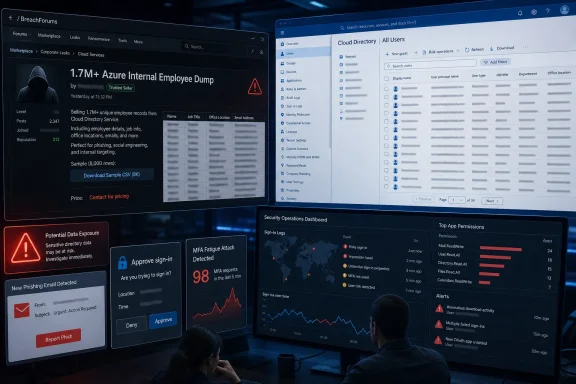 The file may be real, but the breach claim is still unproven
The technical details described by Security Affairs are plausible. The reported fields — including FacsimileTelephoneNumber and PhysicalDeliveryOfficeName — match properties commonly found in Microsoft directory tooling and older Azure AD/MSOnline-style exports. The reported presence of McDonald’s onmicrosoft.com tenant domain would also be consistent with an internal Entra directory record rather than a list assembled solely from public company pages.
But consistency is not provenance. A CSV file can show that its contents resemble an Entra export without proving who exported it, when that occurred, what permissions they used, or whether the seller still has access. The report’s references to character-encoding errors and truncated job titles make the sample look like a messy operational export rather than a polished marketing database, but those artifacts cannot establish the alleged intrusion route on their own.
That is more than a semantic distinction. The seller says stolen credentials were used, while Security Affairs describes a dataset that could have been exported by many kinds of authenticated identities. There is no public evidence tying the sample to a privileged McDonald’s administrator, a compromised service principal, an infostealer infection, or a specific Microsoft Graph application.
The claimed 1.7 million-record count is even less certain. An 8,000-record sample represents under one-half of one percent of that number, and the reported data has no reliable timestamp fields. It may contain historical accounts, guests, shared identities, vendors, service accounts, duplicate entries, or records from business units that no longer use the same systems. Until McDonald’s, a regulator, or a second independent investigation verifies the larger archive, the 1.7 million figure should be treated as a seller’s marketing claim.
A directory dump does not require Global Administrator access
The report’s most consequential claim is that one working tenant login may have been enough to obtain a large part of the directory. Microsoft’s own Entra documentation supports the core of that concern: by default, native member users can read broad directory information, including enumerating users and contacts and reading public properties. Guest users are more restricted by default, though administrators can weaken those limits.
In other words, a full administrator takeover is not necessarily required for an attacker to turn one compromised employee account into a useful organizational map. The exact fields available vary with tenant configuration, object type, permissions, Microsoft Graph scopes, and which attributes an organization has made visible. Yet the central risk is real: basic directory visibility can provide enough context for an attacker to impersonate a manager, payroll team, franchise support desk, supplier, or internal IT worker.
Microsoft Graph permissions are relevant here. An application with Directory.Read.All can read users, groups, and applications across a tenant, and Microsoft explicitly characterizes directory permissions as broad access that should be avoided where more specific permissions will do. A malicious or over-permissioned enterprise application is therefore at least as important to investigate as a stolen user password.
The public reporting does not establish that McDonald’s had a misconfigured tenant, weak multifactor authentication, or an exposed app registration. It does show why companies should not dismiss directory information as harmless merely because it does not include passwords. A list of real personnel, their roles, locations, phone numbers, and internal naming conventions is operational intelligence.
The immediate danger is convincing impersonation
The alleged sample’s value lies in credibility. A phishing email that knows a recipient’s restaurant location, manager title, direct telephone number, corporate address pattern, and internal business unit has a much better chance of surviving a recipient’s first glance. The attack does not need to be technically sophisticated if it persuades someone to approve an MFA prompt, disclose a one-time code, install remote-support software, or “re-authenticate” through a fake Microsoft sign-in page.
For a global franchise organization, the exposure can also create trust-boundary problems. Corporate employees, restaurant teams, franchisees, vendors, and outsourced IT staff often expect messages from one another. That makes an accurate directory especially useful for attackers looking to pose as a payroll contact, a store-support technician, an invoice approver, or a Microsoft 365 administrator.
Organizations named in the seller’s other listings should treat the McDonald’s case as a warning sign, not proof that they were accessed by the same actor. Security Affairs reported that TheHatman made several similarly formatted listings involving other large companies. Similar CSV schemas could indicate one operator running a repeated collection process, but they could also reflect recycled tools, copied claims, or datasets obtained from different sources.
The report therefore supports heightened vigilance, not attribution. There is currently no public, independently corroborated evidence identifying the access method or demonstrating a common campaign against every organization named by the seller.
What Entra administrators should check now
A response should begin with evidence preservation and identity review, rather than a blanket password reset that destroys useful investigative context. Security teams should review Entra sign-in logs, Conditional Access outcomes, directory audit logs, and application-consent activity for unusual behavior around accounts with access to sensitive directories or administrative tools.
The most useful checks are concrete:
- Review Microsoft Entra sign-in logs for unfamiliar locations, impossible-travel alerts, suspicious client applications, unexpected device registrations, and sign-ins using authentication methods your organization does not normally permit.
- Review enterprise applications and app registrations for recent consent grants, newly added credentials, broad Microsoft Graph permissions, and service principals assigned directory roles or
Directory.Read.All-style access. - Audit accounts that can read directory data at scale, including privileged administrators, automation identities, HR integrations, identity-governance tools, and third-party support platforms.
- Confirm that former employees, contractors, franchise personnel, and dormant service accounts have been disabled or removed where appropriate, and revoke active sessions for identities tied to suspicious activity.
- Search internal ticketing, finance, and help-desk teams for recent requests that used unusually accurate employee or location details, especially requests involving MFA resets, payment changes, account recovery, or remote access.
Microsoft also recommends blocking device-code authentication where it is not required. Device code flow is legitimate for devices with limited input capability, but Microsoft identifies it as a higher-risk authentication method that can be used in phishing and unmanaged-device scenarios. Conditional Access can place such a policy in report-only mode first, allowing administrators to discover legitimate dependencies before enforcing a block.
Do not treat MFA as a complete answer. MFA remains necessary, but stolen session tokens, malicious OAuth consent, device-code phishing, and a compromised managed endpoint can all undermine a security program that measures success only by whether a password was entered.
The missing date is a response problem, not a footnote
The absence of reliable timestamps makes this alleged exposure harder to triage. If the data is years old, many listed employees and phone numbers may no longer be current; if it is recent, it may accurately reflect today’s reporting lines and operational contacts. In either case, historical data can remain useful to scammers, particularly against long-serving staff or businesses that preserve familiar address formats and support processes.
McDonald’s and the other companies named in the listings need not confirm a criminal seller’s claims to take defensive action. A carefully worded notice to affected employees and franchise partners can warn of targeted impersonation without authenticating the seller’s numbers or describing investigative details. The operational advice is straightforward: no payment, password reset, MFA approval, software installation, or account-recovery request should be acted on from an unsolicited email, chat, or telephone call without verifying it through a known internal channel.
The evidence available today supports a narrower conclusion than the headline claim: a seller is offering data that appears consistent with a McDonald’s Entra directory export, while the alleged 1.7 million-record scale and the claimed Azure credential compromise remain unverified. For defenders, that is enough reason to audit directory-read access and prepare employees for highly tailored social engineering — because the damage from an identity directory often begins after the file is sold, not when it is first exported.
