

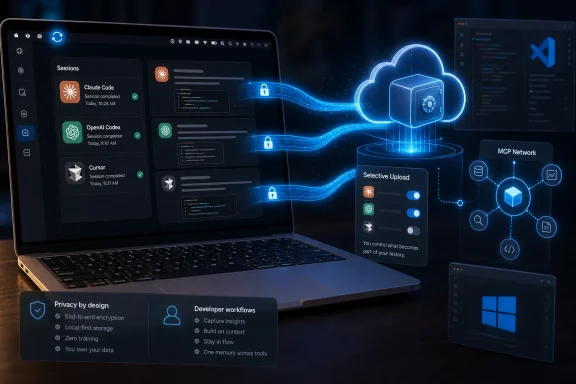
TestingCatalog first reported the launch on August 5, and MemoryPlugin’s own download page confirms the app’s core boundaries: it runs on Apple Silicon Macs using macOS 12 or later, watches supported local session stores, and syncs prompts plus assistant replies after the user chooses individual projects and chats. The company also says it has published its memory service in the official Model Context Protocol registry, while its own documentation confirms a hosted MCP endpoint accessible over streamable HTTP and Server-Sent Events.
The news for Windows users is more qualified. MemoryPlugin Sync itself is not available for Windows, and there is no Intel Mac build either. The company says both are “on the way,” but gives neither a target date nor a preview channel. Windows developers can already connect MemoryPlugin’s remote MCP server from clients such as VS Code and GitHub Copilot Chat, Claude Desktop, Cursor, and other MCP-capable software; what they cannot do is use the new desktop app to automatically ingest local Claude Code, Codex, or Cursor session files into the archive.
The Mac app changes the archive, not the coding agent
MemoryPlugin Sync is easy to mistake for a direct integration with Claude Code, Codex, or Cursor. It is not. The app is an ingestion utility: it reads completed sessions from disk, places selected conversation material into MemoryPlugin’s hosted chat-history system, and lets other connected AI products search or recall those stored conversations later.
That distinction matters operationally. An agent running in Claude Code does not suddenly receive all of a user’s historical coding conversations merely because the Mac app is installed. For live access, the agent still needs a MemoryPlugin MCP connection or another supported integration. Sync supplies the archive; MCP gives an AI client tools to search, retrieve, and write against it.
MemoryPlugin’s MCP documentation describes a server with functions for semantic memory search, bucket management, chat-history recall, full-conversation retrieval, and file search. The hosted service uses OAuth 2.0 with PKCE and dynamic client registration, avoiding the older pattern in which a long-lived API token has to be pasted into an MCP JSON file. That is a better default for a service intended to hold conversations from multiple AI vendors, especially on a shared or managed workstation.
The result is a two-part product. Sync copies selected past coding discussions into the company’s history system. The MCP server makes that history available to compatible desktop clients and agents. The separate open-source skill is intended to push agents into using those MCP tools routinely rather than leaving recall and saving entirely to agent discretion.
“Only prompts and replies” is a meaningful boundary—but not a complete privacy guarantee
MemoryPlugin says Sync excludes tool output, local file contents, terminal commands, code, and model thinking. It also says each project and conversation must be explicitly checked before an initial sync begins, that the app works in the background only after that review, and that a synced conversation can be removed later to stop it from being re-imported.
Those controls are materially better than an opaque whole-directory upload. They also give teams a workable review point before a developer’s local agent history reaches a third-party service.
But the company’s headline phrasing—“code never leaves your machine”—needs a practical qualification. Prompts and assistant replies can contain code, stack traces, credentials pasted by mistake, proprietary error messages, API payloads, schema fragments, or descriptions of internal systems. A coding-agent conversation often carries sensitive material precisely because the user asks the model to inspect, generate, or explain it. Excluding raw tool traces is useful, yet it does not make the uploaded transcript harmless by default.
Administrators should treat Sync as a cloud chat-history export feature, not as a local-only developer tool. Before enabling it on corporate Macs, organizations should determine whether Claude Code, Codex, or Cursor transcripts are covered by source-code handling policies, customer-data restrictions, retention rules, and incident-response procedures. MemoryPlugin says data is encrypted in transit and at rest, is not sold, and is not used to train models. Those are vendor commitments; they do not replace an organization’s own classification and approval process.
The removal behavior deserves attention as well. MemoryPlugin says the Remove action deletes the chat from its history and stops it syncing again. Its broader documentation separately explains that excluding a conversation removes it from search and context while the stored conversation remains until deleted. Users should therefore verify whether they want to exclude, remove, or fully delete a record, rather than assuming every visibility control erases the underlying transcript.
Pro pricing is the real gate on automatic coding-history sync
MemoryPlugin calls Sync a free macOS app, but the feature that makes it useful across products is paid. The company allows any plan to browse and read local chats in the app, while syncing coding-agent conversations to the hosted archive requires Pro.
The current pricing page lists Core at $89 per year and Pro at $180 per year, each beginning with a seven-day trial. Core covers the last 500 conversations in chat history; Pro removes the history cap and adds conversation summaries, monthly insights, shared buckets, and expanded analytics. The previous distinction matters because coding-agent users can generate a large number of short, iterative sessions quickly. A 500-conversation ceiling is much more restrictive in a terminal-agent workflow than in occasional browser chatbot use.
This makes the desktop launch less a free local session viewer than an acquisition path for the Pro tier. Users can inspect their local histories at no cost, but the cross-tool recall proposition—the reason to install it—depends on sending those histories into MemoryPlugin’s service and maintaining a Pro subscription.
MemoryPlugin’s own public material also contains a small but revealing rollout mismatch. Its main homepage still labels the desktop application as “Coming soon” in the product inventory, while the dedicated download page offers the macOS build and calls it available now. The download page is the more specific record and appears to reflect the actual launch, but the stale homepage copy signals a hurried release cycle. Users should rely on the download page’s hardware and OS requirements rather than the broader marketing matrix.
The agent skill addresses the harder problem: getting agents to use memory
Alongside Sync, MemoryPlugin has released an MIT-licensed Agent Skills package on GitHub. The repository contains a Claude Code plugin configuration, hooks, an MCP configuration, and a reusable SKILL.md instruction set designed for Claude Code, Codex, Cursor, GitHub Copilot, Gemini CLI, and other tools that support the emerging agent-skills convention.
The skill’s operating model is deliberately prescriptive: search memory before making assumptions, save durable decisions before ending work, use dated atomic records, organize them into topical buckets, and produce a one-line receipt when an agent stores something. It also directs agents not to save secrets, API keys, transient debugging material, or information already maintained in repository instructions such as CLAUDE.md or AGENTS.md.
That last point is sensible, but it identifies another limit of the product. MemoryPlugin is positioning hosted personal memory as a layer above project-local instructions, while source repositories remain the authoritative home for code-specific conventions. An agent should not retrieve a cloud memory entry about a build setting and treat it as stronger than the checked-in configuration, current infrastructure-as-code, or a repository’s own security policy.
The skill can improve consistency where users hop between tools, but it cannot guarantee correct recall. Its own purpose is to influence agent behavior: MCP makes memory available; the skill tries to make using it habitual. Administrators should expect agents to make imperfect retrieval decisions, particularly when multiple projects share similar names, technology stacks, or historical decisions.
Windows already has the MCP route, but not the session collector
For Windows users, the immediate option is MemoryPlugin’s hosted MCP service rather than Sync. Its documentation includes a VS Code and GitHub Copilot Chat configuration using a project-level .vscode/mcp.json file, and it describes the same HTTP endpoint for Claude Desktop, Cursor, Windsurf, and other remote-MCP clients. The Windows version of Claude Desktop is explicitly listed in the company’s configuration guidance.
That path allows an AI client to search memories and any conversations already imported into MemoryPlugin. It does not automatically find and upload local Windows sessions from Codex, Cursor, or Claude Code. In other words, Windows can consume the central memory layer today, but it cannot yet contribute coding-agent session history through the new desktop collector.
That split is likely to matter most for mixed-platform teams. A developer using an Apple Silicon Mac can opt selected agent conversations into the archive; a colleague on Windows can query the same memory through MCP if account and bucket permissions permit it. The Windows machine’s own terminal and IDE sessions remain outside that archive until MemoryPlugin delivers the promised Windows application—or users import relevant context through another supported method.
For now, MemoryPlugin Sync is a real expansion from browser-chat history into local coding-agent history, but its first release is narrowly scoped: Apple Silicon only, three agent sources, completed conversations only, and Pro-only cloud sync. The more consequential capability for Windows administrators is already the hosted MCP connection. The missing piece is the local session collector, and MemoryPlugin has not said when that gap will close.