

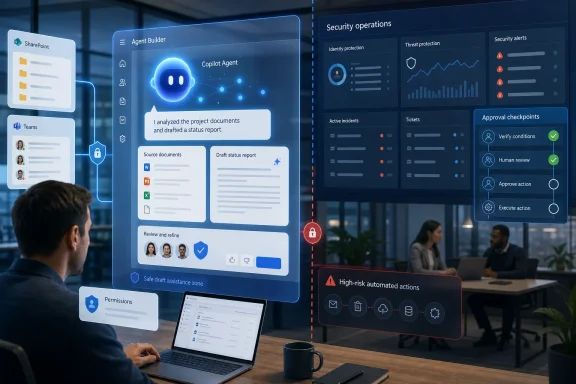
That distinction is the part organizations need to understand before treating “build an AI agent” as a quick employee self-service project. Microsoft’s Agent Builder can create a useful declarative agent without code. It does not turn a natural-language instruction into an unattended security-operations automation with authority over Entra ID, Defender, endpoints, ticketing, and incident-response policy.
Microsoft’s own product documentation draws the line more clearly than the consumer-friendly guide does. Agent Builder is positioned for quick, natural-language configuration with instructions and existing content; Microsoft directs organizations toward Copilot Studio, Microsoft 365 Agents Toolkit, or custom development when an agent must use APIs, actions, external systems, or more controlled workflows. The practical consequence is simple: begin with an agent that summarizes, classifies, drafts, and flags. Treat anything that changes records, sends messages, alters permissions, or disables accounts as an integration and governance project.
The status-report example is the right first build
The guide’s strongest advice is to start with a repeated job rather than with AI capabilities. A status-report assistant grounded in a team’s emails, Teams messages, and project documents is a sensible candidate because the human workflow already exists, the desired output is reviewable, and the consequence of an occasional mistake is usually limited to an inaccurate draft rather than an irreversible system change.
The best initial scope is even tighter than “review the last seven days.” Define a named SharePoint site or folder, a dedicated Teams channel, a precise reporting window, and output categories such as decisions, blockers, risks, and next milestones. Require the agent to label the source material behind each item where possible and to write “not found” rather than fill gaps with plausible prose.
That last instruction matters. Microsoft’s documentation for declarative agents warns that generated output can be inaccurate, incorrect, or out of date. The technology can produce a polished sentence from fragmentary, conflicting, or stale information. If a report agent is instructed to provide a complete update at all costs, it may make uncertain information look settled. If it is instructed to flag conflicts and omissions, it becomes a faster first-pass analyst whose work remains auditable by the person publishing the report.
The same principle works for shared-inbox agents. Start with classification and response drafting. Ask the agent to identify issue type, urgency indicators, intended owner, and the applicable approved response template. Keep the final send button with a human until the team has real evidence that the routing rules, knowledge sources, and escalation instructions behave reliably.
Microsoft’s guide presents this as iteration, and that is correct. The missing operational detail is that iteration needs a test set: a small collection of real but sanitized emails, reports, and edge cases against which the team checks every revision. “It sounded good in chat” is not a test result.
Knowledge sources decide what the agent can safely say
In Agent Builder, the work is less about composing a clever personality than defining a usable evidence boundary. Microsoft allows agents to be configured with knowledge from SharePoint and OneDrive, websites, and other supported sources. A user building an agent can also set instructions about output format, tone, scope, and what to do when evidence is incomplete.
Microsoft 365 Copilot’s permission model does provide an important baseline: when an agent uses organizational content, it operates within the signed-in user’s existing access rights. Sharing an agent does not automatically grant every recipient access to the documents behind it. If a recipient lacks access to a source file or site, the agent should not use that protected content in that person’s response.
That is a protection against a direct permission bypass, not a guarantee that an agent is ready for broad deployment. SharePoint permissions are often inherited, fragmented, or simply too generous. An agent can make pre-existing oversharing much easier to discover and summarize. If dozens of staff already have read access to a folder containing sensitive material, an agent grounded in that folder does not create the underlying access problem—but it can reduce the effort required to extract the information.
There is another limitation that Microsoft’s documentation states plainly: website grounding depends on what Bing has indexed. Dynamic pages and client-side content may be incomplete or stale relative to the live website. A policy assistant pointed at an intranet-like web source therefore should not be assumed to have the same answer as a user opening the current policy page in a browser.
For IT teams, the safe design pattern is straightforward:
- Use a curated SharePoint library or a controlled document set for policies, procedures, and approved templates.
- Write explicit instructions that tell the agent to state when its sources do not answer the question.
- Keep procedural instructions in the agent’s configuration rather than hiding them inside editable reference documents.
- Review who can edit both the agent and the underlying knowledge sources before sharing it.
That third point addresses a less obvious risk. Microsoft warns builders not to use SharePoint documents as a workaround for the platform’s instruction limits. Knowledge sources are data for grounding, not trusted system instructions. If people with ordinary edit rights can alter a document that the agent treats as operational guidance, they may be able to influence its behavior without changing the agent configuration itself.
“Share” is a deployment step, not an afterthought
Microsoft’s guide ends with testing, sharing, and scaling. That ordering is right, but “share” deserves more scrutiny than a casual team tool normally receives. Microsoft says Agent Builder sharing gives specified people within the organization direct access to the agent; it does not by itself publish the agent across the organization or deploy it across multiple channels. Broader distribution requires the appropriate organizational process and, in many cases, Copilot Studio.
Administrators can control whether users may share agents with everyone, only selected users or groups, or no one. Those controls are not retroactive: Microsoft says a change in sharing policy affects future sharing actions, while agents already shared remain available until someone manually changes their sharing setting. An administrator who decides to restrict agent sharing needs an inventory of what users have already built and distributed; changing the tenant-wide setting alone will not retract existing access.
Ownership is the other overlooked control. A team’s weekly-report agent might look harmless until its creator changes jobs, its SharePoint site is reorganized, or its output becomes part of a management routine. Before a group adopts an agent, name a business owner, a technical owner, the approved data sources, a support contact, and a review date. The record can be short, but it should exist outside the chat window.
The licensing picture also needs attention. Microsoft’s current documentation says that basic Copilot Chat access and web-grounded agents may be available more broadly, while organizational-data grounding through SharePoint, Microsoft Graph, or Copilot connectors requires either Microsoft 365 Copilot licensing or a tenant configured for pay-as-you-go consumption. The guide’s opening instruction—go to Copilot Chat, choose Agents, then New Agent—does not explain that capability and billing differences can appear once a user tries to attach work data.
For a small pilot, that means IT should verify the actual tenant configuration before employees are encouraged to build agents around team documents. A prompt-only assistant may work, while the version that retrieves the needed SharePoint content may fail for unlicensed users or require metered billing. “No code” does not mean “no licensing, permissions, or operating cost.”
The phishing example needs an action layer and human controls
Microsoft’s article correctly says agents can do more than answer questions. Microsoft’s broader Copilot platform supports actions through integrations, workflows, and APIs. An agent can, in the right architecture, send emails, update records, trigger processes, or work with connected business systems.
But the hypothetical security agent in the guide is a chain of interdependent operations, not a single grounded response. It must determine that a sign-in is suspicious, establish the correct account, decide whether to disable it, assess potentially affected devices and identities, collect evidence, create a ticket in the organization’s service platform, notify the correct responders, and preserve a record of what happened. Microsoft’s declarative-agent architecture documentation says the approach is not intended for complex multistep operations or iterative reasoning loops.
A security team should therefore build that scenario from the security stack outward, not from Agent Builder inward. Microsoft Defender, Entra ID, Sentinel, and the organization’s SOAR or ticketing tooling should remain the authoritative detection, containment, and case-management systems. An AI layer may summarize an incident, propose a response plan, enrich a ticket, or require an approver before invoking a well-defined containment action. It should not be granted broad, opaque authority merely because the conversational interface can describe the workflow convincingly.
The same caution applies outside security. An agent that drafts an HR response is a content tool. An agent that sends it, updates an employee record, or triggers a workflow has become an operational identity with permissions. The approval step, logging, rollback plan, and least-privilege service connection should scale with the consequence of the action.
Build the first agent as a controlled prototype
Microsoft’s Signal guide is useful as an introduction because it steers non-developers toward real work problems and encourages refinement. Its major omission is that the “agent” label covers both a personal knowledge assistant and an integrated automation system. They may share a chat interface, but they demand very different levels of engineering and accountability.
For most Microsoft 365 teams, the first successful project will be a bounded assistant that reads approved sources, produces a repeatable draft, and exposes uncertainty rather than concealing it. A project update, inbox triage recommendation, or policy Q&A agent can save time immediately while giving the organization evidence about quality, source hygiene, and adoption.
Move to actions only after the team can answer four concrete questions: what exact system call will be made, under whose authority, what approval is required, and how will the organization detect and reverse a bad result. Until those answers exist, the most valuable AI agent is the one that prepares the work for a person—not the one permitted to perform it.