
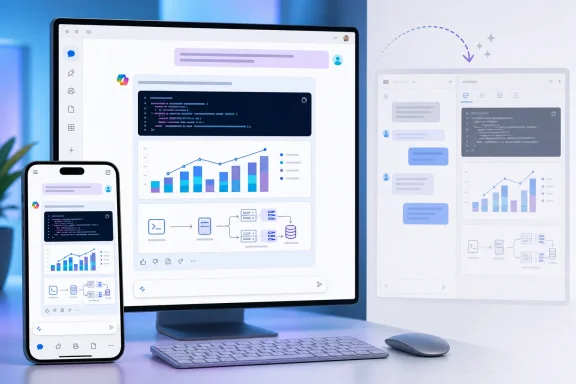
The change is modest on paper, but it addresses a real workflow break for people using Copilot Chat to draft scripts, interpret data, or turn a prompt into a visual artifact. Microsoft’s current model requires users to open a side-by-side canvas to inspect those results. The planned implementation would keep the preview adjacent to the prompt, explanations, source grounding, and follow-up requests that produced it.
Microsoft’s roadmap says the feature is intended for desktop and mobile users in the worldwide, standard multi-tenant cloud. It does not identify eligible Microsoft 365 Copilot license tiers, a staged rollout order, client version requirements, or whether the capability will appear identically in the web app, desktop app, and mobile clients.
 Roadmap status is not release status
The important date is September 2026, not August 19, when Microsoft added the entry to its public Microsoft 365 Roadmap. The item is explicitly still in development. Microsoft’s own roadmap documentation also warns that release dates are estimates and that features can be postponed, cancelled, or removed once their status changes.
That distinction is especially useful for IT teams that track Copilot changes through public roadmap entries. A General Availability release ring does not mean a function has begun deploying; it identifies the intended release channel once Microsoft is ready to ship it. There is no preview or Frontier availability listed for Code Blocks, and Microsoft has not published a Message Center notice with deployment dates, tenant preparation steps, or an admin control.
Administrators should therefore avoid writing September availability into end-user documentation as a firm commitment. Treat it as a planned service change until Microsoft moves the entry to a released state or posts a Message Center announcement with a rollout schedule.
Inline rendering changes the review loop
A side-by-side canvas makes sense for extended authoring, but it separates the rendered result from the surrounding discussion. In a Copilot Chat session, that division can be inconvenient when a user needs to compare a generated PowerShell command with the stated assumptions, ask for a correction, or verify that a chart uses the intended figures.
Inline previews should make that loop shorter. A help-desk analyst could ask for a Microsoft Graph query, inspect the returned code in context, then request narrower permissions or error handling without shifting attention to a second workspace. An infrastructure engineer could ask Copilot to visualize capacity data, see the resulting chart directly in the response, and refine the underlying criteria in the next message.
The practical benefit is reviewability, not a promise that Copilot-generated code has become reliable enough to run unattended. Code that looks clean in an inline block can still contain unsafe assumptions, unsupported modules, incorrect scopes, or destructive defaults. Rendering the output closer to the conversation may make scrutiny easier; it does not substitute for code review, testing, least-privilege credentials, or change control.
This is also separate from Microsoft 365 Copilot Pages. Microsoft introduced Pages as a collaborative canvas where users can work with Copilot output, including interactive content, outside the linear chat stream. Code Blocks, as described in roadmap item 569429, appears aimed at the immediate Chat response rather than replacing Pages or turning Copilot Chat into a full development environment.
The feature arrives after a chat-centered redesign
The timing matters because Microsoft has already been reshaping the Microsoft 365 Copilot app around Chat. A Microsoft 365 Message Center notice published in May and updated in June described a simplified, chat-centered interface for web and desktop users, with a richer prompting canvas, revised response layout, streamlined navigation, and a temporary opt-out period before the new experience became the default in July.
Code Blocks fit that direction: Microsoft is concentrating more work inside the response thread rather than sending users to separate surfaces. For organizations that have trained employees on the revised Copilot app, this is likely to register as a response-format change rather than a new standalone tool.
There is, however, an operational wrinkle. The prior redesign applied broadly to users accessing the Microsoft 365 Copilot app and included both Microsoft 365 Copilot and Copilot Chat tenants. The Code Blocks roadmap entry names the product as Microsoft Copilot for Microsoft 365 but does not say whether users of the no-add-on Copilot Chat experience will receive it. That is a meaningful omission for organizations where some staff have full Microsoft 365 Copilot licenses and others use the basic chat service.
Microsoft also has not said whether code blocks will support syntax highlighting, copy controls, downloadable files, editing, execution, accessibility features, or chart and diagram export. Those details determine whether the feature is merely a cleaner presentation layer or an actual improvement for technical work.
What IT teams should do now
There is no configuration work to perform based on the public entry. The reasonable preparation is to identify the internal guidance that assumes Copilot opens a side-by-side code canvas and flag it for review once the feature begins to appear.
Teams using Copilot for scripting, reporting, and automation should preserve their existing safety rules:
- Generated PowerShell, shell commands, SQL, and API calls should be tested in a non-production environment before they are used against production systems.
- Users should verify permissions, target scope, and data handling even when Copilot presents output as a polished chart, diagram, or code preview.
- Internal training should make clear that inline display changes where an answer is reviewed, not the governance rules governing whether it may be executed or shared.
No independent outlet or additional Microsoft documentation appears to have reported technical details for roadmap item 569429 as of August 19. Until Microsoft publishes those details, the defensible reading is narrow: Copilot Chat is scheduled to display certain structured outputs inline beginning in September, with the older side-by-side code canvas no longer the only stated preview path.
