
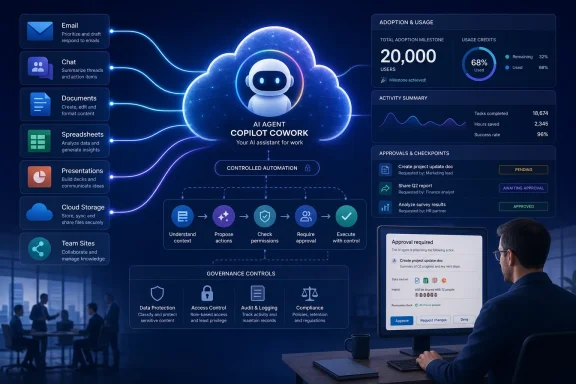
The important change is practical: Cowork is designed to take a broad instruction—prepare for a customer meeting, turn notes into a proposal, build a deck, organize follow-up—and execute a sequence of actions across Outlook, Teams, Word, Excel, PowerPoint, OneDrive, SharePoint, and connected services. Microsoft 365 documentation confirms that Cowork can create files, prepare and send email, schedule meetings, post to Teams, search organizational data, and run recurring tasks. This is a different operating model from Copilot Chat, which Microsoft describes as focused on answers, summaries, and drafting within a single session.
For Windows and Microsoft 365 administrators, however, the useful takeaway is not Microsoft’s language about a “digital coworker.” It is that Cowork turns ordinary user permissions, business data, and approval workflows into an agent runtime that can act across the tenant. That makes its rollout a governance project as much as an end-user AI project.
 Cowork is available, and its usage is billable
Copilot Cowork became generally available on June 16, 2026, after an earlier Frontier preview. It requires a Microsoft 365 Copilot User Subscription License, but Microsoft has separated Cowork’s costs from the fixed per-user Copilot license: Cowork tasks are billed on a usage basis in Copilot Credits.
That distinction is easy to miss in a story centered on employee experimentation. A conventional Copilot prompt and a Cowork workflow are not equivalent units of work. Microsoft says Cowork consumption is based on model use, retrieval of organizational context, tool and skill calls, and runtime. A complex job that searches multiple repositories, drafts several files, invokes connectors, and runs over an extended period can use more credits than a simple request for a summary.
Microsoft’s internal examples are tailored to exactly the type of work likely to grow expensive at scale: multi-source briefings, customer research, deck creation, recurring follow-up routines, and prototype generation. The productivity case may be strongest where a worker is currently stitching together data manually across applications. It is substantially weaker where an employee could achieve the same result with a short Copilot Chat prompt or a standard Power Automate flow.
This is where the internal adoption narrative leaves out a material operational question: Microsoft did not publish the organization’s Cowork credit consumption, the average cost per internal user, or the rate at which internally created work was accepted without major rework. The reported 20,000-user figure establishes interest, but it does not establish return on investment.
For tenant administrators, usage limits and billing policies should be decided before broad availability turns exploratory use into unplanned spend. Microsoft says administrators can view consumption in the Microsoft 365 admin center and set limits by user or group. That makes a phased deployment more defensible than opening Cowork tenant-wide and discovering later that recurring workflows have become a variable line item.
The central feature is permissioned action, not better text generation
Microsoft’s Inside Track article frames Cowork as an agent that can “plan, execute, and check in.” Microsoft’s product documentation gives that description sharper boundaries. Cowork operates with the user’s existing Microsoft 365 permissions, which means it can access only the services, files, messages, and data that the requesting user can access.
That permission inheritance is reassuring only if the tenant’s existing access controls are already sound. Cowork does not create a new privilege model; it accelerates the use of the old one. A user with overly broad access to SharePoint sites, sensitive Teams chats, sales data, or mailboxes may now be able to ask an agent to pull that material together at a pace and scale that a manual workflow discouraged.
Microsoft says Cowork pauses for approval before sensitive actions such as sending an email, posting to Teams, or scheduling a meeting. Users can review, pause, cancel, or modify the work as it proceeds. Those checkpoints are a useful control, but they should not be confused with a full accuracy or data-loss-prevention guarantee.
Microsoft’s own responsible-AI documentation explicitly says Cowork is not intended for work requiring guaranteed accuracy without human review. It warns that the agent can misinterpret ambiguous instructions, generate inaccurate material when underlying organizational information is incomplete or stale, and struggle with complicated tasks that have many dependencies. The company’s support documentation gives similar advice: users remain responsible for actions Cowork takes on their behalf.
The approval screen is therefore the last line of defense, not a ceremonial button. Organizations introducing Cowork should train users to inspect recipient lists, attached files, claims made in generated communications, meeting invites, and any output derived from mixed internal and web sources. The right habit is to delegate preparation and assembly, then review the external consequence.
What Cowork can—and cannot—do in Microsoft 365
Cowork’s built-in skills cover the mainstream Microsoft 365 workload: Word documents, Excel workbooks, PowerPoint presentations, PDFs, email, calendar management, meeting preparation, organizational search, deep research, communications, and adaptive cards. It can also create recurring prompts, such as daily briefings and weekly status reports, and Microsoft documents event-driven tasks that respond to matching email or Teams activity.
The cloud-native design is part of the appeal. Microsoft says Cowork can continue working when the employee’s device is unavailable, and it stores created files in OneDrive and SharePoint. That makes it more suitable for a multi-hour workflow than an assistant tied to an open desktop session.
There are important limits. Cowork cannot access or edit local files stored only on a user’s PC. It cannot delete files or folders in OneDrive or SharePoint. It cannot read encrypted files even where the user otherwise has access, and uploads are limited to 200 MB per file. In other words, it can automate a cloud-based Microsoft 365 workflow, but it is not a general-purpose remote desktop robot for every legacy line-of-business process.
That boundary will matter to Windows-heavy organizations. If a workflow depends on documents in a local file share, a desktop-only finance package, an unmanaged browser session, or protected encrypted content, Cowork may not be able to finish the job without redesigning where the data lives or how the process is connected. The agent is strongest where work is already in Microsoft 365’s cloud services.
The custom-skills count reveals how quickly the product is moving
Microsoft’s internal article says Cowork supports “up to 20 custom skills.” Current Microsoft Learn documentation says users can create up to 50 custom skills in their OneDrive Cowork skills directory. The likely source of confusion is that each skill may include up to 20 companion files, such as reference documents and scripts, subject to a total size limit.
That is not merely a copy-editing issue. It illustrates that Cowork’s capabilities and limits are changing faster than internal case studies can remain current. Administrators should treat the documentation and the Microsoft 365 admin center—not a promotional deployment narrative—as the operational source of truth before defining policy.
Custom skills are also where the security discussion becomes more serious. A Cowork skill is, in effect, instruction content that influences how the agent works. Microsoft tells customers to upload skills only from trusted sources. Its documentation says custom skills are evaluated for structure, behavior, safety, prompt-injection patterns, conflicts with other skills, and scope, but Microsoft’s support guidance still warns that custom skills created by users are not validated by Microsoft.
That leaves an obvious governance requirement: organizations should decide who can create, share, and install skills before encouraging broad experimentation. A department-specific weekly-report skill is a reasonable pilot. An unreviewed skill that interacts with business systems, redistributes sensitive summaries, or attempts to automate external communications deserves the same scrutiny as any other user-created automation.
Microsoft’s 20,000-user milestone is an adoption metric, not proof of autonomy
According to Microsoft Inside Track, Cowork’s most successful internal users stopped asking for isolated artifacts and started delegating outcomes. The article describes employees using it to draft strategy documents, create collaboration spaces, schedule recurring follow-ups, build interactive HTML experiences, and turn customer discussions into prototypes.
Those examples are plausible fits for Cowork’s documented feature set. They also reveal a more realistic interpretation of “agentic” work than the marketing shorthand suggests. Cowork does not independently decide which corporate goal to pursue. A user provides the goal, Cowork assembles a plan, gathers context that the user is allowed to see, loads skills, produces material, and pauses when an action requires approval.
The value is in reducing the friction between a request and a multi-application result. A meeting follow-up is no longer just a draft email; it can become a prepared recap, a revised deck, a proposed calendar event, and a set of next steps. But the user still owns whether those outputs are correct, appropriate, and worth sending.
Microsoft says it is using feedback from internal users to improve reliability, external-system connections, and output quality. No other outlet has independently reported the company’s three-week internal adoption timing or the 20,000-user total, and Microsoft has not disclosed completion rates, error rates, or the share of actions that users rejected at approval checkpoints. Those are the measures that will determine whether Cowork becomes a routine productivity tool or another AI capability used mostly for demos and low-risk drafting.
For now, the concrete message for Microsoft 365 tenants is straightforward: Cowork is no longer a distant experimental concept. It is a generally available, metered agent that can act on users’ cloud workspaces. The organizations that benefit most will be the ones that pair small, measurable workflow pilots with permission hygiene, spending controls, skill governance, and a firm review process before the agent’s work leaves the building.