
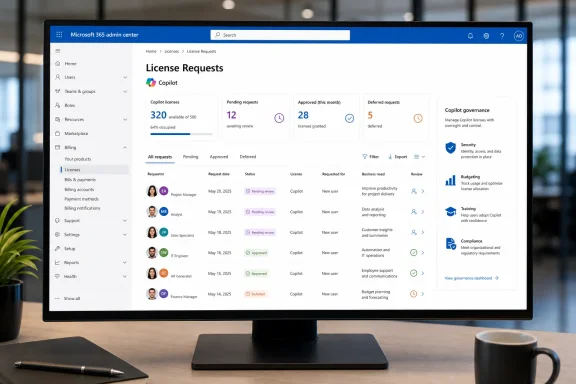
Microsoft is making Microsoft 365 Copilot license demand a more visible administrative workflow with a new, dedicated License Requests page in the Microsoft 365 admin center. The feature, tracked as Microsoft 365 Roadmap ID 561206, is marked Launched for the web-based admin center, with general availability dated May 2026 for worldwide standard multi-tenant organizations and availability spanning both Targeted Release and General Availability rings. Microsoft’s roadmap entry describes the goal plainly: give administrators a clearer place to discover, review, and manage Microsoft 365 Copilot license requests submitted by users.
For organizations trying to turn Copilot deployment from an executive mandate into a manageable operational program, that sounds like a small navigation change. It is more consequential than it first appears. A dedicated page turns licensing requests into a recognizable queue: a point where employee interest, entitlement policy, budget availability, security review, and deployment readiness meet.
The change also reflects a broader reality of enterprise AI adoption. The hard part is rarely making an AI product visible to employees. The difficult work is deciding who should receive a paid capability, why they should receive it, what controls apply once they do, and how IT can make those decisions consistently rather than through scattered email threads or ad hoc tickets.
The new page is intended specifically to help administrators find and act on Microsoft 365 Copilot license requests. That distinction matters because the Microsoft 365 admin center already contains multiple licensing surfaces: administrators can assign licenses from user-focused and product-focused views, while broader subscription and purchasing work lives in billing areas. Microsoft’s existing licensing documentation explains that license assignments can be performed from either Active users or Licenses, depending on whether the administrator is working from a user list or a product list. Microsoft Learn
A dedicated License Requests experience should reduce the friction caused by making administrators mentally translate a user’s request into a purchase, assignment, or group-membership task. In practice, a Copilot request is not simply another license toggle. It often represents a request for access to an AI service that can surface organizational content according to the user’s existing permissions, create work products, interact with connected applications, and become embedded in daily business processes.
That makes the request queue valuable as a governance boundary. It offers a natural opportunity to confirm that a prospective user:
Microsoft’s standard licensing tools support several assignment models. An administrator can assign a product directly to a user, assign it to a group, or manage access based on product inventory. The admin center can also display direct assignments and group-based assignments differently, which is important when an organization needs to understand how someone received access rather than simply whether they have it. Microsoft Learn
That underlying flexibility is useful, but it creates a common operational gap: a license assignment mechanism is not inherently a request-management mechanism. A direct assignment page answers, “How do I give this user a license?” A request page answers an earlier question: “Should this user receive one, and how should that decision be routed?”
For Microsoft 365 Copilot, the latter question can be more complex than the former.
This is especially useful in deployments where departments have uneven levels of AI readiness. Finance may have a defined set of analysis scenarios. Legal may require strict review procedures. Sales may have obvious productivity use cases but limited training completion. Frontline teams may need different tools altogether. A single, generic “approve all” behavior is rarely the best way to manage that variety.
For example, a surge of requests from a particular department could mean:
The current documented workflow enables administrators to review the requested product, requester, request date, and request status. It also supports filtering between pending and completed requests; Microsoft states that requests are retained for 12 months. Microsoft Learn
The significance of Roadmap ID 561206 is that Copilot requests are being elevated into a dedicated destination. That should make the process easier to discover and potentially easier to operate at scale, particularly for teams that divide responsibility between AI program owners, license administrators, finance, and service desk staff.
That remains a sensible choice for enterprises with mature IT service management platforms, mandatory manager approvals, procurement gates, chargeback systems, or regulated access-review procedures. A dedicated Copilot License Requests page should not be interpreted as an instruction to abandon a well-designed internal process.
Instead, the best model may be hybrid:
Microsoft also notes that blocking the Copilot app through Integrated Apps can affect access across the Microsoft 365 Copilot app, Teams, Outlook, and web experiences. In other words, an approved license request may be necessary but still not be sufficient to deliver the intended user experience if app deployment settings and access policies are not aligned. Microsoft Learn
That is a crucial operational lesson: license approval, entitlement assignment, and service availability are related but separate control planes.
A mature workflow should therefore validate all three:
By contrast, Microsoft describes the AI Administrator role as focused on Copilot and AI administration but explicitly notes that it does not manage human user licensing. Microsoft Learn
That division is healthy. It means an organization should not casually assume that the leader responsible for Copilot configuration is automatically the appropriate person to allocate paid seats. The most effective operating model may split responsibilities:
Microsoft recommends limiting Global Administrator assignments because the role has extremely broad tenant access. Microsoft Learn The new page should reinforce that security principle, not erode it: request review should be delegated to the smallest practical set of roles, with clear escalation paths for purchase approvals or exceptional cases.
Discoverability is not just a usability improvement. It improves the chances that requests enter a governed process from the beginning.
Consistency helps protect against two opposite failures:
That makes request visibility materially useful. Administrators can use request volume to determine whether existing Copilot capacity is adequate before demand becomes an emergency procurement issue. A backlog of approved-but-unfulfilled requests is a budgeting signal. A large number of rejected requests may indicate either low relevance or an overly restrictive eligibility model.
A clear response reduces repeated tickets and prevents employees from interpreting a declined request as a random technical failure.
A practical policy should define who can receive Copilot through:
An employee who receives a license but cannot reach the app may submit more support tickets, assume the license is broken, or search for unapproved workarounds. Request reviewers should therefore coordinate with endpoint, Teams, Microsoft 365 Apps, and identity teams before calling a rollout complete.
This is why request workflows need a capacity state:
The Microsoft 365 admin center should be the authoritative place for the Microsoft entitlement itself. It may not be the only system needed to document why a particular individual received access.
For example, a policy might prioritize workers who routinely create documents, analyze business data, manage meetings, or synthesize internal information. It might defer users in departments that have not completed readiness activities or whose use cases require additional security review.
This is also an opportunity to document handoffs. The AI team may assess readiness. The license team may assign seats. Finance may authorize purchases. The manager may verify business need.
Groups also make later changes easier. If a pilot ends, a user changes role, or a department’s allocation changes, administrators have a clearer management boundary.
The request process should therefore be reviewed as part of regular Copilot governance, alongside security posture, data governance, employee feedback, and budget planning.
The answer cannot live entirely in procurement, entirely in IT, or entirely with individual managers. It needs a visible workflow that connects user demand to policy, capacity, security, and business accountability. Microsoft’s new page creates a clearer place to begin that work. Microsoft 365 Roadmap
For administrators, the opportunity is to use the feature as more than a queue for approving seats. With defined eligibility, least-privilege role assignments, group-based deployment, aligned app-access controls, and meaningful adoption measurement, the License Requests page can become a practical control point for scalable Microsoft 365 Copilot governance rather than just another item in the admin center navigation.
For organizations trying to turn Copilot deployment from an executive mandate into a manageable operational program, that sounds like a small navigation change. It is more consequential than it first appears. A dedicated page turns licensing requests into a recognizable queue: a point where employee interest, entitlement policy, budget availability, security review, and deployment readiness meet.
The change also reflects a broader reality of enterprise AI adoption. The hard part is rarely making an AI product visible to employees. The difficult work is deciding who should receive a paid capability, why they should receive it, what controls apply once they do, and how IT can make those decisions consistently rather than through scattered email threads or ad hoc tickets.
 Overview: A Dedicated Place for Copilot License Demand
The new page is intended specifically to help administrators find and act on Microsoft 365 Copilot license requests. That distinction matters because the Microsoft 365 admin center already contains multiple licensing surfaces: administrators can assign licenses from user-focused and product-focused views, while broader subscription and purchasing work lives in billing areas. Microsoft’s existing licensing documentation explains that license assignments can be performed from either Active users or Licenses, depending on whether the administrator is working from a user list or a product list. Microsoft LearnA dedicated License Requests experience should reduce the friction caused by making administrators mentally translate a user’s request into a purchase, assignment, or group-membership task. In practice, a Copilot request is not simply another license toggle. It often represents a request for access to an AI service that can surface organizational content according to the user’s existing permissions, create work products, interact with connected applications, and become embedded in daily business processes.
That makes the request queue valuable as a governance boundary. It offers a natural opportunity to confirm that a prospective user:
- Has an appropriate role and workload.
- Has completed any internal training or acceptable-use requirements.
- Belongs to an approved department, pilot cohort, or security group.
- Has a business justification that fits the organization’s Copilot deployment priorities.
- Can be assigned an available seat without triggering an unplanned purchase.
- Understands that access to Copilot does not override existing permissions or data-governance policies.
Background: Licensing Has Become Part of AI Governance
Traditional Microsoft 365 licensing is already a balancing act between subscription capacity, departmental need, and role-based administration. Copilot makes that balance more visible because demand can originate directly from users who encounter AI features in their applications, hear about them from colleagues, or see them demonstrated by leadership.Microsoft’s standard licensing tools support several assignment models. An administrator can assign a product directly to a user, assign it to a group, or manage access based on product inventory. The admin center can also display direct assignments and group-based assignments differently, which is important when an organization needs to understand how someone received access rather than simply whether they have it. Microsoft Learn
That underlying flexibility is useful, but it creates a common operational gap: a license assignment mechanism is not inherently a request-management mechanism. A direct assignment page answers, “How do I give this user a license?” A request page answers an earlier question: “Should this user receive one, and how should that decision be routed?”
For Microsoft 365 Copilot, the latter question can be more complex than the former.
The difference between access and adoption
A user who asks for Copilot may be expressing genuine demand. But a request, by itself, does not establish expected business value. The organization still needs to distinguish among several categories:- A user who needs Copilot to perform recurring, high-value work.
- A manager requesting seats for a defined team rollout.
- A curious employee looking for general AI access.
- A user who already has a feature or alternative workflow that solves the immediate need.
- A user whose workload involves sensitive data and therefore requires an additional readiness review.
This is especially useful in deployments where departments have uneven levels of AI readiness. Finance may have a defined set of analysis scenarios. Legal may require strict review procedures. Sales may have obvious productivity use cases but limited training completion. Frontline teams may need different tools altogether. A single, generic “approve all” behavior is rarely the best way to manage that variety.
Demand data is deployment data
A well-managed request queue can also become an early indicator of demand patterns. If requests cluster around certain business units, job functions, locations, or project teams, those signals can guide enablement investment.For example, a surge of requests from a particular department could mean:
- The department has identified credible use cases and is ready for a structured rollout.
- A local leader has promoted Copilot without coordinating capacity planning.
- Employees believe they need a license to access an adjacent feature or service.
- Training and communication have created interest but have not adequately explained eligibility.
- Existing license allocation is misaligned with actual demand.
How the New Page Fits with Existing License Requests
Microsoft already supports a self-service license request model for products and services that are blocked from self-service purchase. In that existing workflow, users can request a license from an administrator, potentially name additional users who also need the product, and administrators can review the request through the Licensing area. Microsoft Learn’s license-request guidanceThe current documented workflow enables administrators to review the requested product, requester, request date, and request status. It also supports filtering between pending and completed requests; Microsoft states that requests are retained for 12 months. Microsoft Learn
The significance of Roadmap ID 561206 is that Copilot requests are being elevated into a dedicated destination. That should make the process easier to discover and potentially easier to operate at scale, particularly for teams that divide responsibility between AI program owners, license administrators, finance, and service desk staff.
What administrators can already do in a request workflow
Microsoft’s documented self-service request process includes several practical controls that remain useful context for the new Copilot-oriented experience:- Approve all named users in a request.
- Approve selected users and reject others within the same request.
- Reject an entire request.
- Select the applicable product where more than one option exists.
- Control included apps and services where supported.
- Use a configured security group for group-based license assignment.
- Send a request by email to an internal decision-maker who does not need admin-center access to provide their recommendation. Microsoft Learn
Custom processes still have a place
Microsoft’s documentation also supports using an organization’s own license-request process. Administrators can provide users with a custom message and a link to internal documentation instead of collecting requests in the built-in queue. Microsoft LearnThat remains a sensible choice for enterprises with mature IT service management platforms, mandatory manager approvals, procurement gates, chargeback systems, or regulated access-review procedures. A dedicated Copilot License Requests page should not be interpreted as an instruction to abandon a well-designed internal process.
Instead, the best model may be hybrid:
- Use the Microsoft 365 request experience as the front door for user interest.
- Route exceptions, high-cost requests, or regulated populations through established internal workflows.
- Use groups to apply licenses at scale once an approval decision is made.
- Reconcile request outcomes with procurement and adoption data on a regular schedule.
Why Copilot Requests Deserve Their Own Administrative Surface
The case for a dedicated page rests on more than convenience. Microsoft 365 Copilot sits at the intersection of licensing, AI policy, information governance, app deployment, and employee enablement.Copilot access is shaped by more than a license
Assigning a Microsoft 365 Copilot license does not eliminate the need for application availability and access-policy management. Microsoft documents that administrators can manage the Copilot app’s availability for users or groups through Integrated Apps in the Microsoft 365 admin center. Microsoft LearnMicrosoft also notes that blocking the Copilot app through Integrated Apps can affect access across the Microsoft 365 Copilot app, Teams, Outlook, and web experiences. In other words, an approved license request may be necessary but still not be sufficient to deliver the intended user experience if app deployment settings and access policies are not aligned. Microsoft Learn
That is a crucial operational lesson: license approval, entitlement assignment, and service availability are related but separate control planes.
A mature workflow should therefore validate all three:
- Approval: Is this person eligible for Copilot?
- Entitlement: Is the correct license available and assigned?
- Availability: Can the person access the required Copilot app and experiences under the organization’s deployment policies?
Least privilege matters in the approval path
Organizations should also consider who is allowed to approve a request versus who merely needs visibility into it. Microsoft’s role documentation says that License Administrators can assign and remove user licenses and can manage group-based license assignments. Microsoft LearnBy contrast, Microsoft describes the AI Administrator role as focused on Copilot and AI administration but explicitly notes that it does not manage human user licensing. Microsoft Learn
That division is healthy. It means an organization should not casually assume that the leader responsible for Copilot configuration is automatically the appropriate person to allocate paid seats. The most effective operating model may split responsibilities:
| Responsibility | Likely owner |
|---|---|
| Copilot configuration, readiness, and policy | AI Administrator or designated AI platform team |
| License inventory and user assignment | License Administrator or User Administrator |
| Subscription purchases and billing decisions | Billing Administrator or procurement owner |
| Business-case validation | Department manager or product owner |
| Security and data-risk review | Security, compliance, or information governance team |
| Training and adoption support | Change management or digital workplace team |
Benefits for Windows and Microsoft 365 Administrators
For Windows administrators who increasingly manage a combined environment of devices, identity, Microsoft 365 apps, Teams, Edge, and Copilot experiences, the dedicated page can simplify one of the most visible AI deployment tasks.Better discoverability
A clear destination for Copilot requests means administrators are less likely to overlook demand that would otherwise surface as support tickets, direct messages, or informal manager escalation. It also gives service desk teams a more obvious answer when users ask where to obtain a license.Discoverability is not just a usability improvement. It improves the chances that requests enter a governed process from the beginning.
More consistent decisions
A central queue can encourage common approval criteria. Rather than relying on whichever administrator sees an email first, IT can establish a decision framework based on role, department, training, availability, and business value.Consistency helps protect against two opposite failures:
- Over-allocation, where enthusiasm turns into uncontrolled cost growth.
- Under-allocation, where potentially valuable users remain blocked because no one owns the decision.
Stronger capacity planning
Microsoft’s subscription guidance makes clear that buying or removing licenses is tied to billing-account conditions and subscription rules. For example, Microsoft notes that organizations may face limits on reducing license quantity and that certain account types have specific timing constraints for reductions after purchase or renewal. Microsoft LearnThat makes request visibility materially useful. Administrators can use request volume to determine whether existing Copilot capacity is adequate before demand becomes an emergency procurement issue. A backlog of approved-but-unfulfilled requests is a budgeting signal. A large number of rejected requests may indicate either low relevance or an overly restrictive eligibility model.
Better user communication
Request workflows provide a more structured way to explain outcomes. “Approved” is straightforward, but “not now” also needs context. Organizations should use rejection or deferral messages carefully, describing the next eligible rollout phase, required training, internal request path, or available alternative tools where applicable.A clear response reduces repeated tickets and prevents employees from interpreting a declined request as a random technical failure.
Risks and Limitations to Watch
The dedicated page is promising, but it will not automatically solve the difficult parts of Copilot governance. Administrators should view it as an enabling control, not a complete deployment strategy.Risk: treating requests as automatic approval
User interest is valuable data, but it is not a substitute for eligibility criteria. An organization that treats every request as an entitlement may lose control of cost, adoption quality, and change-management effort.A practical policy should define who can receive Copilot through:
- Role-based eligibility.
- Departmental rollout plans.
- Manager sponsorship.
- Completion of required training.
- Demonstrated need tied to approved scenarios.
- Participation in pilot or measurement programs.
Risk: approving licenses without verifying service access
As Microsoft’s Copilot management guidance demonstrates, application deployment and blocking controls can independently determine whether users can access Copilot across Microsoft 365 surfaces. Microsoft LearnAn employee who receives a license but cannot reach the app may submit more support tickets, assume the license is broken, or search for unapproved workarounds. Request reviewers should therefore coordinate with endpoint, Teams, Microsoft 365 Apps, and identity teams before calling a rollout complete.
Risk: confusing license requests with purchase authority
A request queue can show demand, but it does not make budget unlimited. Microsoft states that licensing and subscription modifications are controlled through the admin center’s billing tools and can involve billing-account prerequisites or subscription-specific constraints. Microsoft LearnThis is why request workflows need a capacity state:
- Approved and assigned
- Approved, awaiting available license
- Approved, procurement required
- Deferred to a later rollout
- Declined with documented rationale
Risk: weak auditability outside the page
A dedicated page improves centralization, but organizations should still preserve the decision context elsewhere when required. High-value license approvals may need manager confirmation, cost-center attribution, training records, or security approval that is retained in a service-management platform or governance system.The Microsoft 365 admin center should be the authoritative place for the Microsoft entitlement itself. It may not be the only system needed to document why a particular individual received access.
A Practical Operating Model for Copilot License Requests
The most effective response to the new page is not simply to tell users, “Request Copilot here.” It is to build a lightweight but deliberate operating process around it.1. Define eligibility before demand spikes
Publish a short internal policy that identifies eligible job categories, priority departments, required learning, support expectations, and escalation routes. Keep it specific enough to guide decisions but concise enough that employees will actually read it.For example, a policy might prioritize workers who routinely create documents, analyze business data, manage meetings, or synthesize internal information. It might defer users in departments that have not completed readiness activities or whose use cases require additional security review.
2. Align request ownership with least privilege
Ensure the people reviewing requests have the right business and licensing authority without granting unnecessary tenant-wide rights. Microsoft’s role guidance supports using scoped roles such as License Administrator for license work rather than relying on Global Administrator access. Microsoft LearnThis is also an opportunity to document handoffs. The AI team may assess readiness. The license team may assign seats. Finance may authorize purchases. The manager may verify business need.
3. Use groups for repeatable scale
Where a department or cohort is approved as a unit, group-based licensing is generally more repeatable than assigning seats one user at a time. Microsoft supports assigning licenses to groups and distinguishes group-based assignment from direct user assignment in the admin center’s licensing view. Microsoft LearnGroups also make later changes easier. If a pilot ends, a user changes role, or a department’s allocation changes, administrators have a clearer management boundary.
4. Measure the entire pathway, not merely approvals
Track more than the number of licenses assigned. A useful dashboard should include:- Requests received by department and role.
- Approval, rejection, and deferral rates.
- Time from request to decision.
- Time from decision to usable access.
- Number of users awaiting capacity.
- Training completion before and after assignment.
- Adoption and usage indicators after licensing.
- Support-ticket volume associated with onboarding and access.
5. Revisit the policy regularly
Copilot capabilities, organizational use cases, license availability, and internal readiness all change. A strict policy appropriate for an early pilot may become unnecessarily restrictive after a broader rollout. Conversely, a permissive policy may require tighter controls if costs rise faster than expected or adoption data shows limited value.The request process should therefore be reviewed as part of regular Copilot governance, alongside security posture, data governance, employee feedback, and budget planning.
The Bigger Significance of a Small Admin Center Change
Microsoft 365’s new dedicated License Requests page is an administrative refinement, but it addresses a real operational pain point. As Microsoft 365 Copilot moves from selective deployment to ordinary workplace infrastructure, organizations need a controlled way to handle the inevitable question: Who gets a license next?The answer cannot live entirely in procurement, entirely in IT, or entirely with individual managers. It needs a visible workflow that connects user demand to policy, capacity, security, and business accountability. Microsoft’s new page creates a clearer place to begin that work. Microsoft 365 Roadmap
For administrators, the opportunity is to use the feature as more than a queue for approving seats. With defined eligibility, least-privilege role assignments, group-based deployment, aligned app-access controls, and meaningful adoption measurement, the License Requests page can become a practical control point for scalable Microsoft 365 Copilot governance rather than just another item in the admin center navigation.
References
- Primary source: Microsoft 365 Roadmap
Published: 2026-07-28T22:43:45.1902826Z
Microsoft 365 Roadmap | Microsoft 365
The Microsoft 365 Roadmap lists updates that are currently planned for applicable subscribers. Check here for more information on the status of new features and updates.www.microsoft.com
- Related coverage: learn.microsoft.com
Manage Self-Service License Requests | Microsoft Learn
License requests management lets admins control self-service purchases. Discover how to approve, deny, or share license requests in the Microsoft 365 admin center.learn.microsoft.com