
The practical qualifier is in Microsoft’s wording: the capability applies to newly created Declarative Agents. Organizations with existing agents should not assume that pointing those agents at a SharePoint library full of scanned contracts, invoices, maintenance manuals, personnel forms, or archived case files will suddenly make the images usable. Microsoft’s updated roadmap entry does not say whether an existing agent can inherit the capability after republishing, editing its knowledge sources, or being recreated.
Microsoft’s February 2026 What’s New in Microsoft 365 Copilot post separately described the same outcome: new declarative agents can use scanned PDFs and image-based SharePoint documents as grounding material. That corroborates the feature itself, but it does not add a migration path for agents created before the change. No independent outlet appears to have reported a different scope or a remediation procedure for existing agents.
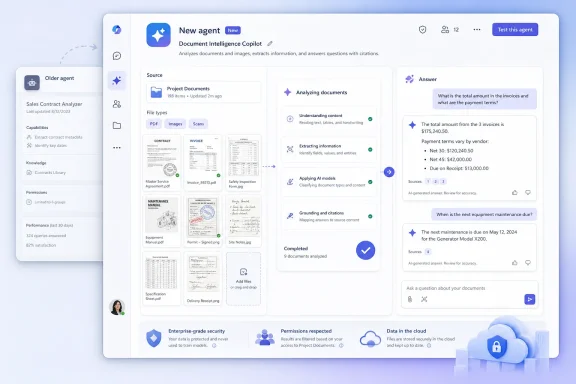 What changed for SharePoint-grounded agents
Declarative Agents are configured versions of Microsoft 365 Copilot intended for a defined business task: a help-desk assistant restricted to internal documentation, an HR policy guide, a project agent scoped to a SharePoint site, or a customer-support assistant that combines enterprise knowledge with approved actions. Microsoft Learn describes their basic ingredients as instructions, capabilities, knowledge sources, and app metadata.
For many of those uses, the distinction between a text PDF and a scanned PDF is decisive. A conventional PDF can carry a text layer that search and retrieval systems can index. A scanned PDF may contain page images alone, even if it looks perfectly readable to a person. The same problem applies to image-based reports, forms, correspondence, diagrams with embedded labels, and document archives created from a scanner or copier.
Roadmap item 550514 says newly created agents can now reliably ground answers in those SharePoint-referenced documents. In Copilot terminology, grounding means providing retrieved organizational content to the model as evidence for its response. It does not mean the agent has gained unrestricted knowledge of a document library, nor does it guarantee that every answer will be correct. It means scanned material can participate in the retrieval path that supplies the agent’s answer.
That is a material expansion for enterprises that have treated document conversion as a prerequisite for AI use. Before this change, a SharePoint repository could be fully permissioned, organized, and linked to an agent yet remain much less useful if its important content existed only as scans.
“Newly created” is the deployment constraint
The rollout is a service-side Microsoft 365 capability, not a Windows update, browser feature, or downloadable Copilot component. There is no client build number to deploy and no stated administrator toggle in the roadmap entry. But the creation-date limitation turns what might look like an automatic platform improvement into a testing and lifecycle-management job.
Microsoft has not documented whether “newly created” means agents built through Agent Builder only, agents authored with the Microsoft 365 Agents Toolkit, SharePoint-created agents, or every declarative-agent authoring route. Its current documentation says declarative agents can be built through Agent Builder, Agents Toolkit, Copilot Studio, and SharePoint. The roadmap language is broad, but it does not spell out behavior for each path.
Administrators and developers should therefore treat a new agent as the supported validation object. Recreate a narrow test agent using the same intended SharePoint scope as the production agent, add representative scanned PDFs as referenced knowledge, and prompt it with questions whose answers appear only in the scans. Compare the response with a known source page, including names, dates, identifiers, exclusions, and figures.
Do not treat a fluent summary as proof of reliable retrieval. The useful test is whether the agent can locate the right document, extract the specific detail requested, and distinguish material in the scan from material elsewhere in SharePoint. For image-heavy files, test information that appears in tables, stamps, handwritten annotations, charts, and low-quality pages separately; Microsoft has not published quality thresholds or a list of scan characteristics that may still fail.
SharePoint permissions still set the boundary
This feature does not create a new path around SharePoint access controls. Microsoft’s documentation for Agent Builder says SharePoint and OneDrive knowledge sources respect existing permissions and sensitivity labels for referenced files. Its SharePoint administration guidance likewise states that an agent’s answer excludes content from a source a user cannot access.
That is the reassuring part of the release: making an image-based file usable for grounding should not, by itself, make it discoverable to people who lacked permission to read it. The less reassuring part is that better extraction can make sensitive archives far more findable to people who already have broad access.
A department that gave a large group read access to a decades-old scanned personnel archive, for example, may have accepted that the material was difficult to search manually. A Copilot agent capable of answering natural-language questions from that archive changes the operational reality even when every underlying permission remains intact. Security teams should review whether broad historical-library permissions still reflect the organization’s intended use now that the content can be retrieved conversationally.
Microsoft also notes that Restricted SharePoint Search prevents SharePoint from being used as an agent knowledge source. Site-level restricted content discovery can prevent content on a designated site from surfacing in Copilot and organization-wide search, while also blocking users from adding that site’s content to agents. Those controls matter for repositories that should remain available for direct, need-to-know document access without becoming an AI knowledge base.
The rollout does not remove ordinary knowledge-source limits
The new scan capability should not be read as permission to attach an entire tenant’s records archive to a general-purpose agent. Microsoft’s current Agent Builder documentation limits an agent to up to 100 selected SharePoint files, one SharePoint list, and up to 50 OneDrive files when using those direct selection methods. A SharePoint site or folder reference can scope access more broadly, but the design still needs to reflect least privilege and a defined task.
Microsoft also warns that a SharePoint site reference does not automatically include its lists. List attachments are not indexed or used for grounding, meaning the scanned-PDF improvement should not be confused with universal image or attachment support across all SharePoint data structures. The specific announced scope is scanned PDFs and image-based documents referenced from SharePoint.
Content readiness remains another operational consideration. Microsoft says newly uploaded SharePoint or OneDrive files can take several minutes before an agent includes them in answers, and the Agent Builder interface marks sources as “Preparing” during that period. An agent failure immediately after a library update may therefore be an indexing-readiness problem rather than evidence that the scan capability has failed.
Administrators should also keep source scopes narrow. Microsoft’s pro-code documentation warns that omitting the SharePoint and OneDrive source arrays can make all content available to the signed-in user available to an agent. Scanned archives tend to be large, poorly classified, and historically over-permissioned; they are a poor candidate for an unscoped experiment.
A controlled validation plan is better than a bulk rebuild
For production environments, the sensible response is not to delete every existing declarative agent. Start with the agents whose purpose depends most directly on image-based archives, then document the creation date, authoring method, SharePoint scope, and expected source documents.
A short validation cycle should include the following:
- Create a new test Declarative Agent with the minimum necessary SharePoint library, folder, or file references rather than a tenant-wide source.
- Use several representative scanned documents, including clean pages and the lower-quality material that users actually struggle to search.
- Ask questions with objectively verifiable answers and record whether the agent cites or identifies the correct underlying document in its response experience.
- Confirm results under accounts with different SharePoint permissions, especially where a library includes confidential subfolders or sensitivity-labeled files.
- Keep the existing agent in place until the replacement has passed both retrieval and access-control testing.
The calendar record is also worth reading carefully. Microsoft’s roadmap assigns general availability to February 2026, while the company’s February update post contains inconsistent timing language: it says the feature “is rolling out in March,” then says it “rolled out in February.” The roadmap was last updated on August 25, 2026. The safest conclusion is that the capability is now listed as launched, but Microsoft’s public status material does not provide a precise deployment timeline or a definitive cutoff date for “newly created” agents.
For organizations sitting on scanned SharePoint archives, the release changes the first question from “Do we need to OCR everything before Copilot can use it?” to “Which agents should be recreated, and which document collections are safe and useful to expose as grounded knowledge?”
