
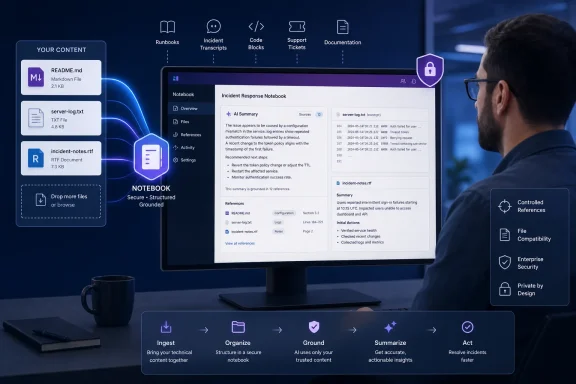
The timing matters less than the practical change: a Copilot Notebook can now be grounded in files such as README.md, exported ticket queues, incident transcripts, runbooks, installation notes, and legacy RTF documents without first converting them into an Office format. Copilot Notebooks limits answers to material that a user deliberately adds to the notebook, so support for these formats expands the source set that can inform a response rather than adding a new general-purpose file viewer.
For IT teams, this is a useful correction to a product that previously centered its workflow on Microsoft 365-native documents. It does not, however, turn Copilot Notebooks into an unrestricted knowledge base, and Microsoft’s own documentation still contains an important inconsistency administrators should understand before presenting the feature as universally available.
 Markdown support makes developer documentation usable without conversion
Markdown is the consequential addition. It is the default publishing format for GitHub READMEs, many internal documentation repositories, project wikis, AI-agent instruction files, change logs, and lightweight operational runbooks. Before this rollout, a team wanting to ask Copilot Notebook questions across that material often had to copy content into a Word document, a Copilot Page, or another supported source.
Microsoft’s Message Center announcement for Markdown says Notebook users can add .md files as grounding sources and have Copilot reason over their contents. The company specifically called out technical documentation, READMEs, runbooks, wikis, and AI-generated Markdown. That is a more concrete use case than the broad productivity framing around Notebooks: an engineer can put a service README, release notes, deployment guidance, and a postmortem into one scoped workspace and ask for a handoff summary or a comparison between documented behavior and an incident record.
The limits of that workflow are worth stating plainly. Notebook grounding is not repository integration. Microsoft has announced support for Markdown files added as references; it has not said that Notebooks can automatically track a Git repository, follow branches, interpret commit history, or continuously ingest every documentation change. Teams working from GitHub, Azure DevOps, or a SharePoint-synced documentation tree should treat the initial rollout as file-level reference support unless their tenant’s interface and connector configuration indicate otherwise.
That distinction affects operational use. A manually added runbook can become stale, while a reference connected through a supported Microsoft 365 location may update as its underlying source changes. Microsoft says notebook references can remain current as work evolves, but the company has not published format-specific behavior explaining whether a directly uploaded Markdown file updates in place after it is edited outside the notebook. For incident response and change-management work, administrators should test that behavior rather than assuming the notebook is always reading the newest revision.
TXT and RTF close a gap Microsoft had already scheduled
The “new” text-format announcement combines changes that Microsoft had placed on separate rollout tracks. Microsoft’s Message Center entry MC1420894, published July 8, said TXT and RTF files would begin rolling out worldwide in early July and complete by mid-July. A separate entry, MC1423103, said Markdown support was rolling out worldwide with an expected completion in early August.
That means organizations that still cannot attach one or more of these formats on August 14 should not assume the feature is unavailable to their licensing tier. The published schedules indicate the rollout should be complete, although Microsoft commonly cautions that user-facing features can roll out gradually. It is reasonable to check with a test notebook first, then confirm that the account has an eligible Copilot entitlement and the required OneDrive or SharePoint service plan.
TXT is deceptively important for administration work. A large share of operational evidence arrives as text exports: service logs, command-line output, configuration snapshots, vulnerability scan summaries, support-case exports, chat transcripts, and application traces. RTF fills a different niche, covering formatted legacy notes and documents that can survive in enterprise file shares long after WordPad and similar tools have disappeared from standard desktop images.
Microsoft says existing security, compliance, and governance policies continue to apply to the additional formats. That is welcome, but it is not a complete answer to the governance question. If a user can add an unstructured support-ticket export or a log containing account names, hostnames, internal URLs, or customer data, the Notebook becomes another sanctioned location in which that content can be processed by Copilot. The new formats do not create that risk from nothing, but they make it easier to bring data that was previously stranded in text files into the AI workflow.
Microsoft’s support pages have not kept pace with the rollout
The clearest discrepancy is in Microsoft’s public documentation. A Microsoft Support page explaining how Copilot Notebooks works still lists supported notebook formats as .docx, .pptx, .xlsx, .pdf, .page, .loop, and OneNote pages. It does not list .txt, .rtf, or .md.
Meanwhile, another Microsoft Support page covering file formats for Microsoft 365 Copilot explicitly says its format list applies to Copilot Chat, Pages, Notebooks, and Create, and includes TXT, RTF, and Markdown among document formats. Microsoft’s Message Center notices are more specific still: they identify TXT, RTF, and Markdown as notebook reference sources and give dedicated rollout timelines.
The latter sources are the better record for this feature. But the contradiction is not trivial for support desks. An administrator following the older Notebooks help article could conclude that a user’s text-file upload is unsupported, even though Microsoft’s rollout notices say the opposite. The documentation gap also explains why some third-party coverage treats the change as a fresh launch even though portions of it were scheduled weeks earlier.
Until Microsoft updates the Notebooks-specific file-format list, IT teams should preserve the relevant Message Center communications in their internal Copilot documentation. The practical guidance should be: TXT, RTF, and Markdown are supported as notebook references under the announced rollout, but users should validate file ingestion and response grounding with non-sensitive test content before relying on the feature in production workflows.
A scoped workspace, not an invitation to upload everything
Copilot Notebooks is designed around selected references. Microsoft describes it as a workspace where Copilot answers based on the material added to that notebook rather than searching the general web. It can use up to 300 files in a notebook, according to Microsoft’s product documentation, and when a shared SharePoint location is used it selects up to 300 files most relevant to a prompt.
That model has two consequences. First, a Notebook can produce more focused answers than a broad Copilot chat because the user controls the corpus. Second, an answer is only as complete as the material chosen for the notebook. Adding a README and a log file can help compare expected behavior with observed failure conditions, as Microsoft suggests, but it cannot establish root cause if the needed telemetry, timeline, or configuration history was never added.
Users should also avoid treating the format expansion as a guarantee that every text artifact will parse cleanly. Plain-text logs may be enormous, malformed, encoded unexpectedly, or packed with repetitive entries. Markdown may contain links, code blocks, tables, generated content, and embedded instructions that require human interpretation. RTF documents can carry formatting artifacts that matter to a human reader but not to an AI summary. The right test is not merely whether the file uploads; it is whether Copilot can accurately identify a known fact in the file, distinguish it from a different reference, and explain the basis of its answer.
For administrators, a small controlled pilot is more valuable than a broad announcement. Use a sanitized README, a known-good text export, and an RTF document with a few deliberately verifiable facts. Ask Notebook-specific questions, check whether the output remains confined to the provided sources, and document any file-size, parsing, or permission behavior observed in the tenant.
The immediate payoff is fewer document conversions
Microsoft’s March redesign positioned Copilot Notebooks as a workspace for gathering references, producing summaries, creating study materials, generating mind maps, and drafting follow-on Office content. The format additions do not change those headline capabilities. They remove an avoidable preparation step for information that already exists in text-based form.
For Windows and enterprise IT readers, the most useful application is straightforward: put the operational documents that already drive a task into the same scoped Notebook, then use Copilot to identify changes, extract ownership, compare expected and actual behavior, or prepare a concise handoff. Keep the authoritative source files where they belong, enforce the same data-handling rules that apply to other Copilot references, and verify answers against the original record.
The critical next step for Microsoft is documentation cleanup. The feature is now far more relevant to developers and administrators than the old Office-file-only impression suggested, but public support guidance should not require customers to reconcile separate Message Center notices and a conflicting format table to learn what a Notebook can accept.
