
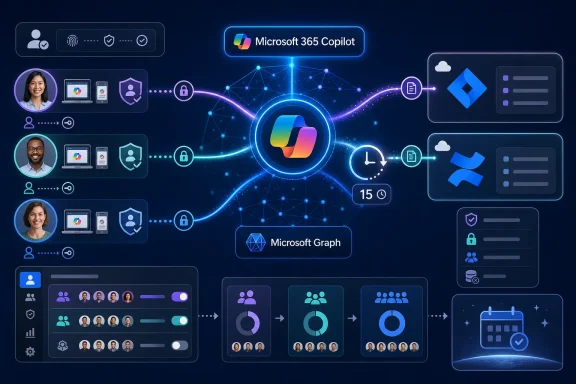
The important qualification is that this is not a free-form connector framework for end users. Microsoft’s Copilot documentation calls the feature personal sync connectors: Microsoft-published integrations that users authorize with their own third-party credentials. Each connector indexes only the user’s accessible content into Microsoft Graph, where it can be used by Microsoft 365 Copilot Chat and Microsoft Search. It does not turn Jira or Confluence into a shared, organization-wide Copilot knowledge base by default.
For organizations that have avoided a central Jira or Confluence connector because of administrative overhead, that distinction may make the feature appealing. For administrators, it creates a new class of externally sourced data entering Copilot’s retrieval index through individual user consent rather than a conventional deployment project.
 Personal connectors are already a limited preview
Microsoft’s August 20 roadmap entry frames the release as being “in development,” with preview availability in August and general availability in September. But Microsoft Learn documentation updated August 4 says personal sync connectors are already in preview for a limited set of customers. The apparent discrepancy is less a contradiction than a reminder that a roadmap date is a rollout target, not proof that every commercial tenant can use the feature today.
The documentation identifies Jira Cloud and Confluence Cloud as the initial personal sources. Both are familiar products in development, support, and IT operations teams, where useful records are often divided between Microsoft 365 documents, Jira work items, and Confluence documentation. The new model lets a user connect what they are personally entitled to see in Atlassian rather than requiring an administrator to configure a source-wide crawler and identity mapping for the whole company.
Microsoft says users begin from the Microsoft 365 Copilot desktop app or web client, choose the option to change data sources, select a connector, and complete delegated authentication. The connector then indexes qualifying data into Microsoft Graph. Initial indexing can take from roughly 30 minutes to several hours, depending on the amount of content, while incremental synchronization is expected about every 15 minutes and a full synchronization about every seven days.
That cadence has a practical consequence for users expecting live project status. This is a synced connector, not a live query into Atlassian at prompt time. A Jira issue just created, reassigned, or closed may not appear in Copilot immediately. Microsoft’s documentation specifically says new or changed items can take up to about 15 minutes to surface after the incremental sync, and longer during first-time indexing.
The connector does not ingest everything a user can see
The roadmap entry describes synchronizing content a user already has permission to access. Microsoft’s implementation details show that the first release is deliberately narrower than that description may suggest.
For Jira Cloud, personal sync connectors index issues, which Microsoft also calls work items, created or modified within the previous 90 days. For Confluence Cloud, the connector indexes wikis and blog posts. It can crawl a user’s complete personal space, but content in shared spaces is limited to items created or modified in the previous 90 days.
That means a personal connector is best understood as a recent-work index, not an archival search system. A product manager asking Copilot to summarize a quarter’s active Jira work could receive useful results. A developer asking it to locate the rationale for a five-year-old architecture decision documented in a shared Confluence space may receive nothing even if that person can open the page directly in Confluence.
This is the most material limitation in the feature as currently documented, and it changes how organizations should evaluate it. A tenant-configured connector can be built and governed as a more comprehensive organizational search integration. Personal sync connectors trade that breadth for lower setup friction and user-level isolation. They solve the problem of making a worker’s current external knowledge easier for that worker to find inside Copilot; they do not replace records-management or enterprise-search planning.
Microsoft’s connector documentation also distinguishes these personal sync connectors from federated connectors. Federated connectors retrieve information live at query time using Model Context Protocol rather than placing the content into Microsoft Graph. Personal sync connectors instead synchronize and index content. The choice affects freshness, search behavior, and governance: live retrieval avoids an indexed copy but depends on query-time access, while sync enables Graph-backed search and Copilot grounding but introduces an indexed dataset and a synchronization delay.
Microsoft gives admins a veto, but the default is enabled
The “self-serve” label should not be read as “unmanaged.” Microsoft says its published personal sync connectors appear in the Microsoft 365 admin center under Copilot > Connectors and are enabled for a tenant by default unless an administrator turns them off. Global Administrators and AI Administrators can manage availability, restrict a connector to selected Microsoft Entra ID groups through staged rollout, and review adoption statistics such as how many users have connected.
There is also a built-in seven-day review window. When Microsoft introduces a new personal sync connector, it appears first for administrators for at least seven calendar days before it becomes available to users. During that time, admins can assess it, disable it, or configure staged rollout. If it is disabled during the review window, users will not see it.
This is a better control model than a surprise client-side integration, but it shifts the operational burden onto IT to notice and act. An organization that treats Copilot connectors as part of its approved application catalog should review the new entries promptly rather than assuming that a user cannot connect a source until an admin expressly deploys it.
The staged-rollout capability is also useful but constrained. Microsoft’s current documentation says a rollout can target up to 100 users and 15 Microsoft 365 groups. That is enough for a pilot involving engineering, service desk, or project-management teams, but it is not a detailed policy engine. Administrators should determine up front which user populations may connect Jira and Confluence, whether the organization’s Atlassian authentication and conditional-access policies permit the flow, and who will own incident response if a connected source produces unexpected Copilot results.
Existing tenant connectors take precedence
Organizations that have already deployed a centrally configured Jira Cloud or Confluence Cloud connector need to pay close attention to a documented coexistence rule. Microsoft says that when both a tenant-configured synced connector and a personal sync connector exist for the same source, Copilot serves results from the tenant connector and displays the source as a single entry.
For a tenant-wide Confluence deployment, users cannot separately configure the personal Confluence connector. If the tenant connector is only staged to selected users, those users use the centralized connection while users outside that staged group may still be able to use the personal version. The result is sensible from a duplication standpoint, but it can create uneven search coverage during a migration or pilot: one group may receive centrally indexed content while another receives only a personal, recent-content view.
IT teams should therefore inventory existing Copilot connectors before enabling personal sync connectors. Running both models without a plan risks confusion when a user asks why a particular Jira issue, Confluence page, or citation appears for one colleague but not another. The answer may be neither an Atlassian permission change nor a Copilot failure; it may simply be that the two users are backed by different connection models and indexing scopes.
Microsoft says personal connections use the user’s own identity and source permissions, with content indexed per user and unavailable to other users through that personal connector. Authentication uses delegated OAuth 2.0, and Microsoft says a user can revoke access by disconnecting the connector. Disconnecting stops synchronization and deletes indexed content; disabling a connector tenant-wide does the same for the affected connector’s indexed data.
Those deletion and isolation claims are meaningful safeguards, but they do not remove the normal governance questions around allowing external business data into Microsoft Graph. Security and compliance teams will still want to review what Jira and Confluence data types are in scope, whether sensitive project records are exposed to the authorized user’s Copilot experience, and how the organization will communicate the 90-day indexing boundary.
September will test the operational model, not the connector catalog
Jira Cloud and Confluence Cloud have been available as administrator-configured Microsoft 365 Copilot connector sources for some time. What changes with roadmap item 568788 is who initiates the connection and how narrowly Microsoft scopes the resulting index. Instead of a search administrator configuring a source for the organization, a licensed Copilot user can connect their own account—provided the tenant leaves the connector available.
For end users, the feature promises less waiting for centralized integrations and better access to recent work spread across Atlassian and Microsoft 365. For sysadmins, the immediate task is to decide whether the default-enabled model fits company policy before the September general-availability window reaches their tenant. The first useful deployment is likely a controlled group of Jira and Confluence-heavy users, with test prompts built around recent issues and documentation—not an assumption that Copilot has suddenly indexed the organization’s entire Atlassian history.