

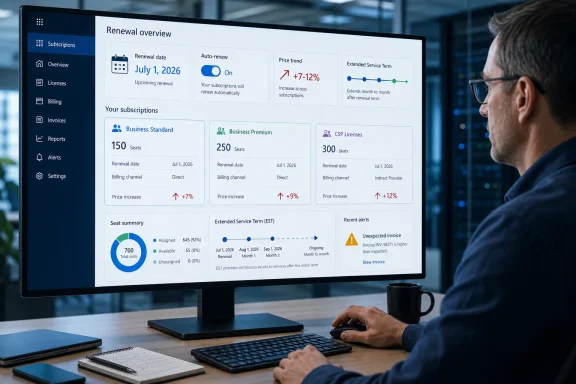
Spiceworks correctly flags the combination as a renewal-management problem rather than a simple price-hike story. Microsoft confirmed that new list prices apply at the next renewal after July 1, 2026, whether the customer pays an annual commitment annually or monthly. The company also ended the free CSP grace period on May 4, replacing it with a paid, month-to-month continuation option.
For Windows administrators and Microsoft 365 tenant owners, the immediate task is to identify which billing relationship and subscription type you actually have. Microsoft’s EST rules are not a universal “auto-renew off equals paid extension” rule for every commercial tenant. They are chiefly a CSP end-of-term mechanism, while direct customers with a Microsoft Customer Agreement have their own EST workflow in the Microsoft 365 admin center. Treating every subscription the same is how a routine renewal becomes either an unexpected invoice or an avoidable Exchange Online outage.
The $14 Business Standard Price Is Only Part of the Bill
Microsoft 365 Business Basic rose from $6 to $7 per user per month in U.S. list pricing, a 16% increase. Business Standard rose from $12.50 to $14, a 12% increase, while Apps for business went from $8.25 to $10. Microsoft 365 Business Premium stayed at $22, and Office 365 E1 remained at $10.
The arithmetic in the Spiceworks report is sound: a 100-seat Business Standard deployment costs $1,800 more annually at list price after the move from $12.50 to $14 per user per month. That assumes all 100 licenses remain necessary and that the customer is comparing the same annual commitment and billing arrangement. It is a useful planning number, but it is not the whole exposure for organizations with a mix of Business, Frontline, enterprise, no-Teams, nonprofit, or government SKUs.
Microsoft’s official pricing table shows that the increases stretch beyond the familiar small-business plans. Microsoft 365 F1 rose 33% from $2.25 to $3, Microsoft 365 F3 rose 25% from $8 to $10, Office 365 E3 rose 13% from $23 to $26, and Microsoft 365 E3 rose 8% from $36 to $39. Several no-Teams variants also changed, sometimes by materially different percentages from their Teams-included equivalents.
The practical consequence is that administrators should not extrapolate a Business Standard increase across the tenant. Export every subscription, quantity, term, billing plan, and renewal date before forecasting costs. A tenant that looks like “Microsoft 365 Business” in an invoice summary can contain standalone Microsoft 365 Apps, Entra, Windows Enterprise, Teams, archived project licenses, trial conversions, and inherited SKUs that follow different price lists and renewal terms.
Microsoft says the price changes accompany additional security, management, and Copilot Chat capabilities. For Business Basic and Business Standard, the additions include 50 GB more mailbox storage, URL time-of-click protection, Copilot Chat enhancements, and Copilot Chat Analytics. Business Premium receives the extra 50 GB and Copilot Chat additions, but Microsoft’s own packaging table does not list URL time-of-click protection as a new Premium addition. That omission is logical: Premium already includes a stronger security stack than Basic and Standard.
The important limitation is that Microsoft did not add new capabilities to every SKU it increased. Apps for business rose 21%, for example, but Microsoft’s packaging table lists no new feature bundle for that standalone product. The vendor’s broad “pricing and packaging” framing should therefore not be read as proof that each affected line item received a matching functional upgrade.
EST Changes What “Auto-Renew Off” Means for CSP Customers
Microsoft’s Extended Service Term change is the part most likely to catch an MSP or internal procurement team off guard. Microsoft’s Partner Center documentation says that, effective May 4, 2026, the free grace period for accessing services on non-renewed eligible subscriptions was discontinued. The three end-of-term options are now renew, explicitly cancel, or move to EST.
An EST maintains service on a month-to-month basis while the customer decides what to do. For CSP subscriptions with a monthly equivalent, Microsoft bills EST at the current monthly-term rate plus 3%. If no monthly plan exists, the uplift can reach 23%. Charges are prorated for the time the EST is active.
That sounds like a modestly priced safety net, and it can be one. But it is a paid safety net with operational restrictions. Microsoft’s documentation states that customers in EST cannot change the number of licenses or change the EST subscription type. A company that enters EST intending to tidy excess seats, downgrade users, or move Business Standard users to Business Premium before deciding on a renewal will find that the bridge period prevents precisely those changes.
This is the detail absent from much renewal advice: EST preserves service, not procurement flexibility. The license-count audit needs to happen before the original term expires, not after the subscription has rolled into EST.
The new default behavior also needs careful wording. Microsoft’s Partner Center record says eligible CSP subscriptions that had auto-renew set to false without an explicit cancellation instruction were converted to EST during a backfill process completed in February. It also says that API attempts to set auto-renew to false without an explicit end-of-term cancellation are converted to EST for eligible subscriptions.
That does not mean every Microsoft 365 customer who switches off recurring billing is automatically placed into EST. Microsoft’s separate admin-center guidance for direct customers says EST applies to subscriptions under a Microsoft Customer Agreement billing account and is selected as a paid continuation option. Customers on older Microsoft Online Subscription Agreement arrangements, enterprise agreements, seller-led orders, or subscriptions not eligible for EST can face different cancellation and renewal paths.
Spiceworks’ core warning applies, but the implementation depends on how the licenses were purchased. Customers buying through a CSP should ask their reseller to confirm the scheduled end-of-term action for every eligible subscription. Direct customers should inspect the subscription details in the Microsoft 365 admin center rather than assuming a familiar toggle has its old meaning.
The Seven-Day Window Is an Escape Hatch, Not a Review Cycle
Microsoft’s cancellation policy gives many Microsoft Customer Agreement customers seven days after a subscription starts or renews to cancel and receive a prorated credit or refund. The same seven-day concept applies to CSP licensing under Microsoft’s New Commerce Experience policy, subject to the relevant purchase channel and terms.
That short window has two implications. First, it can correct a renewal executed with the wrong seat count or wrong subscription, provided the organization catches the error quickly and its purchase type qualifies. Second, it is not a substitute for planning. After seven days, an annual commitment does not become adjustable merely because the company pays its invoice monthly; Microsoft’s own policy says annual subscriptions billed monthly continue to be charged for the remaining term.
The distinction between term and billing frequency remains a common source of surprises. An annual term with monthly billing spreads payments across the year; it does not create a monthly cancellation right. A genuinely monthly subscription generally offers greater exit flexibility, but often costs more than an annual commitment. The price increase does not erase that trade-off.
For a company whose renewal already occurred after July 1, the first action is to identify the renewal date and determine whether it remains within the applicable seven-day correction window. The next action is to verify whether the agreement is MCA, MOSA, CSP, enterprise agreement, or another commercial arrangement. The answer determines both the cancellation mechanism and whether an EST is relevant.
Do not assume that a partner will make the commercial decision for you. A competent CSP can manage scheduled actions and notify customers, but Microsoft’s Partner Center documentation places the tools and controls with the partner. If the customer expects cancellation at term end, that instruction should be explicit, documented, and acknowledged—not inferred from a historical auto-renew setting.
Business Premium’s Unchanged Price Alters the Tiering Math
The Business Standard-to-Business Premium gap has narrowed from $9.50 to $8 per user per month because Standard increased while Premium did not. That does not automatically make Premium economical for every Standard user, but it changes a decision that many organizations made under old pricing.
At the new list price, moving a user from Standard to Premium costs $96 annually, compared with $114 under the old price relationship. For staff who would otherwise require separate endpoint management, identity, device-security, or advanced email-protection capabilities, the reassessment is warranted. The analysis must still account for what is already licensed through Microsoft 365 E3, EMS, standalone Intune, Defender products, or a third-party security platform.
The inverse exercise is equally valuable. Some accounts assigned Business Standard may only need Exchange Online, Teams where applicable, SharePoint, and browser-based productivity tools—workloads Business Basic can cover. Others may be inactive accounts, temporary accounts, duplicate test users, or former employees retained because offboarding and licensing have become separate processes.
Microsoft’s price increase creates an obvious incentive to lower seat counts, but that is only possible during the right change window. An annual commitment typically needs its reduction scheduled at renewal, while EST blocks seat-count changes entirely. The tenant’s assigned-license report is helpful, but it should be paired with HR records, sign-in data, mailbox requirements, shared-mailbox status, conditional-access policy needs, and the identity of the actual service owner.
A clean audit distinguishes between an unused license and a user who is merely quiet. Removing a license from an employee on leave, a shared resource mailbox, or a recently migrated device can have different consequences. The target is not the lowest number on an invoice; it is the smallest defensible license estate that keeps people working and preserves the required security controls.
What to Record Before the Next Subscription End Date
Microsoft’s pricing FAQ confirms that customers with renewals after July 1, 2026, transition to the new prices at their next renewal. Existing multi-year agreements continue at their present pricing until their own renewal. There is no single “Microsoft 365 renewal day” for the market; each subscription reaches the change on its own term-end date.
A useful renewal record should include:
- The precise subscription SKU, including whether it includes Teams, because the price and product rights can differ from its no-Teams counterpart.
- The purchase channel and billing-account type, because CSP, MCA, MOSA, and enterprise-agreement cancellation paths are not interchangeable.
- The term length, billing plan, renewal date, and the specific scheduled end-of-term action.
- The purchased quantity, assigned quantity, actual business owner, and a decision on each material group of seats before the term ends.
- The date seven days after renewal, recorded as a post-renewal verification deadline rather than as the start of a leisurely audit.
Microsoft gave customers advance notice of the July pricing changes; the new EST policy gave partners a similarly long implementation runway. The risk now is no longer lack of notice. It is that organizations will discover after expiration that their “do not renew” setting preserved service at a premium price—or that an EST kept the tenant alive but froze the license cleanup they meant to perform.
For eligible CSP subscriptions, the choice must be made before expiration: renew deliberately, cancel deliberately, or pay for EST deliberately. Leaving that decision to an old auto-renew setting is no longer a neutral option.