
The practical change is real. Microsoft’s current Copilot tools can create draft documents and presentations from a description or source file, while PowerPoint’s design features can propose layouts, images, and structure. Wink, the Meitu-owned enhancement tool highlighted by Windows Report, offers a Windows desktop client, browser tools, and mobile apps for upscaling, denoising, captions, retouching, and video repair.
What has become easier is the first usable pass. What has not disappeared is the need to verify the result, protect the source material, and understand whether an “enhancement” is correcting pixels or inventing them.
That distinction is where the original report needed much more scrutiny.
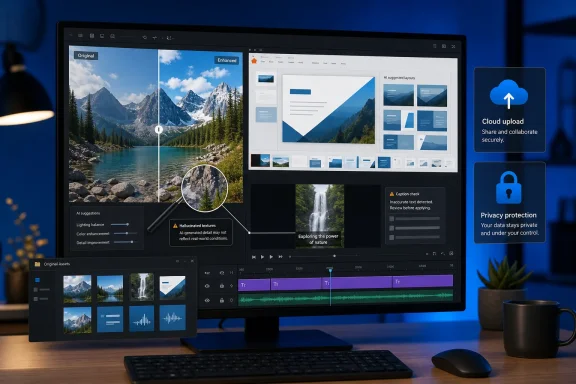 AI removes friction, not responsibility
The useful part of everyday creative AI is not mysterious. A small business owner can turn one horizontal clip into a vertical short video, add captions, improve lighting, and export it without learning Premiere Pro. A student or office worker can turn a Word document into a draft PowerPoint presentation and then use layout suggestions rather than manually placing every textbox.
Those are meaningful reductions in repetitive work. They lower the skills barrier for tasks that previously demanded familiarity with editing timelines, masking tools, slide masters, aspect-ratio conversions, color adjustment, and typography.
Microsoft’s own documentation makes the boundary clear, however: Copilot can draft a slide from a referenced file, create a presentation, rewrite text, and recommend designs, but Microsoft repeatedly tells users to review and edit output before sharing it. Its documentation for PowerPoint Design Suggestions specifically warns that generated layouts, text, and images can be inaccurate, misleading, irrelevant, or inappropriate.
That is not boilerplate. It is the operating rule.
A generated deck can be visually coherent and still be factually wrong. A caption can be grammatically clean while mistranscribing a product name. An automatic crop can retain the speaker’s face while cutting off the product, safety label, or legal disclaimer that made the original shot useful. AI shortens the path from raw material to draft; it does not assume editorial, legal, or brand accountability for the person using it.
For Windows users, the sensible workflow is therefore generate, inspect, revise, export. Treat the AI result as a starting file, not a final deliverable.
“Enhancement” can mean reconstruction
Windows Report presents image restoration as though the software can inspect remaining image information and “rebuild the missing detail.” That wording is technically true in a narrow sense—and potentially misleading in the way most people will read it.
When an image is severely blurred, compressed, low-resolution, or damaged, the original fine detail often no longer exists in the file. An AI upscaler can make a face, fabric, tree line, or building look more convincing by predicting plausible texture from patterns learned during training. It cannot recover information that was never captured or has been permanently lost.
That makes a result more attractive, but not necessarily more historically accurate.
Research published through the AAAI conference on real-world image super-resolution found that diffusion-based restoration models can introduce structural errors and spurious texture details. More recent research presented at a CVPR workshop in 2026 warned that generative super-resolution applied to faces can produce subtle changes in appearance or even identity.
For an Instagram post, that may be an acceptable trade. A bakery owner who wants a brighter, steadier product reel can reasonably prioritize speed and presentation. For an old family photograph, legal record, insurance image, evidence file, medical image, or archival scan, the consequences are different. A sharpened eye, reconstructed wrinkle pattern, altered facial contour, or cleaned-up background should not be mistaken for recovered fact.
Wink’s own marketing promises to “restore” missing sharpness, texture, and fine detail, and advertises 4K enhancement for older video and photos. The product may produce useful results, particularly where the original has moderate noise or compression rather than severe damage. But its output should be kept separate from the original.
The simple rule is worth following:
- Keep the untouched original file in a separate folder before running AI repair, denoise, face enhancement, recoloring, or upscaling.
- Compare the output at 100 percent zoom, especially around faces, hands, text, logos, jewelry, and straight architectural lines.
- Do not use an AI-restored image as proof of a detail that is not clearly visible in the source.
- Export a version marked as enhanced if it will be shared in a professional, historical, or evidentiary context.
AI restoration is a presentation tool. It is not a forensic recovery tool merely because the result looks sharper.
The “free to low-cost” claim skips licensing and subscriptions
The submitted Windows Report article frames the change partly as an economic one, contrasting freelance rates with “free to low-cost” in-app AI processing. The comparison is too neat.
Wink’s Google Play listing says its premium features are tied to weekly, monthly, or annual auto-renewing subscriptions. Its own pricing page describes premium models and monthly credits for AI creation features. Microsoft, meanwhile, sells several Microsoft 365 plans with different Copilot access and capability levels; availability can also depend on the user’s account, subscription, organization settings, region, and whether an IT administrator has enabled the feature.
That does not make the tools poor value. It means the cost is not simply zero because the user did not hire a freelancer.
There is also a category error in comparing a one-click AI enhancement with professional creative work priced by the hour or minute. A freelance editor may be hired to make editorial decisions, organize a shoot, retouch assets to a brand standard, fix audio, manage revisions, license media, and deliver platform-specific final files. An AI tool can eliminate part of that workload—particularly basic resizing, cleanup, caption generation, and draft composition—but it does not automatically provide the judgment embedded in the service being compared.
The better comparison is task-specific. If the job is “produce a readable captioned vertical cut from existing footage,” automation can save substantial time. If the job is “turn raw footage into an effective product campaign that complies with brand and advertising requirements,” the tool is assisting the work rather than replacing it.
Windows Report also cites a claim that posting three to five times a week on Instagram yields about 12 percent more reach per post than posting once a week. That figure comes from Buffer’s analysis of more than two million posts sent through Buffer, not from Instagram itself. Buffer describes the number as a likely outcome from its dataset and cautions against sacrificing quality for volume.
The report reproduced that sentence twice without naming Buffer or explaining the scope of the analysis. That is a small editorial failure, but it reveals a larger issue: creator-growth statistics are highly context-dependent. A posting cadence that helps a social-media-heavy brand may be irrelevant to a local service business, a technical publication, or a Windows administrator preparing internal documentation.
Cloud processing changes the privacy question
The fastest consumer enhancement services are often cloud services. That is convenient: users do not need a powerful GPU, large local AI models, or advanced editing software. It also means photos, videos, prompts, or documents may leave the PC.
That needs to be a visible part of the decision, especially when the source material includes children, family photographs, customer footage, unreleased products, employee video, contract material, or internal presentations.
Wink’s Google Play data-safety disclosure says the app may share photos and videos with third parties and may collect personal information including user identifiers and optional phone numbers. The disclosure also says data is encrypted in transit and that users can request deletion. Separately, Wink’s published AI terms give the company a license to use submitted content to operate the service and optimize or improve its AI features.
Those statements do not establish that every uploaded file is retained for training. They do establish that users should not assume a one-click enhancement is local-only or private by default.
Wink’s Chinese-language privacy policy describes some cloud AI functions as requiring image or video uploads to backend servers and says that the service automatically deletes the material after processing. That is more reassuring than silence, but it also demonstrates why users need to read the terms that apply to their region and product version rather than rely on a marketing label such as “privacy-first.”
Microsoft 365 Copilot is a different case. Microsoft says prompts and responses for commercial Microsoft 365 Copilot users are processed within the Microsoft 365 service boundary and that organizational data is not used to train foundation models. That protection is meaningful for work and school accounts, but it does not excuse poor permission hygiene. Copilot can only surface content a user already has permission to access, which means over-shared SharePoint sites, OneDrive folders, Teams files, and mailboxes remain an organizational exposure problem.
For IT teams, creative AI policy should therefore cover more than approved apps. It should define what staff may upload, whether consumer accounts are permitted for work files, how generated material is reviewed, and where originals are retained.
Microsoft 365 Copilot is strongest as a draft engine
The most immediately useful Windows workflow in the report is its Microsoft 365 Copilot example: using AI to turn rough source material into an initial document or presentation structure.
Microsoft supports that use case. Copilot can create presentation content from files, summarize existing material, reorganize sections, and propose edits. PowerPoint’s traditional Designer feature can also generate slide layout ideas from the content already on a slide. For people who have spent years fighting with bullets, image placement, inconsistent alignment, and weak slide hierarchy, those features can remove a surprising amount of friction.
But the practical gain is not “a deck in minutes” in the sense of a finished presentation. It is a deck-shaped draft in minutes.
A good presentation needs an argument, appropriate evidence, accurate numbers, a coherent audience level, and a decision about what the audience should do next. Copilot can assist with all of those steps, but it cannot reliably know which internal number is confidential, whether a source is current, whether a recommendation was approved, or whether a chart makes a causal claim its data cannot support.
The right use is to give Copilot clean source material, request a defined structure, apply a real template or brand kit where available, then verify every claim, image, label, and speaker note before distribution. That may still turn an hour of formatting into 15 minutes of review. It just should not be sold as a replacement for thinking.
The real creative advantage of AI on a Windows PC is speed to a competent draft: a usable thumbnail, an accessible caption track, a cleaned-up clip, a structured slide deck, or a photo that is easier to share. That is a substantial change for people who do not want to become video editors or designers.
But speed has made review more important, not less. The faster a tool produces polished output, the easier it is to publish invented visual detail, inaccurate text, unwanted crops, off-brand layouts, or sensitive material uploaded to the wrong service. The winners will not be the people who press “enhance” first; they will be the ones who keep the original, inspect the result, and know when a plausible-looking output is not good enough.
