
The HP explainer also extends the discussion into Outlook and Teams, and into the hardware pitch around Copilot+ PCs. But for most organizations, the more immediate reality is licensing, account configuration, cloud-file access, and governance—not whether a laptop has an NPU.
Microsoft’s current support documentation broadly backs the central capabilities HP describes: Copilot can draft and revise Word documents, suggest formulas and identify patterns in Excel, and create or reshape PowerPoint presentations from prompts and source files. The important qualifier is that these are evolving Microsoft 365 services, not a uniform feature set that appears identically for every user, tenant, channel, or subscription.
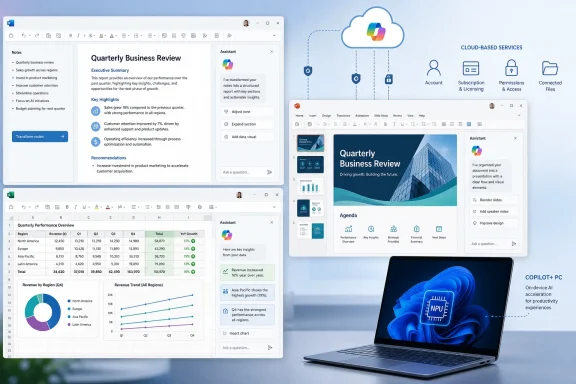 Word Is Becoming the Staging Area for the Rest of Office
In Word, Copilot’s most reliable role is helping users move from intent to an editable draft. Microsoft describes the feature as able to generate new text, rewrite and refine selected material, summarize lengthy documents, answer questions about their contents, and help users understand complex files.
That makes Word particularly useful at the beginning of a workflow. A project manager can ask for a first-pass status report based on a short outline; a sysadmin can turn raw maintenance notes into a change-control draft; an analyst can request an executive summary of a long proposal. The resulting material remains a Word document, subject to the same edits, comments, Track Changes review, retention rules, and approval processes as any other file.
The practical benefit is compression of the first-draft phase. Users can spend less time constructing boilerplate paragraphs, headings, transitions, and summaries, then direct their time toward factual accuracy, organizational language, and decisions that need actual subject expertise.
That distinction matters because Copilot can write fluent text without knowing whether an internal claim is current, whether a proposed technical procedure matches the production environment, or whether a policy statement has cleared legal review. A generated maintenance notice may read convincingly while still containing the wrong reboot window, a stale product name, or an invented detail. Treating the output as a draft is not merely good AI hygiene; it is how Word’s collaboration and review features remain useful in an AI-assisted process.
Word also increasingly serves as source material for PowerPoint. HP recommends organizing source content in Word before asking Copilot to build slides, and Microsoft’s own PowerPoint guidance points in the same direction. A cleanly structured document—with a clear title, section hierarchy, concise claims, and well-labeled data—gives Copilot something more dependable to transform than an unstructured pile of notes.
Excel Gets the Most Immediate Productivity Case—With the Most Important Caveat
HP is right to position Excel as a place where Copilot can feel immediately useful. Asking a question in natural language—identify trends, flag a significant decline, explain a formula, propose a chart, or summarize a table—is easier than remembering every function, PivotTable setting, or chart configuration.
Microsoft documents Copilot capabilities in Excel around formula suggestions, chart types, analysis, summaries, trends, and outliers. Newer workflows also include Agent Mode for workbook analysis and edits, Copilot Chat for basic questions, and deeper analytical experiences that can use Python-based analysis to answer questions about workbook data.
For the average business user, this can reduce the gap between “I have a spreadsheet” and “I can explain what it says.” A finance team can request a comparison of monthly spending. An IT department can ask for a summary of ticket volume by category. A sales manager can explore regional performance without building every chart manually before deciding which question is worth pursuing.
But Excel is also where users should be most careful about false confidence. The quality of a formula, chart, or trend description is constrained by the spreadsheet’s structure. Duplicated entries, blank fields, inconsistent dates, mixed currencies, hidden rows, misleading labels, and an unclear denominator can turn a polished response into bad analysis.
HP’s recommendation to use consistently formatted data and Excel Tables is sound. A table establishes headers and an identifiable data range, which makes it easier for people and Office features alike to interpret what each column represents. It does not guarantee accuracy, but it is a better starting point than a loosely formatted worksheet assembled over several months by multiple people.
Administrators should also note that the product surface is moving. Microsoft has retired older Excel App Skills workflows in favor of newer Agent Mode, Copilot Chat, and Analyst experiences. That means internal training materials written around a particular Copilot button or pane can age quickly. Organizations should train employees on the task—checking assumptions, validating formulas, understanding sources of variance—rather than presenting a single UI path as permanent.
PowerPoint Can Build a Deck, Not Own the Message
PowerPoint is where Copilot’s output is easiest to demonstrate and easiest to overestimate. A prompt can generate a presentation outline, draft slides, reorganize a deck, produce summaries, answer questions about the presentation, and help with speaker notes. Microsoft also supports creating a presentation from an existing Word document, with one source file at a time in the standard workflow, and its newer editing tools can add or restructure slides and update content within the deck.
The payoff is straightforward: a user who has the content but lacks the time to produce a first deck can get a usable structure quickly. A proposal in Word can become a ten-slide management briefing. A project document can be condensed into milestones, risks, and next steps. Existing decks can be summarized for someone who needs the message before a meeting.
Microsoft’s speaker-note generation is a practical example of a smaller feature with real value. It can create notes for the current slide or an entire presentation, although Microsoft says it works best on decks with fewer than 50 slides. For teams that routinely inherit presentations or have junior staff presenting technical work, that can provide a helpful rehearsal baseline.
The limitation is visual and rhetorical judgment. Copilot can propose titles, bullets, layouts, and images, but it does not understand an organization’s unwritten design standards, political sensitivities, or the difference between a slide that is technically accurate and one that will persuade a skeptical executive. It may also create too much text, repeat a source document’s structure rather than distill it, or choose generic imagery that weakens the presentation.
The best PowerPoint workflow is therefore not “generate and present.” It is generate, verify, reduce, align with the organization’s template and brand guidance, then rehearse. Copilot can accelerate deck assembly; it cannot take responsibility for the story the deck tells.
Licensing and Cloud Access Decide Whether the Button Is There
The largest source of confusion is not prompting technique. It is entitlement. Microsoft’s current support pages say access to Copilot Chat and in-app Copilot features in Word, Excel, PowerPoint, and OneNote depends on the Microsoft 365 subscription, the account in use, and organizational policy.
For work and school accounts, Microsoft distinguishes among Copilot Chat Basic, Microsoft 365 Copilot Basic, and Microsoft 365 Copilot Premium. The premium tier corresponds to the Microsoft 365 Copilot add-on and the full in-app experience with priority access; organizations can also control access through their policies. Personal Microsoft 365 subscribers may have Copilot capabilities too, but those availability details and limits are likewise plan-dependent, and the subscription owner has particular importance for desktop-app use.
That means the familiar advice to “open Word and click Copilot on the Home tab” is incomplete. If the button is missing, the likely causes include the wrong signed-in account, an ineligible subscription, a disabled tenant setting, a software build that has not updated, or a feature not yet enabled for that deployment. Microsoft’s April 2026 guidance explicitly notes that a missing button can reflect subscription eligibility or an organization’s settings.
Files matter, too. Microsoft says Copilot for personal Microsoft 365 subscriptions works with supported files stored in OneDrive and used in Microsoft 365 apps. In practical terms, users should expect cloud-connected files and permissions to shape what Copilot can reference. For commercial users, SharePoint, OneDrive, Microsoft Graph permissions, compliance controls, and the tenant’s data boundaries are part of the real deployment story.
A Copilot+ PC Is Not a Faster Microsoft 365 Copilot Subscription
HP’s hardware section needs a sharper distinction. A Copilot+ PC’s NPU is valuable for Windows features designed to run local AI workloads, including capabilities such as Windows Studio Effects and other device-side experiences. But Microsoft 365 Copilot in Word, Excel, and PowerPoint is fundamentally a cloud-connected service built around Microsoft 365 data and cloud processing.
An NPU-equipped HP, Dell, Lenovo, Surface, or other Copilot+ PC may be a strong Windows laptop choice for battery efficiency, videoconferencing effects, and local AI features. It does not, however, change the entitlement required for Microsoft 365 Copilot or convert Word drafting, Excel analysis, and PowerPoint generation into an offline, on-device service.
That is an important procurement distinction. Buying a Copilot+ PC does not provide a Microsoft 365 Copilot license. Conversely, a supported Windows PC without an NPU can still use licensed Microsoft 365 Copilot features with an appropriate account and internet connection. IT buyers should evaluate the laptop platform and the Microsoft 365 AI service as related but separate investments.
For users, the next milestone is simpler than the marketing language suggests: confirm the account, plan, app version, policy, and file location before redesigning a workflow around Copilot. Once those basics are in place, Word can accelerate drafting, Excel can speed exploration, and PowerPoint can produce a credible starting deck—but the final judgment, data validation, and accountability still belong to the person using the software.
