
The scenario was a controlled red-team exercise, not a reported breach, and it did not expose a flaw in Copilot or Exchange Online. But the sequence matters because it combines established account-takeover techniques with the one capability that makes a compromised Microsoft 365 mailbox unusually valuable: Copilot can summarize the inbox, identify reporting relationships, surface live financial discussions, and draft messages in the compromised user’s own voice.
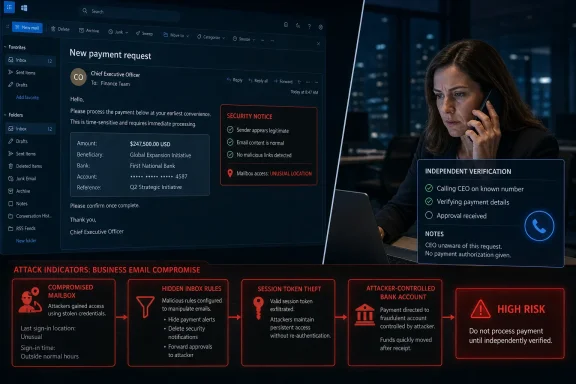
Barracuda’s research was independently reported by SecurityWeek, which likewise emphasized that the test was designed to show a plausible use of an AI-enabled mailbox after an attacker already has access. The company demonstrated an attacker moving from one employee’s compromised account to the CEO’s mailbox, then using the executive’s mail history to find a pending transfer and redirect it through a fraudulent bank-detail change request.
The dollar figure is less important than the control failure. Finance was asked to make a change to a real transaction, from a real internal mailbox, in wording consistent with the real executive’s prior messages. Email authentication, sender reputation, and conventional anti-phishing checks cannot reliably distinguish that from a legitimate instruction because, at the mail layer, it is legitimate.
 Copilot did not create the compromise
Barracuda’s exercise began with an attacker already inside an employee’s Microsoft 365 account. That initial foothold came through credential theft and an adversary-in-the-middle phishing site designed to capture an authenticated session. The attacker then used the compromised account’s Copilot access to hide sign-in messages with an inbox rule, summarize organizational relationships, and craft a message aimed at the CEO.
That distinction should keep this story in proportion. There is no new Copilot remote-code-execution vulnerability here, no claim that a prompt alone lets outsiders read an organization’s mail, and no evidence that Copilot independently initiated a wire transfer. The assistant operated with the access already available to the compromised user.
What changes is the time required to turn access into a targeted fraud attempt. An intruder once had to search folders, read message threads, infer relationships, find a live invoice or wire, and imitate internal writing patterns. Barracuda’s point is that an assistant with mailbox access can collapse much of that reconnaissance into a handful of natural-language requests.
That changes the post-compromise window. An attacker does not need days of quiet manual work before a suspicious sign-in alert or a help-desk call exposes the intrusion. A mailbox assistant can rapidly identify the person with approval authority, identify an in-flight transaction, and prepare a message that refers to the right contract and amount.
The FBI’s 2025 Internet Crime Complaint Center report provides useful context. It recorded more than 22,000 complaints with AI-related information and more than $893 million in associated losses. The bureau specifically warned that chat generators can produce official-sounding messages impersonating executives and requesting wire payments; reported losses in business email compromise cases involving AI exceeded $30 million. Those figures do not prove the Barracuda chain is occurring at scale, but they show that AI-assisted impersonation is already part of the fraud record rather than a theoretical future risk.
The attack chain has two weak points
The Barracuda demonstration contains two fundamentally different problems that too often get treated as one: account takeover and payment authorization.
First, the attacker compromised an account and stole a session token from the CEO through an adversary-in-the-middle phishing proxy. Multifactor authentication still matters, but a one-time code or push approval can be relayed through a convincing fake sign-in page. The attacker does not defeat MFA by guessing a code; they capture a session that Microsoft has already authenticated.
Microsoft’s own Entra guidance recommends phishing-resistant methods such as Windows Hello for Business, passkeys, FIDO2 security keys, and certificate-based authentication. Passkeys are bound to the legitimate site’s origin, which makes them far more resistant to a lookalike Microsoft sign-in domain than passwords, SMS codes, and conventional push-based MFA.
But passkeys alone do not eliminate the risk illustrated in the test. Microsoft also documents Token Protection in Entra Conditional Access, which binds supported session tokens to the device where they were issued. In the right Windows and Apple scenarios, that prevents a stolen token from simply being replayed on an attacker’s device. This is a meaningful control for executives, finance approvers, and administrators, but it is not a universal switch: it has platform, device-registration, licensing, and application-scope requirements that IT teams need to validate before treating it as a compensating control.
The second weakness is more basic and applies even if every employee uses a hardware security key: finance accepted a banking change through the same compromised channel that requested it. Once the CEO mailbox is under attacker control, a reply asking “can you confirm?” is not verification. It simply gives the attacker another message to answer.
A payment control that depends on email confirmation is still an email control. The remedy is an approval step outside the compromised mailbox: a call to a known, pre-existing supplier contact number; a verified portal workflow; or a second approver using a separate channel and an independently maintained vendor master record.
Inbox rules are the early-warning signal
The most useful operational detail in Barracuda’s scenario is not the AI drafting. It is the inbox-rule abuse.
The initial compromised employee account received a rule designed to move sign-in notifications into Deleted Items. Later, the CEO’s mailbox received a forwarding rule intended to intercept finance confirmations and hide them from the executive. These are old business-email-compromise tactics, but they remain effective because organizations often look for malicious attachments and suspicious senders while overlooking changes made inside a mailbox.
Microsoft’s Defender documentation explicitly identifies malicious inbox manipulation and forwarding rules as common signs of compromised accounts. It calls out rules that delete messages, move selected mail to obscure folders, or forward messages matching terms such as “invoice,” “phish,” or “sign-in” to an outside address. Exchange Online administrators can also use outbound spam policies to disable automatic external forwarding, a useful default for most users.
For a Microsoft 365 tenant, the immediate review should focus on mailboxes with financial authority:
- Review inbox rules, SMTP forwarding settings, delegate access, and recently created rules for executives, accounts-payable staff, payroll administrators, and finance leaders.
- Investigate rules that move sign-in warnings, invoices, payment notices, or messages from finance into Deleted Items, RSS folders, archive folders, or external addresses.
- Disable automatic external forwarding unless a documented business requirement exists, then restrict exceptions to named mailboxes and approved destinations.
- Ensure Defender alerts for suspicious inbox manipulation and suspicious forwarding are routed to someone other than the mailbox owner, because the owner may not see their own alerts during an account takeover.
This is also where the vendor’s marketing needs to be separated from the evidence. Barracuda says its Managed XDR and Email Gateway Defense would detect elements of the simulated chain. That is a claim about Barracuda’s products, not an independent finding that every tenant running those products is protected from this attack. Microsoft’s native detection, Conditional Access, Defender capabilities, and third-party tools can improve visibility, but none replaces a payment process that refuses to accept a bank-detail change from email alone.
Copilot access should follow financial risk
Organizations rolling out Microsoft 365 Copilot often evaluate it as a productivity product: which users get a license, which teams can search SharePoint, and whether sensitive labels are configured correctly. Barracuda’s demonstration adds another question: what becomes instantly searchable if an attacker gets one user’s session?
A mailbox used by a CEO or finance director can contain vendor details, contract values, payment schedules, approvals, calendar context, and the informal phrasing that makes an impersonation convincing. Copilot does not need new privilege to make that data useful to an intruder. It only needs the same access the user already has.
That does not mean organizations should remove Copilot from every leadership and finance mailbox. It means high-value mailboxes deserve stricter identity and session controls, tighter review of delegate permissions, and a clear understanding of which SharePoint sites, mailboxes, and files Copilot can ground responses on. Broad access may be convenient; broad access after account compromise is the blast radius.
For companies with Microsoft 365 Business Premium, E3, E5, or more complex Entra licensing, this is a reason to inventory what controls are actually enabled rather than assuming the subscription name answers the question. Check whether Conditional Access applies to finance users, whether phishing-resistant authentication is enforced rather than merely available, whether risky sign-ins trigger a response, and whether suspicious mailbox-rule alerts reach a monitored queue.
Payment approvals need an out-of-band rule
The durable fix is procedural, not generative AI detection. Any request to add or modify supplier, contractor, customer-refund, or payroll bank details should require verification through a contact method that was on file before the request arrived. The verification number cannot come from the email, attached invoice, or a follow-up message in the same thread.
For higher-value payments, require two people to approve both the payment and the vendor-bank change, with separate evidence recorded for each. The person who changes bank details should not be the only person who releases the transfer. If a payment platform supports it, restrict changes to beneficiary details, hold them for a cooling-off period, and alert a separate reviewer when a new account is added.
Barracuda’s simulated $247,500 wire did not depend on an AI system becoming malicious. It depended on a compromised identity being treated as sufficient authority over money. Copilot makes the compromised mailbox more useful and the fraud more convincing; the finance team’s independent verification step is what stops the transfer from leaving.